Advanced Java in One Shot – Ultimate Cheat Sheet
A quick and clear revision guide to how Java web applications were built before Spring — using Servlets, JSP, JDBC, and core Java EE concepts. Perfect for interviews, exams, and strengthening your backend fundamentals.

Shreyash Gurav
March 02, 2026
9 min read
Advanced Java in One Shot – The Ultimate Cheat Sheet
Advanced Java in One Shot – The Ultimate Cheat Sheet is a quick reference covering key Technologies used to build Java web applications such as JDBC, Servlets, JSP, and common design patterns. It helps developers and students quickly revise how Java web applications are built and how these technologies work together in real-world projects.
JDBC (Java Database Connectivity)#
What is JDBC?#
JDBC is an API that enables Java applications to interact with relational databases. It provides methods for querying, updating, and managing data across different database systems.
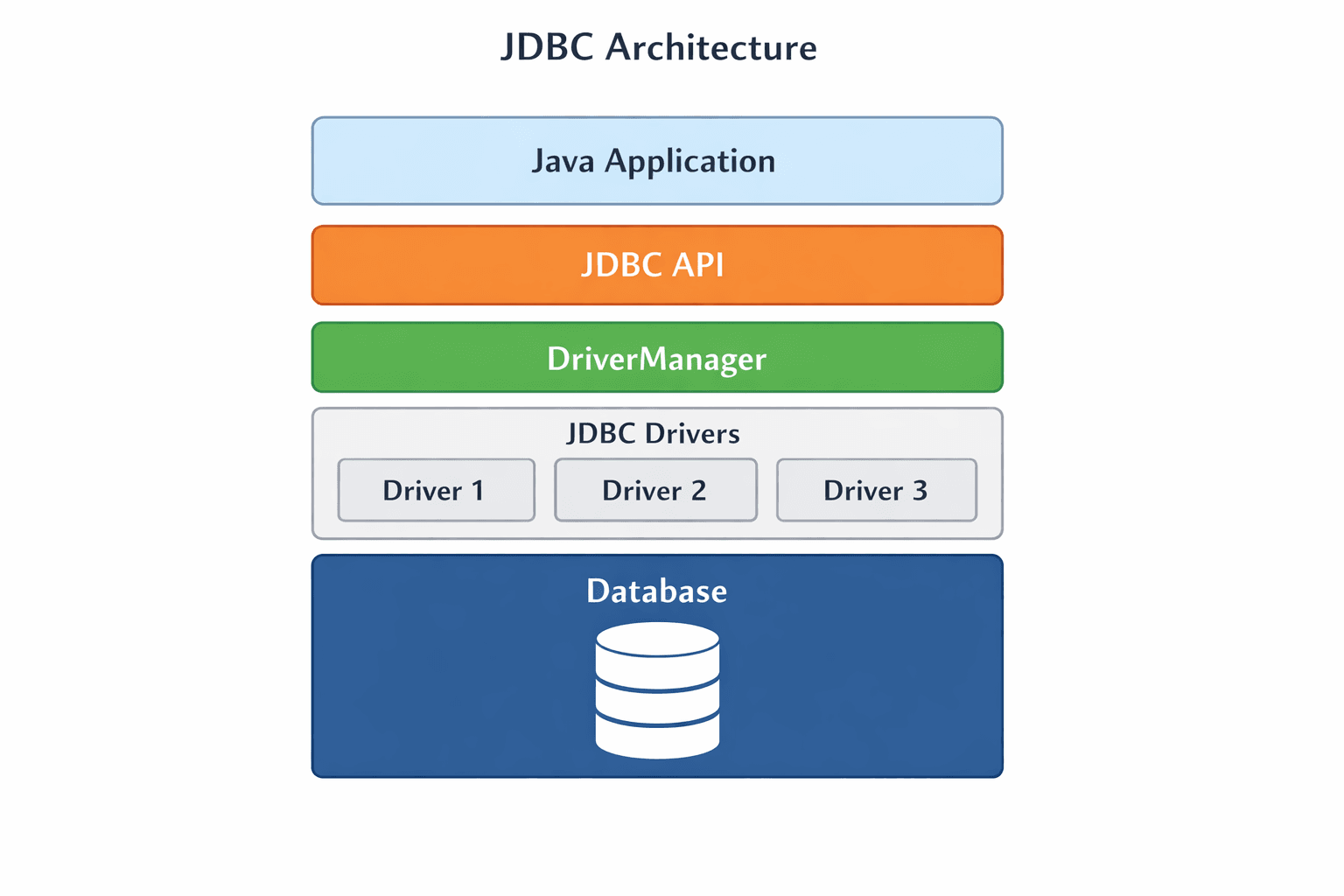
JDBC Architecture#
The architecture consists of:
- Java Application – Your code using JDBC API
- JDBC Driver Manager – DriverManager manages registered JDBC drivers and selects the appropriate driver to establish a database connection.
- JDBC Driver – Database-specific implementation
- Database – The actual data source
Types of JDBC Drivers#
| Driver Type | Description | Use Case |
|---|---|---|
| Type 1: JDBC-ODBC Bridge | Converts JDBC calls to ODBC | Legacy systems, not recommended |
| Type 2: Native-API | Uses database client libraries | Performance critical apps |
| Type 3: Network Protocol | Middleware server converts calls | Multi-database environments |
| Type 4: Thin Driver | Pure Java, direct DB connection | Most common for modern apps |
Core Components#
DriverManager
- Manages list of database drivers
- Establishes connection using
getConnection()
Connection
- Represents session with database
- Creates statements, manages transactions
Statement
- Executes static SQL queries
- Vulnerable to SQL injection
PreparedStatement
- Precompiled SQL with parameters
- Prevents SQL injection
- Better performance for repeated queries
CallableStatement
- Executes stored procedures
- Supports IN/OUT parameters
ResultSet
- Represents query results
- Provides cursor to navigate data
Database Operations – CRUD Example#
Statement vs PreparedStatement#
| Feature | Statement | PreparedStatement |
|---|---|---|
| Performance | Slower for repeated queries | Faster, precompiled |
| SQL Injection | Vulnerable | Protected |
| Parameter Handling | String concatenation | Type-safe setters |
| Binary Data | Difficult | Easy with setBinaryStream() |
| Use Case | One-time DDL queries | Repeated or user-input queries |
Batch Processing#
Transaction Management#
Connection Pooling#
- Reuses database connections to improve performance
- Common libraries: HikariCP, Apache DBCP
- Configure pool size, timeout, and validation
Stored Procedures with CallableStatement#
Metadata#
DatabaseMetaData – Information about database itself
ResultSetMetaData – Information about result columns
Servlets#
What is a Servlet?#
A Java program that runs on a web server and handles client requests, generating dynamic web content.
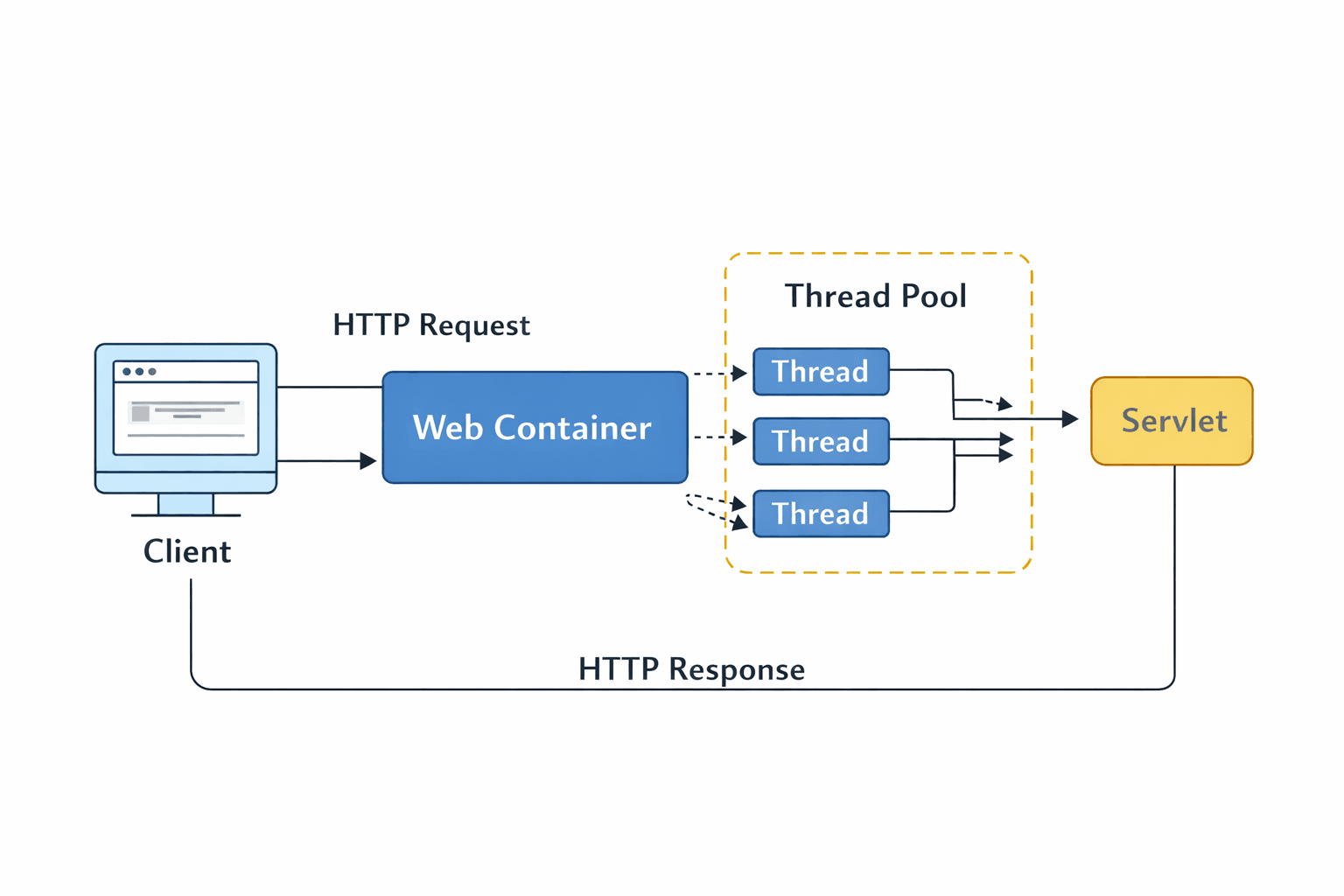
Servlet Architecture#
- Client sends HTTP request
- Web container loads servlet (if needed)
- The container uses a thread pool to process requests concurrently.
- Servlet processes request and generates response
- Response sent back to client
Servlet Lifecycle#
| Stage | Method | Description |
|---|---|---|
| Initialization | init() | Called once when servlet is first loaded |
| Request Handling | service() | Dispatches to doGet/doPost methods |
| Destruction | destroy() | Called once when servlet is unloaded |
Core HTTP Methods#
Handling Request Parameters#
RequestDispatcher – Forward vs Include#
Forward: Transfer control completely
Include: Include content then continue
Session Management Techniques#
| Technique | How it Works | Best For |
|---|---|---|
| Cookies | Small data stored on client | Remembering preferences |
| HttpSession | Server-side storage with session ID | Shopping carts, user data |
| URL Rewriting | Session ID appended to URLs | When cookies are disabled |
HttpSession Example
Cookie Example
Servlet Configuration#
web.xml approach
Annotation approach (Servlet 3.0+)
Servlet Filters#
Intercept requests before they reach servlet and responses before they reach client.
Common uses: Authentication, Logging, Compression, Encryption
Servlet Listeners#
Monitor events in servlet context, session, and requests.
JSP (JavaServer Pages)#
What is JSP?#
A server-side technology that allows embedding Java code directly into HTML pages. JSPs are translated into servlets during runtime.
JSP Lifecycle#
- Translation – JSP converted to servlet
- Compilation – Servlet compiled to class
- Loading – Class loaded into container
- Initialization –
jspInit()called - Request Processing –
_jspService()handles requests - Destruction –
jspDestroy()called
JSP vs Servlets#
| Aspect | JSP | Servlet |
|---|---|---|
| Primary Use | Presentation layer | Business logic layer |
| Code Focus | HTML with embedded Java | Java with embedded HTML |
| Design | Easier for UI designers | Better for developers |
| Performance | Slightly slower (translation) | Faster (direct Java) |
| Separation | Mixes logic and presentation | Can separate better with MVC |
JSP Elements#
Scriptlets – Blocks of Java code
Expressions – Output values directly
Declarations – Define methods/variables
Directives#
Page directive – Configuration for JSP
Include directive – Include file at translation time
Taglib directive – Declare custom tag libraries
JSP Standard Actions#
JSTL (JSP Standard Tag Library)#
Core tags – Flow control, loops
Formatting tags – Dates, numbers
Expression Language (EL)#
Simplifies data access in JSP without scriptlets.
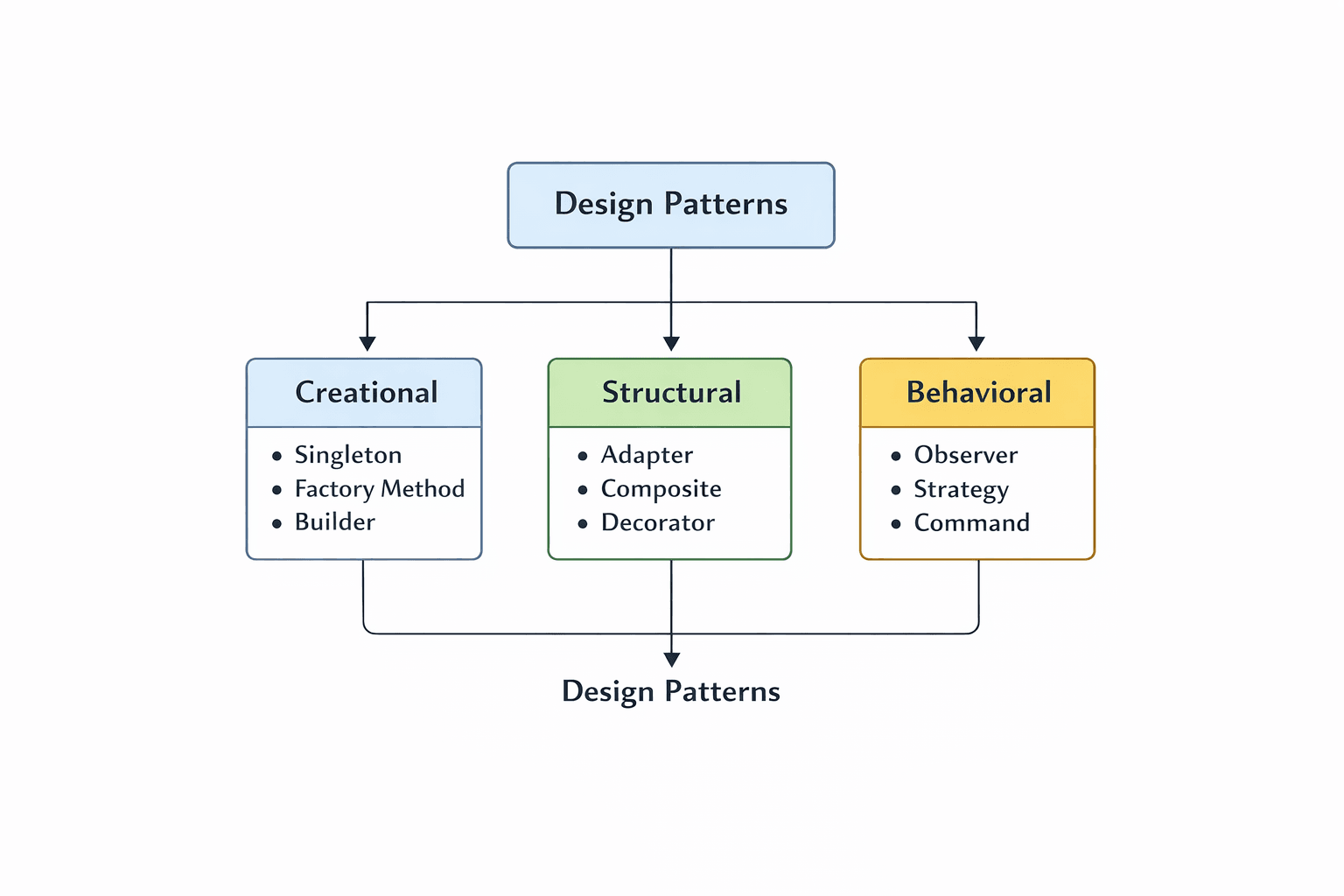
Java Design Patterns#
Why Design Patterns?#
- Provide proven solutions to common problems
- Improve code reusability and maintainability
- Establish common vocabulary among developers
- Reduce development time and errors
Creational Patterns#
Singleton Pattern Ensures only one instance of a class exists.
Used in: Connection pools, configuration managers, logging
Factory Pattern Creates objects without specifying exact class.
Used in: Creating different database connections, UI components
Builder Pattern Constructs complex objects step by step.
Used in: Creating objects with many optional parameters, immutable objects
Structural Patterns#
Adapter Pattern Allows incompatible interfaces to work together.
Used in: Integrating legacy code, third-party libraries
Decorator Pattern Adds responsibilities to objects dynamically.
Used in: Java I/O streams, GUI components
Facade Pattern Provides simplified interface to complex subsystem.
Used in: Simplifying complex APIs, service layers
Behavioral Patterns#
Observer Pattern Notifies dependents when state changes.
Used in: Event handling, messaging systems, MVC architecture
Strategy Pattern Encapsulates interchangeable algorithms.
Used in: Payment processing, sorting algorithms, validation rules
Command Pattern Encapsulates requests as objects.
Used in: Undo/redo functionality, task queues, transaction management
Design Patterns Summary#
| Pattern | Category | Purpose | Common Use |
|---|---|---|---|
| Singleton | Creational | Single instance | Connection pools |
| Factory | Creational | Object creation abstraction | Database drivers |
| Builder | Creational | Step-by-step construction | Complex objects |
| Adapter | Structural | Interface compatibility | Legacy code integration |
| Decorator | Structural | Dynamic behavior addition | I/O streams |
| Facade | Structural | Simplified interface | Service layers |
| Observer | Behavioral | State change notification | Event handling |
| Strategy | Behavioral | Interchangeable algorithms | Payment methods |
| Command | Behavioral | Request as object | Undo operations |
Conclusion#
Advanced Java builds the foundation for Java web applications using technologies like JDBC, Servlets, and JSP, along with important design patterns for better code structure. This cheat sheet provides a quick reference to revise the key concepts in one place. If you found it useful, consider sharing it with others learning Advanced Java.
Want to Master Spring Boot and Land Your Dream Job?
Struggling with coding interviews? Learn Data Structures & Algorithms (DSA) with our expert-led course. Build strong problem-solving skills, write optimized code, and crack top tech interviews with ease
Learn more