Docker Compose
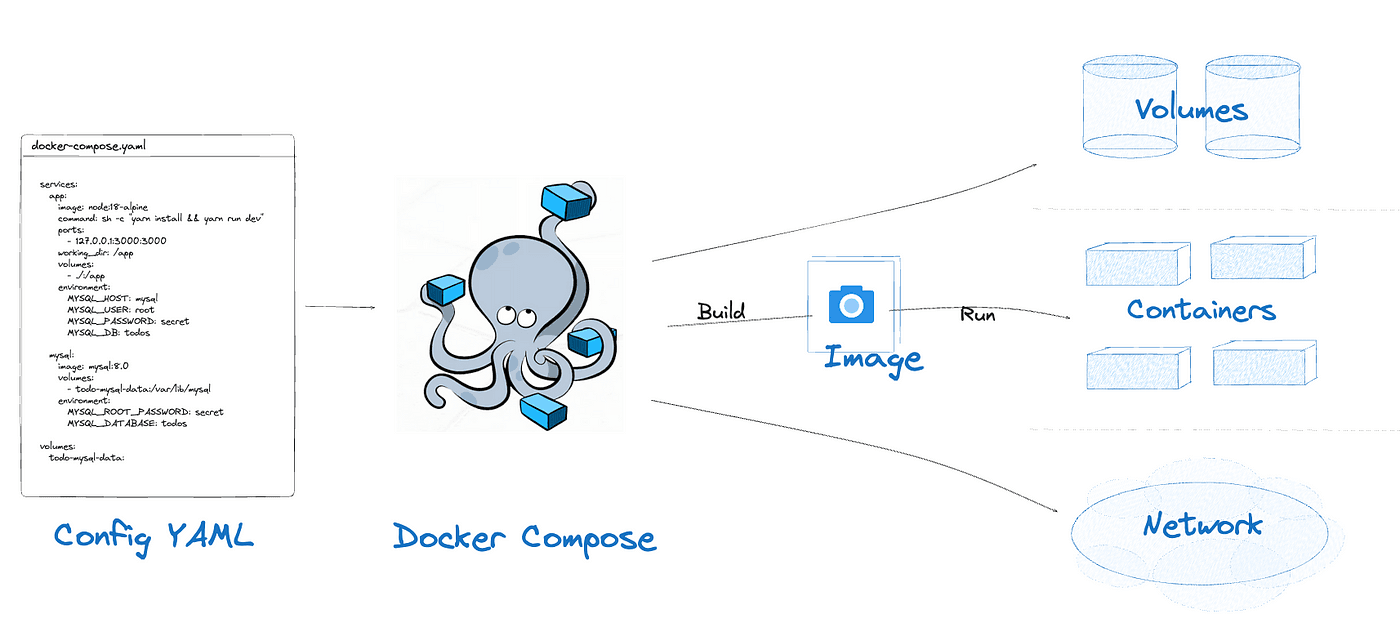
Docker Compose is a tool for defining and running multi-container applications. It is the key to unlocking a streamlined and efficient development and deployment experience.
Compose simplifies the control of your entire application stack, making it easy to manage services, networks, and volumes in a single YAML configuration file. Then, with a single command, you create and start all the services from your configuration file.
Commands#
Before running these commands, navigate to the folder containing your configuration/compose files.
- Start services
- Build (if required) and start all services in foreground.
docker compose up - Start services in detached mode (recommended for normal usage).
docker compose up -d - Build specific file if multiple compose files are present in single folder.
docker compose -f <file-name.yml> up
- Build (if required) and start all services in foreground.
- Stop services
- Stop running containers without removing them.
docker compose stop - Stop and remove containers, networks, and default resources.
docker compose down
- Stop running containers without removing them.
- Rebuild Service
- Rebuild service images without starting containers. Useful when Dockerfile changes or Dependencies updated.
docker compose build - Rebuild images and starts services in one command, recommended after code or configuration changes.
docker compose up --build
- Rebuild service images without starting containers. Useful when Dockerfile changes or Dependencies updated.
- Check Service Status
- Displays the status of all services like container name, state(up/expires), ports, etc.,
docker compose ps
- Displays the status of all services like container name, state(up/expires), ports, etc.,
- View logs
- Stream logs from all running services in real time.
docker compose logs -f - Stream logs for a specific service.
docker compose logs -f <service-name>
- Stream logs from all running services in real time.
- Run a One-Off Command
- Runs a temporary container to execute a command
docker compose run <service-name> <command>
- Runs a temporary container to execute a command
Docker Compose File – Syntax & Components#
1. filename:
We can create separate docker compose files for different services, applications, databases, etc., <type-name>.docker-compose.yml
2. version:
Specifies the compose file format version. Optional in newer Compose(v2+). version: “3.9”
3. services:
Defines the containers that make up your application. Each key under services: represents one container.
4. volumes:
Defines persistent volumes managed by Docker.
5. networks:
Defines custom networks for service isolation and communication.
Minimal Example:
When the below compose file will be run then it will create a container with database running by pull the mysql image. It will also a database with name testdb and set the username to admin and password to Root@123 using which we can connect our application to this conatainer.
Conclusion#
Docker Compose simplifies the management of multi-container applications by allowing developers to define services, networks, and volumes in a single configuration file. With simple commands, entire application stacks can be built, started, stopped, and scaled efficiently, making development, testing, and deployment workflows much more streamlined.