Docker Architecture & Underlying Technology
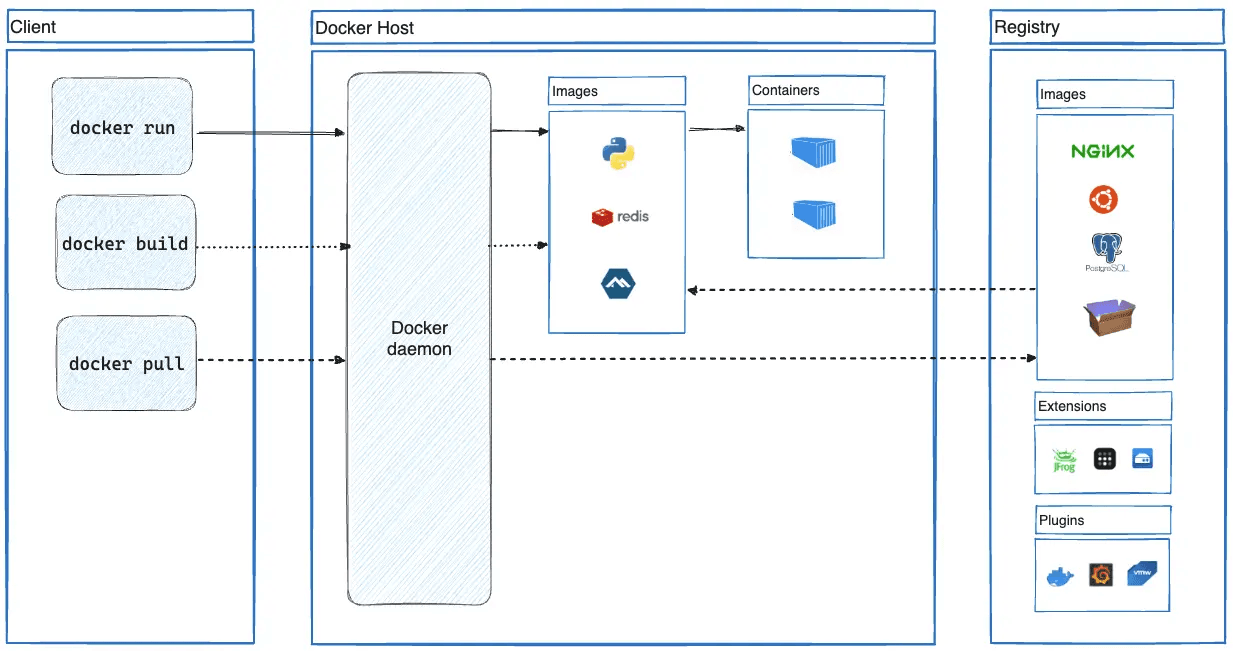
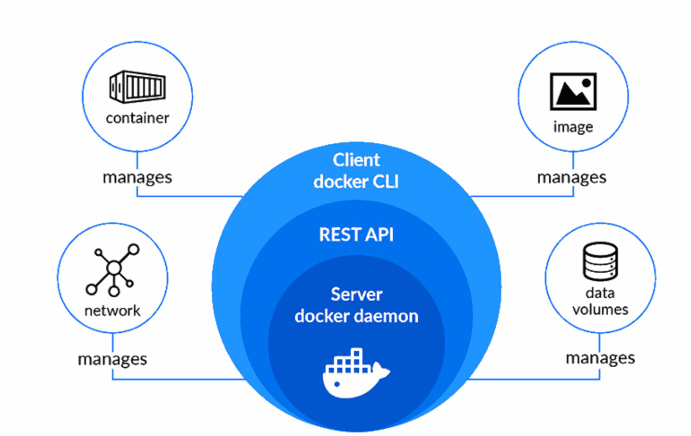
Docker uses a client-server architecture where the Docker client communicates with the Docker daemon to perform container-related operations.
The Docker daemon is a background service responsible for building images, running containers, and managing container lifecycle operations such as start, stop, and distribution.
Communication between the client and daemon happens through a REST API, typically over UNIX sockets (for example,
/var/run/docker.sock on Linux) or over a network interface for remote management.
Core Architectural Model#
Docker daemon#
The Docker daemon (dockerd) listens for Docker API requests and manages Docker objects such as images, containers, networks, and volumes. A daemon can also communicate with other daemons to manage Docker services.
Docker Client#
The Docker Client is the primary interface for users where commands can be executed such as
docker run or docker build, the client translates them into REST API requests and send them to the
Docker Daemon.
Docker Host#
Docker Host refers to the machine (physical server, virtual machine, or cloud instance) where the Docker daemon runs. It is the environment responsible for running containers. The Docker Host provides:
- The operating system
- The Docker daemon (
dockerd) - Container runtime
- Network and storage resources
In simple terms, a Docker Host is any system capable of running Docker containers. When we install Docker Desktop, it creates and manages a Docker Host internally (inside a lightweight VM).
Docker Desktop#
Docker Desktop is an easy-to-install application for your Mac, Windows, or Linux environment that enables you to build and share containerized applications and microservices. Docker Desktop includes the Docker daemon (dockerd), the Docker client (docker), Docker Compose, Docker Content Trust, Kubernetes, and Credential Helper.
Docker Registry#
A Docker registry stores Docker images. Docker Hub is a public registry that anyone can use, and Docker looks for images on Docker Hub by default.
When we use the docker pull or docker run commands, Docker pulls the required images from your configured registry. When you use the docker push command, Docker pushes your image to your configured registry.
Conclusion#
Docker’s architecture is built on a clear and efficient client-server model, where the Docker Client communicates with the Docker Daemon to manage containers, images, networks, and volumes. With components like Docker Host, Docker Desktop, and Docker Registry working together, Docker provides a complete ecosystem for building, running, and distributing containerized applications reliably across environments.