Docker Networking
Docker networking is the system that enables containers to communicate with each other, the host, and external networks. It defines how data moves between containers and across systems during containerized application execution.
It provides isolated, flexible network environments using built-in drivers like bridge, host, overlay, and none. Each driver supports different use cases, such as local development, swarm-based orchestration, or integration with legacy infrastructure.
Proper network configuration is critical for performance, security, and service discovery.
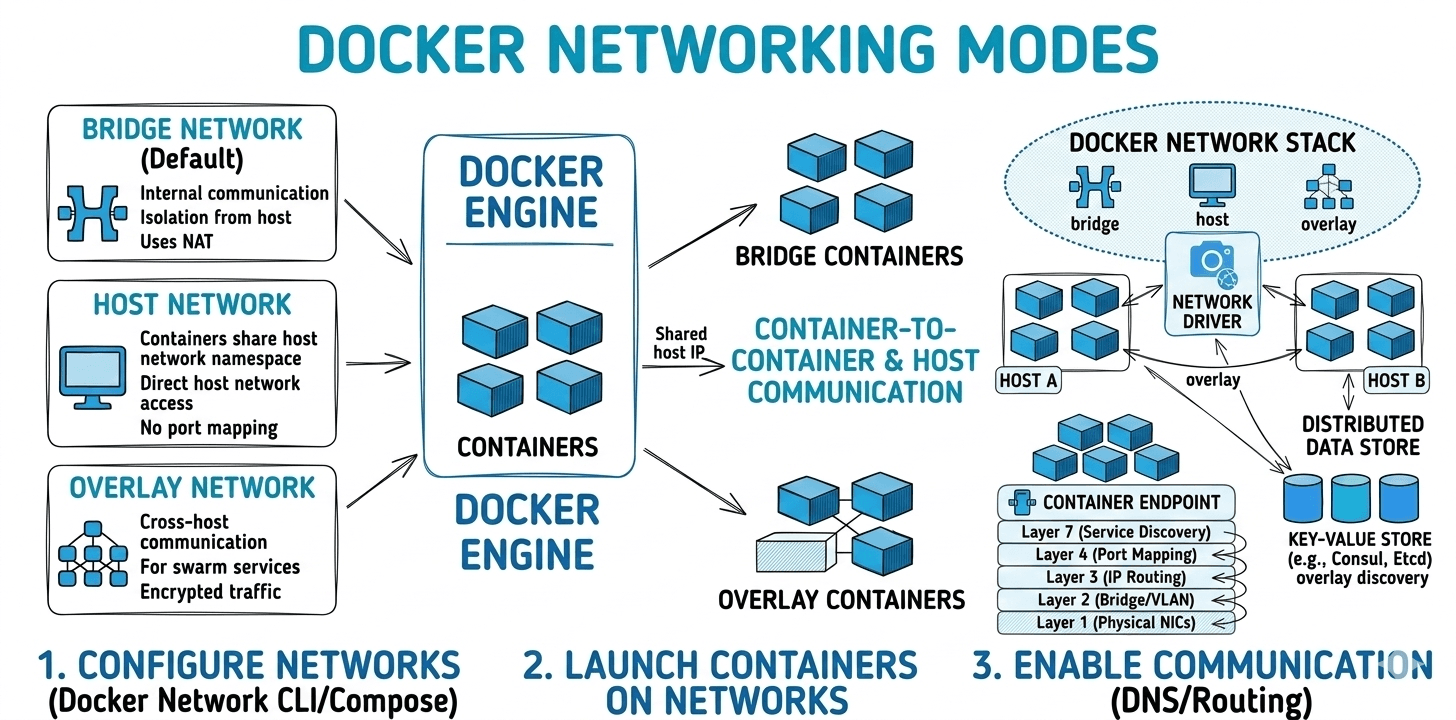
Core Networking Concepts#
Docker networking is built on top of native Linux kernel networking primitives. Instead of implementing a completely new networking stack, Docker leverages existing Linux features such as network namespaces, virtual ethernet interfaces, and iptables-based packet filtering to provide isolation, connectivity, and port forwarding for containers. Understanding these underlying technologies helps explain how containers communicate with each other, the host machine, and external networks.
1. Network Namespaces
A Network Namespace is a Linux kernel feature that provides network stack isolation. Each container runs inside its own network namespace, which means it has a completely separate networking environment.
Within a network namespace, a container gets:
- Its own network interfaces
- Its own IP address
- Independent routing tables
- Separate ARP tables
- Independent firewall rules
Because of this isolation, containers cannot directly see or intercept network traffic from other containers or the host system unless explicitly connected through Docker networking.
From the container’s perspective, it behaves like a standalone machine with its own network stack, even though it shares the same underlying host kernel.
Key benefits:
- Strong network isolation
- Independent network configuration per container
- Secure multi-container deployments
2. Virtual Ethernet Devices (veth pairs)
To allow communication between the container and the host network, Docker creates Virtual Ethernet (veth) pairs. A veth pair acts like a virtual network cable connecting two network namespaces.
It consists of two endpoints:
- One endpoint resides inside the container’s network namespace
- The other endpoint resides in the host network namespace
Inside the container, the interface typically appears as:
On the host side, the corresponding interface connects to a Linux bridge network (commonly docker0 for the default bridge network).
The data flow works as follows:
This mechanism enables:
- Container-to-container communication
- Container-to-host communication
- Container access to external networks
3. iptables and Network Address Translation (NAT)
Docker uses iptables, the Linux firewall and packet filtering system, to manage port forwarding, traffic routing, and NAT rules. When a container port is exposed using Docker's port mapping, Docker automatically configures iptables rules on the host.
Example:
In this case:
- Port 8080 on the host machine
- Forwards traffic to port 80 inside the container
Docker achieves this by adding NAT (Network Address Translation) rules in the host’s iptables configuration.
Traffic flow:
This mechanism allows:
- External users to access services running inside containers
- Secure and controlled port exposure
- Dynamic port mapping without manual firewall configuration
Why Docker Networking Matters#
- Container-to-container communication: Services need to talk to each other (e.g., backend to database).
- Access to the outside world: Containers often need to fetch updates or interact with external APIs.
- Exposing services to users: Web applications need to be reachable from the internet or other systems.
- Security and isolation: Docker networks help isolate environments and reduce attack surfaces.
Strengths of Docker Networking#
- Fast, simple local development: Multi-container apps are quick to spin up and tear down.
- Automatic service discovery: User-defined bridge and overlay networks enable seamless DNS-based lookup.
- Driver flexibility: Coverage for most scenarios—simple, performance, multi-host, and legacy integration.
Known Issues and Trade-Offs#
- Default bridge lacks service discovery: No hostname/DNS resolution, only IP-based communication.
- Root-privileged daemon: Docker daemon runs as root; exposing the socket is a serious security risk.
- Shared kernel isolation: Containers share the host’s kernel, so kernel vulnerabilities can break isolation.
- Resource usage: Docker (especially Docker Desktop) can consume significant resources, notably on non-Linux systems.
- Version mismatch errors: CLI and daemon version drift can cause “client API version” errors, halting workflows.
Conclusion#
Docker networking provides the foundation for reliable communication between containers, the host system, and external networks. By leveraging Linux kernel technologies such as network namespaces, virtual ethernet devices, and iptables-based NAT, Docker creates isolated yet flexible networking environments. Proper configuration of Docker networks ensures secure service communication, efficient resource usage, and scalable containerized application deployments.