![Complete System Design Interview Preparation For 2-7 Years of Experience [2026]](https://cs-prod-assets-bucket.s3.ap-south-1.amazonaws.com/System_Design_in_One_Shot_97afc77fc6.avif)
Complete System Design Interview Preparation For 2-7 Years of Experience [2026]
A complete system design reference for developers, covering scalability, databases, load balancers, caching, Kafka, CDN, microservices, and distributed systems. Built for engineers preparing for system design interviews or designing production-grade systems from scratch.

Rohan Saxena
February 01, 2026
19 min read
Introduction#
There is no prerequisite to read this one shot blog.
If you know how to build a basic backend, understand what an API is, and have used a database at least once, you are good to go.
This article is designed to be a single source of truth for system design fundamentals. You should be able to read this and then directly start attempting system design interview problems or designing real-world systems with confidence.
Most system design content online focuses heavily on theory. This cheatsheet focuses on:
- Practical intuition
- Real-world usage
- How things break at scale
- Why certain design decisions exist
Think of this as notes shared by a friend who has already made mistakes so you do not have to repeat all of them.
What This One Shot Blog Covers?#
This is a long read by design. Roughly 60 minutes if read properly.
You will learn:
- Why system design matters
- What servers actually are
- Latency vs throughput
- Scaling fundamentals
- Auto scaling
- Back-of-the-envelope estimation
Later parts will go much deeper into databases, caching, distributed systems, messaging, consistency, and interview strategy.
Why Study System Design?#
Most developers start by building systems like this:
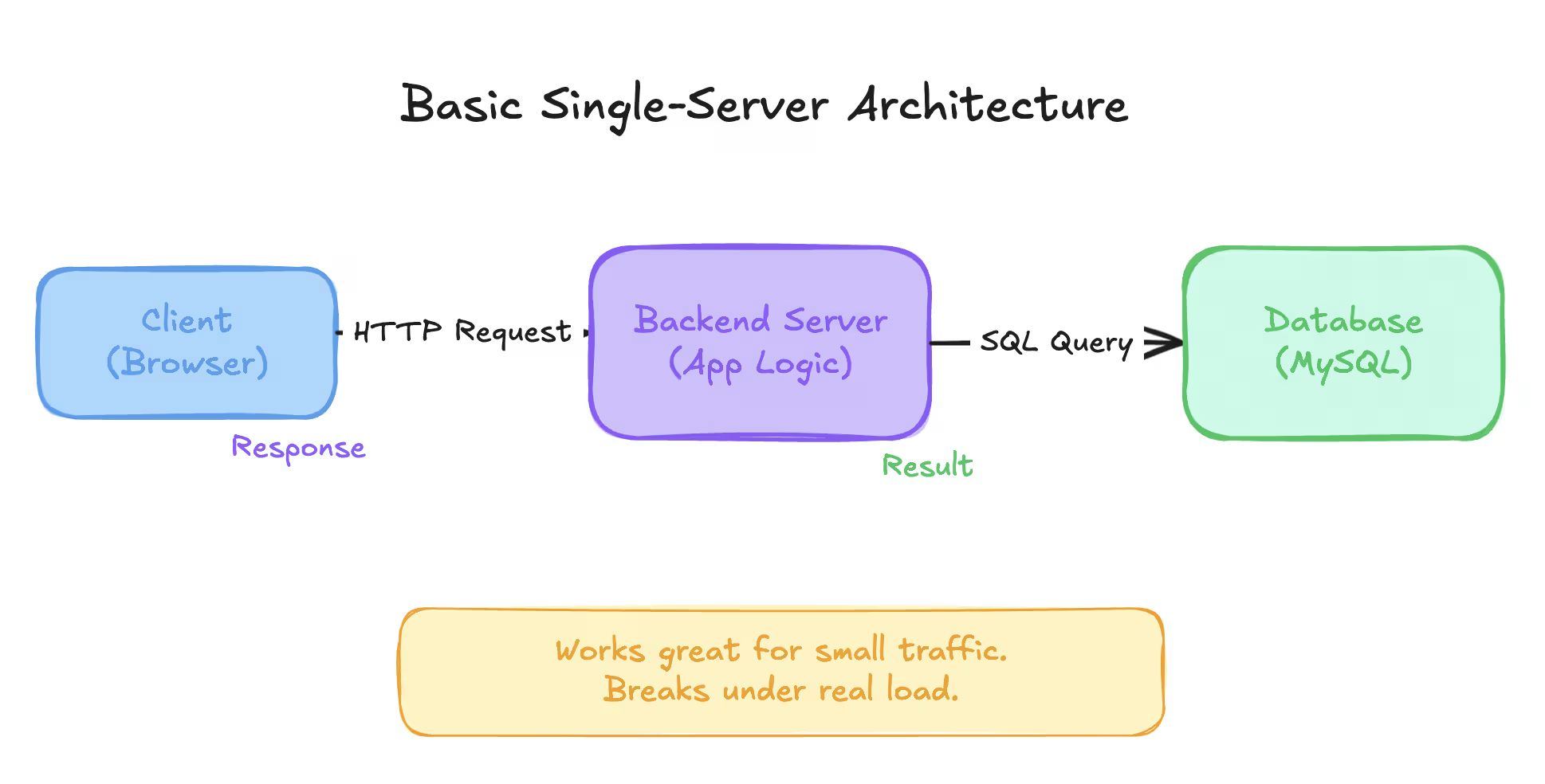
This architecture works perfectly for:
- College projects
- Hackathons
- Early MVPs
- Side projects with limited users
Now imagine this same system when:
- Thousands of users hit it simultaneously
- Database queries increase massively
- One server goes down
- Traffic spikes unexpectedly
Suddenly:
- APIs slow down
- Requests start failing
- The database becomes the bottleneck
- The system crashes at the worst possible time
System design is about preparing for growth and failure.
It answers questions like:
- How do we scale without rewriting everything?
- How do we handle failures gracefully?
- How do we make systems reliable under load?
- How do real companies handle millions of users?
If you do not design for scale early, scale will force redesign later.
What Is a Server?#
A server is simply a computer running your application.
There is nothing special about it.
When you run a backend locally on:
You are already running a server.
Breaking it down#
localhostresolves to the IP address127.0.0.1- This IP points to your own machine
8080is the port number- The port tells the operating system which application should receive the request
Your laptop can run multiple applications at the same time. Ports help the OS route requests to the correct application.
What happens when you visit a website?#
When you type:
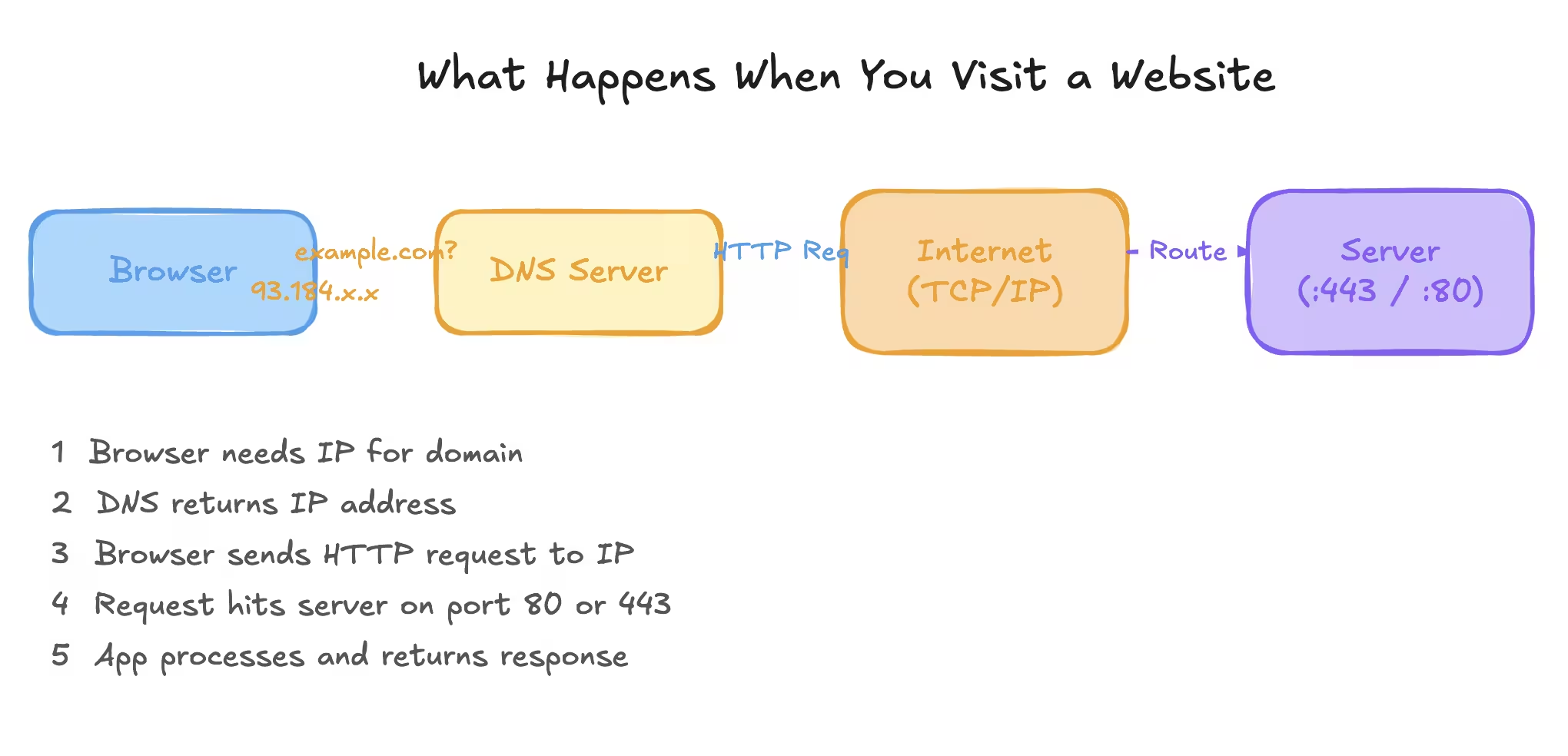
Behind the scenes:
- DNS resolves
example.comto an IP address - Your browser sends a request to that IP
- The request hits a server on a specific port
- The server routes it to the correct application
- The application processes the request and sends a response
Remembering IP addresses is hard, so humans use domain names. Machines still talk using IP addresses.
How Do We Deploy an Application?#
Locally, your application runs on your laptop.
To make it accessible to others:
- You need a public IP address
- You need a machine that stays online
- You need to expose your application to the internet
Managing physical servers is painful. That is why cloud providers exist.
Cloud providers give you:
- Virtual machines
- Public IP addresses
- Networking
- Security tools
In AWS, a virtual machine is called an EC2 instance.
Uploading your application code from your laptop to a cloud server is called deployment.
Latency and Throughput#
These two terms appear everywhere in system design discussions. They measure different things and both matter.
Latency#
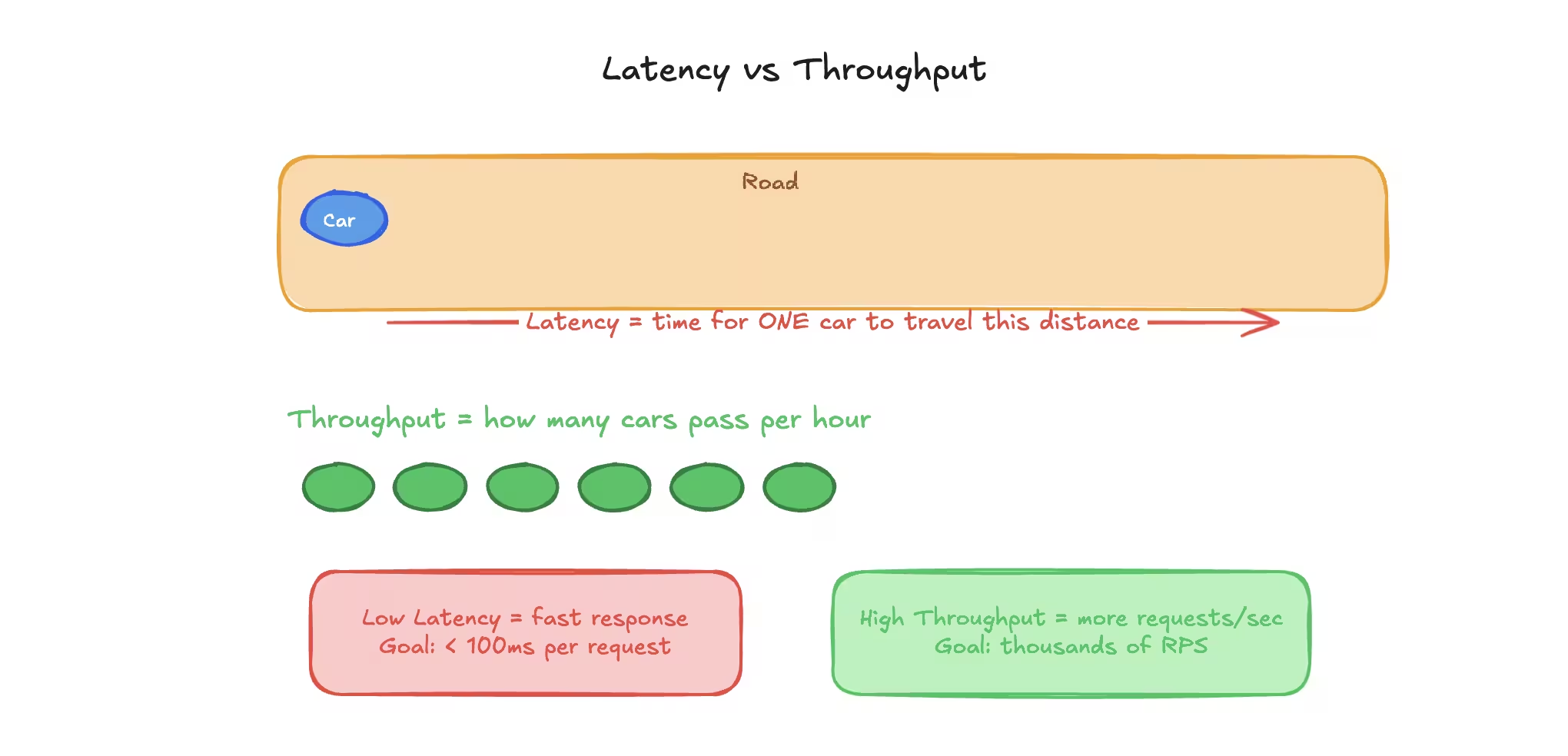
Latency is the time taken for a single request to go from the client to the server and back.
It is usually measured in milliseconds.
Examples:
- API responds in 120 ms
- Webpage loads in 300 ms
Lower latency means:
- Faster responses
- Better user experience
Higher latency means:
- Slower apps
- Frustrated users
- More retries and refreshes
Round Trip Time (RTT)#
RTT is the total time taken for:
- Request to reach the server
- Response to come back
RTT is often used interchangeably with latency.
Throughput#
Throughput is the number of requests a system can handle per second.
It is measured as:
- Requests per second (RPS)
- Transactions per second (TPS)
A system can have:
- Low latency but low throughput
- High throughput but high latency
The ideal system has:
- Low latency
- High throughput
In reality, you usually balance between the two.
Simple Analogy#
| Concept | Real World Example |
|---|---|
| Latency | Time taken by one car to travel a road |
| Throughput | Number of cars that can pass per hour |
Scaling Basics#
Scaling means handling more load.
Load can be:
- More users
- More requests
- More data
There are only two ways to scale a system.
Vertical Scaling#
Vertical scaling means increasing the power of a single machine.
Examples:
- More CPU cores
- More RAM
- Larger disk
Pros#
- Simple to implement
- No architectural changes required
Cons#
- Has a hard upper limit
- Expensive
- Single point of failure
Vertical scaling is usually the first step because it is easy.
Horizontal Scaling#
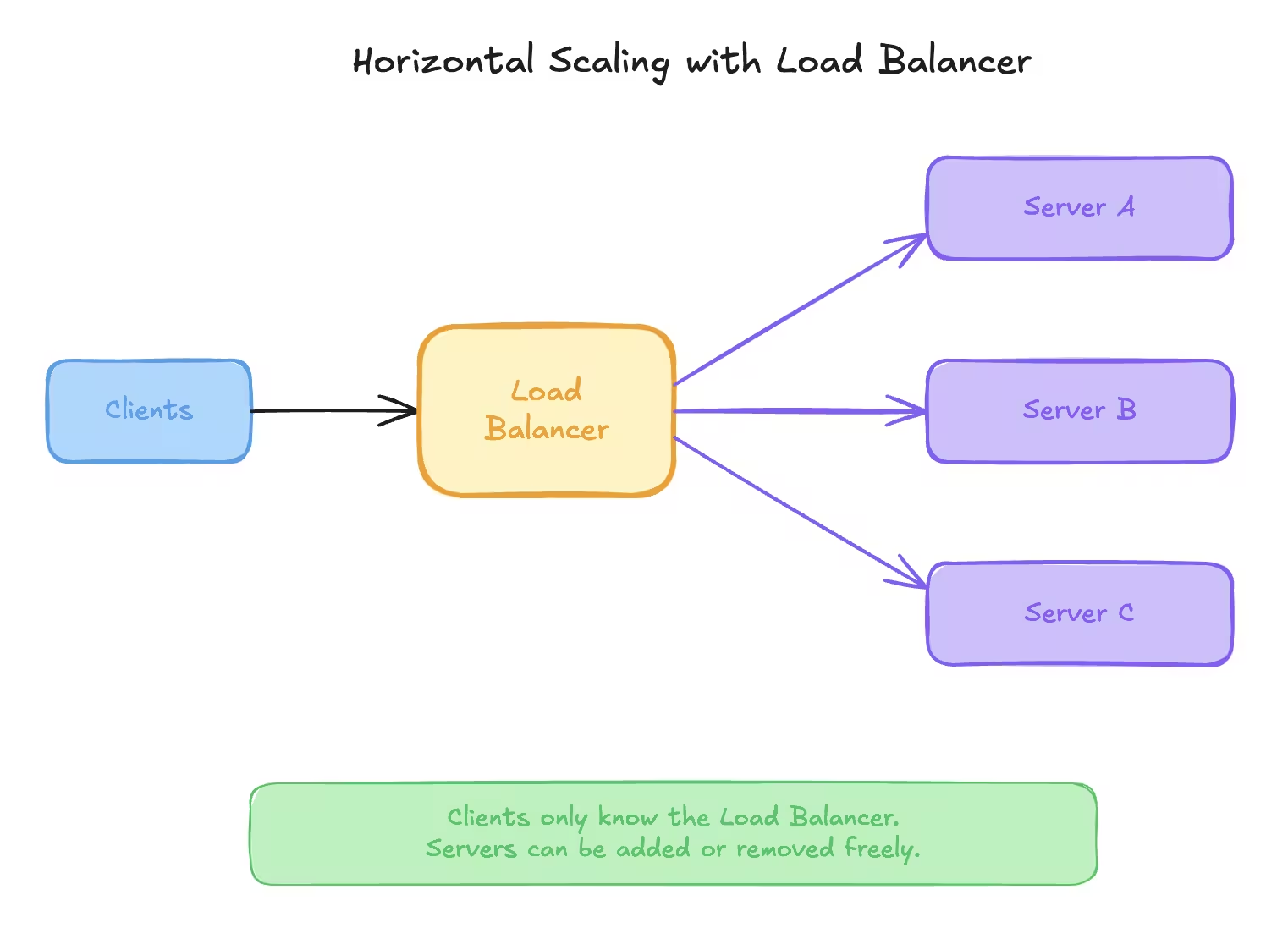
Horizontal scaling means adding more machines and distributing the load.
Instead of one powerful server:
- Use many smaller servers
- Spread traffic evenly
Clients cannot decide which server to talk to. That is where load balancers come in.
Load Balancer (High Level)#
A load balancer:
- Acts as a single entry point
- Receives all incoming requests
- Forwards them to backend servers
Clients only know the load balancer. Servers can be added or removed freely.
Horizontal scaling is the most common approach in real-world systems.
Auto Scaling#
Traffic is rarely constant.
Some days:
- Low usage
Some days:
- Traffic spikes suddenly
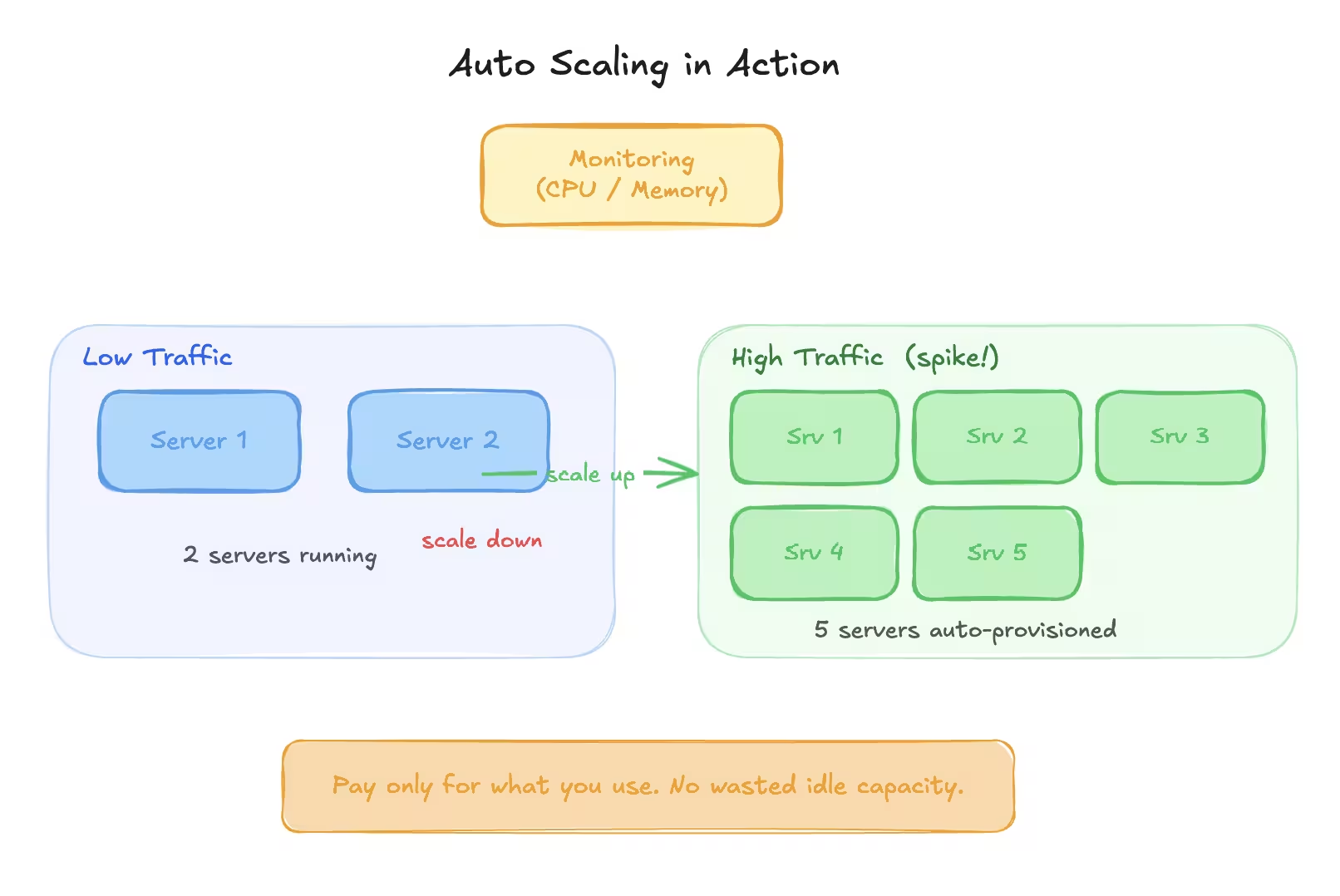
Running maximum servers all the time is expensive and wasteful.
Auto scaling solves this.
How Auto Scaling Works#
- Monitor server metrics like CPU or memory
- Define thresholds
- Add servers when load increases
- Remove servers when load decreases
This allows:
- Cost efficiency
- High availability
- Automatic recovery
Auto scaling should always be combined with monitoring and alerts.
Back-of-the-Envelope Estimation#
In system design interviews, you are expected to estimate scale.
Exact numbers are not required. Reasonable approximations are.
Spend around 5 minutes on this in interviews.
Memory and Storage Reference Table#
| Unit | Approximate Size | Power of 10 |
|---|---|---|
| 1 KB | 1,000 bytes | 10³ |
| 1 MB | 1,000,000 bytes | 10⁶ |
| 1 GB | 1,000,000,000 bytes | 10⁹ |
| 1 TB | 1,000,000,000,000 bytes | 10¹² |
What We Usually Estimate#
- Load estimation
- Storage estimation
- Resource estimation
Example: Load Estimation#
Assume:
- 50 million daily active users
- Each user performs 10 actions per day
Total actions per day:
50,000,000 x 10 = 500,000,000 actions/day
Approximate requests per second:
500,000,000 / 86,400 ≈ 5,800 requests/sec
Example: Storage Estimation#
Assume:
- Each record is 1 KB
- 500 million records per day
Daily storage required:
500 million x 1 KB = 500 GB per day
Monthly storage:
500 GB x 30 ≈ 15 TB
Example: Resource Estimation#
Assume:
- 6,000 requests per second
- Each request takes 10 ms of CPU time
Total CPU time per second:
6,000 x 10 ms = 60,000 ms
If one CPU core handles 1,000 ms per second:
60,000 / 1,000 = 60 CPU cores
If one server has 4 cores:
60 / 4 = 15 servers
CAP Theorem#
CAP theorem is one of the most important ideas in system design.
It explains why distributed systems are forced to make trade-offs.
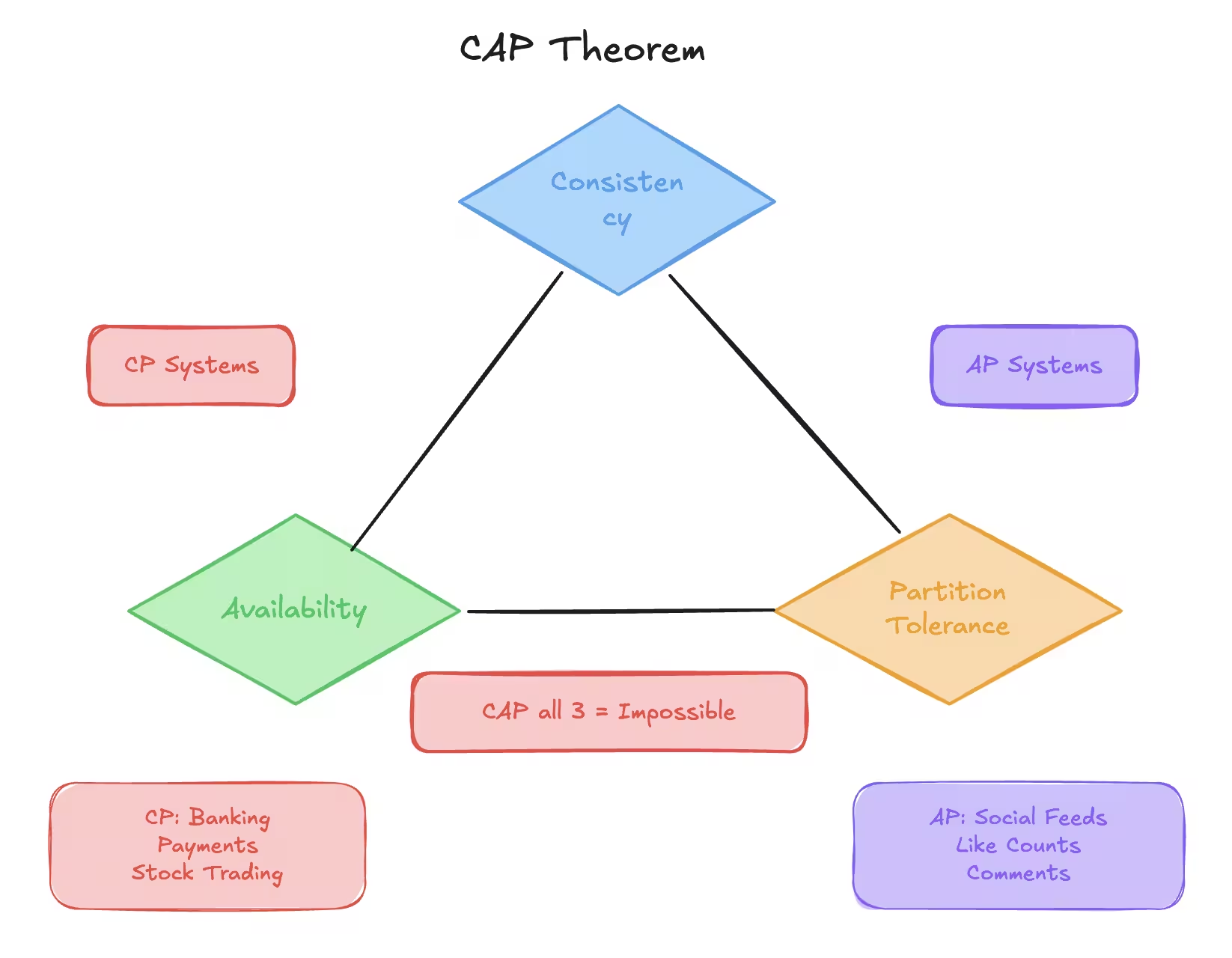
CAP stands for:
- Consistency
- Availability
- Partition Tolerance
This discussion always assumes we are talking about distributed systems.
What Is a Distributed System?#
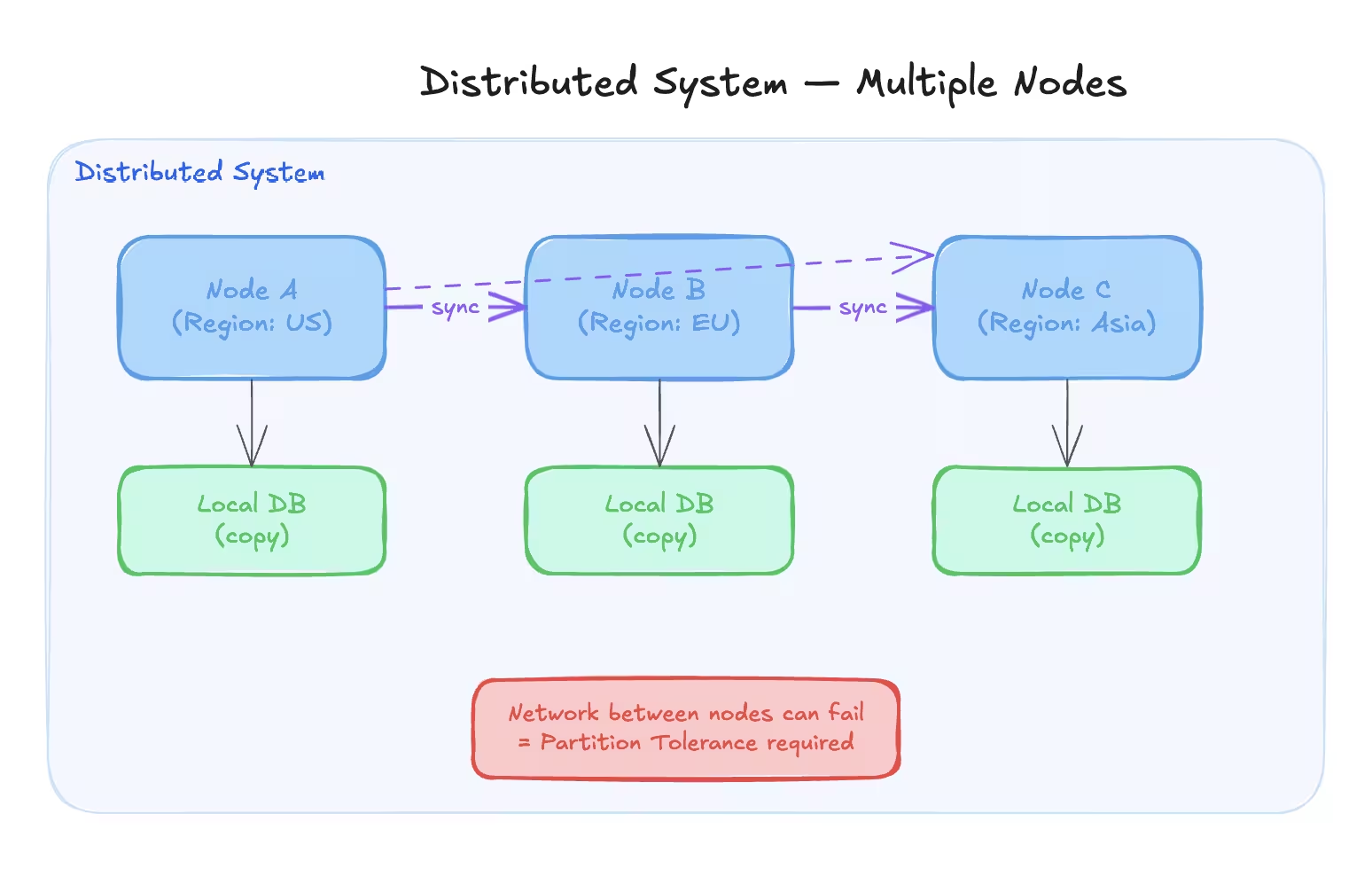
A distributed system is one where:
- Data is stored across multiple machines
- Requests are served by multiple nodes
- Systems communicate over a network
We use distributed systems because:
- One machine is not enough at scale
- We want fault tolerance
- We want lower latency by serving users from nearby locations
Each individual machine in a distributed system is called a node.
The Three Properties Explained#
Consistency#
Consistency means:
- Every read returns the most recent write
- All nodes see the same data at the same time
If data is updated on one node, that update must be reflected on all nodes before reads are allowed.
Example:
- User updates their profile name
- Any request from any node should show the updated name immediately
Availability#
Availability means:
- Every request receives a response
- The system continues to function even if some nodes fail
The response does not need to be correct or latest, but the system should not refuse requests.
Example:
- One database replica crashes
- Other replicas continue serving traffic
Partition Tolerance#
Partition tolerance means:
- The system continues to operate even if network communication breaks between nodes
Network failures are unavoidable in real systems. Because of this, partition tolerance is mandatory in distributed systems.
The Core Idea of CAP Theorem#
In a distributed system, you can only guarantee two out of three properties at the same time.
Possible combinations:
- CP (Consistency + Partition Tolerance)
- AP (Availability + Partition Tolerance)
Impossible combination:
- CAP (all three at once)
Why Can We Not Have All Three?#
Assume three nodes:
- Node A
- Node B
- Node C
Now assume a network partition occurs:
- Node B loses connection with A and C
If we choose Availability:#
- Node B continues serving requests
- Node A and C continue serving requests
- Data may become inconsistent
Result:
- Availability achieved
- Consistency sacrificed
If we choose Consistency:#
- Stop serving requests until network is restored
- Prevent inconsistent writes
Result:
- Consistency achieved
- Availability sacrificed
There is no way to avoid this trade-off.
Why Not Choose CA?#
CA assumes:
- No network failures
In real-world distributed systems:
- Network partitions will happen
- Latency spikes will happen
- Nodes will temporarily disconnect
That is why real systems always choose between CP or AP.
When to Choose CP vs AP#
Choose CP When:#
- Data correctness is critical
- Inconsistent data is unacceptable
Examples:
- Banking systems
- Payment systems
- Stock trading platforms
- Account balances
Choose AP When:#
- High availability is more important than strict consistency
- Slightly stale data is acceptable
Examples:
- Social media feeds
- Like counts
- Comments
- View counts
Database Scaling#
Initially, applications use a single database server.
As traffic increases:
- Queries slow down
- CPU usage increases
- Disk IO becomes a bottleneck
We scale databases step by step, not all at once.
Over-engineering early is just as bad as under-engineering.
Indexing#
Without indexes:
- Database scans every row
- Time complexity is O(N)
With indexes:
- Database uses a data structure like B-trees
- Time complexity becomes O(log N)
Indexes are created on columns that are frequently queried.
Key Points About Indexing#
- Improves read performance
- Slightly slows down writes
- Uses extra storage
- Should be added thoughtfully
You rarely regret adding the right index.
Partitioning#
Partitioning means:
- Breaking a large table into smaller tables
- All partitions live on the same database server
Each partition has:
- Its own index
- Smaller data size
- Faster queries
The database engine decides which partition to query.
Partitioning improves performance without changing application logic.
Master Slave Architecture#
Used when:
- Reads heavily outnumber writes
- One database cannot handle read traffic
How It Works#
- One master handles all writes
- Multiple slaves handle reads
- Data is replicated from master to slaves
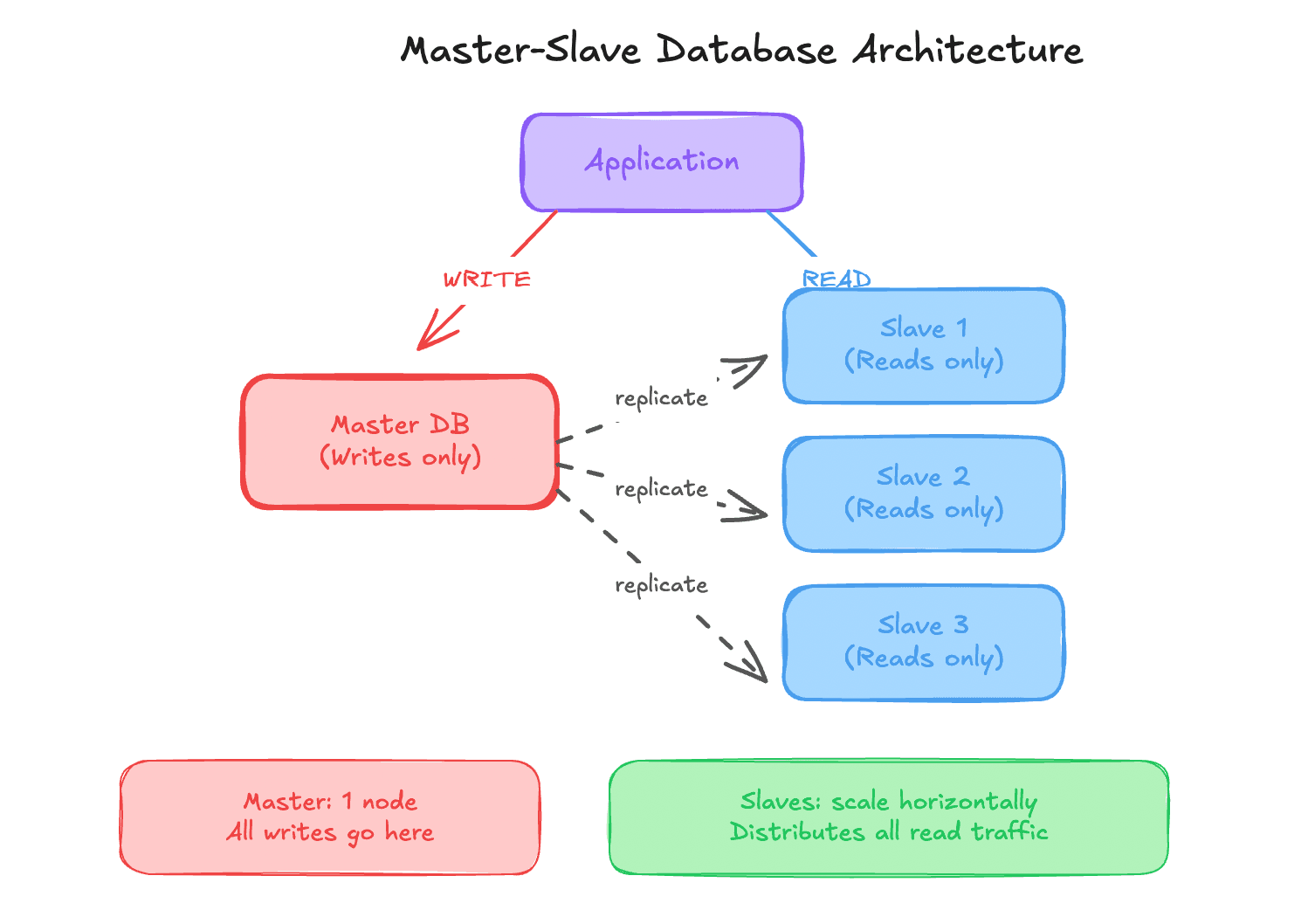
Reads are distributed. Writes remain centralized.
Multi-Master Architecture#
Used when:
- Write traffic becomes very high
- One master cannot handle all writes
Multiple masters:
- Handle writes independently
- Periodically sync data
Challenges#
- Write conflicts
- Data reconciliation
- Complex business logic
Multi-master setups are powerful but risky.
Database Sharding#
Sharding means:
- Splitting data across multiple database servers
- Each server holds a subset of the data
Each server is called a shard.
Sharding is done using a sharding key.
Sharding Strategies#
Range-Based Sharding#
Data split by ranges.
Example:
- Users 1 to 1,000 on shard 1
- Users 1,001 to 2,000 on shard 2
Pros:
- Simple logic
Cons:
- Uneven load
- Hot shards
Hash-Based Sharding#
Shard determined by hash function.
Example: hash(user_id) % number_of_shards
Pros:
- Even data distribution
Cons:
- Hard to rebalance
- Adding shards is complex
Geographic Sharding#
Data split by region.
Example:
- Asia users on one shard
- Europe users on another shard
Pros:
- Low latency
Cons:
- Traffic imbalance
Directory-Based Sharding#
A lookup table maps keys to shards.
Pros:
- Flexible
- Easy to reassign shards
Cons:
- Lookup table becomes a bottleneck
Disadvantages of Sharding#
- Complex application logic
- Expensive joins
- Hard consistency guarantees
- Difficult rebalancing
Avoid sharding until absolutely necessary.
Summary of Database Scaling#
Follow this order:
- Vertical scaling
- Indexing
- Partitioning
- Read replicas
- Sharding
Scale only when needed.
SQL vs NoSQL Databases#
Choosing the right database matters more than choosing the popular one.
SQL Databases#
Characteristics:
- Structured schema
- Tables and rows
- Strong consistency
- ACID guarantees
Examples:
- MySQL
- PostgreSQL
- Oracle
Use SQL when:
- Data integrity matters
- Complex joins are required
- Transactions are critical
NoSQL Databases#
Characteristics:
- Flexible schema
- Horizontal scaling
- High availability
- Eventual consistency
Types:
| Type | Example | Use Case |
|---|---|---|
| Document | MongoDB | JSON-like data |
| Key-Value | Redis | Caching |
| Column | Cassandra | Large-scale writes |
| Graph | Neo4j | Relationship queries |
Scaling Differences#
| Feature | SQL | NoSQL |
|---|---|---|
| Scaling | Vertical | Horizontal |
| Schema | Fixed | Flexible |
| Consistency | Strong | Eventual |
| Joins | Supported | Limited |
When to Use Which#
Use SQL when:
- Financial data
- User accounts
- Orders and payments
Use NoSQL when:
- High traffic
- Large datasets
- Real-time systems
- Low latency requirements
Many production systems use both together.
End of Part 2#
In this part, you learned:
- CAP theorem
- Distributed system trade-offs
- Database scaling strategies
- SQL vs NoSQL decision making
Next part will cover:
- Microservices
- Load balancer deep dive
- Caching and Redis
Microservices#
Before microservices became popular, most applications were built as monoliths.
Understanding the difference is critical.
Monolith Architecture#
In a monolith:
- Entire backend is one single application
- All features live in the same codebase
- Deployed as one unit
Example for an e-commerce app:
- User management
- Product listing
- Orders
- Payments
All of this exists in one backend service.
Advantages of Monolith#
- Simple to build initially
- Easy to debug at small scale
- Faster development for small teams
Disadvantages of Monolith#
- Hard to scale individual features
- One crash can bring down everything
- Codebase becomes messy over time
- Deployments become risky
Most startups begin with a monolith. That is normal and often the right choice.
Microservice Architecture#
Microservices break a large application into small, independent services.
Each service:
- Has its own codebase
- Has its own database (usually)
- Can be deployed independently
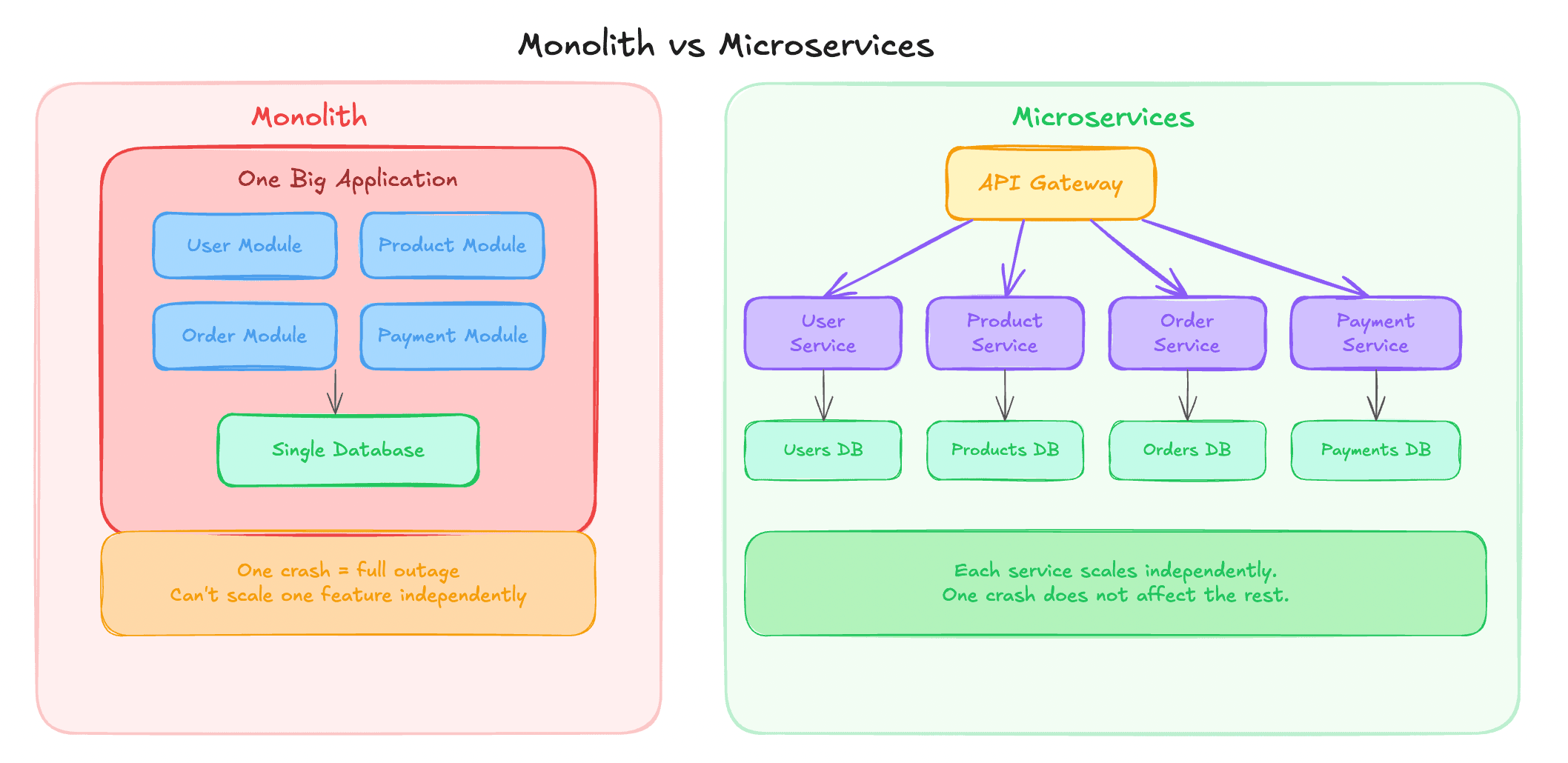
Example microservices for e-commerce:
- User Service
- Product Service
- Order Service
- Payment Service
Why Do We Use Microservices?#
Independent Scaling#
If Product Service gets more traffic:
- Scale only Product Service
- No need to scale entire system
Independent Deployments#
- Deploy Order Service without touching Payment Service
- Fewer production risks
Fault Isolation#
- Payment Service crash does not kill User Service
- System degrades gracefully
Technology Flexibility#
- One service in Node.js
- Another in Go
- Another in Java
Each team can choose what fits best.
When Should You Use Microservices?#
Do not start with microservices blindly.
Microservices make sense when:
- Team size increases
- Multiple teams work independently
- Application grows large
- Deployment frequency increases
- You want to avoid single point of failure
Small teams with early-stage products should usually start with a monolith.
How Clients Communicate in Microservices#
Each microservice runs on:
- Different machines
- Different IP addresses
- Different ports
Clients should not manage this complexity.
So we introduce an API Gateway.
API Gateway#
API Gateway:
- Acts as a single entry point
- Routes requests to correct microservices
- Hides internal architecture from clients
Client: /login /products /orders
Gateway:
- Sends
/loginto User Service - Sends
/productsto Product Service - Sends
/ordersto Order Service
Additional Responsibilities of API Gateway#
- Authentication and authorization
- Rate limiting
- Request validation
- Response aggregation
- Caching
API Gateway simplifies client logic and centralizes cross-cutting concerns.
Load Balancer Deep Dive#
Whenever you horizontally scale services, you need a load balancer.
Clients should not know:
- How many servers exist
- Which server is healthy
- Which server is busy
Why Load Balancer Is Required#
Without a load balancer:
- Clients must know all server IPs
- Clients must decide routing
- Failures become client problems
With a load balancer:
- Single entry point
- Automatic traffic distribution
- Health checks
- Failover handling
Load Balancer Algorithms#
Round Robin#
Requests are sent to servers sequentially.
Example:
- Request 1 to Server A
- Request 2 to Server B
- Request 3 to Server C
- Repeat
Pros:
- Simple
- Fair distribution
Cons:
- Ignores server load
- Assumes equal capacity
Weighted Round Robin#
Each server has a weight.
Servers with higher weight:
- Receive more requests
Useful when:
- Servers have different hardware capacity
Least Connections#
Traffic is routed to:
- Server with fewest active connections
Pros:
- Dynamic
- Adapts to real-time load
Cons:
- Not ideal when requests vary greatly in duration
Hash-Based Routing#
Routing based on:
- Client IP
- User ID
- Session ID
Ensures:
- Same user hits same server
Useful for:
- Session persistence
- Stateful applications
Caching#
Caching is one of the highest impact optimizations in system design.
Caching stores:
- Frequently accessed data
- In fast storage
- For quick retrieval
Why Caching Is Needed#
Database access is slow compared to memory.
Example:
- Database fetch takes 500 ms
- Processing takes 100 ms
- Total response time is 600 ms
With caching:
- Cached response served in 50 ms
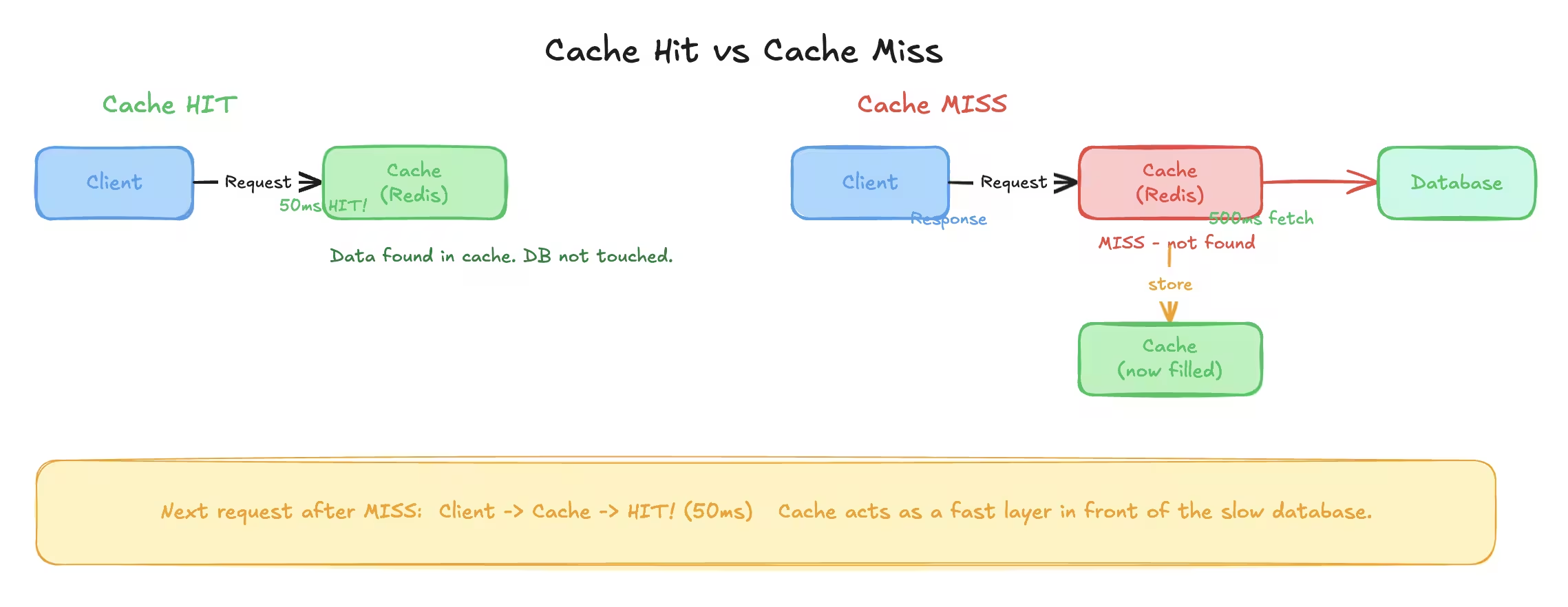
Huge improvement with minimal effort.
Where Can We Cache?#
Client Side Cache#
- Browser cache
- Mobile app cache
Used for:
- Static files
- Images
- Scripts
Server Side Cache#
- Stored on backend servers
- Often in memory
Examples:
- Redis
- Memcached
CDN Cache#
- Used for static content
- Geographically distributed
Examples:
- Images
- Videos
- Stylesheets
Application Level Cache#
- Inside application code
- Stores computed results
- Avoids repeated computation
Cache Invalidation#
Caching is easy. Invalidation is hard.
Whenever data changes:
- Cached value must be updated or removed
Common strategies:
- Time based expiration
- Manual eviction
- Write-through cache
Poor invalidation leads to stale data bugs.
Redis Introduction#
Redis is an in-memory data store.
In-memory means:
- Data stored in RAM
- Extremely fast read and write
Redis is commonly used for:
- Caching
- Rate limiting
- Pub-sub
- Session storage
Why Not Store Everything in Redis?#
RAM is expensive and limited.
Databases:
- Store data on disk
- Handle large volumes
- Persist data reliably
Redis:
- Fast but volatile
- Data may be lost if not persisted
Redis complements databases. It does not replace them.
Redis Data Model#
Redis stores data as key-value pairs.
Key naming convention: user:1 user:1:email product:45
Colon separation helps readability and grouping.
Common Redis Data Types#
String#
- Simple key-value
- Most commonly used
Commands:
- SET
- GET
- MGET
List#
Ordered collection.
Commands:
- LPUSH
- RPUSH
- LPOP
- RPOP
Use cases:
- Queues
- Stacks
Set#
- Unique values
- No duplicates
Use cases:
- Unique visitors
- Tags
Hash#
- Key-value pairs inside a key
- Similar to an object
Use cases:
- User profiles
- Configurations
Redis TTL (Time To Live)#
Keys can have expiration time.
Example:
- Cache valid for 24 hours
- Automatically deleted after expiry
TTL helps:
- Avoid stale data
- Control memory usage
Cache Hit and Cache Miss#
- Cache hit: Data found in cache
- Cache miss: Data not found in cache
Flow:
- Check cache
- If hit, return data
- If miss, fetch from database
- Store in cache
- Return response
Write-Through vs Read-Through Cache#
Read-Through#
- Cache populated on read
- Cache miss triggers database read
Write-Through#
- Data written to cache and database together
- Ensures cache consistency
Choice depends on use case.
End of Part 3#
In this part, you learned:
- Monolith vs microservices
- API gateway
- Load balancer internals
- Caching strategies
- Redis fundamentals
Next part will cover:
- Blob storage
- CDN
- Message brokers
- Kafka
- Pub-sub systems
Blob Storage#
Databases are great at storing:
- Text
- Numbers
- Structured records
Databases are terrible at storing:
- Images
- Videos
- PDFs
- Audio files
Trying to store large binary files inside databases leads to:
- Slow queries
- Huge backups
- Scaling nightmares
That is why blob storage exists.
What Is a Blob?#
Blob stands for Binary Large Object.
Any file such as:
- Image
- Video
- ZIP
- Audio
Can be represented as a sequence of binary data. That binary data is called a blob.
Why We Do Not Store Blobs in Databases#
Problems with storing blobs in databases:
- Large row sizes
- Slow reads and writes
- Difficult scaling
- Expensive storage
Databases are optimized for structured data, not large files.
Blob Storage Services#
Blob storage is usually a managed service.
Examples:
- AWS S3
- Cloudflare R2
- Google Cloud Storage
- Azure Blob Storage
These services handle:
- Scaling
- Durability
- Replication
- Availability
You treat them like a black box.
How Blob Storage Is Used#
Typical flow:
- Client uploads file
- Backend generates upload credentials
- File stored in blob storage
- Database stores file URL or metadata
- Client accesses file via URL
Database stores references, not the file itself.
AWS S3 Basics#
You can think of S3 like Google Drive for applications.
Key properties:
- Extremely cheap storage
- Virtually unlimited size
- High durability
- Global availability
S3 is ideal for:
- Images
- Videos
- Static website files
- Backups
- Logs
Important S3 Concepts#
| Concept | Meaning |
|---|---|
| Bucket | Container for files |
| Object | A file stored in S3 |
| Key | Path of the file |
| Region | Physical location |
S3 provides durability close to 100 percent by replicating data internally.
Content Delivery Network (CDN)#
Serving files directly from blob storage works. Serving them fast worldwide does not.
CDN solves this problem.
What Is a CDN?#
A CDN is a network of servers distributed across the world.
These servers:
- Cache static content
- Serve users from nearby locations
- Reduce latency
Examples:
- AWS CloudFront
- Cloudflare CDN
- Akamai
Why CDN Is Needed#
Assume:
- Files stored in India
- User requests from USA
Without CDN:
- High latency
- Slow loading
- Poor experience
With CDN:
- File cached near user
- Faster response
- Reduced load on origin server
How CDN Works#
- User requests a file
- Request goes to nearest edge server
- If file exists in cache, return it
- If not, fetch from origin
- Cache it at edge
- Serve future requests locally
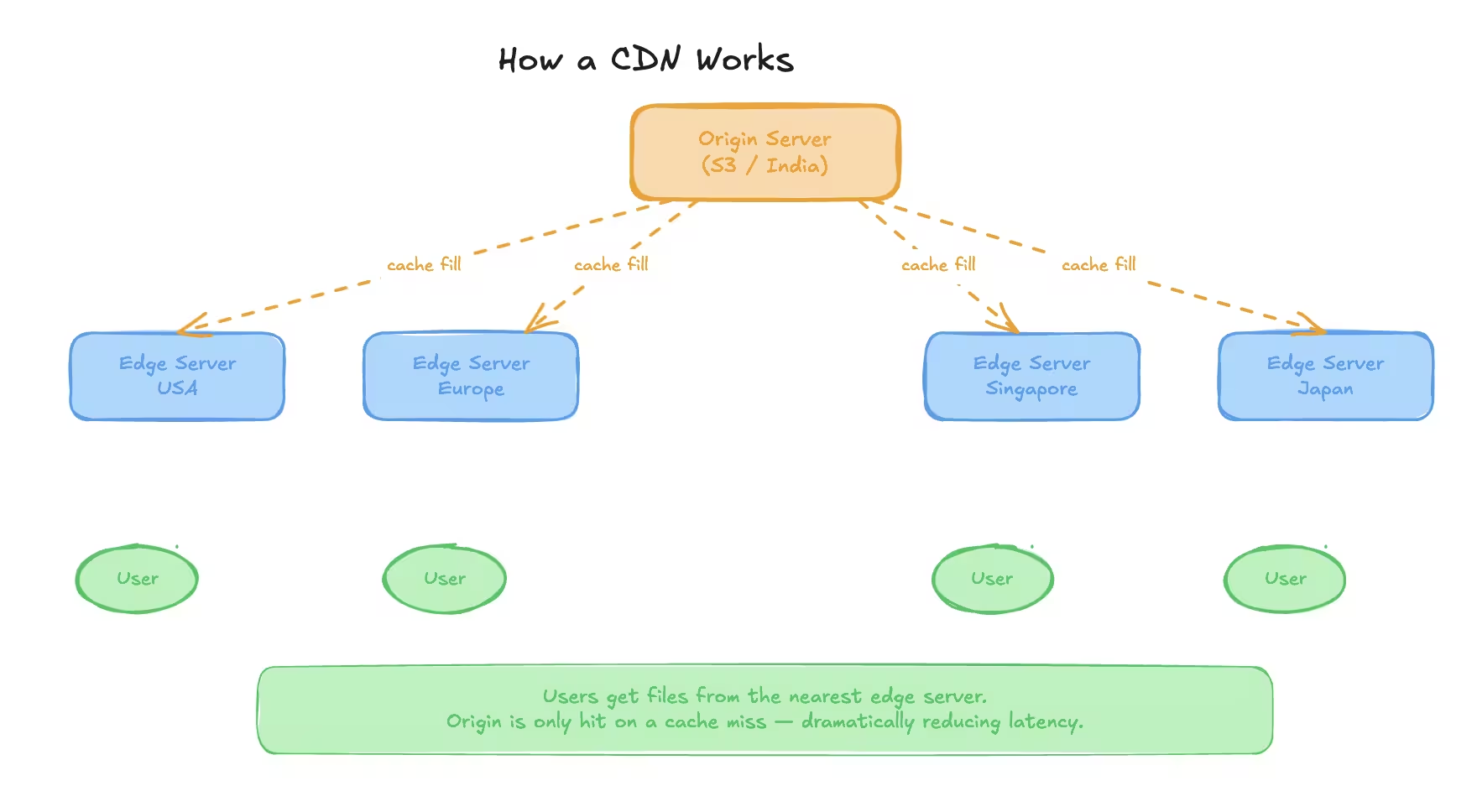
CDN Terminology#
| Term | Description |
|---|---|
| Edge Server | CDN server near user |
| Origin Server | Original source like S3 |
| TTL | Cache expiry duration |
| Cache Hit | File served from CDN |
| Cache Miss | File fetched from origin |
Message Broker#
Not all tasks should be handled synchronously.
Some tasks:
- Take too long
- Are non-critical
- Should not block user response
That is where message brokers are used.
Synchronous vs Asynchronous Processing#
Synchronous#
- Client waits for response
- Used for quick operations
- Risk of timeouts for long tasks
Asynchronous#
- Client gets immediate acknowledgement
- Task processed in background
- User notified later if needed
Why Message Brokers Are Used#
Message brokers help with:
- Decoupling services
- Reliability
- Retry mechanisms
- Load buffering
Producer and consumer do not need to know about each other.
Message Broker Components#
| Role | Description |
|---|---|
| Producer | Sends messages |
| Broker | Stores messages |
| Consumer | Processes messages |
Types of Message Brokers#
There are two major types:
- Message Queues
- Message Streams
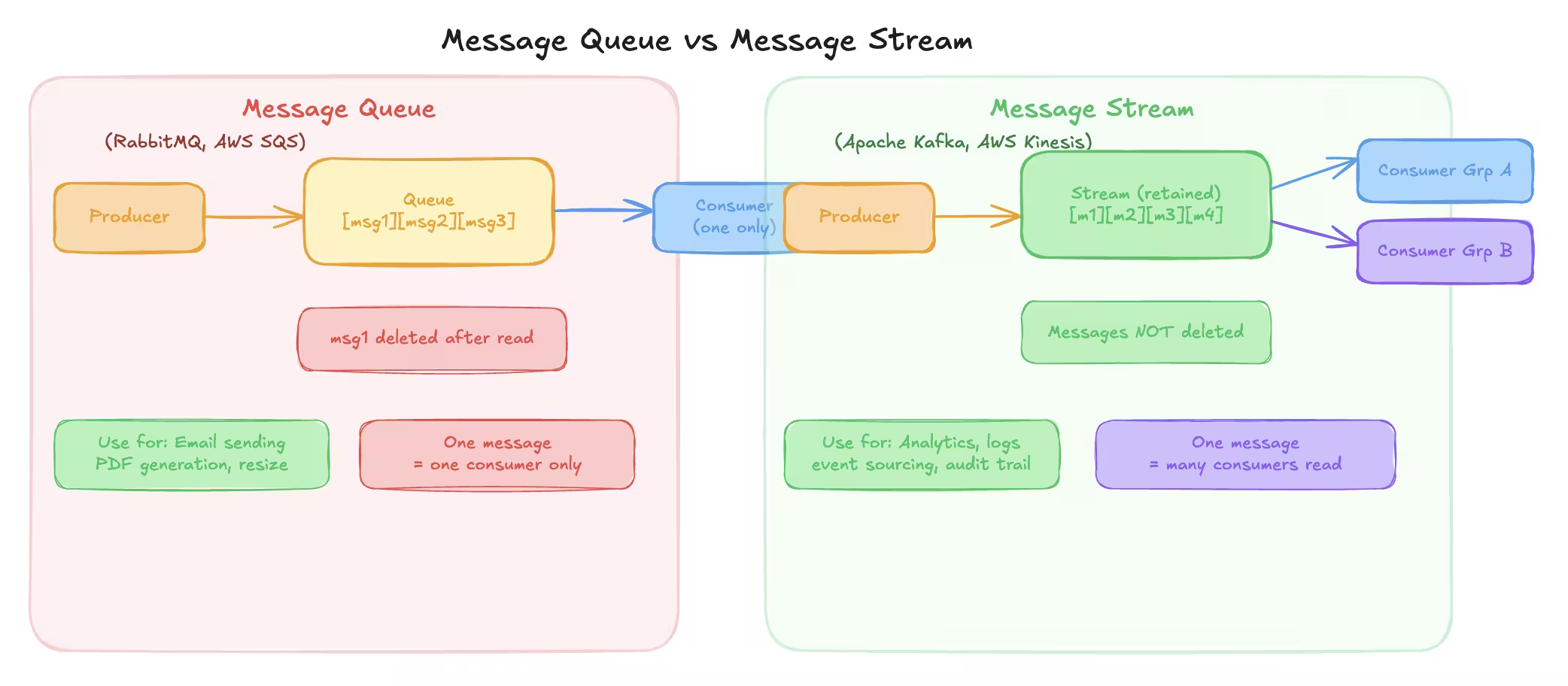
They solve different problems.
Message Queue#
In a message queue:
- One message is processed by one consumer
- Message is deleted after processing
Examples:
- RabbitMQ
- AWS SQS
When to Use Message Queues#
Use message queues when:
- One consumer should handle a task
- Task must not be duplicated
- Order matters less
Examples:
- Email sending
- PDF generation
- Image resizing
Message Stream#
In a message stream:
- One message can be consumed by many consumers
- Messages are not deleted immediately
- Consumers track their own progress
Examples:
- Apache Kafka
- AWS Kinesis
When to Use Message Streams#
Use message streams when:
- Same event must trigger multiple actions
- High throughput is required
- Event history is valuable
Examples:
- Activity logs
- Analytics
- Event sourcing
Apache Kafka Overview#
Kafka is a distributed message streaming platform.
It is designed for:
- High throughput
- Fault tolerance
- Scalability
Kafka can handle millions of messages per second.
Kafka Core Concepts#
| Concept | Meaning |
|---|---|
| Producer | Sends messages |
| Consumer | Reads messages |
| Broker | Kafka server |
| Topic | Message category |
| Partition | Subdivision of topic |
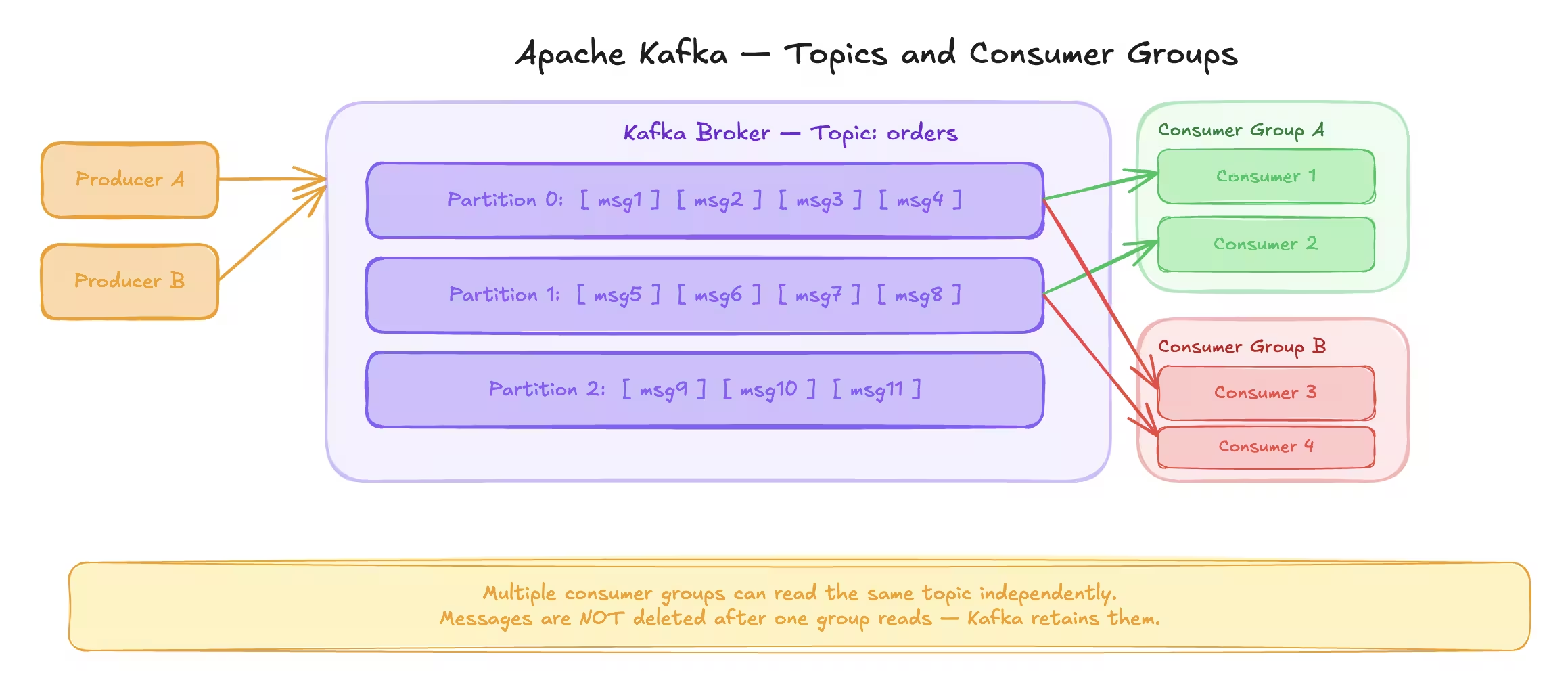
Kafka Topics and Partitions#
Topics are split into partitions.
Partitions allow:
- Parallel processing
- Horizontal scaling
Each partition:
- Is ordered
- Can be processed by only one consumer per group
Consumer Groups#
Consumers belong to groups.
Rules:
- One partition assigned to one consumer per group
- Multiple groups can read same topic
- Enables parallelism
Kafka Rebalancing#
When:
- Consumer joins
- Consumer leaves
- Partition count changes
Kafka automatically reassigns partitions. No manual intervention required.
Kafka Use Case Example#
Assume:
- Ride-sharing app
- Driver location updated every 2 seconds
Instead of writing directly to database:
- Write updates to Kafka
- Batch write to database later
This reduces database load drastically.
Realtime PubSub#
PubSub stands for Publish Subscribe.
In PubSub:
- Messages are pushed immediately
- No storage by default
- Real-time delivery
PubSub vs Message Broker#
| Feature | Message Broker | PubSub |
|---|---|---|
| Storage | Yes | No |
| Delivery | Pull based | Push based |
| Latency | Medium | Very low |
| Use Case | Background jobs | Realtime updates |
Redis PubSub#
Redis supports PubSub.
Used for:
- Realtime chat
- Notifications
- Live updates
PubSub Example#
In a chat application:
- Clients connected to different servers
- Messages published to Redis channel
- All subscribed servers receive message
- Servers forward message to connected clients
This enables realtime communication across servers.
Limitations of PubSub#
- No message persistence
- If consumer is offline, message is lost
- Not suitable for critical workflows
PubSub is for speed, not reliability.
End of Part 4#
In this part, you learned:
- Blob storage and S3
- CDN concepts
- Message brokers
- Message queues vs streams
- Kafka internals
- Realtime PubSub
Next part will cover:
- Event-driven architecture
- Distributed systems
- Leader election
- Consistency deep dive
- Consistent hashing
- Data redundancy
- Proxy
- How to solve any system design problem
Event-Driven Architecture (EDA)#
Event-driven architecture is a way of designing systems where:
- Services react to events
- Components are loosely coupled
- Workflows are asynchronous by default
Instead of calling services directly, systems communicate by emitting events.
Why Do We Need Event-Driven Architecture?#
Consider an e-commerce application.
When an order is placed:
- Order service creates the order
- Payment service processes payment
- Inventory service updates stock
- Notification service sends confirmation
- Analytics service records the event
If these are synchronous calls:
- One failure breaks everything
- Latency increases
- Tight coupling forms
EDA solves this.
How EDA Works#
- An event occurs
- Event is published to an event bus
- Multiple consumers listen to the event
- Each consumer reacts independently
The producer does not know who consumes the event.
Event Notification vs Event-Carried State#
Event Notification#
Event contains minimal information.
Example: order_created { order_id }
Consumers fetch required data separately.
Pros:
- Lightweight events
Cons:
- Extra database calls
Event-Carried State Transfer#
Event carries full data.
Example: order_created { order_id, user_id, amount, items }
Pros:
- No extra fetch required
Cons:
- Larger events
- Schema evolution complexity
Distributed Systems#
A distributed system consists of:
- Multiple nodes
- Network communication
- Shared responsibility
Distributed systems exist because:
- One machine is not enough
- We need fault tolerance
- We want scalability
Problems in Distributed Systems#
Distributed systems introduce challenges:
- Partial failures
- Network latency
- Clock synchronization
- Data consistency
Designing distributed systems is about handling failures gracefully.
Leader Election#
In many distributed systems:
- One node must act as leader
- Leader coordinates work
- Followers execute tasks
Leader election decides:
- Which node becomes leader
- How leadership changes on failure
Why Leader Election Is Needed#
Examples:
- Distributed locks
- Scheduled jobs
- Master coordination
- Metadata management
Without a leader:
- Duplicate work
- Conflicts
- Inconsistent state
How Leader Election Works (High Level)#
Common approaches:
- Using distributed coordination systems
- Heartbeats to detect failure
- Automatic re-election
Popular tools:
- ZooKeeper
- etcd
- Consul
When leader fails:
- New leader is elected automatically
- System recovers without downtime
Consistency Deep Dive#
Consistency defines how up-to-date data appears across nodes.
There are multiple consistency models.
Strong Consistency#
Strong consistency guarantees:
- Reads always return latest write
- No stale data
Used when correctness matters.
Examples:
- Banking balances
- Financial ledgers
- Inventory counts for purchases
Trade-off:
- Higher latency
- Lower availability during failures
Eventual Consistency#
Eventual consistency guarantees:
- Data will become consistent over time
- Temporary inconsistency is allowed
Used when availability matters more.
Examples:
- Social media likes
- Feed updates
- View counts
When to Choose Which#
| Use Case | Consistency Type |
|---|---|
| Payments | Strong |
| Orders | Strong |
| Social feeds | Eventual |
| Analytics | Eventual |
Achieving Strong Consistency#
Common techniques:
- Distributed locks
- Synchronous replication
- Two-phase commit
- Leader-based writes
These approaches reduce availability but ensure correctness.
Achieving Eventual Consistency#
Common techniques:
- Asynchronous replication
- Conflict resolution
- Versioning
- Last-write-wins strategy
Eventual consistency trades accuracy for speed and availability.
Consistent Hashing#
Consistent hashing is used to:
- Distribute data evenly
- Reduce data movement when nodes change
Used in:
- Caching systems
- Load balancers
- Distributed databases
Problem With Normal Hashing#
Normal hashing: hash(key) % number_of_nodes
When nodes change:
- Almost all keys are remapped
- Cache becomes useless
How Consistent Hashing Solves This#
- Nodes placed on a hash ring
- Keys mapped to nearest node clockwise
- Only a small subset of keys move when nodes change
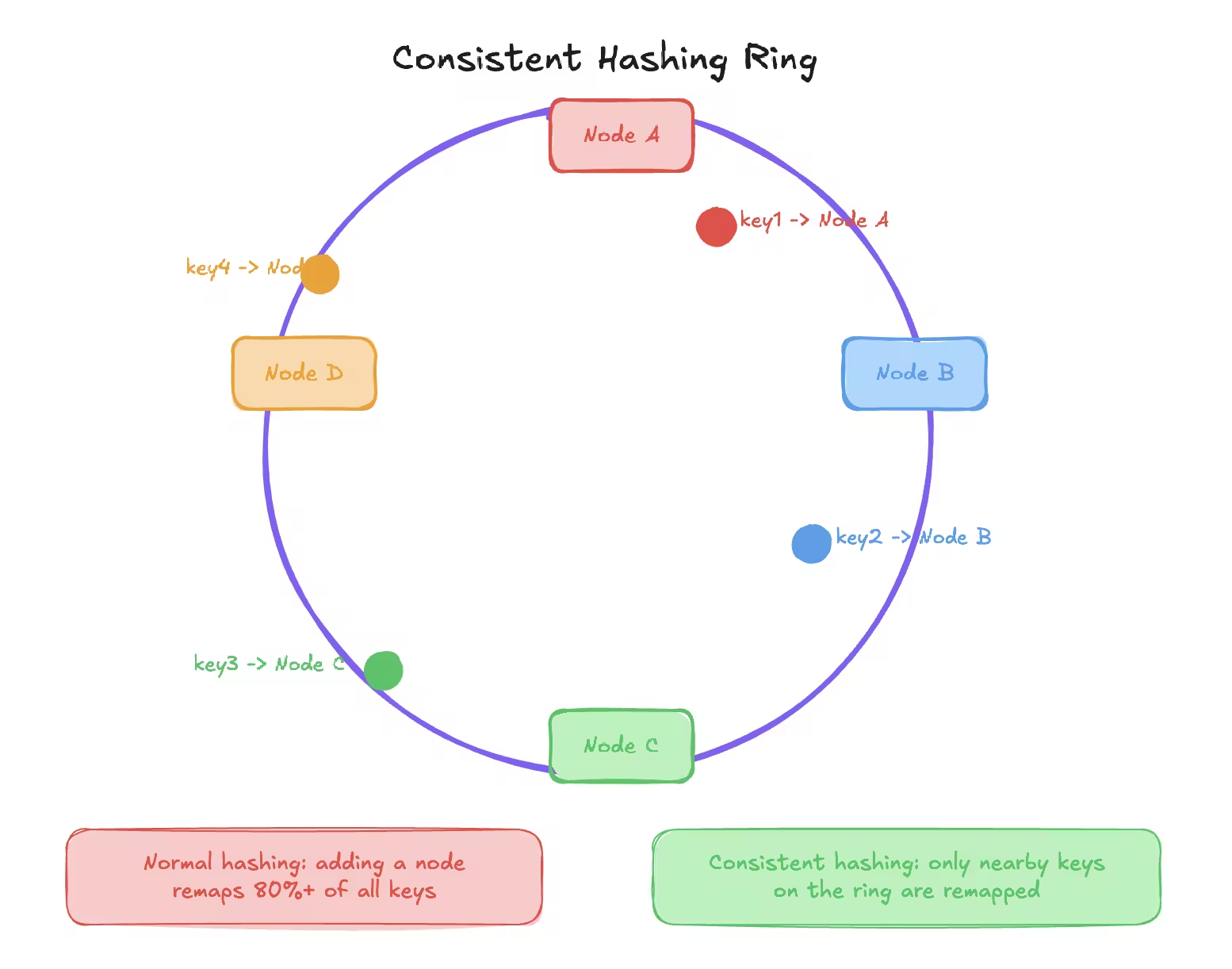
This makes scaling efficient.
Virtual Nodes#
To avoid uneven distribution:
- Each physical node has multiple virtual nodes
- Improves balance
- Reduces hotspots
Most real implementations use virtual nodes.
Data Redundancy and Data Recovery#
Failures are inevitable.
Disks fail. Servers crash. Regions go down.
Data redundancy protects against data loss.
Why Data Redundancy Is Needed#
- Hardware failure
- Human error
- Natural disasters
- Software bugs
If data exists only in one place, it will be lost eventually.
Common Redundancy Techniques#
Replication#
- Multiple copies of data
- Stored across nodes or regions
Backups#
- Periodic snapshots
- Stored separately
- Used for recovery
Continuous Backup#
- Near real-time replication
- Minimal data loss
Recovery Strategies#
| Strategy | Purpose |
|---|---|
| Point-in-time recovery | Restore to specific moment |
| Failover | Switch to replica |
| Disaster recovery | Region-level failure |
Always test backups. Untested backups do not exist.
Proxy#
A proxy acts as an intermediary between:
- Client and server
- Server and backend services
Forward Proxy#
Used on client side.
Examples:
- Corporate proxies
- VPNs
- Content filtering
Client knows proxy exists.
Reverse Proxy#
Used on server side.
Examples:
- Nginx
- HAProxy
- Cloudflare
Client does not know backend servers.
Why Reverse Proxies Are Used#
- Load balancing
- Security
- SSL termination
- Caching
- Request routing
Reverse proxies are foundational in modern architectures.
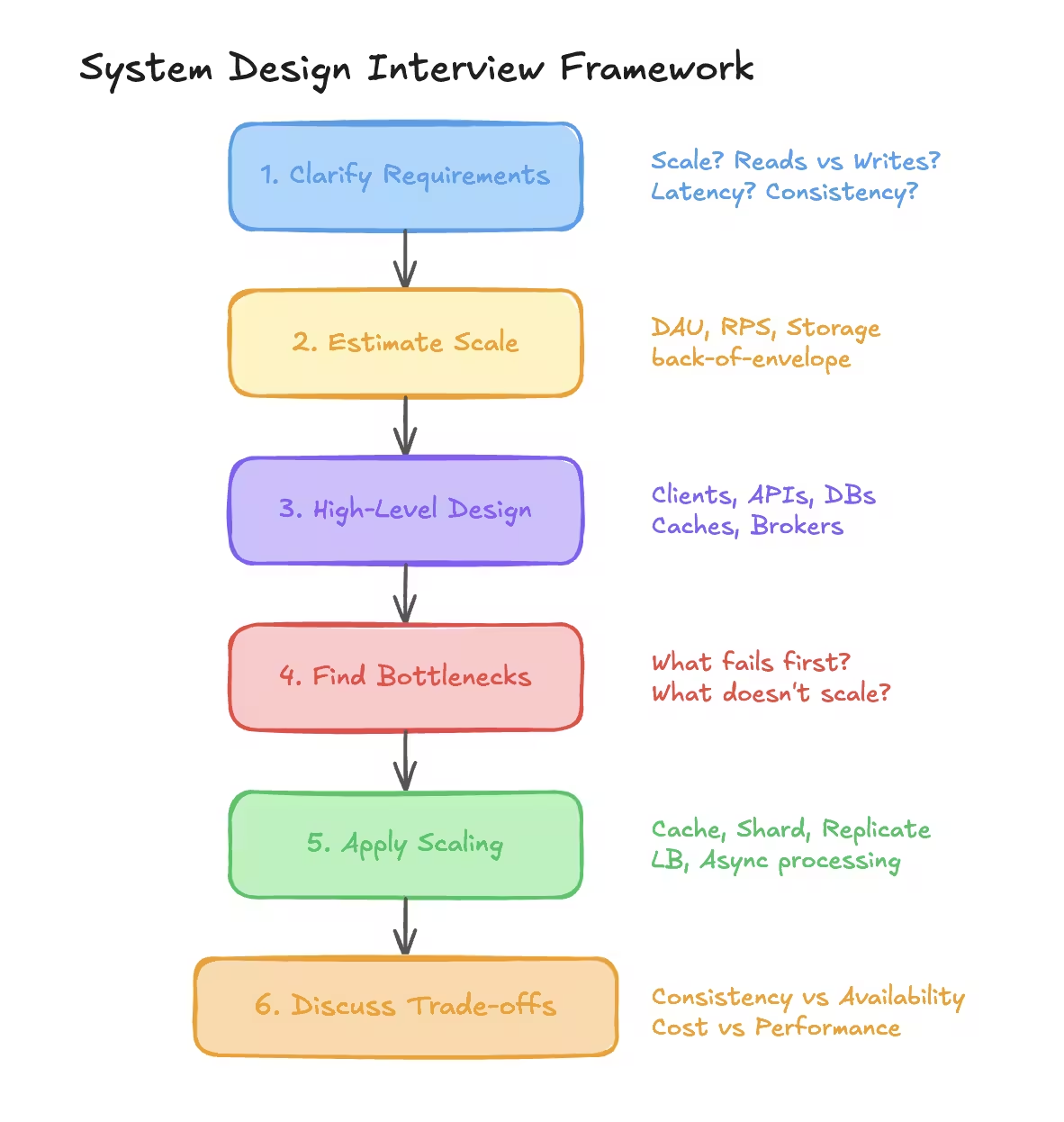
How to Solve Any System Design Problem#
This is the most important section.
Step 1: Clarify Requirements#
Ask questions:
- Scale
- Read vs write ratio
- Latency expectations
- Consistency needs
Never assume.
Step 2: Estimate Scale#
- Users
- Requests per second
- Storage growth
Use back-of-the-envelope estimation.
Step 3: High-Level Design#
- Clients
- APIs
- Databases
- Caches
- Message brokers
Draw boxes first, not tables.
Step 4: Identify Bottlenecks#
Ask:
- What fails first?
- What does not scale?
- What is expensive?
Step 5: Apply Scaling Techniques#
- Caching
- Replication
- Sharding
- Load balancing
- Async processing
Step 6: Discuss Trade-offs#
Every design has trade-offs.
Talk about:
- Consistency vs availability
- Cost vs performance
- Simplicity vs scalability
Interviewers care about reasoning, not perfection.
Final Thoughts#
System design is not about drawing fancy diagrams.
It is about:
- Thinking clearly
- Making reasonable trade-offs
- Designing for failure
- Keeping systems simple
Everyone learns system design by building systems that break.
Build. Observe. Fix. Repeat.
Want to Master Spring Boot and Land Your Dream Job?
Struggling with coding interviews? Learn Data Structures & Algorithms (DSA) with our expert-led course. Build strong problem-solving skills, write optimized code, and crack top tech interviews with ease
Learn more