Spring Cloud in One Shot — The Ultimate Cheatsheet
A simple, practical guide to understanding how Spring Cloud helps build real microservices for production. It covers the key pieces like service discovery, API Gateway, configuration management, load balancing, and fault tolerance — all explained in a clear and straightforward way. Perfect for developers who want to move from basic Spring Boot to building scalable, production-ready microservices.
Shreyash Gurav
March 02, 2026
26 min read
Spring Cloud in One Shot — The Ultimate Cheatsheet
A practical reference for Java backend developers building microservices with Spring Cloud, covering essential concepts such as service discovery, API gateways, centralized configuration, client-side load balancing, resilience patterns, event-driven communication, distributed tracing, and production-ready monitoring and observability.
1. Microservices Fundamentals#
Monolith vs Microservices#
A monolith packages all application features — UI, business logic, data access — into a single deployable unit. Microservices split that unit into independently deployable services, each owning a single business capability.
| Aspect | Monolith | Microservices |
|---|---|---|
| Deployment | Single artifact | Independent per service |
| Scaling | Scale entire app | Scale individual services |
| Technology | Single stack | Polyglot allowed |
| Failure impact | Entire app affected | Isolated to service |
| Team structure | One team | Autonomous teams |
| Development speed | Fast initially | Faster at scale |
Microservices Architecture Principles#
- Single Responsibility — each service owns exactly one business domain
- Loose Coupling — services communicate over well-defined APIs; no shared databases
- High Cohesion — related logic lives together inside the same service
- Decentralized Data — each service manages its own datastore
- Design for Failure — assume any downstream call can fail; handle gracefully
- Automate Everything — CI/CD pipelines, containerization, and infrastructure as code
Challenges in Distributed Systems#
Distributed systems introduce problems that simply do not exist in a monolith:
- Network latency and partial failures
- Data consistency across service boundaries
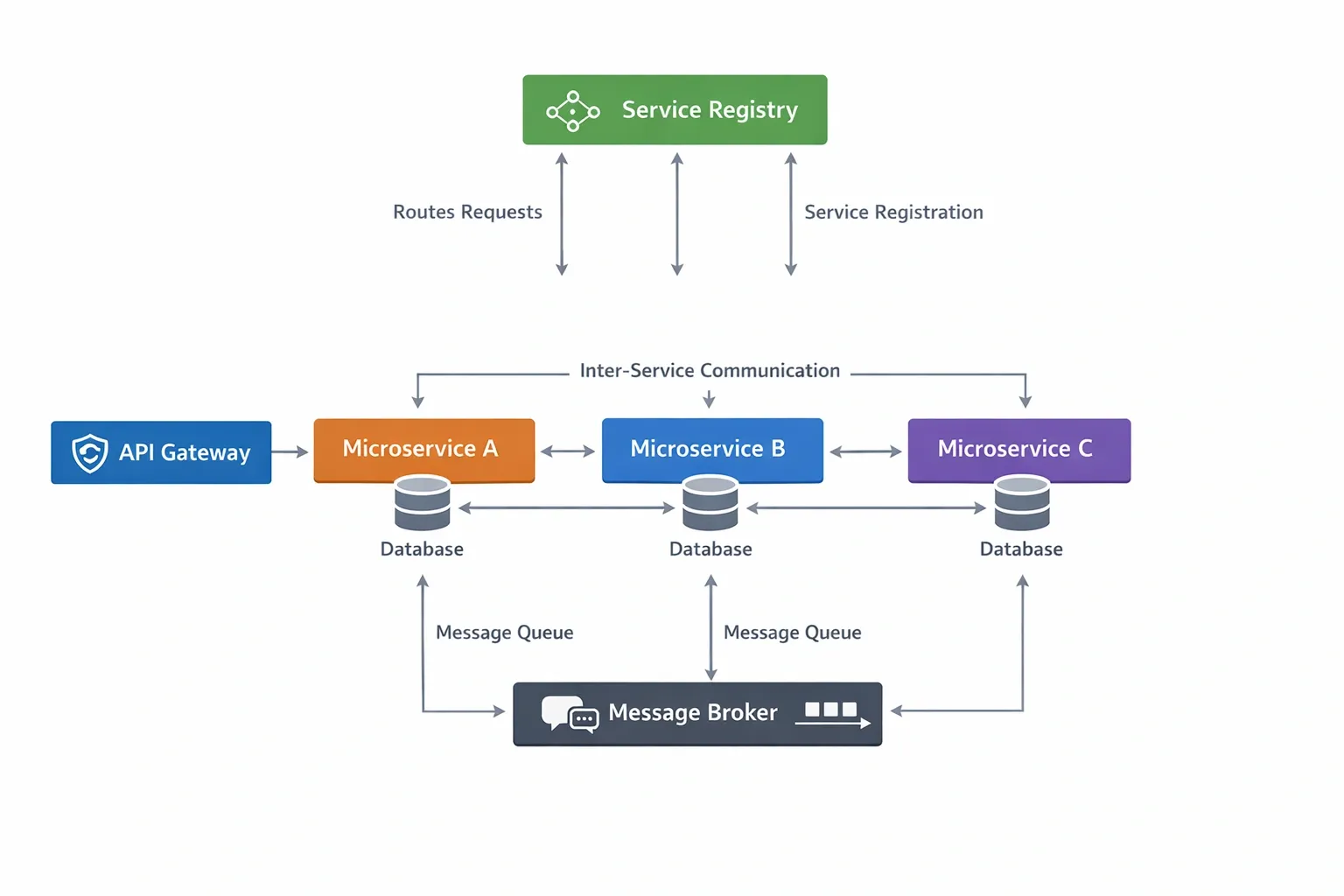
- Service discovery — how does Service A find Service B?
- Distributed tracing — how do you follow a request across 10 services?
- Security — each service must authenticate callers
- Operational complexity — many moving parts to monitor and deploy
Service-to-Service Communication#
Synchronous communication — the caller waits for a response.
- HTTP/REST using
RestTemplateorWebClient - gRPC for high-performance binary protocol
- OpenFeign for declarative HTTP clients
Asynchronous communication — the caller publishes an event and moves on.
- Apache Kafka for high-throughput event streaming
- RabbitMQ for message queuing with routing
- Event sourcing patterns
When to choose which:
| Use Synchronous When | Use Asynchronous When |
|---|---|
| Immediate response is required | Loose coupling is priority |
| Simple request-response | High throughput needed |
| Real-time validation | Services can tolerate delay |
| UI is waiting for result | Long-running processing |
2. Introduction to Spring Cloud#
What is Spring Cloud#
Spring Cloud is a collection of tools and frameworks built on top of Spring Boot that solves the common infrastructure problems in distributed systems. It is not a single library but an ecosystem of coordinated projects.
Why Spring Cloud#
Without Spring Cloud, a team building microservices would need to integrate Eureka, Zuul, Ribbon, Hystrix, and dozens of other libraries manually, write glue code, and maintain compatibility. Spring Cloud provides opinionated, pre-integrated solutions for all of these concerns with sensible defaults.
Spring Cloud Ecosystem#
| Module | Purpose |
|---|---|
| Spring Cloud Netflix | Eureka, Ribbon, Hystrix (largely in maintenance mode) |
| Spring Cloud Gateway | API routing and filtering |
| Spring Cloud Config | Centralized configuration server |
| Spring Cloud LoadBalancer | Client-side load balancing |
| Spring Cloud OpenFeign | Declarative HTTP clients |
| Spring Cloud Stream | Event-driven messaging abstraction |
| Spring Cloud Sleuth / Micrometer | Distributed tracing |
| Spring Cloud Bus | Configuration broadcast via messaging |
| Spring Cloud Contract | Consumer-driven contract testing |
| Spring Cloud Kubernetes | Native Kubernetes integration |
| Spring Cloud Vault | Secrets management with HashiCorp Vault |
Spring Boot and Spring Cloud Relationship#
Spring Boot provides the application runtime, auto-configuration, and embedded server. Spring Cloud builds on Spring Boot's auto-configuration mechanism to wire distributed system infrastructure automatically. Every Spring Cloud service is a Spring Boot application. Spring Cloud adds the coordination layer.
Always import the Spring Cloud BOM. Never manage Spring Cloud dependency versions individually — version mismatches between modules cause subtle, hard-to-debug failures.
3. Service Discovery#
What is Service Discovery#
In a static deployment you hard-code IP addresses and ports. In a microservices deployment, services are ephemeral — they start, stop, scale up, and scale down dynamically. Service discovery solves the question: given a service name, what network address should I call right now?
Service Registry#
The service registry is the central directory. Every service instance registers itself on startup and sends periodic heartbeats. If a heartbeat stops, the registry removes the instance.
Client-Side vs Server-Side Discovery#
Client-Side Discovery — the client queries the registry and picks an instance itself. The client holds the load-balancing logic. Spring Cloud uses this model.
Server-Side Discovery — the client calls a router (load balancer), which queries the registry internally. AWS ALB and Kubernetes Services use this model.
Netflix Eureka#
Eureka is the most widely used service registry in the Spring Cloud ecosystem. It is designed for AWS-style availability — it prefers availability over consistency (AP in CAP theorem). When the registry cannot reach enough peers, it enters self-preservation mode and stops evicting instances.
Eureka Server Setup#
Eureka Client Setup#
Service Registration and Heartbeats#
- On startup, the client POSTs its metadata (hostname, IP, port, health URL, status) to the registry
- Every 30 seconds (default), the client sends a heartbeat PUT request
- If the registry receives no heartbeat for 90 seconds, it marks the instance as DOWN
- If the registry loses over 85% of expected heartbeats from all clients, it enters self-preservation mode and stops evicting any instance — this prevents mass deregistration during network partitions
4. API Gateway#
API Gateway Pattern#
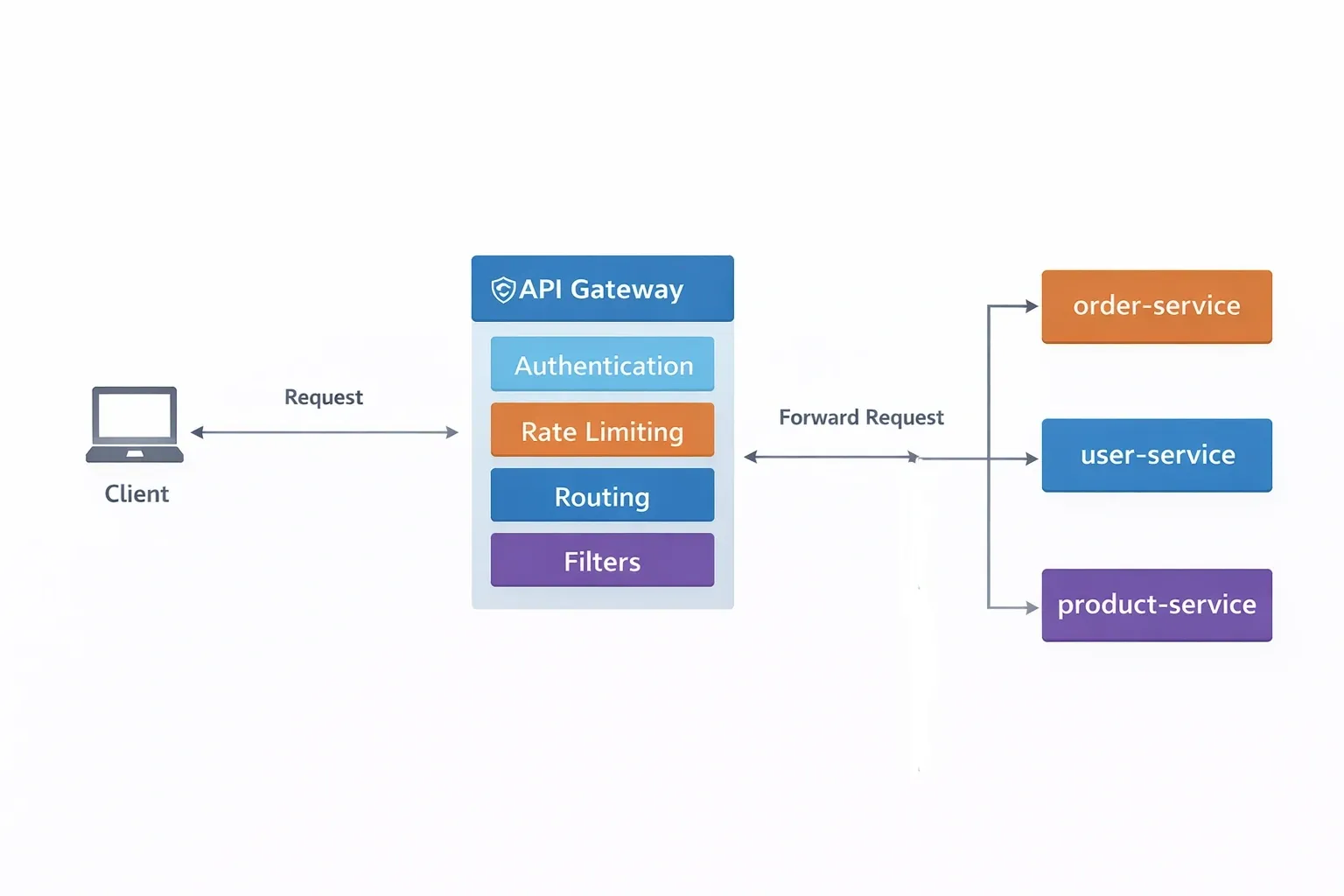
An API Gateway is the single entry point for all client requests. Instead of clients calling each microservice directly, they call the gateway. The gateway handles routing, authentication, rate limiting, SSL termination, request transformation, and logging in one place.
Benefits:
- Clients are decoupled from internal service topology
- Cross-cutting concerns are handled once, not in every service
- Service URLs can change without affecting clients
Spring Cloud Gateway#
Spring Cloud Gateway is the modern, reactive replacement for Netflix Zuul. It is built on Project Reactor and Spring WebFlux, which means it is non-blocking and handles high concurrency efficiently.
Routing#
A route is the fundamental unit in Spring Cloud Gateway. Each route has:
- An ID for identification
- A URI — the downstream service address
- Predicates — conditions that must match for the route to apply
- Filters — transformations applied to request or response
Predicates#
Predicates determine whether a route matches an incoming request. Multiple predicates on one route are ANDed together.
| Predicate | Example | Description |
|---|---|---|
| Path | Path=/api/users/** | Matches URL path pattern |
| Method | Method=GET,POST | Matches HTTP method |
| Header | Header=X-Request-Id, \\\\d+ | Matches header with regex |
| Query | Query=color, red | Matches query parameter |
| Host | Host=**.example.com | Matches Host header |
| After | After=2024-01-01T00:00:00Z | Matches requests after datetime |
| Weight | Weight=group1, 80 | Weighted routing for canary deploys |
Filters#
Filters transform requests or responses. They run in order and fall into two categories: GatewayFilter (per route) and GlobalFilter (all routes).
Custom filter with Java:
Authentication at Gateway#
Centralize JWT validation at the gateway so individual services do not need to repeat it.
Rate Limiting#
Spring Cloud Gateway integrates with Redis for distributed rate limiting using the token bucket algorithm.
5. Centralized Configuration#
Externalized Configuration#
The Twelve-Factor App methodology mandates that configuration is separated from code. In microservices, this means you do not bake environment-specific properties into your JAR. You fetch them at runtime from a central source.
Benefits:
- One change propagates to all service instances without redeployment
- Environment-specific config (dev, staging, prod) managed in one place
- Secrets managed outside source code
- Audit trail via Git history
Spring Cloud Config Server#
The Config Server is a standalone Spring Boot application that serves configuration over HTTP. It reads from a Git repository, local file system, HashiCorp Vault, or AWS S3.
Config Server URL pattern:
Config Client#
File resolution in the Git repo follows this priority order (highest wins):
order-service-dev.ymlorder-service.ymlapplication-dev.ymlapplication.yml
Git-based Configuration Management#
Organize the Git repository cleanly:
Refresh Scope#
Without @RefreshScope, a bean reads its configuration once at startup. With @RefreshScope, the bean is re-initialized when a /actuator/refresh endpoint is called.
Trigger a refresh on one instance:
Dynamic Configuration Reload with Spring Cloud Bus#
To refresh all instances simultaneously without calling each one individually, use Spring Cloud Bus. It broadcasts the refresh event over a message broker (Kafka or RabbitMQ) to every subscribed instance.
6. Client-Side Load Balancing#
Load Balancing Concepts#
Load balancing distributes incoming requests across multiple instances of a service to avoid overloading any single instance. In the Spring Cloud model, the load balancer runs on the client side — meaning the service making the call decides which instance to call, based on a list it receives from the service registry.
Spring Cloud LoadBalancer#
Spring Cloud LoadBalancer replaced Netflix Ribbon as the default client-side load balancer starting from Spring Cloud 2020. It is included automatically when you add the Eureka client dependency.
Using @LoadBalanced with RestTemplate#
Using @LoadBalanced with WebClient (Reactive)#
Load Balancing Algorithms#
| Algorithm | Behavior | When to Use |
|---|---|---|
| Round Robin (default) | Cycles through instances in order | Most scenarios; even distribution |
| Random | Picks a random instance | Reduces hot spots under bursty load |
| Custom | Implement ReactorServiceInstanceLoadBalancer | Custom business logic needed |
Custom Load Balancer Configuration#
Integration with Service Discovery#
The ServiceInstanceListSupplier fetches the instance list from Eureka (or Consul or Kubernetes). The load balancer then applies its algorithm to that list. Caching is enabled by default with a 35-second TTL to avoid hammering the registry on every request.
7. Fault Tolerance and Resilience#
Distributed System Failures#
In a distributed system with 10 services, if each has 99.9% uptime, the end-to-end availability of a chain through all 10 is approximately 99%. Without resilience patterns, a slow or failing downstream service can cascade into a full system outage through thread pool exhaustion.
Circuit Breaker Pattern#
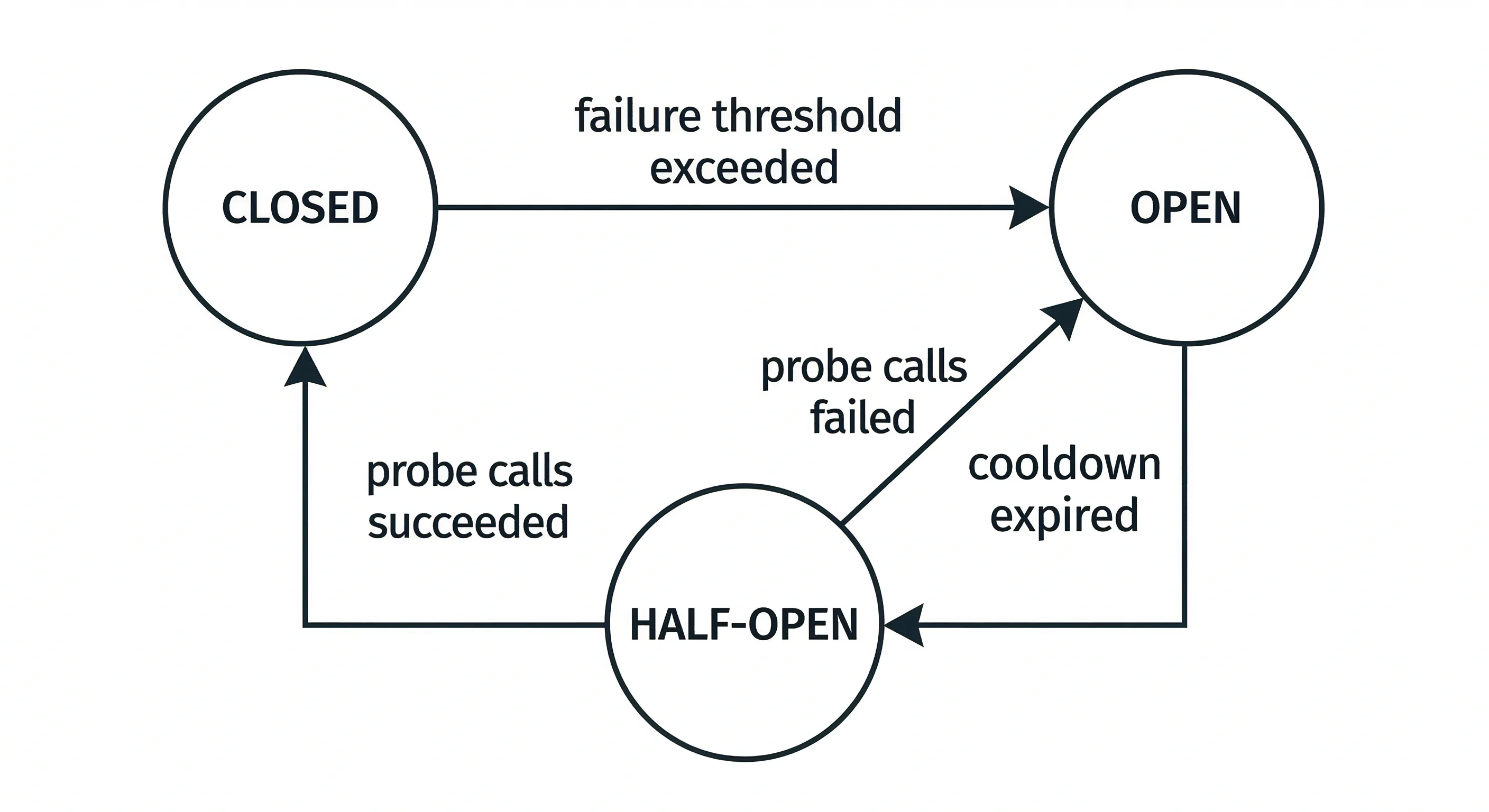
The circuit breaker sits around an external call. It monitors failures. When the failure rate exceeds a threshold, it opens and stops all calls to that service for a cooldown period. After the cooldown, it enters half-open state and allows a limited number of test calls through.
States:
- CLOSED — normal operation; calls pass through
- OPEN — calls fail immediately without hitting the downstream service
- HALF-OPEN — a limited number of probe calls are allowed to test recovery
Resilience4j#
Resilience4j is the recommended library for Spring Cloud fault tolerance. It provides circuit breaker, retry, rate limiter, bulkhead, and time limiter as individual composable decorators.
Circuit Breaker Configuration#
Retry Pattern#
Bulkhead Pattern#
A bulkhead limits the number of concurrent calls to a service, preventing one slow service from consuming all available threads.
Rate Limiter#
Timeout Handling#
Combining Multiple Resilience Patterns#
Annotations can be stacked. The execution order is: TimeLimiter -> CircuitBreaker -> RateLimiter -> Bulkhead -> Retry.
8. Distributed Tracing#
Observability in Microservices#
A single user request in a microservices system touches multiple services. When something goes wrong or is slow, you need to reconstruct the complete journey of that request across service boundaries. Distributed tracing provides this capability.
Trace ID and Span ID#
- Trace ID — a single unique identifier assigned when a request first enters your system. It follows the request through every service it touches.
- Span ID — a unique identifier for one unit of work within a trace. Each service call creates a new span. Spans record their parent span ID to form a tree.
- Parent Span ID — links a child span to the span that initiated it.
Micrometer Tracing with Zipkin#
From Spring Boot 3, Spring Cloud Sleuth is replaced by Micrometer Tracing. The concepts are identical; the library changed.
Micrometer Tracing auto-instruments:
RestTemplateWebClient- Feign clients
- Kafka producers and consumers
@Scheduledmethods@Asyncmethods
The trace ID and span ID are automatically injected into the MDC (Mapped Diagnostic Context), so they appear in every log line without extra code:
Log format: [service-name, trace-id, span-id]
Running Zipkin Locally#
Access the UI at http://localhost:9411. You can search by trace ID, service name, and time range.
9. Event-Driven Microservices#
Event-Driven Architecture#
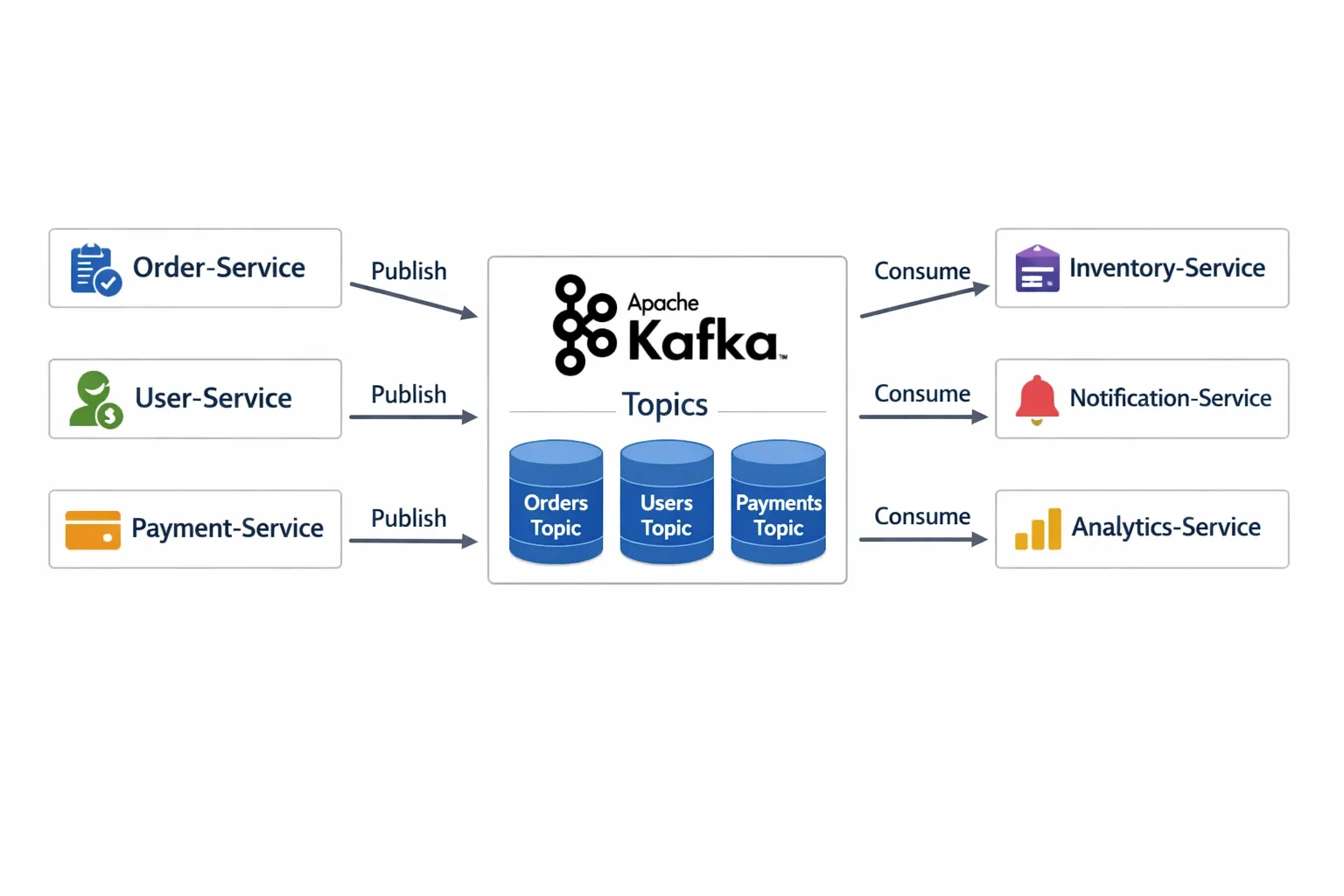
In event-driven architecture, services communicate by publishing and consuming events through a message broker. The producer has no knowledge of consumers. This creates strong decoupling and allows services to evolve independently.
Spring Cloud Stream#
Spring Cloud Stream is a framework for building event-driven microservices connected to message brokers. It abstracts the broker-specific APIs behind a uniform programming model using Java functional interfaces.
Producers and Consumers#
Spring Cloud Stream uses three functional interfaces:
| Interface | Role | Bindings Created |
|---|---|---|
Supplier<T> | Source / Producer | output |
Consumer<T> | Sink / Consumer | input |
Function<T,R> | Processor | input + output |
Binding Configuration#
Apache Kafka#
Kafka is a distributed, partitioned, replicated commit log. It is optimized for high-throughput, fault-tolerant event streaming.
Key concepts:
| Concept | Description |
|---|---|
| Topic | Named category for messages |
| Partition | Topic split for parallelism; messages in a partition are ordered |
| Offset | Position of a message within a partition |
| Producer | Writes messages to topics |
| Consumer | Reads messages from topics |
| Consumer Group | Set of consumers that cooperate; each partition assigned to one consumer |
| Broker | Single Kafka server node |
RabbitMQ#
RabbitMQ uses exchanges and queues. Producers publish to exchanges; exchanges route to queues based on binding rules.
| Exchange Type | Routing Behavior |
|---|---|
| Direct | Routes to queue whose binding key matches the message routing key exactly |
| Topic | Matches routing key patterns with * and # wildcards |
| Fanout | Broadcasts to all bound queues; ignores routing key |
| Headers | Routes based on message header attributes |
10. Security in Microservices#
Microservices Security Challenges#
- Each service needs to know who is calling it and whether they are authorized
- Tokens need to propagate through service chains
- Services must not blindly trust data from other internal services without validation
- Secrets (DB passwords, API keys) cannot be stored in config files or source code
Spring Security with OAuth2#
OAuth2 is the industry-standard protocol for authorization. In a microservices context, a client authenticates with an Authorization Server (Keycloak, Okta, Auth0) and receives a JWT access token. It presents this token on every API call. Services validate the token without calling the Authorization Server on every request.
JWT Authentication#
A JWT (JSON Web Token) has three Base64URL-encoded parts: header, payload, and signature.
Payload example:
Resource Server Configuration (Spring Boot 3)#
Token Propagation#
When Service A calls Service B, it must forward the JWT. Use the TokenRelay filter in the gateway, or propagate manually with Feign.
For Feign clients:
11. Distributed Transactions#
Transaction Problems in Microservices#
The classic database transaction (ACID) does not work across services that own separate databases. If an order service writes to its database and then calls inventory service, and inventory fails, you cannot simply roll back the order database — the transaction boundary is gone.
Eventual Consistency#
Accept that in a distributed system, data will not always be instantly consistent across all services. Design flows so that all services will eventually reach a consistent state, even if there are brief windows of inconsistency.
Saga Pattern#
A saga is a sequence of local transactions. Each service in the chain performs its local transaction and publishes an event (or calls the next service). If any step fails, compensating transactions undo the previous steps.
Choreography Saga#
Each service listens for events and decides what to do next independently. There is no central coordinator.
Compensating flow on failure:
Orchestration Saga#
A central orchestrator tells each service what to do. It tracks the saga state and issues compensating commands when a failure occurs.
| Choreography | Orchestration | |
|---|---|---|
| Coordination | Decentralized | Centralized orchestrator |
| Coupling | Loose | Tighter to orchestrator |
| Visibility | Hard to trace | Easy to trace |
| Failure handling | Complex — each service must listen for failures | Simpler — orchestrator handles rollback |
| Best for | Simple flows with few steps | Complex flows with many conditions |
12. Monitoring and Observability#
Spring Boot Actuator#
Actuator exposes operational endpoints over HTTP (or JMX). It is the foundation for all monitoring in a Spring Boot microservice.
Key Actuator endpoints:
| Endpoint | Description |
|---|---|
/actuator/health | Service health status including custom indicators |
/actuator/metrics | All Micrometer metrics |
/actuator/prometheus | Prometheus-formatted metrics |
/actuator/env | All environment properties (sensitive — secure this) |
/actuator/loggers | View and change log levels at runtime |
/actuator/threaddump | Current thread state |
/actuator/info | Application metadata |
/actuator/refresh | Trigger config refresh (with Cloud Config) |
Custom Health Indicator#
Micrometer and Prometheus#
Micrometer is the metrics facade for Spring Boot applications — analogous to SLF4J but for metrics. It supports counters, gauges, timers, and distribution summaries.
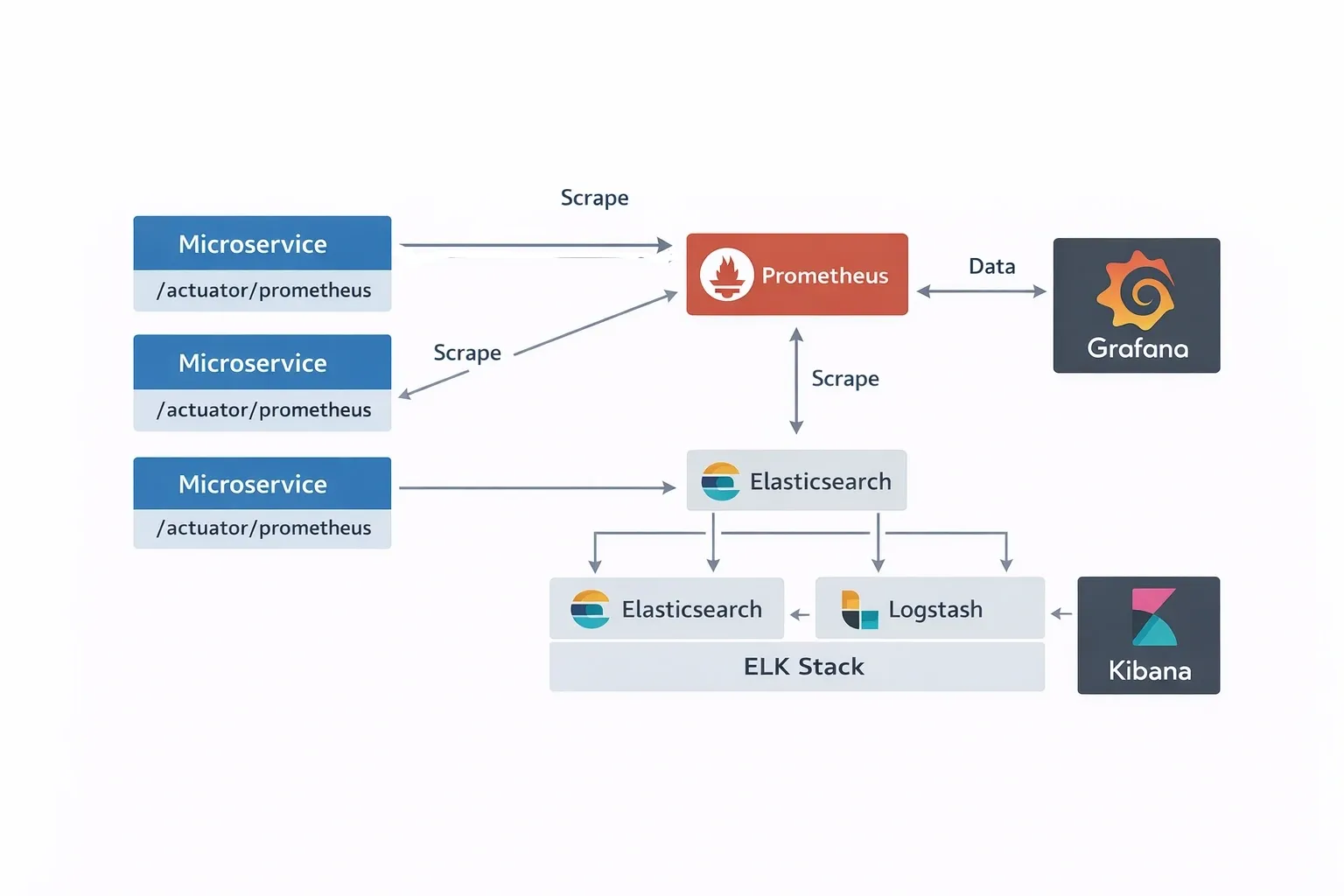
Prometheus scrapes the /actuator/prometheus endpoint. Configure the scrape job:
Grafana#
Grafana connects to Prometheus as a data source and provides dashboards. The Spring Boot community maintains pre-built Grafana dashboards for JVM metrics, HTTP request rates, error rates, and circuit breaker states. Import dashboard ID 4701 (JVM Micrometer) from grafana.com as a starting point.
Logging in Microservices#
Structured logging (JSON format) is essential in microservices because it allows log aggregation systems (ELK Stack, Grafana Loki) to parse, index, and query logs across all services.
Output:
13. End-to-End Microservices Request Flow#
Complete Request Trace: Place an Order#
This section traces one user request — placing an order — through every layer of a production Spring Cloud system.
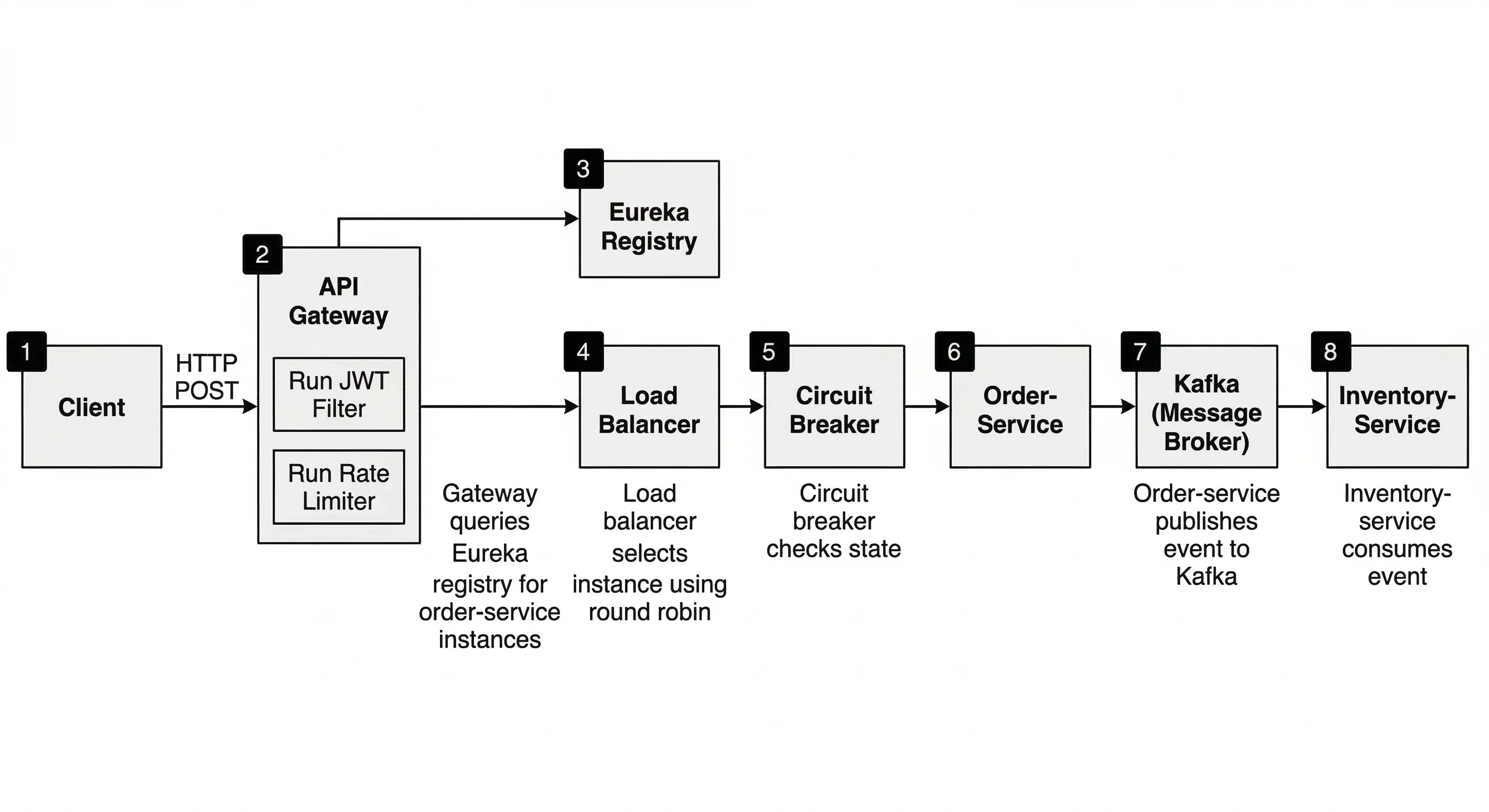
Step-by-step:
- Client sends request
POST <https://api.example.com/api/orders>- Bearer JWT token in Authorization header
- API Gateway receives request
- JWT filter validates token signature against JWKS endpoint
- Rate limiter checks Redis for remaining token budget
- Route predicate
Path=/api/orders/**matches
- Gateway performs service discovery
- Resolves
lb://order-serviceby querying Eureka registry - Receives list of available instances:
[192.168.1.10:8080, 192.168.1.11:8080]
- Resolves
- Load balancer selects instance
- Round-robin selects
192.168.1.10:8080 TokenRelayfilter copies JWT to forwarded request
- Round-robin selects
- Circuit breaker check
- Resilience4j checks state of
order-servicecircuit breaker - Circuit is CLOSED — request proceeds
- Resilience4j checks state of
- Order Service processes request
- Validates request body
- Calls Product Service via Feign client to verify product exists
- Feign call is load-balanced and has its own circuit breaker
- Saves order to database with status
PENDING - Returns
202 Acceptedwith order ID
- Asynchronous event published
- Order Service publishes
OrderCreatedEventto Kafka topicorders - Event contains order ID, product ID, quantity, user ID
- Order Service publishes
- Downstream consumers react
- Inventory Service consumes event, decrements stock
- Notification Service consumes event, sends confirmation email
- Payment Service consumes event, initiates charge
- Each service publishes its own result events
- Distributed trace recorded
- All services attached the same trace ID
a1b2c3d4to their spans - Zipkin received all spans and assembled the complete trace tree
- Total request time visible in Zipkin UI
- All services attached the same trace ID
Gateway Routing Flow (Condensed)#
14. Spring Cloud Project Structure#
Recommended Project Layout#
A Spring Cloud system is composed of several Spring Boot applications. The cleanest approach is a Maven or Gradle multi-module project where each module is an independent microservice.
Parent POM#
Config Server — Key Files#
Eureka Server — Key Files#
API Gateway — Key Files#
Microservice — Standard Dependencies#
Shared Library#
The shared library avoids duplicating DTO classes, exception handling, and common configuration across services.
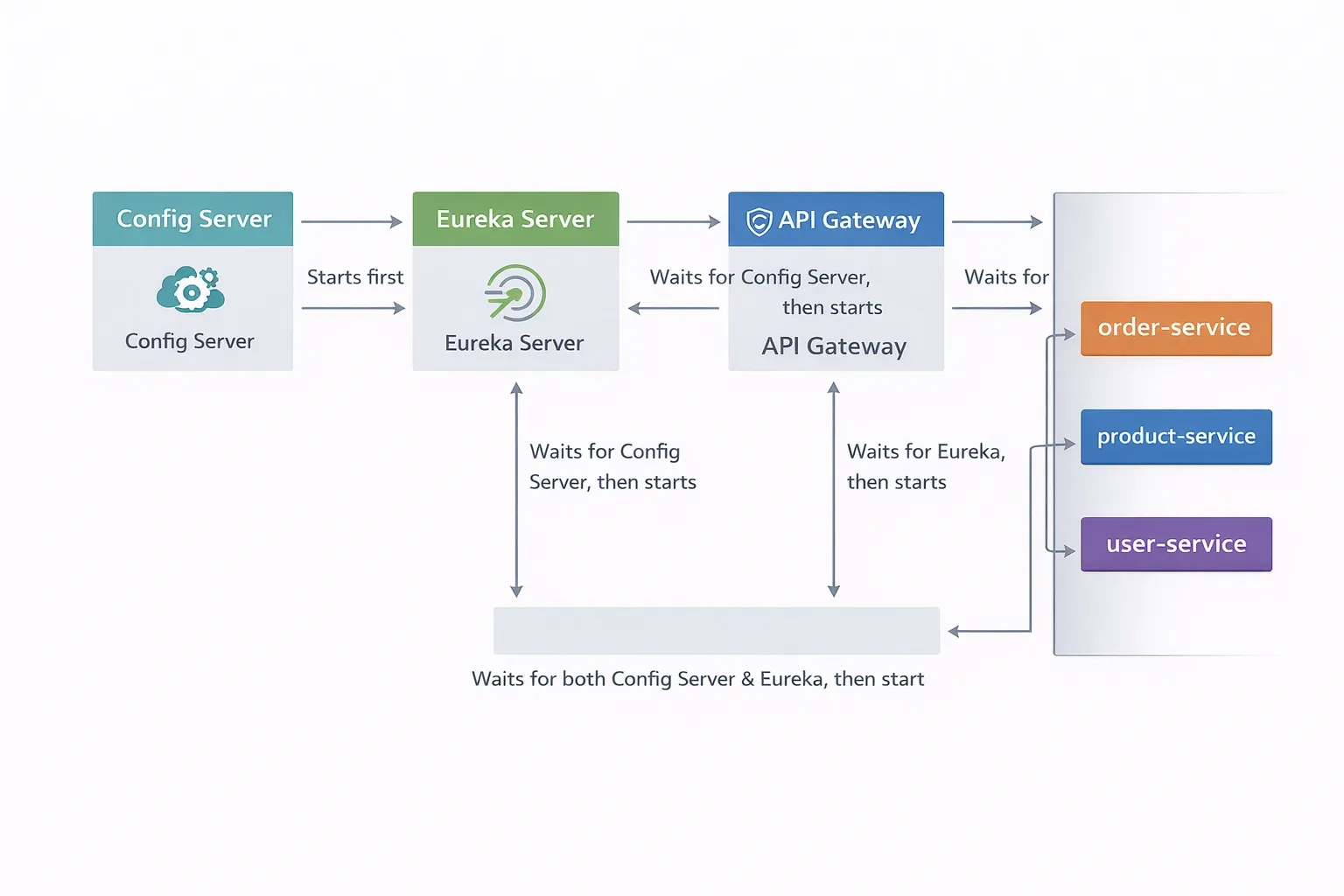
Startup Order#
Infrastructure services must start before business services can register and fetch configuration.
Use Docker Compose depends_on with health checks to enforce this ordering in a containerized environment.
Quick Reference Card#
Annotations Summary#
| Annotation | Location | Purpose |
|---|---|---|
@EnableEurekaServer | Config class | Start Eureka registry |
@EnableDiscoveryClient | Main class | Register with discovery |
@EnableConfigServer | Config class | Start Config Server |
@EnableFeignClients | Config class | Activate Feign scanning |
@RefreshScope | Bean | Re-inject on config refresh |
@LoadBalanced | Bean method | Enable client-side LB |
@CircuitBreaker | Method | Apply circuit breaker |
@Retry | Method | Apply retry logic |
@Bulkhead | Method | Apply bulkhead concurrency limit |
@RateLimiter | Method | Apply rate limiter |
@TimeLimiter | Method | Apply timeout |
@FeignClient | Interface | Declare declarative HTTP client |
Default Ports Convention#
| Service | Default Port |
|---|---|
| Config Server | 8888 |
| Eureka Server | 8761 |
| API Gateway | 8080 |
| Zipkin | 9411 |
| Prometheus | 9090 |
| Grafana | 3000 |
| Kafka | 9092 |
| RabbitMQ | 5672 (AMQP), 15672 (management UI) |
Spring Cloud Version Compatibility#
| Spring Boot | Spring Cloud |
|---|---|
| 3.2.x | 2023.0.x (Leyton) |
| 3.1.x | 2022.0.x (Kilburn) |
| 3.0.x | 2022.0.x (Kilburn) |
| 2.7.x | 2021.0.x (Jubilee) |
Always check the Spring Cloud release train page for the exact compatible versions before starting a new project.
Conclusion#
Spring Cloud simplifies building scalable and resilient microservices by providing tools for service discovery, API gateways, configuration management, fault tolerance, tracing, and messaging. This cheatsheet aimed to give a quick overview of the key components and how they work together in a real microservices architecture.
If you found this cheatsheet helpful, feel free to share it with your friends or fellow developers who are learning Spring Cloud.
Want to Master Spring Boot and Land Your Dream Job?
Struggling with coding interviews? Learn Data Structures & Algorithms (DSA) with our expert-led course. Build strong problem-solving skills, write optimized code, and crack top tech interviews with ease
Learn more