Spring Boot in One Shot – Ultimate Cheat Sheet

    Spring Boot in One Shot – Ultimate Cheat Sheet

    A clear and practical revision guide covering the most important Spring Boot concepts in one place. From project setup and auto-configuration to REST APIs, JPA, security basics, and deployment — everything is explained in a simple, structured way. Perfect for interviews, quick revision, or anyone who wants to understand how Spring Boot applications are built and run in real projects.

    default profile

    Shreyash Gurav

    March 02, 2026

    16 min read

    Spring Boot in One Shot — The Ultimate CheatSheet

    Master Spring Boot from zero to hero with this comprehensive, no-fluff reference. Whether you're just starting out, preparing for interviews, or building a project, this cheat sheet packs everything you need — annotations, config, security, JPA, testing, deployment — with practical examples you can use immediately. No prior Spring experience required!


    1. What is Spring Boot?#

    Spring Boot is an extension of the Spring Framework that eliminates boilerplate configuration and setup. It provides embedded servers, auto-configuration, and production-ready features so developers can focus entirely on business logic rather than infrastructure.

    Key Benefits:

    • Zero XML configuration
    • Embedded Tomcat, Jetty, or Undertow
    • Auto-configures beans based on classpath
    • Production monitoring via Actuator
    • Single executable JAR deployment

    Spring Boot vs Spring Framework:

    FeatureSpring FrameworkSpring Boot
    ConfigurationManual XML/JavaAuto-configured
    ServerExternal TomcatEmbedded
    Setup TimeHighVery low
    DependenciesManual managementStarter bundles
    Learning CurveSteepBeginner friendly

    2. Project Structure#

    A standard Spring Boot project follows a layered package structure. Each folder represents a layer with a single responsibility, making the codebase easy to navigate and maintain.

    src/main/java/com/example/ ├── controller/ ← HTTP request/response handling ├── service/ ← Business logic ├── repository/ ← Database access ├── model/ ← Entities and DTOs └── Application.java ← Main entry point src/main/resources/ ├── application.properties ← App configuration └── static/ ← Static files

    3. Main Application Class#

    @SpringBootApplication is a convenience annotation that combines three annotations into one. When SpringApplication.run() is called, it creates the ApplicationContext, triggers auto-configuration, and starts the embedded server.

    @SpringBootApplication public class Application { public static void main(String[] args) { SpringApplication.run(Application.class, args); } }

    @SpringBootApplication internally combines:

    • @Configuration — marks class as bean source
    • @EnableAutoConfiguration — enables auto-config
    • @ComponentScan — scans current package and sub-packages
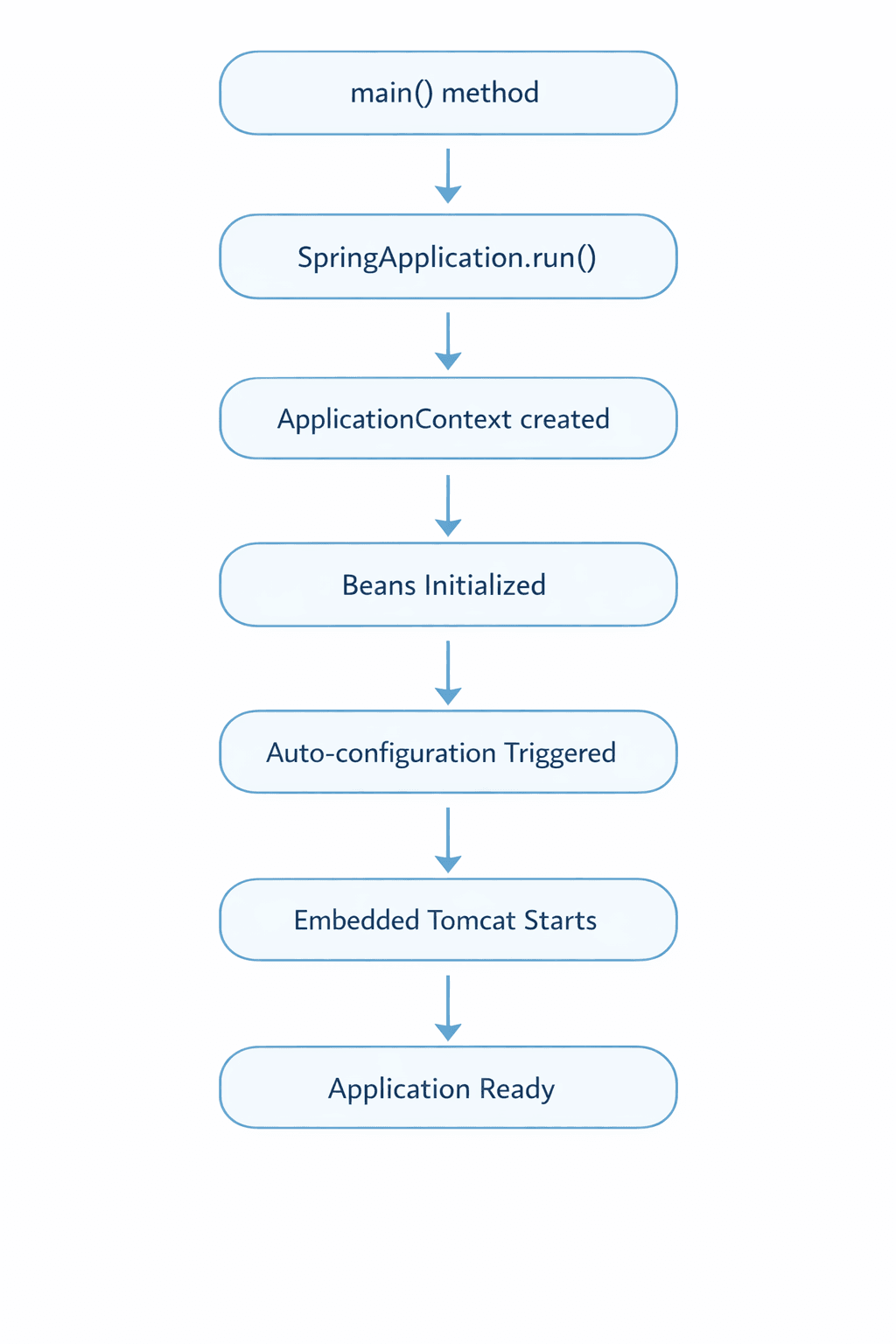
    SpringBoot Application Startup Flow

    4. Spring Starters#

    Starters are pre-packaged dependency bundles for specific features. Instead of manually finding and matching compatible library versions, you add one starter and Spring Boot handles the rest.

    StarterPurpose
    spring-boot-starter-webREST APIs and web apps
    spring-boot-starter-data-jpaJPA and Hibernate
    spring-boot-starter-securityAuthentication and authorization
    spring-boot-starter-testJUnit, Mockito, MockMvc
    spring-boot-starter-actuatorMonitoring and health checks
    spring-boot-starter-validationBean validation

    5. Core Spring Concepts#

    Inversion of Control (IoC)#

    IoC means Spring takes control of object creation instead of you using the new keyword manually. The Spring IoC container creates, wires, and manages all objects (beans) throughout the application lifecycle.

    // Without IoC — you manage everything UserService service = new UserService(new UserRepository()); // With IoC — Spring manages everything @Autowired UserService service;

    Dependency Injection (DI)#

    DI is the mechanism through which IoC is implemented. Spring injects required dependencies into a class automatically, removing tight coupling between components.

    Three types of DI:

    // 1. Constructor Injection — Recommended @Service public class OrderService { private final PaymentService paymentService; public OrderService(PaymentService paymentService) { this.paymentService = paymentService; } } // 2. Setter Injection — for optional dependencies @Service public class NotificationService { private EmailService emailService; @Autowired public void setEmailService(EmailService emailService) { this.emailService = emailService; } } // 3. Field Injection — avoid in production @Autowired private UserRepository userRepository;
    TypeTestableImmutableRecommended
    ConstructorYesYesYes
    SetterPartialNoOptional use
    FieldNoNoNo

    Beans#

    A Bean is any Java object created and managed by the Spring IoC container. You register beans using stereotype annotations or @Bean inside a @Configuration class.

    // Via annotation @Component public class EmailValidator { } // Via @Configuration @Configuration public class AppConfig { @Bean public PasswordEncoder passwordEncoder() { return new BCryptPasswordEncoder(); } }

    Stereotype Annotations#

    AnnotationLayerExtra Behavior
    @ComponentAnyGeneric bean
    @ServiceBusinessSemantic clarity
    @RepositoryPersistenceDB exception translation
    @ControllerPresentationReturns views
    @RestControllerPresentationReturns JSON directly

    6. Configuration#

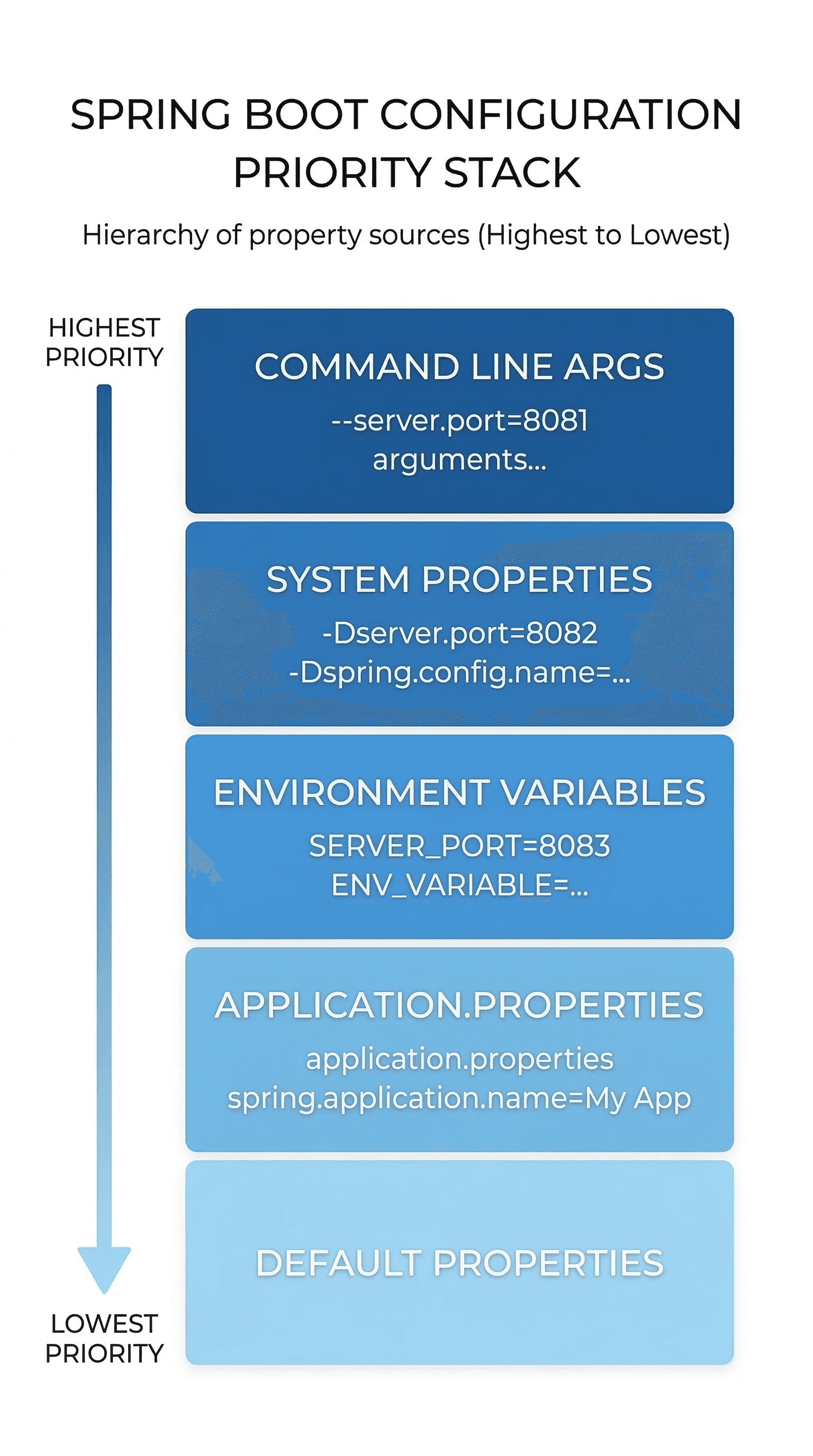
    Spring Boot externalizes configuration so the same JAR can run in dev, test, and production without code changes. Configuration sources follow a priority order — higher sources override lower ones.

    Priority order (highest to lowest):

    1. Command line arguments
    2. Java system properties
    3. Environment variables
    4. application.properties or application.yml
    5. Default properties

    application.properties:

    server.port=8080 spring.datasource.url=jdbc:mysql://localhost:3306/mydb spring.datasource.username=root spring.datasource.password=${DB_PASSWORD} spring.jpa.hibernate.ddl-auto=update spring.jpa.show-sql=true logging.level.com.example=DEBUG

    application.yml (same config, hierarchical format):

    server: port: 8080 spring: datasource: url: jdbc:mysql://localhost:3306/mydb username: root password: ${DB_PASSWORD} jpa: hibernate: ddl-auto: update show-sql: true

    Profiles#

    Profiles let you define environment-specific configuration files. When a profile is active, Spring Boot loads both application.properties and the profile-specific file, with the profile file taking priority.

    # Activate in application.properties spring.profiles.active=dev # Or at runtime java -jar app.jar --spring.profiles.active=prod

    Create separate files per environment:

    • application-dev.properties
    • application-prod.properties
    • application-test.properties
    Spring Boot Configuration Priority

    7. REST API Development#

    Spring Boot makes building REST APIs simple using annotation-based controllers and automatic JSON serialization via Jackson. REST follows stateless communication where each request contains all the information needed to process it.

    HTTP Method to Annotation mapping:

    AnnotationHTTP MethodUse Case
    @GetMappingGETFetch resource
    @PostMappingPOSTCreate resource
    @PutMappingPUTFull update
    @PatchMappingPATCHPartial update
    @DeleteMappingDELETERemove resource

    Complete CRUD Controller:

    @RestController @RequestMapping("/api/users") public class UserController { private final UserService userService; public UserController(UserService userService) { this.userService = userService; } @GetMapping public List<User> getAll() { return userService.getAll(); } @GetMapping("/{id}") public ResponseEntity<User> getById(@PathVariable Long id) { return ResponseEntity.ok(userService.getById(id)); } @PostMapping public ResponseEntity<User> create(@Valid @RequestBody UserRequest request) { return ResponseEntity.status(201).body(userService.create(request)); } @PutMapping("/{id}") public ResponseEntity<User> update(@PathVariable Long id, @Valid @RequestBody UserRequest request) { return ResponseEntity.ok(userService.update(id, request)); } @DeleteMapping("/{id}") public ResponseEntity<Void> delete(@PathVariable Long id) { userService.delete(id); return ResponseEntity.noContent().build(); } }

    Request data extraction:

    // From URL path: /users/5 @GetMapping("/{id}") public User getUser(@PathVariable Long id) { } // From query string: /users?role=admin&page=0 @GetMapping public List<User> getUsers( @RequestParam String role, @RequestParam(defaultValue = "0") int page) { } // From request body (JSON → Java object) @PostMapping public User create(@RequestBody UserRequest request) { }

    HTTP Status Codes:

    CodeMeaningWhen to use
    200OKSuccessful GET, PUT
    201CreatedSuccessful POST
    204No ContentSuccessful DELETE
    400Bad RequestValidation failed
    401UnauthorizedNot authenticated
    403ForbiddenNot authorized
    404Not FoundResource missing
    500Server ErrorUnexpected failure

    8. Validation and Exception Handling#

    Bean Validation API provides declarative constraints on request objects. When @Valid is used in a controller, Spring automatically validates the incoming data before the method executes and throws MethodArgumentNotValidException if it fails.

    Validation annotations:

    AnnotationPurpose
    @NotNullField must not be null
    @NotBlankString must not be empty
    @EmailMust be valid email format
    @Size(min, max)String length range
    @Min / @MaxNumeric range
    @Pattern(regexp)Must match regex

    DTO with validation:

    public class UserRequest { @NotBlank(message = "Name is required") @Size(min = 2, max = 50) private String name; @NotBlank @Email(message = "Invalid email format") private String email; @Min(value = 18, message = "Must be at least 18") private Integer age; }

    Global Exception Handler:

    @RestControllerAdvice centralizes exception handling across all controllers. Without it, Spring returns ugly stack traces. With it, every error returns a clean, consistent JSON response.

    @RestControllerAdvice public class GlobalExceptionHandler { @ExceptionHandler(ResourceNotFoundException.class) public ResponseEntity<ErrorResponse> handleNotFound(ResourceNotFoundException ex) { return ResponseEntity.status(404) .body(new ErrorResponse(404, ex.getMessage())); } @ExceptionHandler(MethodArgumentNotValidException.class) public ResponseEntity<Map<String, String>> handleValidation( MethodArgumentNotValidException ex) { Map<String, String> errors = new HashMap<>(); ex.getBindingResult().getFieldErrors() .forEach(e -> errors.put(e.getField(), e.getDefaultMessage())); return ResponseEntity.badRequest().body(errors); } @ExceptionHandler(Exception.class) public ResponseEntity<ErrorResponse> handleGeneric(Exception ex) { return ResponseEntity.status(500) .body(new ErrorResponse(500, "Unexpected error occurred")); } }

    9. Database Integration — Spring Data JPA#

    Spring Data JPA sits on top of JPA (specification) and Hibernate (implementation) to eliminate manual SQL and ResultSet handling. You define an interface, and Spring generates the full implementation at runtime.

    Entity Mapping#

    @Entity @Table(name = "users") public class User { @Id @GeneratedValue(strategy = GenerationType.IDENTITY) private Long id; @Column(nullable = false) private String name; @Column(unique = true, nullable = false) private String email; @Column(name = "created_at") private LocalDateTime createdAt; }

    Primary Key Generation Strategies:

    StrategyDescriptionBest For
    IDENTITYDB auto-incrementMySQL, PostgreSQL
    SEQUENCEDB sequence objectOracle, PostgreSQL
    AUTOJPA picks strategyQuick prototyping
    TABLESeparate ID tableRarely used

    Repository Layer#

    @Repository public interface UserRepository extends JpaRepository<User, Long> { // Derived query — Spring generates SQL from method name Optional<User> findByEmail(String email); List<User> findByNameContaining(String keyword); List<User> findByAgeGreaterThanEqual(int age); // Custom JPQL query @Query("SELECT u FROM User u WHERE u.age > :age ORDER BY u.name ASC") List<User> findUsersOlderThan(@Param("age") int age); // Native SQL query @Query(value = "SELECT * FROM users WHERE email LIKE %:domain%", nativeQuery = true) List<User> findByEmailDomain(@Param("domain") String domain); // Pagination Page<User> findByDepartment(String department, Pageable pageable); }

    Pagination and Sorting:

    // Page 0, 10 items per page, sorted by name ascending Pageable pageable = PageRequest.of(0, 10, Sort.by("name").ascending()); Page<User> page = userRepository.findAll(pageable); page.getContent(); // list of users page.getTotalPages(); // total pages page.getTotalElements(); // total count

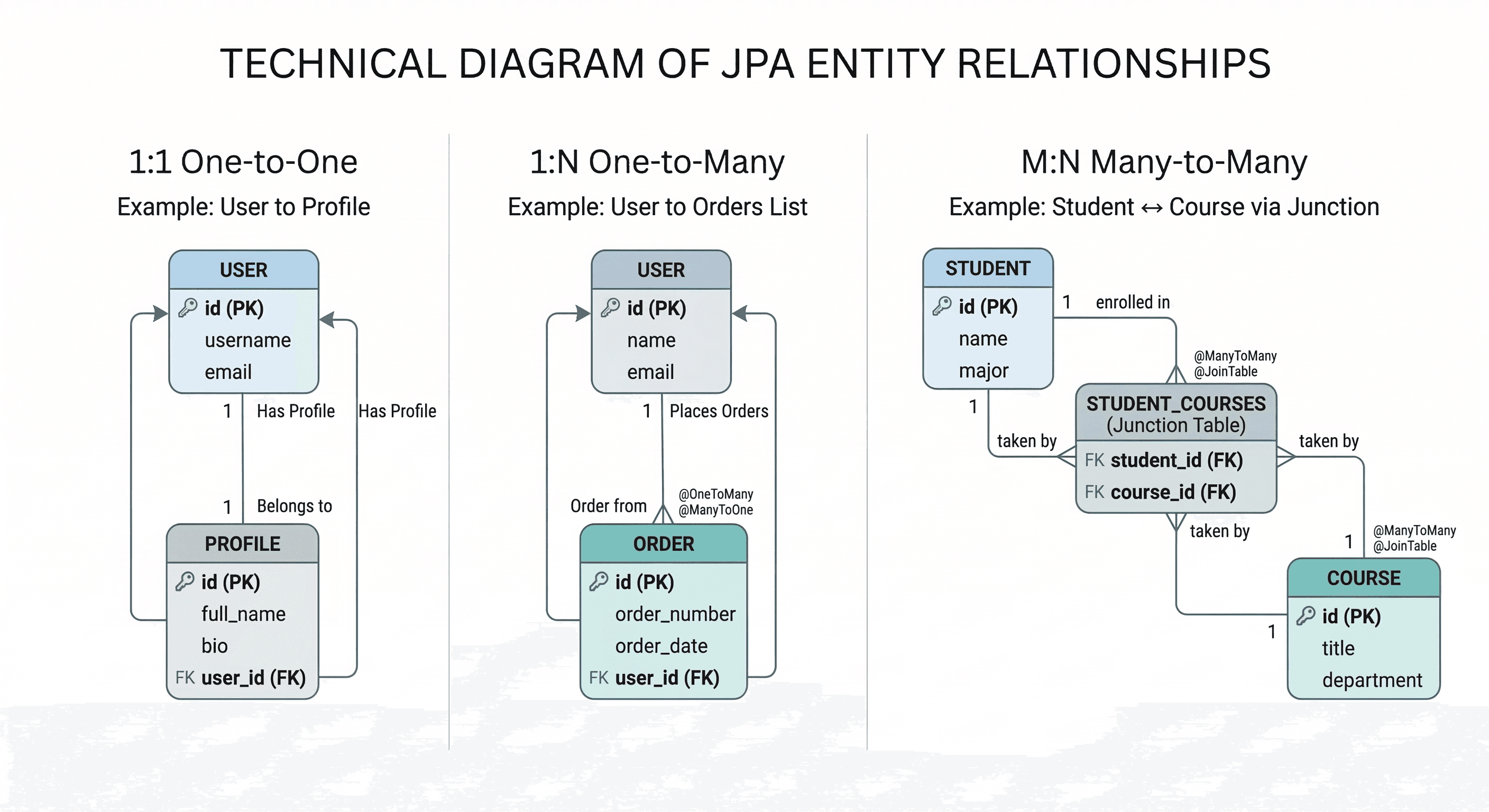
    Entity Relationships#

    One-to-One:

    @Entity public class User { @OneToOne(cascade = CascadeType.ALL) @JoinColumn(name = "profile_id") private Profile profile; }

    One-to-Many / Many-to-One:

    @Entity public class User { @OneToMany(mappedBy = "user", cascade = CascadeType.ALL) private List<Order> orders = new ArrayList<>(); } @Entity public class Order { @ManyToOne @JoinColumn(name = "user_id") private User user; }

    Many-to-Many:

    @Entity public class Student { @ManyToMany(cascade = CascadeType.ALL) @JoinTable( name = "student_course", joinColumns = @JoinColumn(name = "student_id"), inverseJoinColumns = @JoinColumn(name = "course_id") ) private Set<Course> courses = new HashSet<>(); }

    Fetch Types:

    TypeBehaviorDefault for
    EAGERLoads related data immediately@OneToOne, @ManyToOne
    LAZYLoads related data only when accessed@OneToMany, @ManyToMany

    Prefer LAZY for collections to avoid loading unnecessary data.

    Avoid infinite recursion in bidirectional relationships:
    @OneToMany(mappedBy = "user") @JsonManagedReference private List<Order> orders; @ManyToOne @JsonBackReference private User user;
    JPA Entity Relationship Mapping

    10. Transaction Management#

    Transactions ensure that a group of database operations either all succeed or all fail together, maintaining data integrity. Spring Boot provides declarative transaction management through the @Transactional annotation.

    @Service @Transactional public class OrderService { @Transactional(readOnly = true) // Optimizes read-only operations public Order getOrder(Long id) { return orderRepository.findById(id).orElseThrow(); } @Transactional(rollbackFor = Exception.class) public Order createOrder(OrderRequest request) { Order order = orderRepository.save(buildOrder(request)); inventoryService.deductStock(request.getItems()); return order; } }

    Propagation Types:

    PropagationBehavior
    REQUIREDJoin existing or create new (default)
    REQUIRES_NEWAlways creates new, suspends existing
    NESTEDRuns in nested transaction
    MANDATORYMust have existing transaction or throws
    NEVERMust not have transaction or throws
    SUPPORTSRuns in transaction if one exists
    NOT_SUPPORTEDSuspends existing, runs non-transactionally

    Isolation Levels:

    LevelDirty ReadNon-Repeatable ReadPhantom Read
    READ_UNCOMMITTEDYesYesYes
    READ_COMMITTEDNoYesYes
    REPEATABLE_READNoNoYes
    SERIALIZABLENoNoNo

    11. Async Processing#

    @Async allows methods to run in a separate thread so the caller doesn't wait for completion. It is useful for sending emails, notifications, or any long-running task that doesn't need to block the main request.

    // Enable async in config @Configuration @EnableAsync public class AsyncConfig { @Bean(name = "taskExecutor") public Executor taskExecutor() { ThreadPoolTaskExecutor executor = new ThreadPoolTaskExecutor(); executor.setCorePoolSize(5); executor.setMaxPoolSize(10); executor.setQueueCapacity(100); executor.setThreadNamePrefix("Async-"); executor.initialize(); return executor; } } // Use in service @Service public class EmailService { @Async("taskExecutor") public CompletableFuture<String> sendEmail(String to, String content) { // runs in separate thread return CompletableFuture.completedFuture("Sent"); } }

    12. Spring Security#

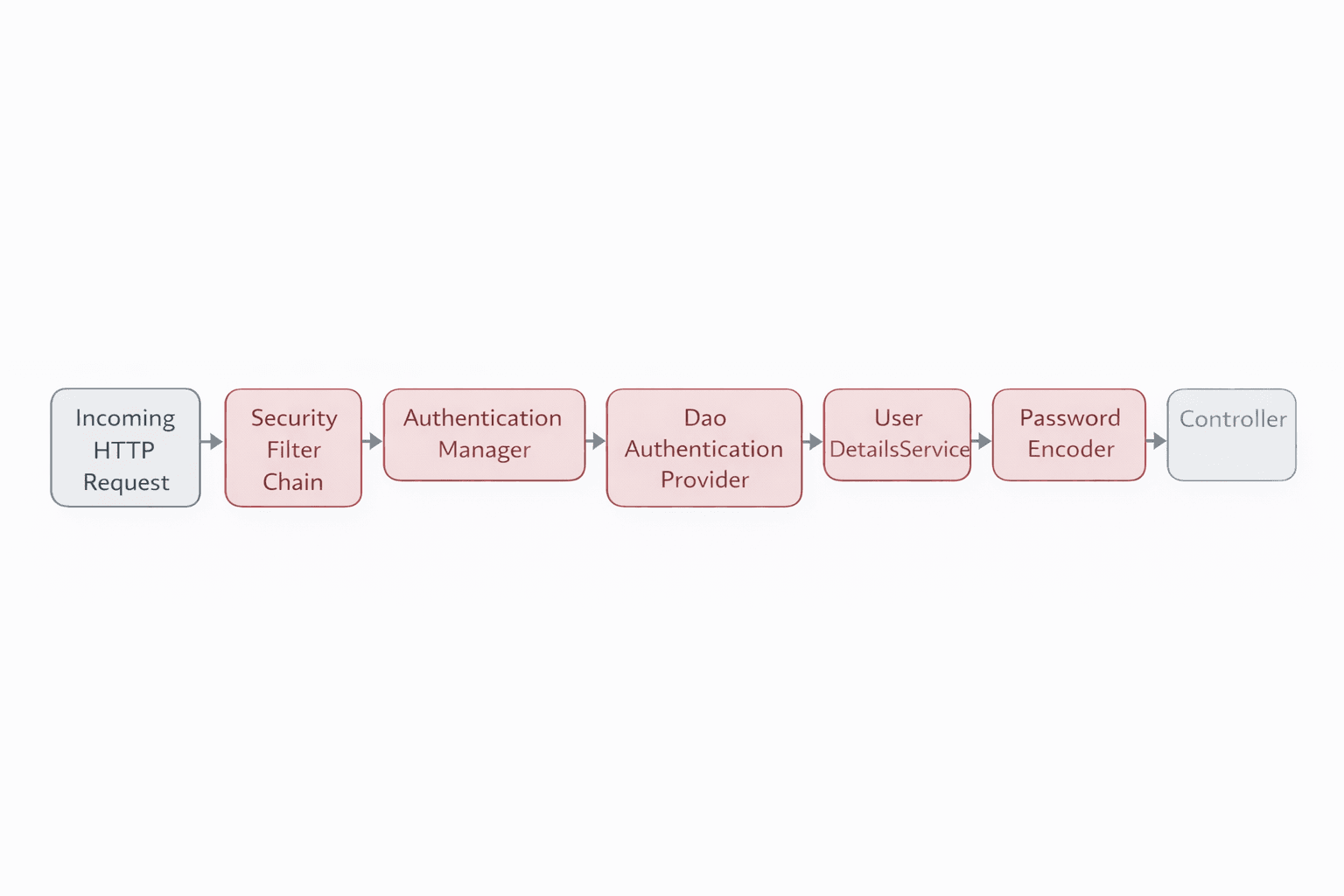
    Spring Security intercepts every incoming request through a filter chain before it reaches your controllers. It handles authentication (who are you?) and authorization (what can you do?) in a structured, extensible way.

    Security Filter Chain#
    @Configuration @EnableWebSecurity public class SecurityConfig { @Bean public SecurityFilterChain filterChain(HttpSecurity http) throws Exception { http .csrf(csrf -> csrf.disable()) .sessionManagement(s -> s.sessionCreationPolicy(SessionCreationPolicy.STATELESS)) .authorizeHttpRequests(auth -> auth .requestMatchers("/api/auth/**").permitAll() .requestMatchers("/api/admin/**").hasRole("ADMIN") .anyRequest().authenticated() ) .authenticationProvider(authenticationProvider()) .addFilterBefore(jwtFilter, UsernamePasswordAuthenticationFilter.class); return http.build(); } @Bean public PasswordEncoder passwordEncoder() { return new BCryptPasswordEncoder(); } @Bean public DaoAuthenticationProvider authenticationProvider() { DaoAuthenticationProvider provider = new DaoAuthenticationProvider(); provider.setUserDetailsService(userDetailsService); provider.setPasswordEncoder(passwordEncoder()); return provider; } }
    Spring Security FilterChain Flow

    13. JWT Authentication#

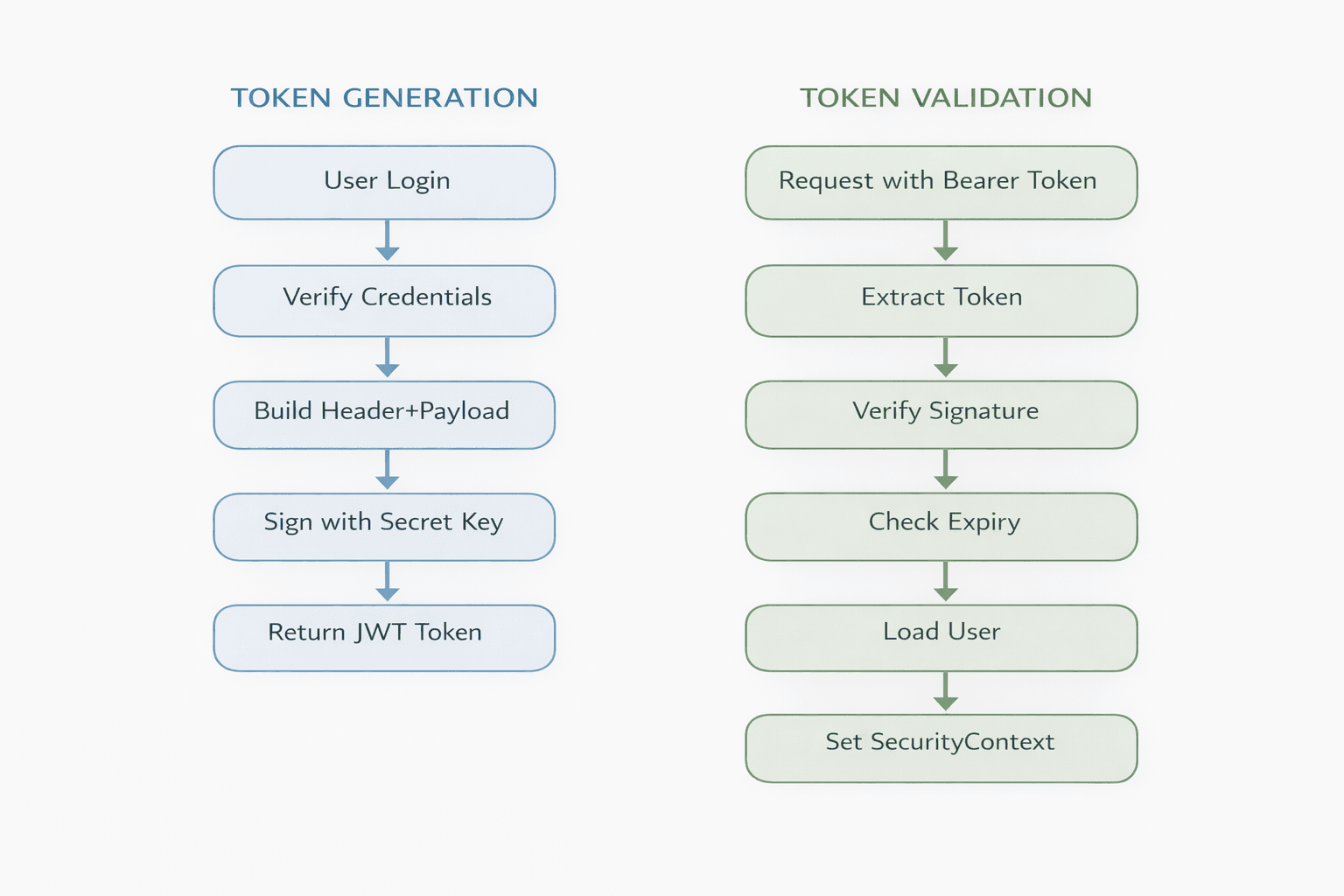
    JWT (JSON Web Token) is a stateless authentication mechanism where the server issues a signed token after login. The client stores the token and sends it with every request — no session storage needed on the server.

    JWT Structure:

    eyJhbGciOiJIUzI1NiJ9 ← Header (algorithm) .eyJzdWIiOiJqb2huIn0 ← Payload (user data, expiry) .SflKxwRJSMeKKF2QT4f ← Signature (tamper-proof)

    Never store passwords or secrets in the payload — it is Base64 encoded, not encrypted.

    @Service public class JwtService { @Value("${jwt.secret}") private String secret; private Key getSigningKey() { return Keys.hmacShaKeyFor(secret.getBytes()); } public String generateToken(String username) { return Jwts.builder() .setSubject(username) .setIssuedAt(new Date()) .setExpiration(new Date(System.currentTimeMillis() + 86400000)) .signWith(getSigningKey(), SignatureAlgorithm.HS256) .compact(); } public String extractUsername(String token) { return Jwts.parserBuilder() .setSigningKey(getSigningKey()).build() .parseClaimsJws(token).getBody().getSubject(); } public boolean isTokenValid(String token, String username) { return username.equals(extractUsername(token)) && !isExpired(token); } }

    JWT Filter:

    @Component @RequiredArgsConstructor public class JwtAuthenticationFilter extends OncePerRequestFilter { private final JwtService jwtService; private final UserDetailsService userDetailsService; @Override protected void doFilterInternal(HttpServletRequest request, HttpServletResponse response, FilterChain chain) throws ServletException, IOException { String authHeader = request.getHeader("Authorization"); if (authHeader == null || !authHeader.startsWith("Bearer ")) { chain.doFilter(request, response); return; } String token = authHeader.substring(7); String username = jwtService.extractUsername(token); if (username != null && SecurityContextHolder.getContext().getAuthentication() == null) { UserDetails userDetails = userDetailsService.loadUserByUsername(username); if (jwtService.isTokenValid(token, userDetails.getUsername())) { UsernamePasswordAuthenticationToken authToken = new UsernamePasswordAuthenticationToken( userDetails, null, userDetails.getAuthorities()); authToken.setDetails( new WebAuthenticationDetailsSource().buildDetails(request)); SecurityContextHolder.getContext().setAuthentication(authToken); } } chain.doFilter(request, response); } }
    JWT Token Generation and Validation Flow

    14. CORS Configuration#

    CORS is a browser security restriction that blocks frontend apps on a different origin from calling your backend. The server must explicitly tell the browser which origins, methods, and headers are allowed.

    @Bean public CorsConfigurationSource corsConfigurationSource() { CorsConfiguration config = new CorsConfiguration(); config.setAllowedOrigins(List.of("<http://localhost:3000>")); config.setAllowedMethods(List.of("GET","POST","PUT","DELETE","OPTIONS")); config.setAllowedHeaders(List.of("*")); config.setAllowCredentials(true); UrlBasedCorsConfigurationSource source = new UrlBasedCorsConfigurationSource(); source.registerCorsConfiguration("/**", config); return source; } // Wire it in SecurityFilterChain http.cors(cors -> cors.configurationSource(corsConfigurationSource()))

    15. Logging with @Slf4j#

    Spring Boot uses SLF4J with Logback by default. The @Slf4j annotation from Lombok auto-generates a logger instance so you can start logging immediately without boilerplate.

    Log Levels (lowest to highest priority):

    LevelUse For
    TRACEExtremely detailed diagnostic info
    DEBUGVariable values, method flow
    INFOBusiness events, app startup
    WARNRecoverable issues, deprecated usage
    ERRORFailures, exceptions
    @Slf4j @Service public class PaymentService { public PaymentResult process(PaymentRequest request) { log.info("Processing payment for order: {}", request.getOrderId()); log.debug("Payment amount: {}", request.getAmount()); try { PaymentResult result = gateway.charge(request); log.info("Payment successful, transaction: {}", result.getTransactionId()); return result; } catch (PaymentGatewayException e) { log.error("Payment failed for order {}: {}", request.getOrderId(), e.getMessage(), e); throw e; } } }

    Configuration:

    logging.level.root=INFO logging.level.com.example=DEBUG logging.level.org.hibernate.SQL=DEBUG logging.file.name=logs/application.log logging.pattern.console=%d{yyyy-MM-dd HH:mm:ss} [%thread] %-5level %logger{36} - %msg%n

    Best practices:

    • Always use parameterized logging log.info("User: {}", name) not string concatenation
    • Never log passwords, tokens, or card numbers
    • Always include the exception object in log.error() for stack trace
    • Use DEBUG and TRACE only — never INFO — for internal flow details

    16. Testing#

    Spring Boot provides excellent testing support out of the box. Following the testing pyramid — many unit tests, some integration tests, few end-to-end tests — gives you fast feedback with reliable coverage.

    Unit Testing with Mockito#

    Unit tests verify a single class in isolation. Mock all dependencies so the test only exercises the class under test.

    @ExtendWith(MockitoExtension.class) class UserServiceTest { @Mock private UserRepository userRepository; @Mock private PasswordEncoder passwordEncoder; @InjectMocks private UserService userService; @Test void shouldCreateUserSuccessfully() { // Arrange UserRequest request = new UserRequest("john", "pass", "john@example.com"); User saved = new User(1L, "john", "encodedPass", "john@example.com"); when(passwordEncoder.encode("pass")).thenReturn("encodedPass"); when(userRepository.save(any(User.class))).thenReturn(saved); // Act User result = userService.createUser(request); // Assert assertThat(result.getId()).isEqualTo(1L); verify(userRepository, times(1)).save(any(User.class)); } @Test void shouldThrowWhenUserNotFound() { when(userRepository.findById(99L)).thenReturn(Optional.empty()); assertThatThrownBy(() -> userService.getById(99L)) .isInstanceOf(ResourceNotFoundException.class); } }

    Controller Testing with MockMvc#

    @WebMvcTest(UserController.class) class UserControllerTest { @Autowired private MockMvc mockMvc; @MockBean private UserService userService; @Test void shouldReturnUser() throws Exception { User user = new User(1L, "john", "john@example.com"); when(userService.getById(1L)).thenReturn(user); mockMvc.perform(get("/api/users/1")) .andExpect(status().isOk()) .andExpect(jsonPath("$.name").value("john")); } }

    Repository Testing with @DataJpaTest#

    @DataJpaTest class UserRepositoryTest { @Autowired private UserRepository userRepository; @Autowired private TestEntityManager entityManager; @Test void shouldFindByEmail() { entityManager.persist(new User(null, "john", "john@example.com")); entityManager.flush(); Optional<User> found = userRepository.findByEmail("john@example.com"); assertThat(found).isPresent(); } }

    Testing annotations summary:

    AnnotationLoadsUse For
    @SpringBootTestFull contextIntegration tests
    @WebMvcTestWeb layer onlyController tests
    @DataJpaTestJPA layer onlyRepository tests
    @ExtendWith(MockitoExtension.class)NothingPure unit tests

    17. Spring Boot Actuator#

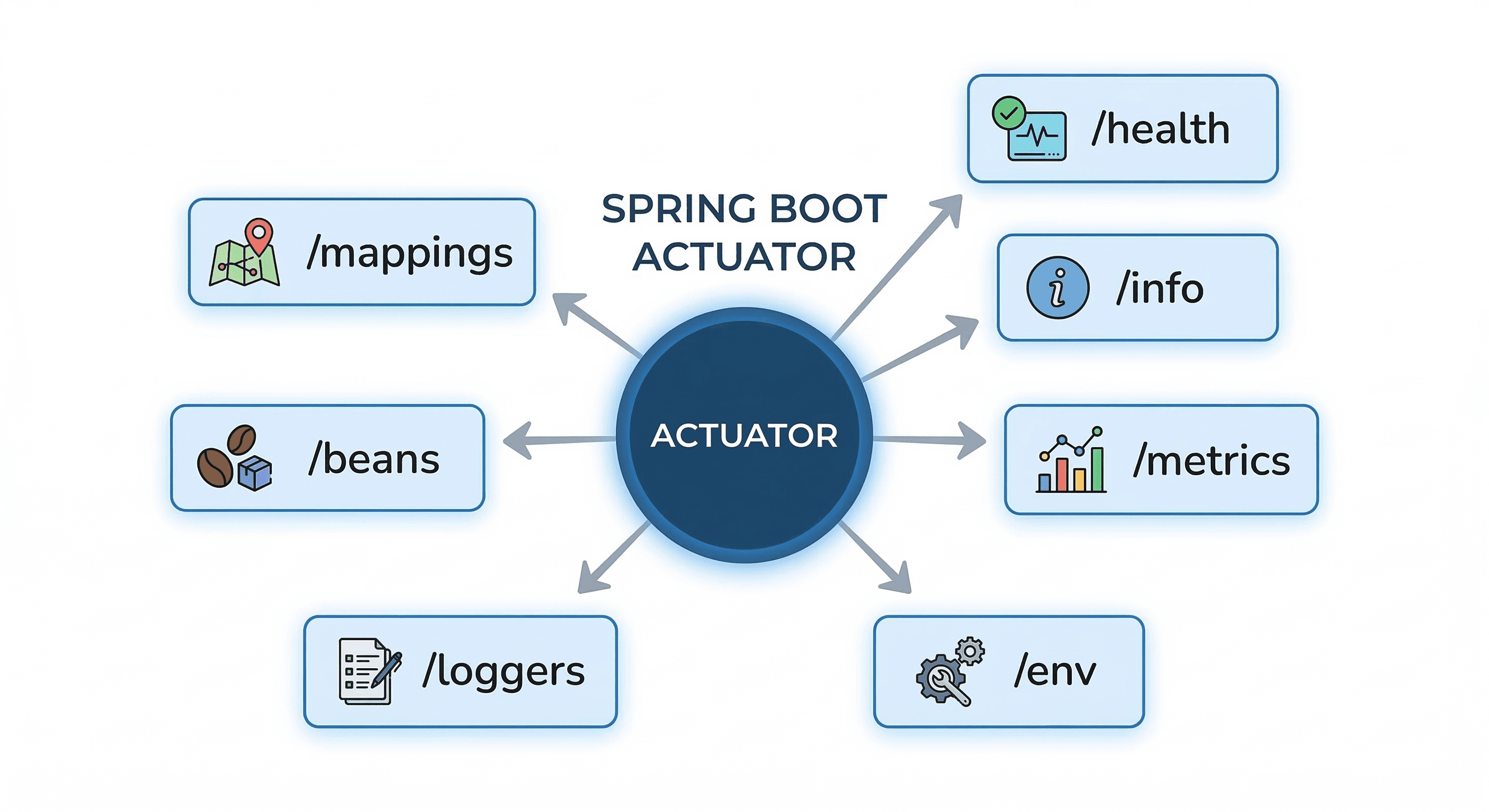
    Actuator exposes production-ready endpoints for health checks, metrics, and application info. It is essential for monitoring applications in production environments and integrates easily with tools like Prometheus and Grafana.

    management.endpoints.web.exposure.include=health,info,metrics,env,loggers management.endpoint.health.show-details=always info.app.name=My Application info.app.version=1.0.0

    Common Endpoints:

    EndpointDescription
    /actuator/healthApp and dependency health status
    /actuator/infoApp version and metadata
    /actuator/metricsJVM, CPU, request metrics
    /actuator/envAll environment properties
    /actuator/loggersView and change log levels at runtime
    /actuator/beansAll registered Spring beans
    /actuator/mappingsAll request mapping paths
    /actuator/threaddumpCurrent thread states
    Spring Boot Actuator Endpoints 

    18. Spring Boot DevTools#

    Spring Boot DevTools enhances the development experience by providing automatic restarts, live reload, and development-time optimizations. It should never be used in production — it's strictly a development dependency.

    xml

    <dependency> <groupId>org.springframework.boot</groupId> <artifactId>spring-boot-devtools</artifactId> <scope>runtime</scope> <!-- Critical: excluded in production --> <optional>true</optional> </dependency>

    Key Features#

    FeatureWhat It DoesDeveloper Benefit
    Automatic RestartRestarts app when classpath files changeInstant feedback after code changes
    LiveReloadTriggers browser refresh automaticallySee UI changes immediately
    Cache DisablingTurns off template/thymeleaf cachingTemplates update without restart
    Property DefaultsSets dev-friendly defaultsNo manual config needed
    Remote DebuggingOptional remote update supportDebug deployed apps

    19. Caching#

    Caching stores the result of expensive operations (database queries, API calls, computations) so repeated requests return instantly without re-executing the underlying logic. Spring Boot integrates with multiple cache providers through a unified abstraction layer.

    Enable caching in your main config:

    @Configuration @EnableCaching public class CacheConfig { // Spring Boot auto-configures a ConcurrentMapCache by default // For production, swap in Redis or Caffeine (see below) }

    Core caching annotations:

    AnnotationBehavior
    @CacheableReturns cached result if exists, otherwise executes and caches
    @CachePutAlways executes and updates the cache
    @CacheEvictRemoves entry (or all entries) from cache
    @CachingGroups multiple cache annotations on one method

    Practical service example:

    @Service public class ProductService { // Cache result — skip DB call if key already exists @Cacheable(value = "products", key = "#id") public Product getById(Long id) { return productRepository.findById(id).orElseThrow(); } // Always update cache after save @CachePut(value = "products", key = "#result.id") public Product update(Long id, ProductRequest request) { return productRepository.save(buildProduct(id, request)); } // Remove single entry on delete @CacheEvict(value = "products", key = "#id") public void delete(Long id) { productRepository.deleteById(id); } // Clear entire cache — useful after bulk operations @CacheEvict(value = "products", allEntries = true) public void clearAll() { } }

    Cache providers:

    ProviderBest ForDependency
    ConcurrentHashMapDev/testing onlyBuilt-in (default)
    CaffeineSingle-instance apps, high performancespring-boot-starter-cache + caffeine
    RedisDistributed apps, multiple instancesspring-boot-starter-data-redis
    EhCacheJVM-local, rich configehcache

    Redis setup :

    spring.cache.type=redis spring.data.redis.host=localhost spring.data.redis.port=6379 spring.cache.redis.time-to-live=600000

    Conditional caching:

    // Only cache if result is not null @Cacheable(value = "users", key = "#email", unless = "#result == null") public User findByEmail(String email) { ... } // Only cache for admin users @Cacheable(value = "reports", condition = "#role == 'ADMIN'") public Report generateReport(String role) { ... }

    Best practices:

    • Always set a TTL (time-to-live) — unbounded caches grow until OutOfMemoryError
    • Use Redis in any multi-instance deployment — in-memory caches are per-JVM and go out of sync
    • Cache at the service layer, never the controller or repository layer
    • Keep cached objects serializable — required for Redis and most distributed providers
    • Use @CacheEvict on every write operation that modifies cached data, or you'll serve stale results

    20. API Documentation with Swagger / OpenAPI#

    Springdoc OpenAPI auto-generates interactive API documentation from your existing controller annotations. It requires zero extra configuration to get started.

    <dependency> <groupId>org.springdoc</groupId> <artifactId>springdoc-openapi-starter-webmvc-ui</artifactId> <version>2.3.0</version> </dependency>

    After adding the dependency:

    • Swagger UI: http://localhost:8080/swagger-ui.html
    • OpenAPI JSON: http://localhost:8080/v3/api-docs

    Allow these paths in your security config:

    .requestMatchers("/swagger-ui/**", "/v3/api-docs/**").permitAll()

    21. Build and Deployment#

    Spring Boot packages the entire application — including the embedded server — into a single executable JAR. This makes deployment simple and consistent across all environments.

    Build commands:

    # Maven mvn clean package mvn clean package -DskipTests # Gradle gradle clean build gradle clean build -x test

    Run the JAR:

    java -jar target/app.jar java -jar target/app.jar --spring.profiles.active=prod java -jar target/app.jar --server.port=9090 java -Xmx512m -Xms256m -jar target/app.jar

    Dockerfile:

    FROM openjdk:17-jdk-slim COPY target/app.jar app.jar EXPOSE 8080 ENTRYPOINT ["java", "-jar", "/app.jar"]
    docker build -t myapp . docker run -p 8080:8080 -e DB_PASSWORD=secret myapp

    Quick Reference — Most Used Annotations#

    AnnotationPurpose
    @SpringBootApplicationBootstrap the application
    @RestControllerREST controller, returns JSON
    @RequestMappingBase URL mapping
    @GetMapping / @PostMapping etc.HTTP method mapping
    @PathVariableExtract from URL path
    @RequestParamExtract from query string
    @RequestBodyBind JSON body to object
    @ValidTrigger bean validation
    @ServiceBusiness logic bean
    @RepositoryData access bean
    @ComponentGeneric bean
    @AutowiredInject dependency
    @ValueInject config property
    @EntityJPA entity (maps to table)
    @TransactionalTransaction boundary
    @AsyncRun in separate thread
    @Slf4jAuto-generate logger
    @RestControllerAdviceGlobal exception handler
    @ExceptionHandlerHandle specific exception
    @ConfigurationBean definition class
    @BeanRegister method return as bean
    @ProfileActivate in specific profile
    @DataJpaTestSlice test for JPA layer
    @WebMvcTestSlice test for web layer
    @MockBeanSpring-aware mock in tests

    Conclusion#

    This Spring Boot cheat sheet covers everything from core concepts to production deployment in a concise, practical format. Master these fundamentals and you'll be ready to build production-ready applications with confidence. If you found this helpful, share it with your friends and colleagues — good knowledge grows when shared!

    Want to Master Spring Boot and Land Your Dream Job?

    Struggling with coding interviews? Learn Data Structures & Algorithms (DSA) with our expert-led course. Build strong problem-solving skills, write optimized code, and crack top tech interviews with ease

    Learn more
    Spring Boot
    REST API`s
    Spring Security
    Spring Data JPA
    Was it helpful?

    Subscribe to our newsletter

    Read articles from Coding Shuttle directly inside your inbox. Subscribe to the newsletter, and don't miss out.

    More articles