RDBMS Guide — The Only Cheat Sheet You Need for Interviews & Real-World Systems
A comprehensive RDBMS cheat sheet covering SQL queries, joins, indexing, normalization, ACID properties, transactions, and database design. Perfect for interview preparation, backend development, and mastering relational database concepts with real-world examples and practical insights.

Shreyash Gurav
March 25, 2026
19 min read
RDBMS Guide — The Only Cheat Sheet You Need for Interviews & Real-World Systems
A Relational Database Management System (RDBMS) powers modern applications by organizing data into structured tables, enforcing relationships with keys, and ensuring reliable, consistent transactions using SQL and ACID principles.
1. RDBMS Fundamentals#
What is an RDBMS?#
A Relational Database Management System is software that stores data in structured tables and enforces relationships between them. The "relational" part comes from relational algebra — data is organized so you can query across tables using shared keys.
Examples: PostgreSQL, MySQL, Oracle, SQL Server, SQLite.
Why RDBMS? (Real-world context)#
Most business data is naturally relational. An order belongs to a customer. A product belongs to a category. RDBMS lets you model that reality directly, enforce rules at the database level, and query across entities without duplicating data.
- Enforces data integrity (you can't have an order with no customer)
- Supports complex queries without application-level joins
- ACID compliance makes it safe for financial, medical, and transactional workloads
- Decades of tooling, optimization, and community support
RDBMS vs DBMS#
| Feature | DBMS | RDBMS |
|---|---|---|
| Data storage | Files, hierarchical | Tables with rows/columns |
| Relationships | Not enforced | Enforced via keys |
| Normalization | Not required | Supported and encouraged |
| SQL support | May not support | Full SQL support |
| ACID compliance | Not guaranteed | Core feature |
| Examples | XML stores, file systems | PostgreSQL, MySQL |
Mental model: DBMS is a filing cabinet. RDBMS is a filing cabinet with enforced cross-references between folders, a query engine, and a transaction log.
2. Core Concepts#
Tables, Rows, Columns#
- Table — a named set of data with a fixed structure (like a spreadsheet with rules)
- Row (tuple/record) — one instance of data in a table
- Column (attribute/field) — a named property with a defined data type
Every column has a data type (INT, VARCHAR, DATE, BOOLEAN, etc.). This isn't just for storage — the database uses types to validate, index, and compare data correctly.
Schema#
A schema is the blueprint. It defines what tables exist, what columns each has, what types they are, and what constraints apply. Think of it as the contract between your application and your data.
Primary Key#
- Uniquely identifies each row in a table
- Cannot be NULL
- Should be immutable — once set, never changed
- Usually a surrogate key (auto-increment INT or UUID) rather than a natural key (email, phone)
Why surrogate keys? Natural keys change. Someone's email changes. Their phone number changes. An auto-increment ID never does.
Foreign Key#
- A column (or set of columns) in one table that references the primary key of another
- Enforces referential integrity — you can't reference a row that doesn't exist
ON DELETE CASCADE means: if the user is deleted, delete their orders too. Alternatives: SET NULL, RESTRICT (block the delete). Choose carefully — wrong cascade behavior is a data loss nightmare.
Constraints#
| Constraint | Purpose |
|---|---|
| NOT NULL | Column must have a value |
| UNIQUE | No duplicate values in the column |
| PRIMARY KEY | NOT NULL + UNIQUE + indexed |
| FOREIGN KEY | References another table's PK |
| CHECK | Custom condition must be true |
| DEFAULT | Fallback value if none provided |
Constraints live in the database, not in your application code. This is intentional — application bugs can be patched, but corrupt data is permanent.
3. Keys in Detail#
| Key Type | Definition | Uniqueness | NULLs |
|---|---|---|---|
| Super Key | Any set of columns that uniquely identifies a row | Yes | Depends |
| Candidate Key | Minimal super key (no redundant columns) | Yes | No |
| Primary Key | The chosen candidate key | Yes | No |
| Alternate Key | Candidate key not chosen as PK | Yes | Depends |
| Foreign Key | References PK in another table | Not required | Allowed |
| Composite Key | PK made of two or more columns | Combined unique | No |
Common confusion points:
- Every primary key is a candidate key, but not every candidate key is the primary key
- A table can have multiple candidate keys (e.g.,
id,email,phone) but only one primary key - A foreign key's value doesn't have to be unique — many orders can reference the same user
- Composite keys are common in junction tables (user_id + role_id together are unique)
Interview trap: "Can a foreign key reference a non-primary key?" Yes — it can reference any UNIQUE column, not just the PK. Most people assume it must be PK.
4. Relationships#
One-to-One (1:1)#
A user has one profile. A country has one capital. Rare in practice. Usually signals you could merge the tables — but sometimes you split for performance (keeping heavy columns separate) or security (separating sensitive data).
One-to-Many (1:N)#
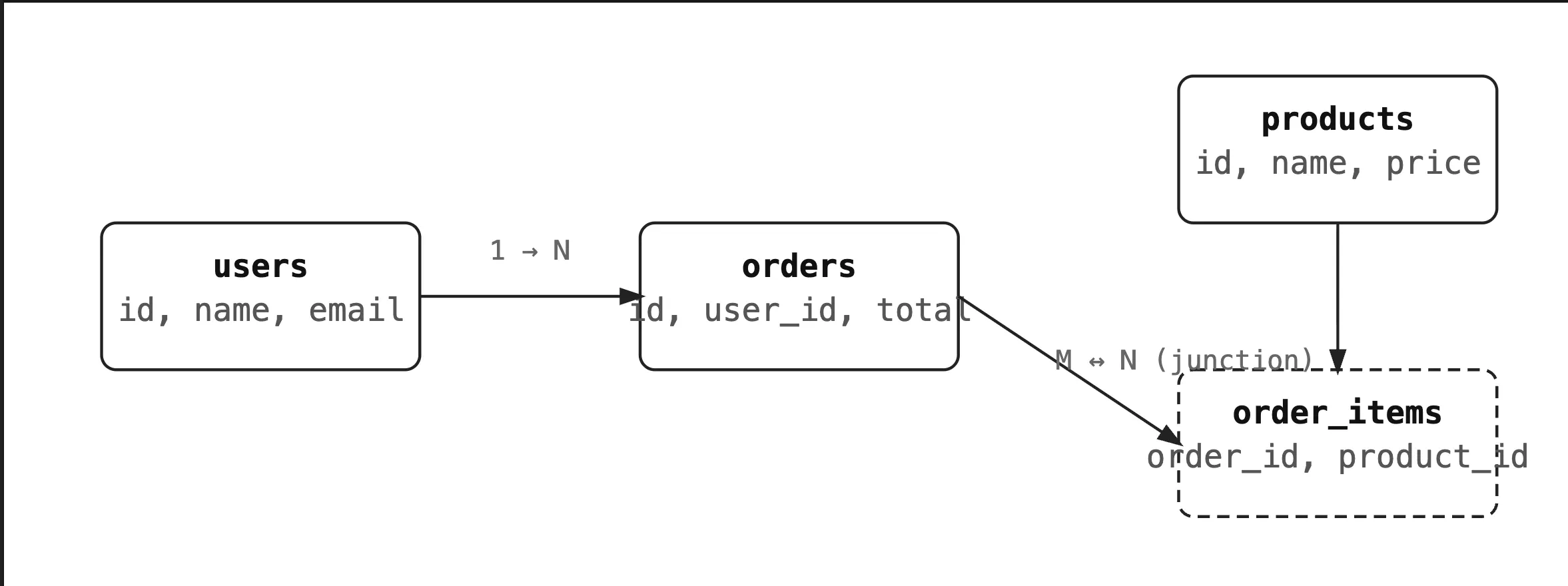
The most common relationship. One customer, many orders. One author, many posts. The foreign key lives on the "many" side.
Many-to-Many (M:N)#
Students take many courses. Courses have many students. You can't express this with just two tables — you need a junction (bridge/associative) table.
The junction table's PK is composite (student_id + course_id). You can also add extra columns to it — enrollment date, grade, status.
Entity Relationships:
5. SQL Fundamentals#
SQL has four sub-languages. Know them cold — interviewers ask this.
| Category | Commands | Purpose |
|---|---|---|
| DDL — Data Definition | CREATE, ALTER, DROP, TRUNCATE | Define/modify schema |
| DML — Data Manipulation | INSERT, UPDATE, DELETE | Modify data |
| DQL — Data Query | SELECT | Read data |
| TCL — Transaction Control | COMMIT, ROLLBACK, SAVEPOINT | Manage transactions |
| DCL — Data Control | GRANT, REVOKE | Permissions |
TRUNCATE vs DELETE: TRUNCATE removes all rows without logging individual deletions — much faster, but cannot be rolled back in most databases and does not fire triggers. Use DELETE when you need control or auditability.
6. CRUD Operations#
Common mistake: Running UPDATE or DELETE without a WHERE clause in production. Always test with a SELECT first using the same WHERE condition.
7. Joins#
The heart of relational databases. A join combines rows from two or more tables based on a related column.
Mental model: Think of two spreadsheets. A join is asking "show me rows where these two sheets have matching values in these columns."
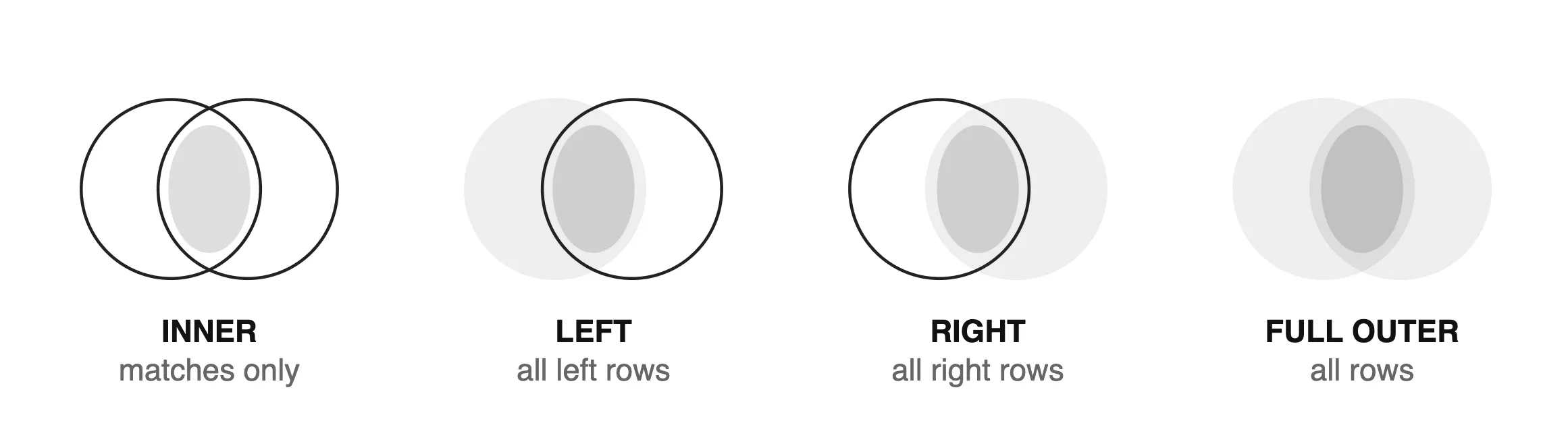
| Join Type | Returns |
|---|---|
| INNER JOIN | Only rows with a match in BOTH tables |
| LEFT JOIN | All rows from left + matched rows from right (NULLs for no match) |
| RIGHT JOIN | All rows from right + matched rows from left (NULLs for no match) |
| FULL OUTER JOIN | All rows from both, NULLs where no match |
| SELF JOIN | Table joined with itself |
| CROSS JOIN | Every combination of rows (Cartesian product) |
Interview trap: "What's the difference between LEFT JOIN and LEFT OUTER JOIN?" They're the same thing. OUTER is optional syntax.
Join Types:
8. Aggregation#
Aggregates collapse multiple rows into a single result. Used constantly in reporting.
WHERE vs HAVING:
- WHERE filters rows before grouping
- HAVING filters groups after aggregation
- You cannot use aggregate functions in WHERE
9. Advanced Queries#
Subqueries#
A query inside another query. Used when you need the result of one query to drive another.
Correlated Subqueries#
The inner query references the outer query. Executes once per row — can be slow on large tables.
When performance matters, rewrite correlated subqueries as JOINs or CTEs.
Window Functions#
Window functions compute a value across a "window" of related rows without collapsing them (unlike GROUP BY).
Common window functions: RANK(), ROW_NUMBER(), DENSE_RANK(), LAG(), LEAD(), SUM() OVER, AVG() OVER.
Mental model: GROUP BY collapses rows. Window functions keep all rows and add a computed column.
10. Normalization#
Normalization is the process of organizing data to reduce redundancy and improve integrity. Each normal form solves a specific class of problem.
The Problem Without Normalization#
| order_id | customer_name | customer_email | product | product_price |
|---|---|---|---|---|
| 1 | Alice | alice@x.com | Keyboard | 49 |
| 2 | Alice | alice@x.com | Mouse | 29 |
| 3 | Bob | bob@x.com | Keyboard | 49 |
Problems: Alice's email appears twice — update one, forget the other. Product price duplicated everywhere.
1NF — First Normal Form#
Rule: Each column must hold atomic (indivisible) values. No repeating groups.
Violation: Storing "Math, Science, English" in a single subjects column.
Fix: One subject per row, or a separate subjects table.
2NF — Second Normal Form#
Rule: Must be in 1NF + no partial dependencies (non-key column depends on only part of a composite PK).
Violation: In order_items(order_id, product_id, product_name) — product_name depends only on product_id, not the full PK.
Fix: Move product_name to a products table.
3NF — Third Normal Form#
Rule: Must be in 2NF + no transitive dependencies (non-key column depends on another non-key column).
Violation: employees(id, dept_id, dept_name) — dept_name depends on dept_id, not on id.
Fix: Move dept_name to a departments table.
BCNF — Boyce-Codd Normal Form#
Stricter version of 3NF. Every determinant must be a candidate key. In practice, 3NF is sufficient for most systems.
When to Denormalize#
- High-read, low-write reporting tables
- Data warehouses and analytics (star schema, fact tables)
- When join cost exceeds storage cost at scale
- Caching pre-computed aggregates for dashboards
Denormalization is a deliberate performance trade-off, not laziness. The mistake is denormalizing before you've proven you need to.
Normalization Flow Diagram:

11. Indexing#
What and Why#
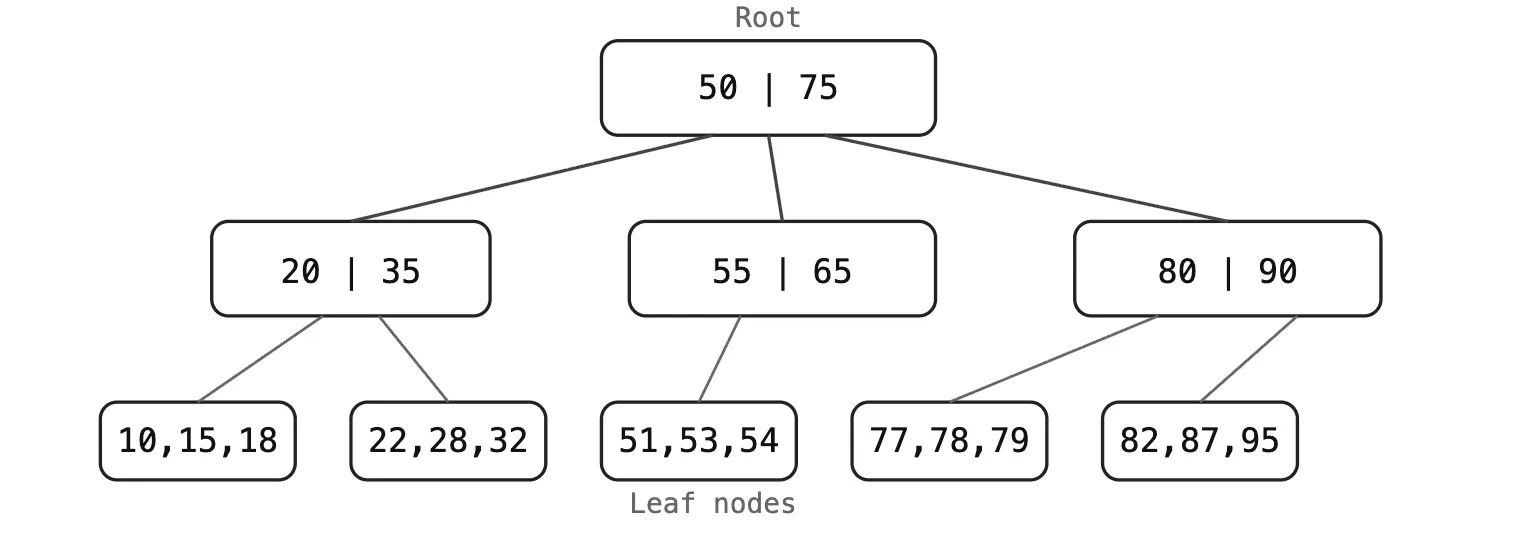
An index is a separate data structure that lets the database find rows without scanning every row in the table. Without an index, every query is a full table scan — O(n). With a B-tree index, lookup is O(log n).
Analogy: A database table is a book. An index is the book's index at the back — instead of reading every page, you go straight to page 247.
How it Works (B-Tree)#
The default index type. A balanced tree where leaf nodes hold the actual row pointers (or values for covering indexes). Each lookup traverses from root to leaf — typically 3–4 levels for millions of rows.
Types of Indexes#
| Type | Use Case |
|---|---|
| B-Tree (default) | Range queries, equality, ORDER BY |
| Hash Index | Equality only (=), not ranges |
| Composite Index | Multiple columns, follows left-prefix rule |
| Unique Index | Enforces uniqueness + fast lookup |
| Partial Index | Index only rows matching a condition |
| Full-Text Index | Text search (LIKE '%word%' won't use B-tree) |
| Covering Index | Index includes all columns the query needs |
Composite Index: Left-Prefix Rule#
An index on (a, b, c) can serve queries filtering on a, a+b, or a+b+c. It cannot serve queries filtering only on b or c.
Trade-offs#
- Indexes speed up reads but slow down writes (INSERT/UPDATE/DELETE must update the index too)
- Each index consumes disk space
- Too many indexes on write-heavy tables is a common performance killer
- Rule of thumb: index columns you frequently filter, join, or sort by
12. Transactions#
What is a Transaction?#
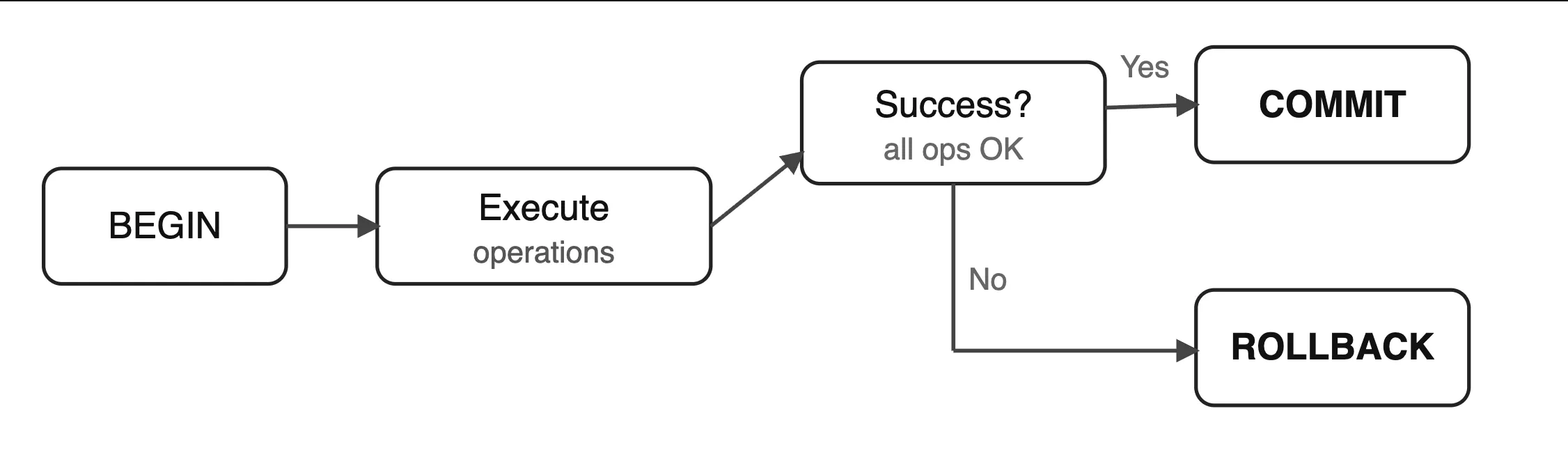
A transaction is a unit of work that either completes entirely or doesn't happen at all. It groups multiple operations into an all-or-nothing block.
ACID Properties#
| Property | Meaning | Real-world guarantee |
|---|---|---|
| Atomicity | All or nothing | If transfer fails mid-way, neither account is changed |
| Consistency | DB goes from one valid state to another | Account total before = account total after |
| Isolation | Concurrent transactions don't interfere | Two people withdrawing at the same time can't both see the same old balance |
| Durability | Committed data survives crashes | Once you see "Payment successful", it's on disk |
Transaction Flow Diagram:#
SAVEPOINT#
13. Concurrency Control#
Why it's Needed#
Multiple users hitting the database simultaneously create race conditions. Without control, two transactions can read the same data, modify it, and overwrite each other.
Locking#
- Shared Lock (S): Read lock. Multiple transactions can hold it simultaneously.
- Exclusive Lock (X): Write lock. Only one transaction; blocks everyone else.
- Row-level lock: Only locks the affected row (preferred, more concurrency)
- Table-level lock: Locks the entire table (fast to acquire, kills concurrency)
Deadlock#
Transaction A holds lock on row 1, wants row 2.
Transaction B holds lock on row 2, wants row 1.
Both wait forever.
Databases detect deadlocks and kill one transaction (the "victim"). Your application must handle this by retrying.
Prevention: always acquire locks in the same order across transactions.
Isolation Levels#
| Level | Dirty Read | Non-Repeatable Read | Phantom Read | Use Case |
|---|---|---|---|---|
| READ UNCOMMITTED | Yes | Yes | Yes | Almost never |
| READ COMMITTED | No | Yes | Yes | Default in most DBs |
| REPEATABLE READ | No | No | Yes | Consistent reports |
| SERIALIZABLE | No | No | No | Financial, critical ops |
- Dirty Read: Reading uncommitted data from another transaction
- Non-Repeatable Read: Re-reading a row gets different data (another tx updated it)
- Phantom Read: Re-running a query gets different rows (another tx inserted/deleted)
Higher isolation = more safety, but more lock contention and lower throughput.
14. Database Optimization#
Query Optimization Tips#
- SELECT only the columns you need —
SELECT *forces the DB to fetch all columns - Filter early with WHERE before joining when possible
- Use indexes on JOIN columns and WHERE clauses
- Avoid functions on indexed columns in WHERE:
WHERE YEAR(created_at) = 2024doesn't use the index;WHERE created_at >= '2024-01-01' AND created_at < '2025-01-01'does - Avoid
SELECT DISTINCTunless truly needed — it adds a sort/dedup step - Use
EXISTSinstead ofINwith large subquery results - Paginate with keyset pagination (
WHERE id > last_seen_id LIMIT 20) instead ofOFFSETfor large tables
EXPLAIN / EXPLAIN ANALYZE#
Key things to look for:
Seq Scan— full table scan, usually bad on large tablesIndex Scan— using an index, goodNested LoopvsHash Join— matters at scalerows=estimate vs actual rows — large mismatch means stale statistics (run ANALYZE)cost=— planner's estimate; focus on actual time in ANALYZE output
Common Mistakes#
- No index on foreign key columns (causes full scan on every JOIN)
- Using
LIKE '%term%'on large tables (can't use B-tree index) - N+1 query problem: fetching 100 posts, then 1 query per post for author
- Not using connection pooling in production
- Running migrations without testing on production-sized data
15. Advanced Features#
Views#
A stored query that acts like a virtual table. Doesn't store data itself.
Use views for: simplifying complex queries, hiding sensitive columns, creating stable interfaces over evolving schemas.
Don't use views for: performance optimization (a view doesn't cache data — it re-runs each time). Use materialized views for caching.
Stored Procedures#
Precompiled SQL logic stored in the database. Can accept parameters, contain control flow, and return results.
Trade-off: logic in the database is harder to version, test, and deploy. Prefer application-layer logic unless there's a specific reason (performance, shared logic across multiple apps).
Triggers#
Automatically execute logic in response to INSERT, UPDATE, or DELETE.
Use triggers for: audit logging, denormalized counter updates.
Avoid triggers for: business logic — they're invisible, hard to debug, and cause surprises.
Cursors#
Row-by-row processing within a stored procedure. Almost always the wrong choice — set-based SQL operations are orders of magnitude faster. Use cursors only when row-by-row processing is genuinely unavoidable (rare ETL edge cases).
16. Scaling Databases#
Vertical vs Horizontal Scaling#
| Vertical (Scale Up) | Horizontal (Scale Out) | |
|---|---|---|
| What | Bigger machine (more CPU, RAM, SSD) | More machines |
| Simplicity | Simple — no app changes | Complex — app must handle distribution |
| Limit | Hard ceiling (biggest available server) | Near-unlimited |
| Cost | Expensive at high end | Commodity hardware |
| When | First resort, up to a point | When vertical ceiling is hit |
Replication#
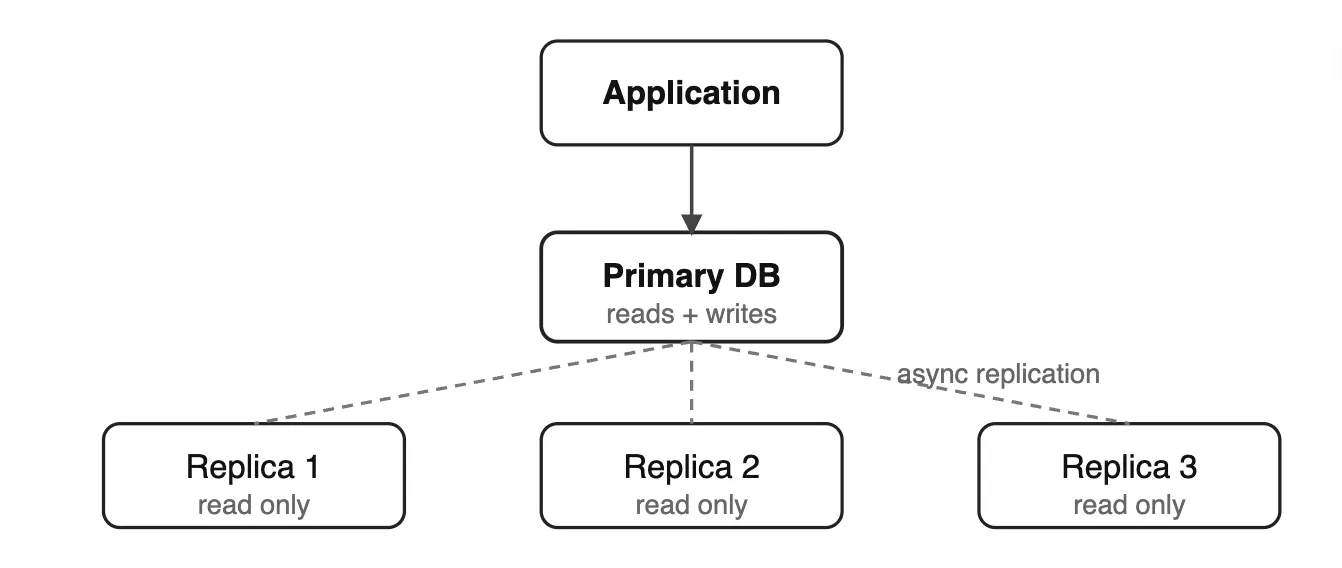
One primary (write) database, one or more replicas (read copies). Changes on primary are streamed to replicas.
- Read replicas absorb read traffic (reporting, analytics, API reads)
- Replication lag is real — reads from replicas may be slightly stale
- If your app reads immediately after writing, use the primary for that read
Sharding#
Splitting data across multiple database instances based on a shard key. User IDs 1–1M on shard 1, 1M–2M on shard 2.
Trade-offs:
- Cross-shard joins are expensive or impossible — design schemas to avoid them
- Choosing the wrong shard key causes hot spots (one shard gets all the traffic)
- Resharding as you grow is painful
Most applications shouldn't shard until they're at massive scale. It's a last resort, not a first step.
Scaling Diagram:
17. SQL vs NoSQL#
| Factor | SQL (RDBMS) | NoSQL |
|---|---|---|
| Data model | Tables, fixed schema | Documents, KV, graphs, columns |
| Schema | Strict, defined upfront | Flexible, schema-on-read |
| Relationships | Built-in JOINs | Manual, denormalized |
| ACID | Yes, native | Depends (many offer eventual consistency) |
| Scaling | Vertical, then complex horizontal | Horizontal by design |
| Query flexibility | Rich SQL | Varies by type |
| Best for | Transactional, relational data | High-scale, flexible, or unstructured data |
Choose SQL when: strong consistency matters, data is relational, you need complex queries, compliance requires auditability.
Choose NoSQL when: massive write throughput (Cassandra), flexible schema (MongoDB for CMS), pure key-value cache (Redis), graph relationships (Neo4j).
Interview trap: "Is NoSQL always faster?" No. PostgreSQL with proper indexes beats many NoSQL solutions for typical workloads. The choice is about data model fit and scale patterns, not raw speed.
18. Real-World System Design#
E-Commerce Database#
Key design decisions:
order_items.unit_pricestores price at time of purchase — product price can change latercategories.parent_idself-references for nested categories (Electronics > Phones > Android)orders.statususes an ENUM or varchar with CHECK constraint (pending, paid, shipped, delivered, cancelled)- Index on
products(category_id),orders(user_id),order_items(order_id)
Blog System#
Key design decisions:
posts.slugis UNIQUE and indexed — used in URLs instead of exposing numeric IDscomments.parent_idself-references for threaded repliesposts.statusENUM: draft, published, archived- Full-text index on
posts(title, body)for search
Banking System#
Key design decisions:
- Never update balance directly. Balance is derived from transactions, or updated only inside a transaction with locking
transactionsis append-only — never update or delete transaction rowsreference_idis idempotency key — prevents duplicate charges if client retries- Use
SERIALIZABLEisolation for transfers or optimistic locking with a version column audit_loguses a trigger on accounts and transactions — every change is recorded
19. Quick Revision Summary#
Fundamentals
- RDBMS stores data in tables with enforced relationships via keys
- Primary key: unique + not null + immutable. Foreign key: references PK in another table
- Constraints live in the DB, not just the app
SQL
- DDL (schema), DML (data changes), DQL (queries), TCL (transactions)
- WHERE filters rows, HAVING filters groups, you can't use aggregates in WHERE
- Joins combine tables: INNER (matches only), LEFT (all left), FULL (all rows)
- Window functions keep all rows + add computed column, unlike GROUP BY
Normalization
- 1NF: atomic values. 2NF: no partial deps. 3NF: no transitive deps
- Denormalize for performance only after proving it's needed
Indexing
- B-tree default, left-prefix rule for composite indexes
- Indexes slow writes — don't over-index write-heavy tables
- Covering index: query fetches everything from the index, never touches the table
Transactions
- ACID: Atomicity, Consistency, Isolation, Durability
- Higher isolation = safer, but more contention
- Deadlocks: always acquire locks in the same order
Scaling
- Vertical first, then replicas for reads, then sharding as last resort
- Replication has lag — don't read from replica immediately after writing
Conclusion#
This RDBMS cheatsheet covers everything from core fundamentals to real-world system design, giving you a solid foundation for interviews and practical development. Focus on understanding the concepts, not just memorizing them—because real strength comes from applying these ideas in real systems.
If you found this helpful, consider sharing it with your friends, developers, or teammates—it might help someone else prepare smarter and faster.
Want to Master Spring Boot and Land Your Dream Job?
Struggling with coding interviews? Learn Data Structures & Algorithms (DSA) with our expert-led course. Build strong problem-solving skills, write optimized code, and crack top tech interviews with ease
Learn more
![Complete System Design Interview Preparation For 2-7 Years of Experience [2026]](https://cs-prod-assets-bucket.s3.ap-south-1.amazonaws.com/System_Design_in_One_Shot_97afc77fc6.avif "Complete System Design Interview Preparation For 2-7 Years of Experience [2026]")