MongoDB in One Shot - The Ultimate Cheatsheet
A concise MongoDB cheatsheet designed to help you quickly understand and revise core concepts. It covers everything from fundamentals and CRUD operations to advanced querying, indexing, aggregation, and schema design, with practical examples for real-world applications. Ideal for learning, quick revision, and interview preparation.

Shreyash Gurav
March 17, 2026
14 min read
MongoDB in One Shot - The Ultimate Cheatsheet
MongoDB is a powerful NoSQL database built for modern applications that demand flexibility, speed, and scalability. Instead of rigid tables and schemas, it stores data in JSON-like documents, making it easy to model real-world data and iterate quickly as requirements evolve.
Designed for high performance and distributed systems, MongoDB enables developers to handle large-scale data with ease through features like indexing, aggregation, replication, and sharding. It is widely used in building scalable backends, real-time applications, and microservices architectures.
1. MongoDB Fundamentals#
What is MongoDB?#
MongoDB is a NoSQL, document-oriented database that stores data as flexible, JSON-like documents instead of rows and columns. It is schema-less by default, meaning each document in a collection can have different fields.
Why MongoDB over SQL?
- Stores hierarchical/nested data naturally
- Horizontally scalable
- Great for unstructured or semi-structured data
- Fast reads on large datasets with proper indexing
JSON vs BSON#
| Feature | JSON | BSON |
|---|---|---|
| Format | Text-based | Binary-encoded |
| Data Types | Limited | Extended (Date, ObjectId, etc.) |
| Speed | Slower parse | Faster for MongoDB internals |
| Used For | Human-readable | MongoDB storage + wire protocol |
MongoDB stores data as BSON internally but exposes it as JSON to the developer.
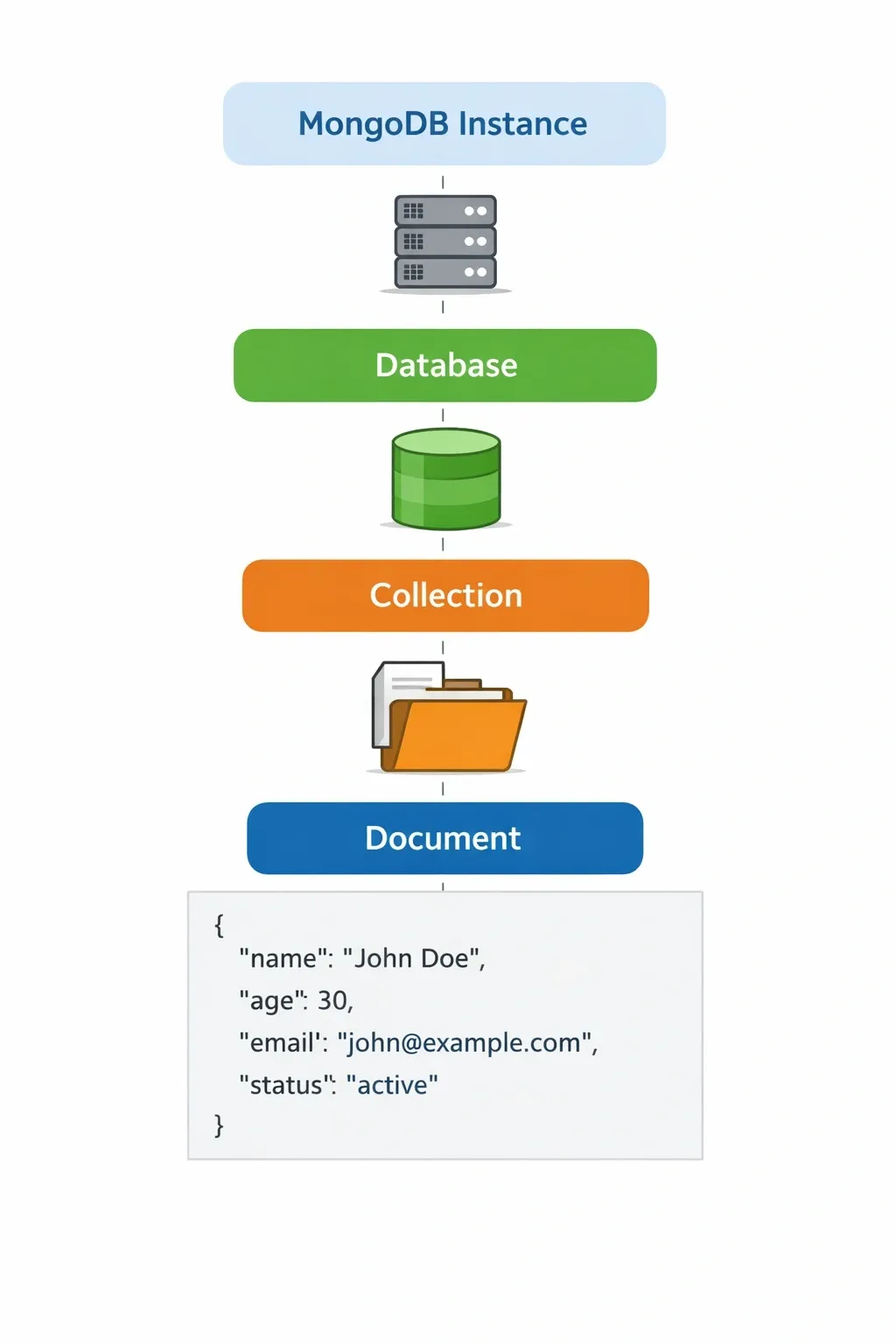
Database → Collection → Document Hierarchy#
- Database - container for collections
- Collection - equivalent to a table in SQL
- Document - equivalent to a row; a BSON object
The _id Field#
Every document must have a unique _id field. If you don't provide one, MongoDB auto-generates an ObjectId.
- ObjectId is 12 bytes: 4-byte timestamp + 5-byte random + 3-byte incrementing counter
- You can use any unique value as
_id(string, integer, etc.)
Installation Checklist#
- MongoDB Community Server - the core database engine
- MongoDB Compass - GUI for exploring and querying data visually
- mongosh - the official MongoDB shell for terminal-based interaction
2. Core CRUD Operations#
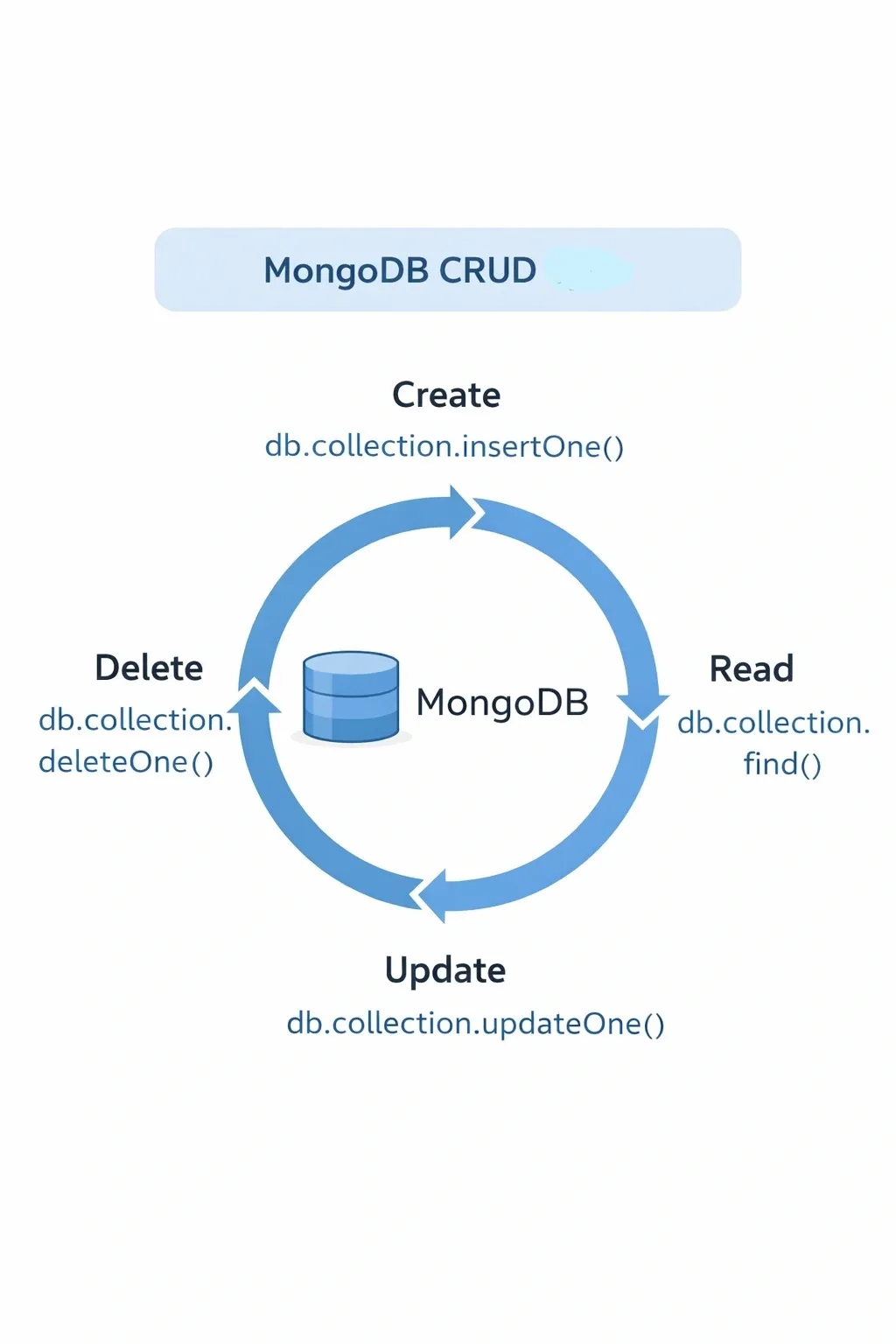
Insert#
insertOne()returnsinsertedIdinsertMany()returns an array ofinsertedIds
Read#
Update#
Delete#
Common Update Operators#
| Operator | Purpose |
|---|---|
$set | Set or update a field value |
$unset | Remove a field |
$inc | Increment a numeric field |
$push | Add an element to an array |
$pull | Remove matching elements from array |
$addToSet | Add to array only if not already present |
$rename | Rename a field |
3. Advanced Querying Techniques#
MongoDB provides a flexible query language to filter, combine conditions, and shape results. Queries operate on documents and can leverage indexes for efficient execution.
Comparison Operators#
Comparison operators filter documents based on field values, similar to SQL WHERE conditions.
These operators are evaluated per document. MongoDB can efficiently use indexes with operators like $eq, $gt, and $lt. The $in operator is useful for matching multiple values but can become slower with very large arrays.
| Operator | Meaning |
|---|---|
$gt | Greater than |
$gte | Greater than or equal |
$lt | Less than |
$lte | Less than or equal |
$eq | Equal |
$ne | Not equal |
$in | Matches any value in array |
$nin | Matches none of the values |
Logical Operators#
Logical operators combine multiple conditions to form complex queries.
MongoDB implicitly applies $and when multiple conditions are specified in a single query object. $or queries may require proper indexing for good performance. $not and $nor are generally less efficient and should be used carefully on large datasets.
Projection#
Projection controls which fields are returned in the result set.
Projection reduces the amount of data transferred from the database and can improve performance. It also enables covered queries when all required fields are present in an index. Inclusion and exclusion cannot be mixed in the same projection, except for _id.
Sorting#
Sorting arranges documents based on specified fields.
Sorting without an index may result in in-memory operations, which are slower. For better performance, indexes should be created on fields used in sorting. Compound indexes should match the sort order.
Limiting and Skipping#
Used to control the number of documents returned and implement pagination.
The limit() function reduces the number of documents returned, improving efficiency. The skip() function can become inefficient on large datasets because MongoDB still scans skipped documents internally.
For scalable pagination, cursor-based approaches (e.g., using _id or indexed fields) are preferred over large skip() values.
4. Indexing and Query Optimization#
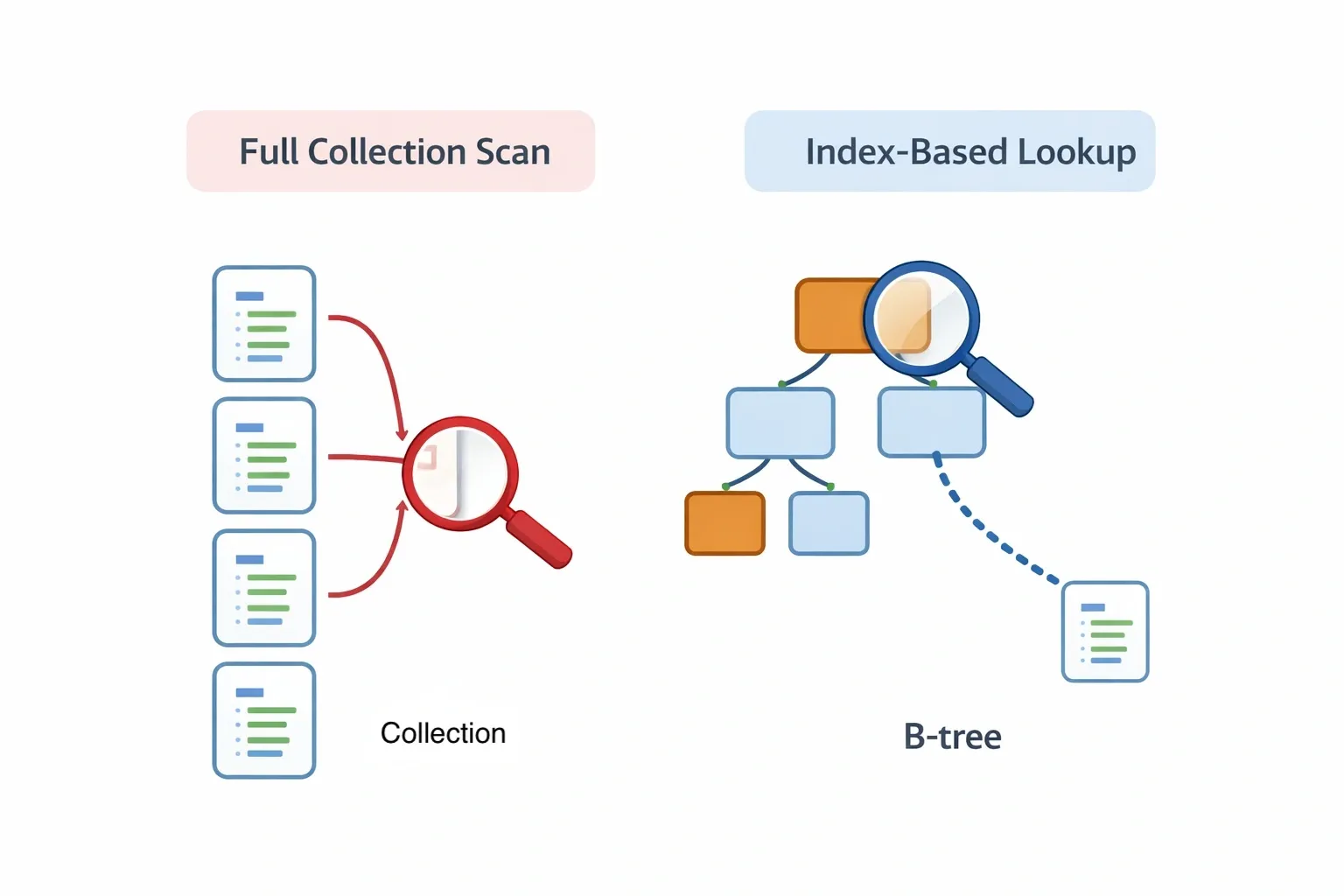
Without an index, MongoDB performs a collection scan - checking every document. With an index, it jumps directly to matching documents. Think of it like a book index versus reading every page.
Creating Indexes#
Text Search with Text Index#
Explain - Understand Query Performance#
Key fields to check in explain output:
COLLSCAN- no index used, bad for large collectionsIXSCAN- index used, efficientnReturned- documents returnedtotalDocsExamined- documents scanned
Indexing Best Practices#
- Index fields used in
find(),sort(), and$lookup - Compound indexes follow the ESR rule: Equality first, Sort next, Range last
- Too many indexes slow down writes
- Use
explain()to verify your index is being used - TTL indexes can auto-expire documents (useful for sessions, logs)
5. Schema Design and Data Modeling#
MongoDB is schema-flexible, but that doesn't mean you should design carelessly. The right schema design depends on your read/write patterns.
Embedding vs Referencing#
Embedding - store related data inside the same document
Referencing - store the related document's _id as a foreign key
When to Embed vs Reference#
| Scenario | Recommendation |
|---|---|
| Data always read together | Embed |
| Child data is small and bounded | Embed |
| Data grows unboundedly (e.g., comments) | Reference |
| Data is shared across many documents | Reference |
| Need to query child data independently | Reference |
Denormalization#
MongoDB often duplicates data intentionally (denormalization) to avoid expensive joins at read time. For example, storing a user's name alongside each order even though it also exists in the users collection - this way you never need a join to display order history.
Schema Design Principles#
- Design your schema around how your application queries data, not how the data naturally relates
- Avoid unbounded arrays inside documents (keep arrays small and finite)
- A document size limit of 16 MB applies in MongoDB
- Use
ObjectIdreferences when relationships are complex or data is large
6. Aggregation Framework Deep Dive#
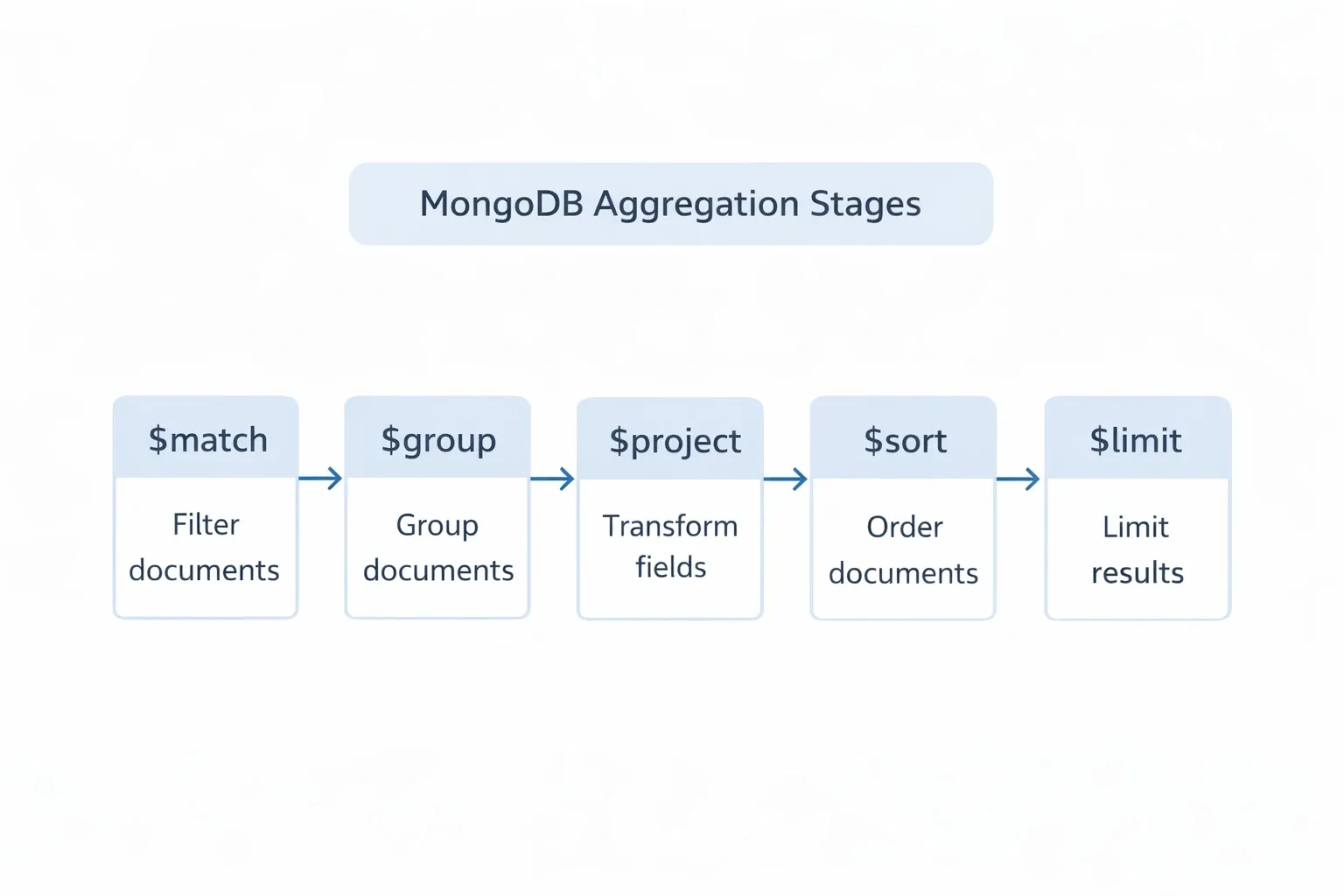
The aggregation pipeline processes documents through a series of stages, where each stage transforms the data. Think of it as a conveyor belt - documents go in, get filtered, grouped, reshaped, and come out the other end.
Basic Pipeline Syntax#
$match - Filter Documents#
Works like find(). Always put $match first to reduce documents early.
$group - Group and Aggregate#
Common $group accumulators:
| Accumulator | Purpose |
|---|---|
$sum | Total sum |
$avg | Average value |
$min | Minimum value |
$max | Maximum value |
$count | Count of documents |
$push | Collect values into array |
$first | First value in group |
$last | Last value in group |
$project - Reshape Documents#
$sort and $limit#
This pipeline finds the top 10 customers by total spending.
$unwind - Flatten Arrays#
$lookup - Join Collections#
7. Relationships and Joins in MongoDB#
MongoDB is not a relational database, but you can model and query relationships effectively.
One-to-One#
One-to-Many#
Many-to-Many#
Use an intermediary collection (like a junction table in SQL) or embed an array of references.
8. Transactions and Data Consistency#
By default, individual document operations in MongoDB are atomic. If you need to update multiple documents atomically, you need multi-document transactions (available from MongoDB 4.0+ with replica sets).
ACID in MongoDB#
| Property | MongoDB Support |
|---|---|
| Atomicity | Single document always; multi-doc via transactions |
| Consistency | Enforced via schema validation + transactions |
| Isolation | Snapshot isolation within transactions |
| Durability | Write concerns + journaling |
Multi-Document Transactions#
Key Points About Transactions#
- Transactions require a replica set or sharded cluster - they don't work on standalone instances
- Keep transactions short and fast to avoid lock contention
- Transactions have a default timeout of 60 seconds
- Use transactions only when you truly need multi-document atomicity; single-document operations are cheaper
9. MongoDB Atlas (Cloud Database)#
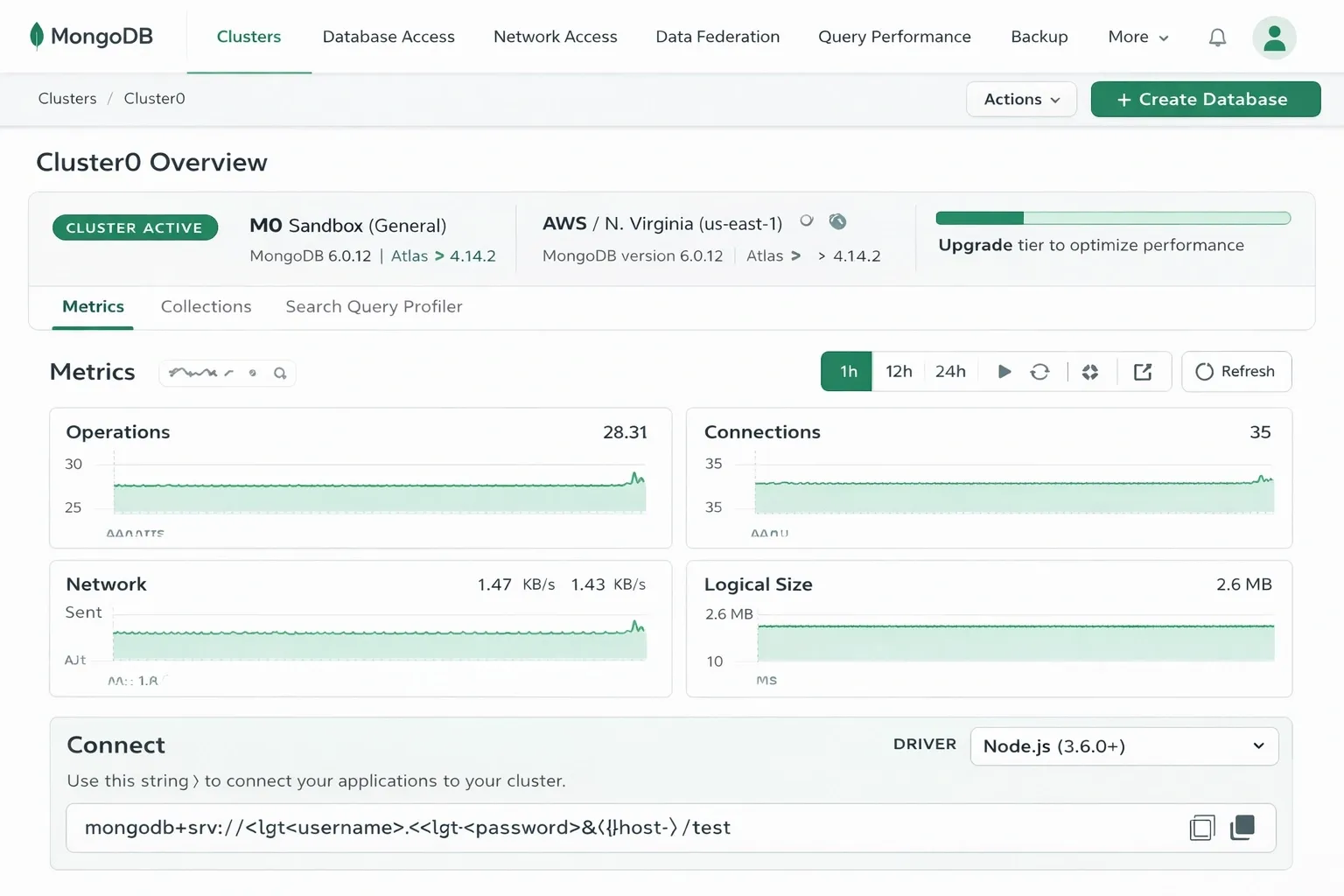
MongoDB Atlas is the fully managed cloud version of MongoDB. It handles provisioning, backups, scaling, and security for you.
Setting Up a Free Cluster#
- Go to cloud.mongodb.com and sign up
- Create a new project
- Build a cluster - choose M0 (free tier) for learning
- Create a database user with username and password
- Whitelist your IP address under Network Access
- Click Connect to get your connection string
Connection String Format#
Atlas Features Worth Knowing#
- Atlas Search - full-text search powered by Lucene
- Atlas Triggers - run serverless functions on database events
- Atlas Data API - access data over HTTP without a driver
- Backups - automated point-in-time backups
- Performance Advisor - suggests indexes based on slow queries
10. Security and Access Control#
Authentication#
MongoDB supports several authentication mechanisms:
- SCRAM (default) - username/password
- X.509 - certificate-based
- LDAP - enterprise only
- Kerberos - enterprise only
Built-in Roles#
| Role | Access Level |
|---|---|
read | Read all collections in a DB |
readWrite | Read and write to a DB |
dbAdmin | Admin tasks, no user management |
userAdmin | Manage users and roles |
clusterAdmin | Manage the entire cluster |
readAnyDatabase | Read across all databases |
root | Superuser - full access |
Creating a User#
Data Protection Best Practices#
- Always enable authentication (disabled by default in local dev)
- Use TLS/SSL for connections in production
- Enable encryption at rest (Atlas does this automatically)
- Never expose MongoDB port (27017) directly to the internet
- Rotate credentials regularly
- Use schema validation to prevent malformed data
11. Scaling and Performance Optimization#
Replication#
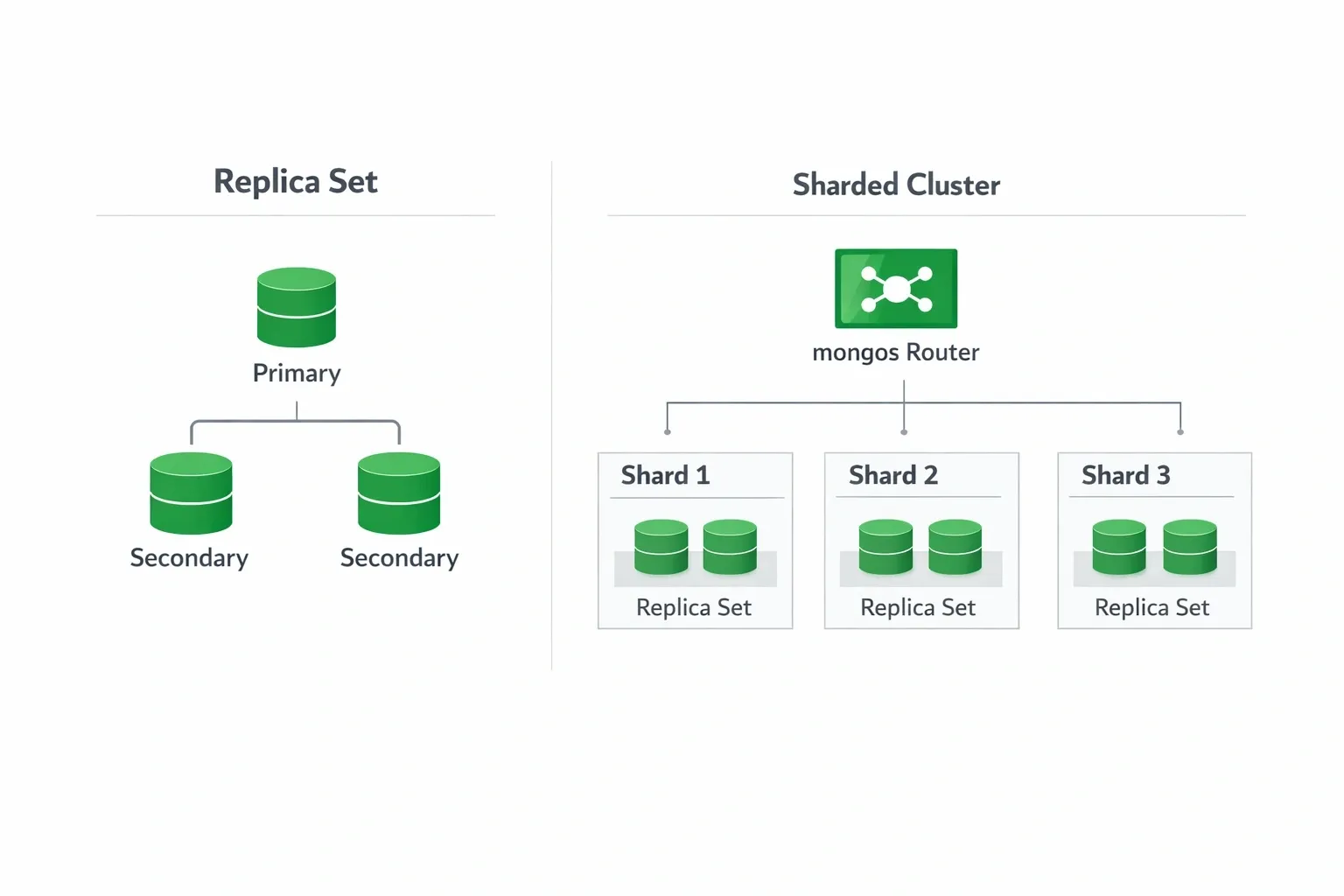
A replica set is a group of MongoDB instances that hold the same data. It provides high availability and data redundancy.
- Reads go to the primary by default; can be configured to read from secondaries
- If the primary goes down, an automatic election picks a new primary
- Minimum recommended: 3 nodes (1 primary + 2 secondaries)
- Write concern and read preference control consistency vs performance tradeoffs
Sharding#
Sharding distributes data horizontally across multiple machines. Use it when a single machine can no longer handle the data volume or throughput.
- Shard - a replica set holding a subset of data
- Mongos - the router that directs queries to the right shard
- Config Servers - store cluster metadata
- Shard Key - the field used to distribute data across shards
Choosing a good shard key:
- High cardinality (many unique values)
- Even distribution of reads and writes
- Avoid monotonically increasing fields like timestamps as the sole shard key (causes hotspots)
Query Optimization Checklist#
- Always use
explain("executionStats")to analyze slow queries - Ensure commonly queried fields are indexed
- Avoid using
$where(executes JavaScript - very slow) - Use projections to return only needed fields
- Avoid large
skip()values on big collections; use cursor-based pagination instead - Keep documents lean - don't store fields you never query
- Use covered queries (index covers all fields in query + projection - no document fetch needed)
Quick Reference Card#
Most Used Commands#
Operator Quick Reference#
| Category | Operators |
|---|---|
| Comparison | $eq $ne $gt $gte $lt $lte $in $nin |
| Logical | $and $or $not $nor |
| Update | $set $unset $inc $push $pull $addToSet $rename |
| Array | $elemMatch $size $all |
| Aggregation | $match $group $project $sort $limit $skip $lookup $unwind |
| Accumulators | $sum $avg $min $max $first $last $push $count |
Conclusion#
MongoDB offers a flexible and powerful approach to data modeling, making it an excellent choice for modern, scalable applications. With its document-based structure, rich query capabilities, and support for indexing, aggregation, and distributed systems, it enables developers to build high-performance backends with ease.
Mastering MongoDB is not just about learning queries, but understanding how to design schemas, optimize performance, and scale systems effectively. By applying the concepts in this guide, you can confidently use MongoDB in real-world applications and production environments.
If you found this helpful, consider sharing it with your friends and peers who are learning or working with MongoDB.
Want to Master Spring Boot and Land Your Dream Job?
Struggling with coding interviews? Learn Data Structures & Algorithms (DSA) with our expert-led course. Build strong problem-solving skills, write optimized code, and crack top tech interviews with ease
Learn more