Master Redis and Caching – A Practical Guide for Modern Backend Development
This Redis & Caching Cheatsheet explains how caching works and how Redis is used to build fast, scalable systems. It covers Redis fundamentals, core data structures, and commonly used commands while also exploring caching strategies, persistence, replication, and clustering. The guide is designed for backend engineers, students, and anyone who wants to learn Redis, with practical explanations and real-world system design use cases.

Shreyash Gurav
March 31, 2026
22 min read
Master Redis and Caching – A Practical Guide for Modern Backend Development
Caching is one of the most important techniques used to build high-performance and scalable systems. Instead of repeatedly querying slow databases, applications store frequently accessed data in a fast in-memory store like Redis, dramatically improving response time and reducing database load.
Redis has become one of the most widely used technologies in modern backend architectures because of its speed, simplicity, and powerful data structures. From session storage and API caching to rate limiting and real-time analytics, Redis plays a key role in handling large-scale traffic efficiently.
This guide explains the core concepts of caching and Redis, including caching strategies, Redis data structures, essential commands, eviction policies, and common production patterns used in scalable systems. Whether you're learning backend engineering or preparing for system design interviews, understanding Redis and caching is a must-have skill.
1. Caching Fundamentals#
What is Caching#
Caching is storing a copy of frequently accessed data in a faster storage layer so future requests can be served without going back to the original, slower source. The core idea is simple: if you already computed or fetched something expensive, save it temporarily so the next request gets it instantly.
Why Caching is Needed#
Every system eventually hits a wall where the database becomes the bottleneck. When thousands of users hit the same endpoint simultaneously, querying the database for every request is wasteful and slow. Caching solves this by absorbing repeated reads.
Problems caching directly addresses:
- Database latency: A typical PostgreSQL query takes 20-100ms. Redis responds in under 1ms. For read-heavy workloads, that difference is enormous.
- High traffic spikes: A viral post, a flash sale, a live event — these create sudden traffic bursts that databases struggle to handle. A cache absorbs the load.
- Repeated identical queries: Fetching the same product details, user profile, or config values thousands of times per second makes no sense. Cache it once, serve it many times.
Cache Hit vs Cache Miss#
- Cache hit: The requested data exists in the cache. Serve it directly. Fast, cheap, ideal.
- Cache miss: The data is not in the cache. Fall through to the database, fetch it, optionally store it in the cache for next time.
Hit rate is the key metric. A 95% hit rate means only 5% of requests touch the database. In high-traffic systems, even a 1% improvement in hit rate can significantly reduce database load.
Cache vs Database#
| Attribute | Cache (Redis) | Database (Postgres/MySQL) |
|---|---|---|
| Speed | Sub-millisecond | 10–100ms+ |
| Storage type | In-memory | Disk-based |
| Data size | Limited by RAM | Effectively unlimited |
| Durability | Optional | Strong by default |
| Query power | Key-based lookups | Full SQL queries |
| Use case | Repeated reads | Source of truth |
Where Caching is Used in Real Systems#
- User session data
- Product catalog and pricing
- Homepage feed or trending content
- Auth tokens and permissions
- Rate limit counters
- Search results
- Computed aggregations (dashboards, leaderboards)
2. Types of Caching#
Client-Side Caching#
The browser or mobile app stores responses locally. HTTP cache headers (Cache-Control, ETag, Expires) control this. Good for static assets, infrequently changing API responses.
Example: A user's browser caches a product image for 24 hours. No network request is made on repeated visits.
CDN Caching#
Content Delivery Networks cache content at edge locations geographically close to users. CDNs like Cloudflare, Fastly, and AWS CloudFront cache HTML pages, images, JS/CSS bundles.
Example: A news article cached at 200 edge locations globally. A user in Mumbai gets content from the nearest edge node, not from the origin server in the US.
Application-Level Caching#
The application server maintains a cache in-process (local memory) or via an external cache like Redis. This is where most backend engineering decisions happen.
Example: An Express.js or Django app caching database query results in Redis before returning them to the client.
Database Caching#
Databases have internal caches (buffer pools, query caches). MySQL's InnoDB buffer pool caches frequently accessed pages. This is mostly automatic and not directly controlled by application engineers.
Distributed Caching#
When you run multiple application servers, a single in-process cache does not work — each server has its own memory. A distributed cache like Redis sits outside all app servers as a shared cache that every server reads from and writes to.
Example: A fleet of 20 API servers all reading from the same Redis cluster. Consistent cache state across all nodes.
3. Introduction to Redis#
What Redis Is#
Redis (Remote Dictionary Server) is an open-source, in-memory data structure store. It functions as a cache, database, and message broker. Unlike a simple key-value store, Redis supports rich data structures: strings, hashes, lists, sets, sorted sets, streams, and more.
Created by Salvatore Sanfilippo in 2009, Redis became the default caching layer for production systems at companies like Twitter, GitHub, Stack Overflow, and Airbnb.
Why Redis Became the Industry Standard#
- Extremely fast: sub-millisecond response times at scale
- Simple mental model: keys map to values, values can be complex structures
- Atomic operations: counters, queues, leaderboards without race conditions
- Built-in expiration: TTLs make cache management straightforward
- Persistence options: optional durability for more than just ephemeral caching
- Cluster support: horizontal scaling built into the server
Redis vs Traditional Databases#
| Feature | Redis | Traditional RDBMS |
|---|---|---|
| Storage | In-memory (optional disk) | Disk-primary |
| Query model | Key-based | SQL with indexes |
| Speed | Sub-millisecond | 10–100ms |
| Schema | Schema-less | Structured schema |
| Joins | Not supported | Full join support |
| Persistence | Optional (RDB/AOF) | Always durable |
| Best for | Caching, real-time ops | Transactional data |
4. Why Redis is Fast#
Redis achieves exceptional performance through a combination of architectural decisions:
- In-memory storage: All data lives in RAM. No disk seeks, no I/O waits. RAM access is orders of magnitude faster than disk.
- Single-threaded event loop: Redis processes one command at a time using a non-blocking I/O event loop (similar to Node.js). No lock contention, no thread context switching.
- Efficient data structures: Redis data structures are carefully optimized in C. A sorted set uses a skip list + hash map combo for O(log N) operations.
- Minimal network overhead: Redis uses a simple text-based protocol (RESP). Commands are compact and parsed fast.
- No disk I/O on reads/writes: By default, reads and writes happen entirely in memory. Persistence writes (RDB/AOF) happen asynchronously and don't block command processing.
Redis Request Processing Model#
The entire cycle happens in microseconds. There is no thread pool, no connection thread per client — just a single loop handling all I/O via epoll/kqueue.
5. Redis Architecture#
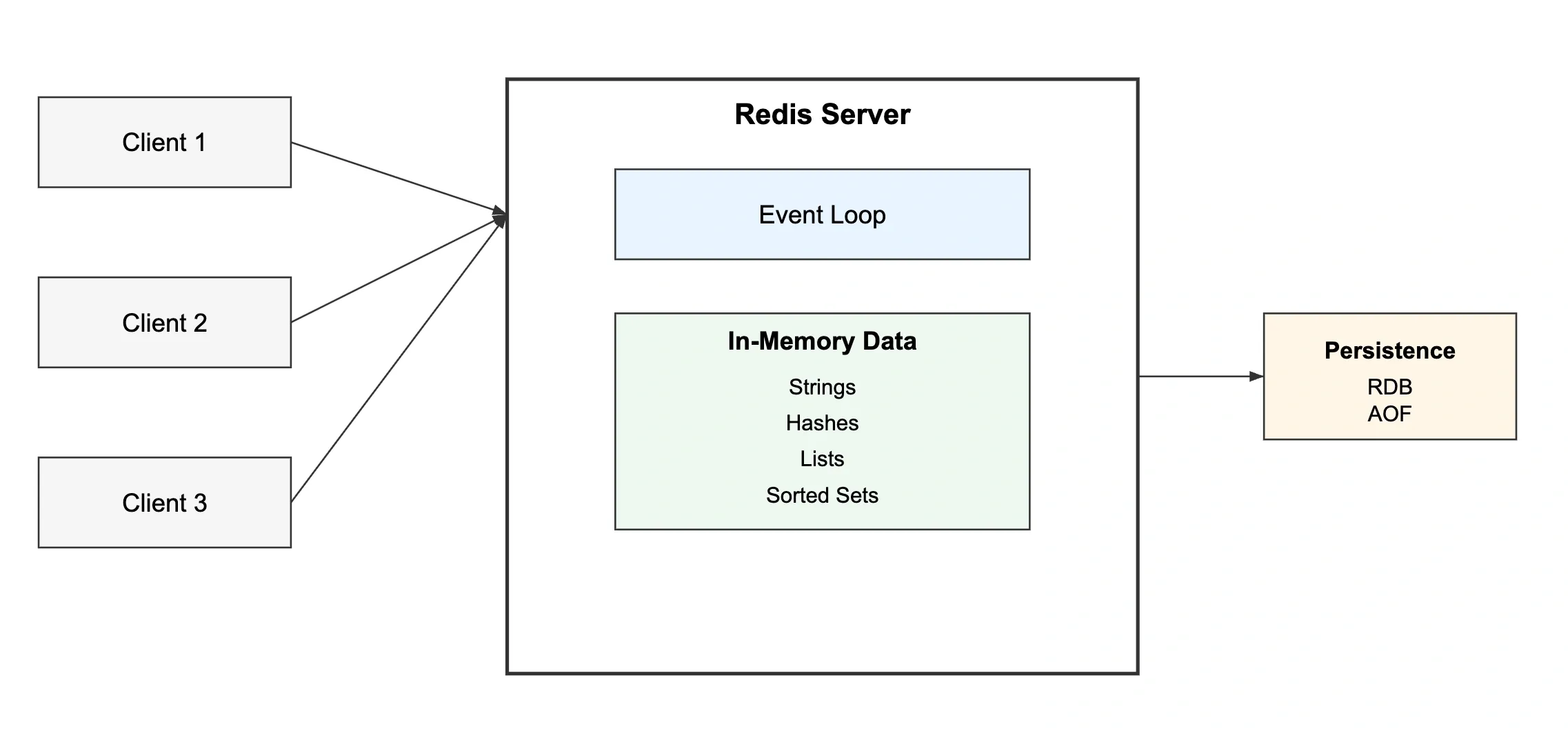
Core Components#
- Redis Server: The process that holds all data in memory and handles all commands
- Redis Client: Any application connecting over TCP (redis-cli, application libraries like ioredis, Jedis, redis-py)
- Event Loop: Single-threaded loop that handles all client connections, reads commands, executes them, sends responses
- In-memory store: The actual data — organized as a hash table of key-value pairs at the top level
- Persistence layer: Optional background processes writing RDB snapshots or AOF logs to disk
6. Redis Installation and Setup#
Installing Redis#
Running and Connecting#
Basic Configuration (redis.conf)#
7. Redis Key Concepts#
Keys and Values#
Every piece of data in Redis has a key (always a string) and a value (can be one of several data types). Keys are case-sensitive. There is no implicit hierarchy — namespacing is a naming convention only.
Key Naming Conventions#
Use colon-separated namespaces. This keeps keys readable and avoids collisions across different parts of your application.
TTL (Time to Live)#
Every key can have an expiration time. Once expired, Redis automatically deletes the key. This is how you prevent stale data from accumulating.
8. Redis Data Structures#
Strings#
The most basic type. Can hold text, numbers, serialized JSON, or binary data up to 512MB.
When to use: Session tokens, counters, simple cached values, feature flags.
Real-world example: Storing a serialized JSON object for a user profile. Fast reads, no joins needed.
Hashes#
A hash maps field names to values inside a single key. Think of it as a row in a database table — one key, multiple attributes.
When to use: Storing objects with multiple attributes. More memory-efficient than storing each field as a separate key.
Real-world example: User profile data where you need to update individual fields without rewriting the whole object.
Lists#
An ordered list of strings. Elements can be added or removed from both ends. Internally a linked list.
When to use: Task queues, recent activity feeds, message queues, job queues.
Real-world example: A background job queue. Workers LPOP from the list. Producers RPUSH new jobs.
Trade-off: LRANGE on large lists is O(N). Avoid storing unbounded lists without trimming via LTRIM.
Sets#
An unordered collection of unique strings. Duplicate inserts are silently ignored.
When to use: Tracking unique visitors, tags, relationships (followers/following), deduplication.
Real-world example: Storing user IDs who have seen a notification. SISMEMBER in O(1) to check if a user already saw it.
Sorted Sets#
Like sets, but every member has a score (floating point). Members are always sorted by score. Allows range queries by rank or score.
When to use: Leaderboards, priority queues, rate limiting sliding windows, time-series data indexed by timestamp.
Real-world example: A gaming leaderboard updated in real-time. ZREVRANGE gives you the top N players instantly.
Bitmaps#
Not a separate type — Bitmaps are strings where individual bits are addressed. Extremely memory-efficient for binary data at scale.
When to use: Tracking daily active users, feature flags per user ID, presence tracking.
Real-world example: 100 million users tracked for daily activity costs only 12MB in bitmap form.
HyperLogLog#
A probabilistic data structure for counting unique elements with very low memory usage. Trades a small error margin (~0.81%) for massive memory savings.
When to use: Counting unique visitors, unique search queries, approximate cardinality at scale.
Real-world example: Counting unique page views. Storing 1 billion unique IDs exactly would take gigabytes. HyperLogLog does it in 12KB.
Streams#
An append-only log data structure. Supports consumer groups for distributed message processing.
When to use: Event sourcing, message queues, activity logs, real-time data pipelines.
9. Core Redis Commands Reference#
String Commands#
Hash Commands#
List Commands#
Set Commands#
Sorted Set Commands#
10. Caching Strategies#
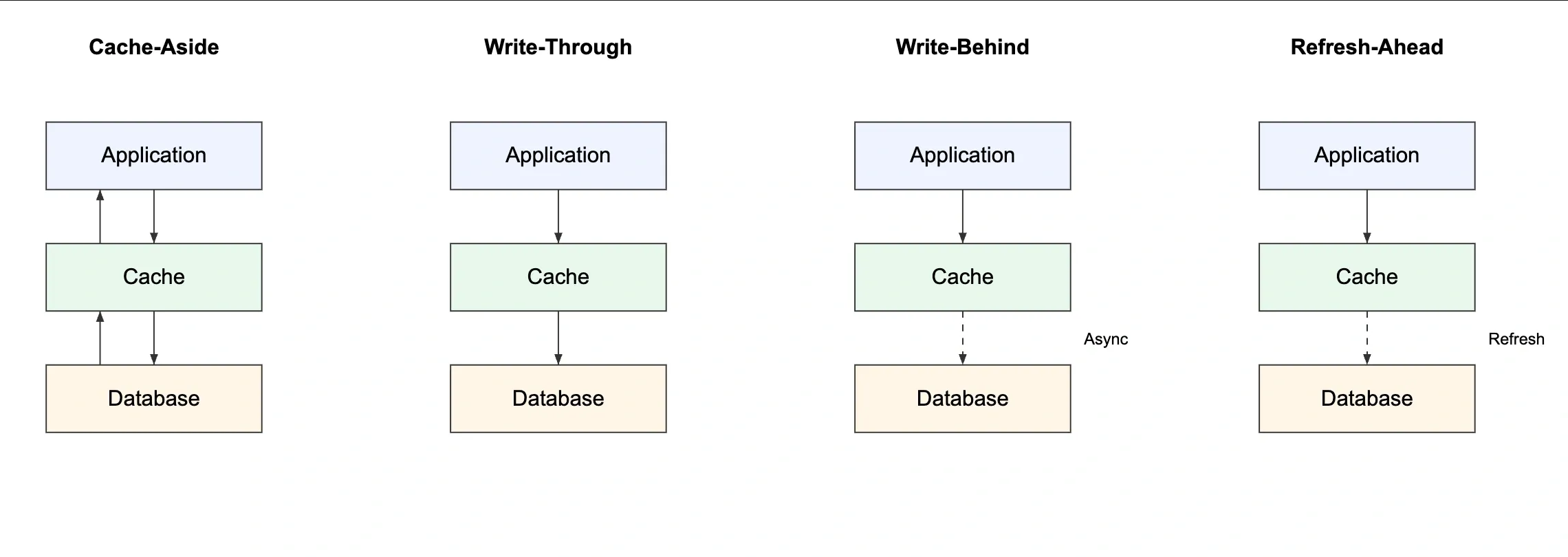
Cache Aside (Lazy Loading)#
The application manages the cache. On read, check cache first. On miss, fetch from DB and write to cache. On write, update the DB and invalidate or update the cache.
How it works:
- Read request comes in
- Check Redis — if hit, return data
- If miss, query database
- Write result to Redis with TTL
- Return data to client
When to use: Read-heavy workloads, data that can tolerate brief staleness, general-purpose caching.
Pros: Only caches what is actually requested, resilient to cache failures.
Cons: First request always misses (cache cold start), potential for stale data if DB updates don't invalidate cache.
Write Through#
On every write to the database, simultaneously write to the cache. Cache is always up to date.
How it works:
- Application writes data
- Write to Redis AND database in the same operation
- Reads always hit the cache
When to use: Data that is written and then immediately read back, systems where stale cache is unacceptable.
Pros: Cache is always fresh, no stale reads.
Cons: Every write hits both systems — higher write latency, cache fills with data that may never be read.
Write Behind (Write Back)#
Write to cache immediately. Write to database asynchronously (batched or delayed).
How it works:
- Application writes to Redis only
- Background worker flushes cache changes to DB periodically
When to use: Write-heavy workloads where write latency is critical (e.g., analytics counters, click tracking).
Pros: Very low write latency, write batching reduces DB load.
Cons: Risk of data loss if cache crashes before flush. Complex to implement correctly.
Refresh Ahead#
Cache proactively refreshes entries before they expire, based on predicted access patterns.
How it works: Before a key's TTL hits zero, a background job refetches and re-caches the value.
When to use: Predictable access patterns, content that must never go stale (e.g., homepage data, config values).
Pros: No cache misses for hot data.
Cons: Wastes resources refreshing data that might never be requested again.
11. Cache Eviction Policies#
When Redis reaches its maxmemory limit, it needs to evict keys. The policy controls which keys get removed.
| Policy | Behavior | When to use |
|---|---|---|
noeviction | Returns error when memory is full | When you must never lose data |
allkeys-lru | Evicts least recently used keys from all keys | General-purpose cache |
volatile-lru | Evicts LRU keys only among keys with TTL set | Mixed cache + persistent data |
allkeys-lfu | Evicts least frequently used keys | Skewed access patterns |
volatile-lfu | Evicts LFU keys only among keys with TTL | Similar to volatile-lru but frequency |
allkeys-random | Evicts random keys | Rarely useful |
volatile-ttl | Evicts keys with the shortest TTL first | When TTL reflects priority |
Production recommendation: allkeys-lru for pure caches. volatile-lru when Redis serves both cache and persistent storage roles.
12. Redis Persistence#
Redis is in-memory, but it offers two persistence mechanisms for durability.
RDB (Redis Database Snapshots)#
Periodic point-in-time snapshots of the entire dataset written to disk. Redis forks a child process to write the dump.
AOF (Append Only File)#
Logs every write command to a file. On restart, Redis replays the log to reconstruct state.
RDB vs AOF#
| Feature | RDB | AOF |
|---|---|---|
| Performance | Faster (periodic) | Slightly slower |
| Durability | Can lose minutes of data | Lose at most 1 second |
| File size | Compact binary | Larger, grows over time |
| Recovery speed | Fast (load binary snapshot) | Slower (replay commands) |
| Use case | Backups, fast restarts | Strong durability required |
Production recommendation: Use both. RDB for fast restarts and backups, AOF for durability.
13. Redis Replication#
Redis supports master-replica (formerly master-slave) replication. The replica receives a full copy of data from the master and then streams incremental updates.
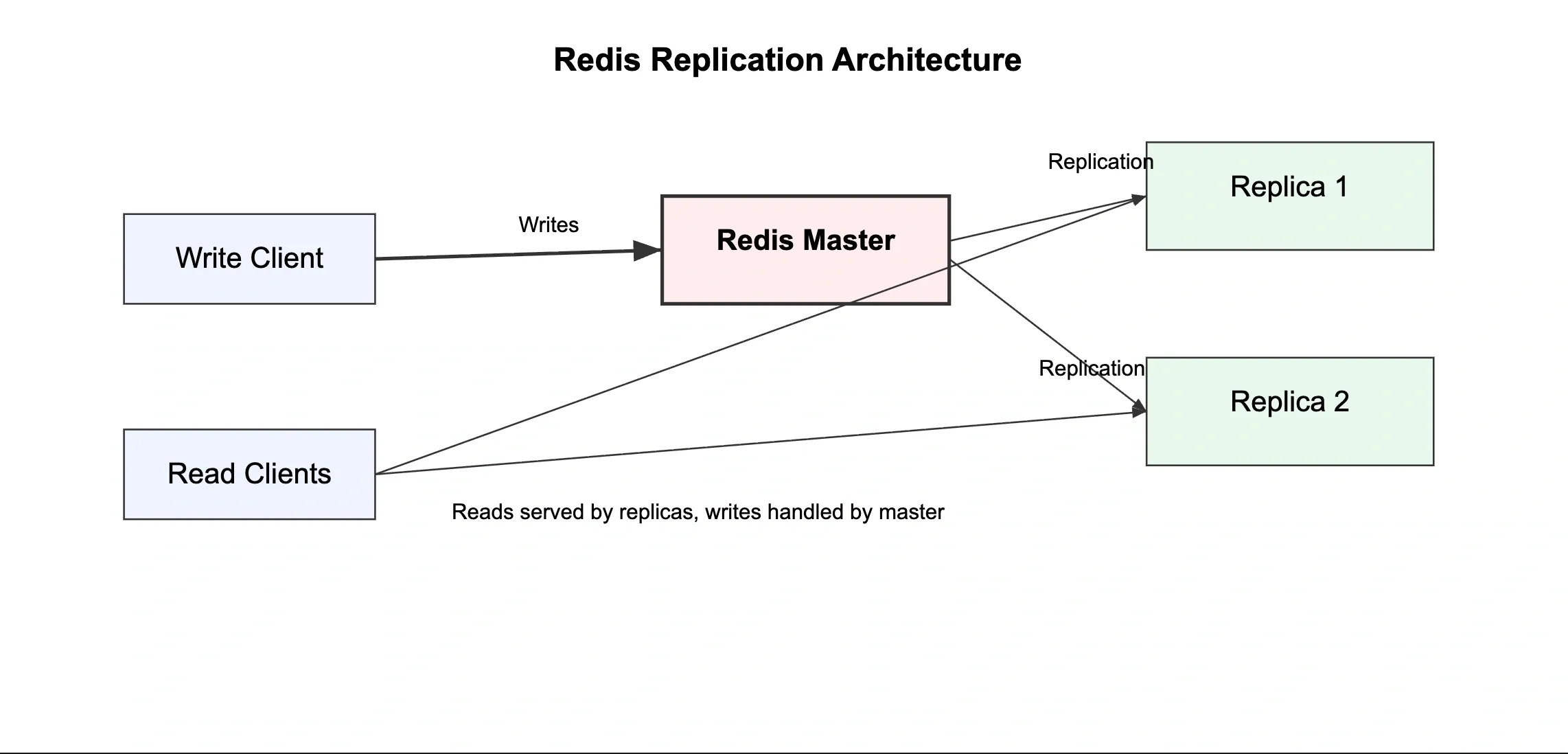
How Replication Works#
- Replica connects to master and sends
REPLICAOFcommand - Master sends full RDB snapshot to replica
- Replica loads snapshot, then receives and applies ongoing write commands
- Replicas serve read requests, master handles all writes
When to Use Replication#
- Scale read traffic across multiple replicas
- Provide a hot standby for failover
- Offload analytics queries to replicas
Important: Replication is asynchronous by default. A replica may lag slightly behind the master. For critical reads, always read from the master.
14. Redis Cluster#
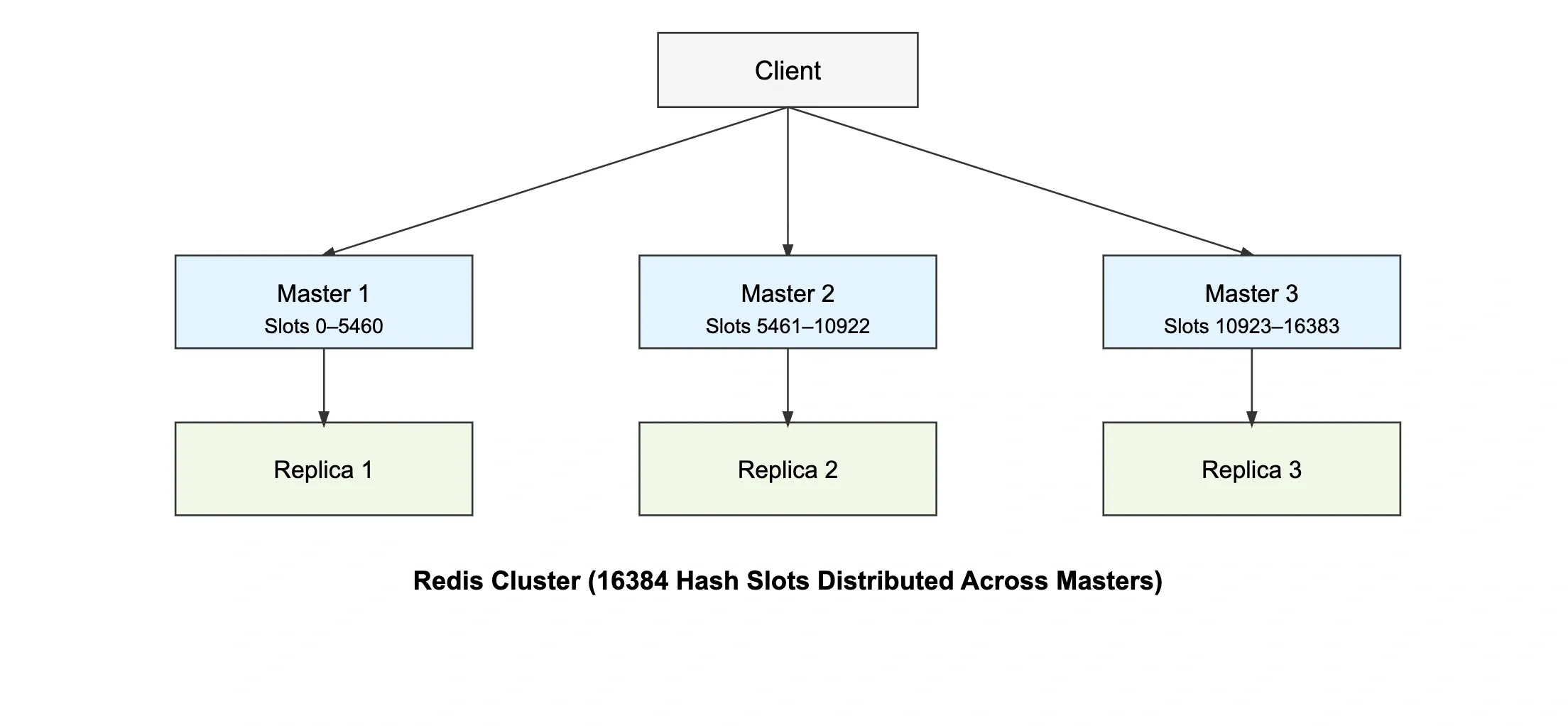
Redis Cluster provides horizontal scaling by sharding data across multiple nodes.
How It Works#
- Redis divides the key space into 16,384 hash slots
- Each master node owns a range of hash slots
- A key's slot is computed as:
CRC16(key) % 16384 - Clients are redirected to the correct node for each key
Key Considerations#
- Keys that need to go to the same slot use hash tags:
{user:100}:profileand{user:100}:settingsland on the same node - Multi-key commands (MGET, MSET) only work if all keys hash to the same slot
- Minimum recommended setup: 3 masters with 3 replicas for high availability
15. Redis Pub/Sub#
Redis Pub/Sub implements the publish-subscribe messaging pattern. Publishers send messages to channels. Subscribers receive all messages on channels they are subscribed to. No message persistence — if a subscriber is offline, it misses the message.
When to Use#
- Real-time notifications (in-app alerts, push triggers)
- Live dashboard updates
- Chat systems (with the understanding that messages are not persisted)
- Fanout events where multiple services need to react to the same event
When Not to Use#
Pub/Sub has no message persistence and no delivery guarantees. If your subscriber process restarts, messages sent while it was down are lost. For reliable messaging, use Redis Streams instead.
16. Redis Streams#
Redis Streams is a persistent, append-only log. Unlike Pub/Sub, messages are stored and can be replayed. Supports consumer groups for distributed processing.
When to Use#
- Event-driven architectures where events need to be replayed or reprocessed
- Background job queues with at-least-once delivery
- Activity feeds, audit logs, order pipelines
- Multiple consumers processing the same stream independently
17. Rate Limiting with Redis#
Redis is the standard tool for implementing rate limiting due to its atomic operations and TTL support.
Fixed Window#
Simplest approach. Count requests per user per time window.
Trade-off: Allows burst at window boundary. A user could make 100 requests at 11:59 and 100 at 12:00 — 200 requests in 2 seconds.
Sliding Window (with Sorted Sets)#
More accurate. Track exact timestamps of requests using a sorted set.
Token Bucket with Lua Script#
For production, use Lua scripts for atomic token bucket logic. This prevents race conditions between check and increment.
18. Redis in System Design#
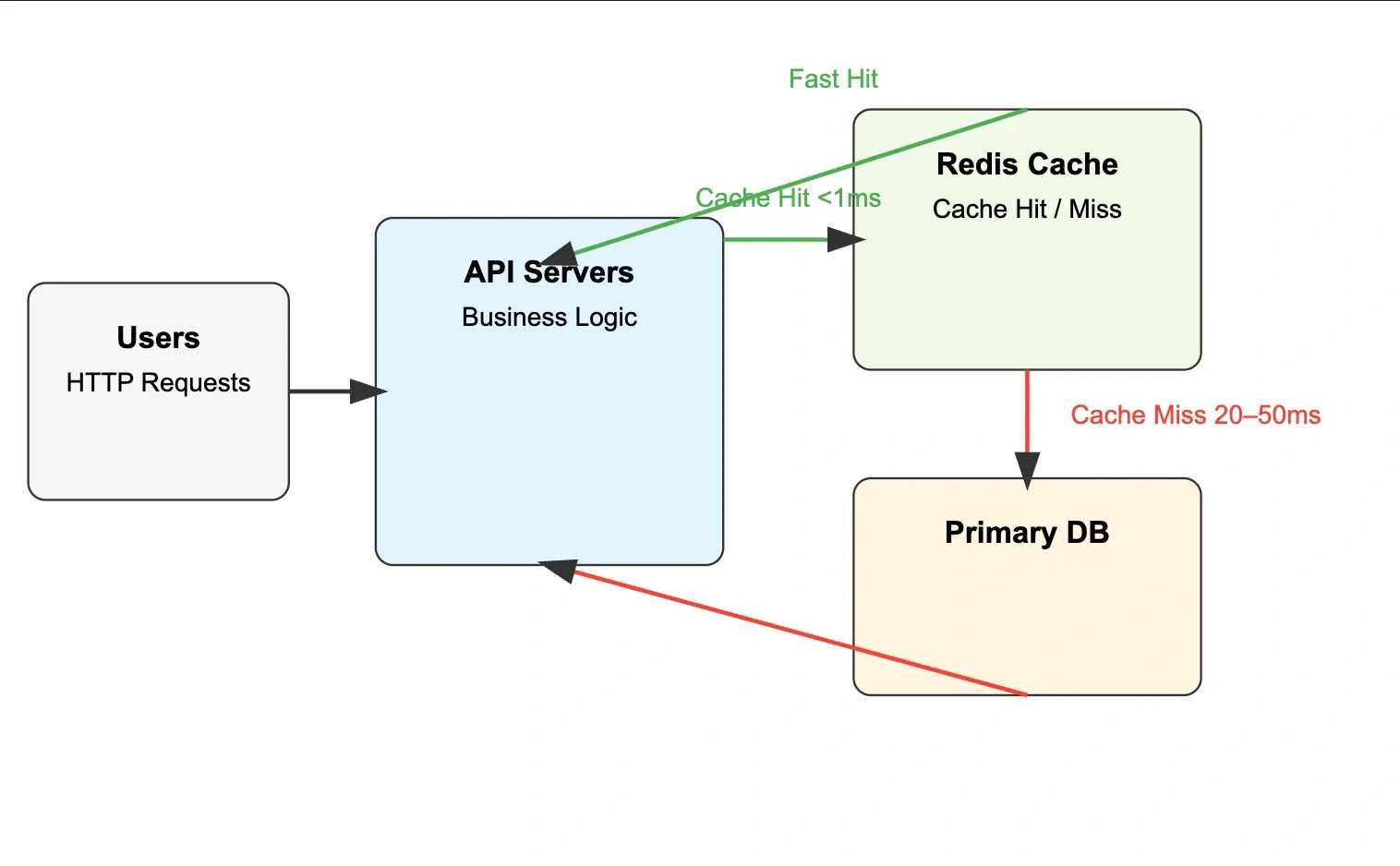
Typical Caching Architecture#
Latency Impact#
| Layer | Typical Latency |
|---|---|
| Redis (in-region) | 0.1–1ms |
| Same-region DB | 10–50ms |
| Cross-region DB | 50–200ms |
With a 90% cache hit rate, average response time drops from 30ms to 3ms — a 10x improvement.
Database Load Reduction#
If 95% of reads are served from cache, the database handles 5% of the original traffic. This extends database capacity, reduces costs, and improves write throughput since fewer reads compete for DB connections.
19. Real-World Redis Use Cases#
Session Storage#
Store authenticated user sessions in Redis with a TTL matching session timeout. Much faster than database session lookups on every request.
Leaderboards#
Sorted sets are purpose-built for this. Scores update atomically. Range queries return top-N players in O(log N + M).
Shopping Cart#
Store cart items as a hash per user. Fast reads, partial updates without rewriting the full cart.
Real-Time Analytics#
Count events atomically. Bitmaps for unique users. HyperLogLog for approximate counts at scale.
API Rate Limiting#
As described in section 16 — Redis is the standard tool across the industry.
Message Queues#
Lists as simple queues. BLPOP for blocking consumers.
20. Common Cache Problems#
Cache Stampede (Thundering Herd)#
What happens: A popular cache key expires. Hundreds of concurrent requests all miss at the same time, all query the database simultaneously, all try to write to Redis simultaneously.
Real-world scenario: A trending product page expires at midnight. 10,000 users simultaneously trigger database queries.
Mitigation:
- Mutex/lock: Only one request fetches from DB. Others wait for the cache to be populated.
- Probabilistic early expiration: Start refreshing before TTL expires using a small random chance as TTL approaches zero.
- Background refresh: An async worker refreshes hot keys before they expire.
Cache Penetration#
What happens: Requests for data that doesn't exist in the database or cache keep bypassing the cache and hitting the database. Common in scraping or malicious traffic patterns.
Real-world scenario: Attacker queries user:0, user:-1, user:999999999 — none exist in DB, cache never populates, database gets hammered.
Mitigation:
- Cache null results with a short TTL:
SET user:0 "NULL" EX 60 - Bloom filter: Maintain a probabilistic set of valid keys. Reject requests for keys not in the filter before they reach the cache or database.
Cache Avalanche#
What happens: A large number of cache keys expire at the same time. All traffic suddenly hits the database simultaneously.
Real-world scenario: You preloaded 10,000 product cache entries at startup with the same 1-hour TTL. At exactly T+1 hour, all 10,000 keys expire simultaneously.
Mitigation:
- Jitter on TTL: Add a random offset to expiration times:
EX = base_ttl + random(0, 300)— entries expire spread over a window, not all at once. - Persistent hot keys: Never expire the most critical cache entries, refresh them via background jobs.
- Circuit breaker: If database error rate spikes, temporarily serve stale cache data.
21. Redis vs Memcached#
| Feature | Redis | Memcached |
|---|---|---|
| Data structures | Strings, hashes, lists, sets, sorted sets, streams | Strings only |
| Persistence | Yes (RDB + AOF) | No |
| Clustering | Built-in cluster mode | Client-side sharding only |
| Pub/Sub | Yes | No |
| Lua scripting | Yes | No |
| Multi-threading | Single-threaded (I/O) | Multi-threaded |
| Memory efficiency | Slightly higher overhead | Very lean |
| Replication | Built-in | Not native |
| Transactions | Yes (MULTI/EXEC) | No |
| Best for | Caching + queues + leaderboards + sessions | Simple high-throughput string cache |
When to choose Memcached: You only need simple string caching, you need raw multi-threaded throughput, and you have no need for persistence, pub/sub, or complex data structures. In practice, most teams choose Redis because its additional capabilities rarely come with a meaningful cost.
22. Redis Best Practices#
Key Design#
- Always namespace keys using a predictable format like
service:entity:id - Keep keys short but descriptive — long keys waste memory
- Avoid spaces and special characters in key names
- Document key patterns just like database schemas
Examples:
Good key design prevents collisions and makes debugging production systems easier.
TTL Discipline#
- Always set a TTL for cached data when possible
- Avoid storing temporary cache entries without expiration
- Add small randomness to TTL values to prevent mass expiration
Example:
Adding slight TTL variation helps avoid cache avalanche situations.
Avoid Large Values#
Large values increase memory usage and network overhead.
Instead of storing one huge object:
Split the data logically:
This improves partial updates and reduces serialization overhead.
Monitor Redis#
Always monitor Redis in production.
Important metrics include:
- Memory usage
- Cache hit rate
- Evicted keys
- Connected clients
- Command latency
Useful commands:
Monitoring helps detect memory pressure, slow commands, and traffic spikes.
Avoid Blocking Commands#
Some commands can block the Redis server if the dataset is large.
Avoid:
Prefer incremental scanning:
These iterate through data gradually without blocking the server.
Quick Reference#
| Topic | Key Idea | Important Commands / Concepts | Use Case |
|---|---|---|---|
| Caching | Store frequently accessed data in fast storage | Cache hit, cache miss | Reduce DB load |
| Redis | In-memory key-value data store | Sub-ms latency, RAM storage | High-performance backend systems |
| Strings | Basic key-value storage | SET, GET, INCR | Counters, sessions |
| Hashes | Store objects with fields | HSET, HGET, HGETALL | User profiles |
| Lists | Ordered collection | LPUSH, RPUSH, LPOP | Queues, feeds |
| Sets | Unique unordered values | SADD, SMEMBERS | Tags, unique users |
| Sorted Sets | Ordered by score | ZADD, ZRANGE | Leaderboards |
| TTL | Auto-expire keys | EXPIRE, TTL | Temporary cache |
| Caching Strategies | Ways to manage cache | Cache-Aside, Write-Through | Performance optimization |
| Eviction | Remove keys when memory is full | LRU, LFU | Memory management |
| Persistence | Save Redis data to disk | RDB, AOF | Durability |
| Replication | Copy data to replicas | Master–Replica | High availability |
| Cluster | Horizontal scaling | Hash slots (0–16384) | Large distributed systems |
| Pub/Sub | Real-time messaging | PUBLISH, SUBSCRIBE | Notifications |
| Streams | Persistent event log | XADD, XREAD | Event processing |
| Common Issues | Cache pitfalls | Stampede, Penetration | Production reliability |
Conclusion#
Redis is one of the most powerful tools used in modern backend systems to improve performance and scalability. By storing frequently accessed data in memory, it significantly reduces database load and improves application response times. Beyond simple caching, Redis provides rich data structures that enable features like leaderboards, rate limiting, queues, and real-time analytics.
Understanding caching strategies, eviction policies, and common cache failure scenarios is essential to use Redis effectively in production systems. When designed correctly, Redis can handle massive traffic spikes while keeping systems stable and responsive.
Mastering Redis and caching concepts is a valuable skill for backend engineers and is frequently tested in system design interviews as well as used heavily in real-world distributed systems.
If you found this cheatsheet useful, consider sharing it with your friends or colleagues who are learning backend development or preparing for system design interviews.
Want to Master Spring Boot and Land Your Dream Job?
Struggling with coding interviews? Learn Data Structures & Algorithms (DSA) with our expert-led course. Build strong problem-solving skills, write optimized code, and crack top tech interviews with ease
Learn more