Core Java in One Shot: The Ultimate Core Java Cheat Sheet
A simple and structured revision guide covering all the essential Core Java concepts in one place. From OOP principles, collections, exception handling, multithreading, and file handling to JVM basics — this cheat sheet helps you quickly revise what truly matters.

Shreyash Gurav
March 02, 2026
34 min read
Core Java in One Shot – The Ultimate Cheat Sheet
Java remains one of the most powerful and widely-used programming languages in the enterprise world. Whether you are preparing for an interview, revisiting concepts, or learning it for the first time, having a structured cheat sheet can save you hours of sifting through documentation. This guide provides a fast, practical reference to the most important Core Java concepts, combining essential theory with code examples you can use immediately.
1. Java Introduction#
History of Java#
Java was created by James Gosling and his team at Sun Microsystems in the early 1990s. Originally named "Oak," it was designed for interactive television, but the project was ahead of its time. The team pivoted, and in 1995, Java 1.0 was officially released. Its timing coincided perfectly with the explosive growth of the World Wide Web, as Java's ability to run small programs (applets) in browsers made web pages dynamic for the first time. Sun Microsystems was later acquired by Oracle Corporation in 2010, which now maintains and develops the language.
Features of Java#
Java's enduring popularity stems from its robust design principles. It was built from the ground up to be reliable, secure, and portable.
- Platform Independent: Java code does not run directly on the operating system. It compiles to an intermediate form called bytecode, which runs on a virtual machine.
- Object-Oriented: Java embraces the object-oriented paradigm, allowing developers to model real-world entities using classes and objects. Everything except the primitive data types is an object.
- Robust: The language is designed for reliability. It has strong memory management, a strict type system, and comprehensive exception handling to catch and manage errors.
- Secure: Java runs inside a virtual machine sandbox, which isolates it from the underlying system. It also lacks explicit pointers, preventing unauthorized memory access.
- Multithreaded: Java has built-in support for concurrent programming, allowing developers to write applications that can perform multiple tasks simultaneously, improving performance and responsiveness.
WORA (Write Once, Run Anywhere)#
This is the cornerstone philosophy of Java. When you write and compile Java code, it generates bytecode (.class files). This bytecode is not specific to any one operating system. To run it on a particular machine, you need a Java Virtual Machine (JVM) built for that specific operating system (Windows, Linux, macOS). The JVM acts as an intermediary, interpreting the bytecode into native machine code. This means you can compile your code on a Windows machine and run it without changes on a Linux server, provided a JVM is installed there.
JDK, JRE, JVM#
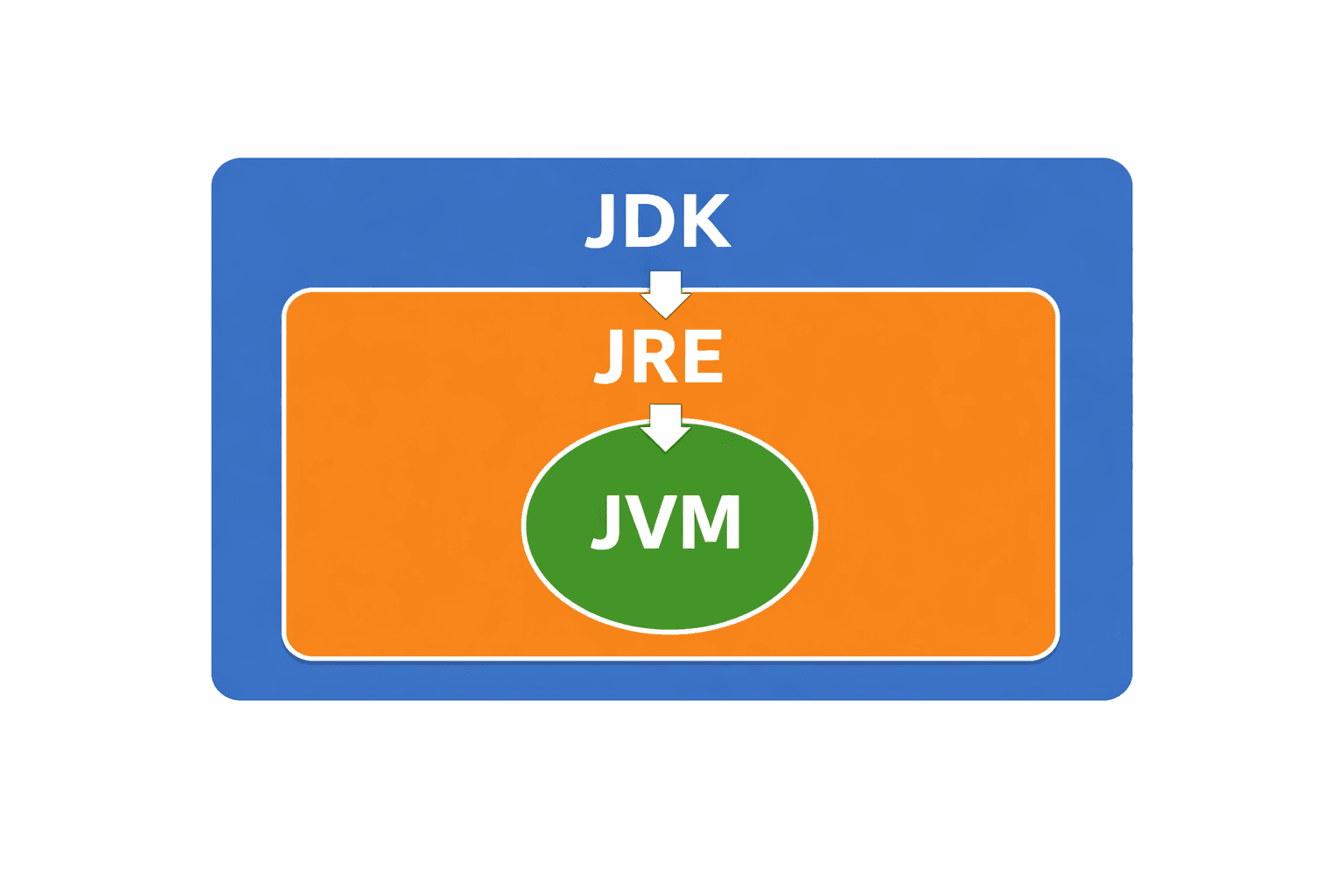
Understanding the Java ecosystem starts with these three acronyms. They are nested layers of the Java platform.
| Component | Full Form | What it Contains | Purpose |
|---|---|---|---|
| JVM | Java Virtual Machine | Runtime engine, Interpreter, JIT Compiler | Executes the bytecode. It is the runtime environment's heart. |
| JRE | Java Runtime Environment | JVM + Java standard libraries | Provides the libraries and JVM needed to run Java applications. It is for end-users. |
| JDK | Java Development Kit | JRE + Development Tools (javac, jar, javadoc) | Provides everything needed to develop and run Java applications. It is for developers. |
Java Program Structure#
Every Java application has a defined structure. The JVM looks for a specific entry point to start execution.
2. Java Fundamentals#
Data Types#
Java is a statically-typed language, meaning every variable must have a declared type. Data types are divided into two categories.
| Category | Type | Size/Range | Description | Example |
|---|---|---|---|---|
| Primitive | byte | 1 byte (-128 to 127) | Useful for saving memory in large arrays. | byte b = 100; |
short | 2 bytes (-32,768 to 32,767) | Rarely used, mainly for specific memory constraints. | short s = 10000; | |
int | 4 bytes | The default integer type. | int i = 100000; | |
long | 8 bytes | Used when a wider range than int is needed. Suffix with L. | long l = 100000L; | |
float | 4 bytes (single precision) | For fractional numbers, less precise than double. Suffix with f. | float f = 5.75f; | |
double | 8 bytes (double precision) | The default floating-point type. | double d = 19.99; | |
char | 2 bytes (Unicode) | Stores a single character, using single quotes. | char c = 'A'; | |
boolean | JVM dependent (True / False) | Represents logical true/false values. | boolean flag = true; | |
| Non-Primitive | String, Arrays, Classes, Interfaces, etc. | Varies | These are reference types that refer to objects stored in heap memory. | String str = "Hello"; |
Variables#
Variables are containers for storing data values. In Java, every variable has a type, a name, and a scope.
Types of Variables:
- Local Variable: Declared inside a method, constructor, or block. It is created when the method is called and destroyed when it exits. It must be initialized before use.
- Instance Variable (Non-static): Declared inside a class but outside any method. It belongs to a specific instance (object) of the class.
- Static Variable (Class Variable): Declared with the
statickeyword. There is only one copy of this variable, shared by all objects of the class.
Operators#
Operators are special symbols that perform specific operations on one, two, or three operands and return a result.
- Arithmetic:
+(addition),-(subtraction),*(multiplication),/(division),%(modulo/remainder) - Relational:
==(equal to),!=(not equal to),>(greater than),<(less than),>=(greater than or equal to),<=(less than or equal to). They return a boolean result. - Logical:
&&(logical AND),||(logical OR),!(logical NOT). Used to combine conditional statements. - Assignment:
=(assign),+=(add and assign),-=(subtract and assign),*=(multiply and assign),/=(divide and assign) - Unary:
++(increment by 1),-(decrement by 1),!(logical complement) - Ternary: A shorthand for an if-then-else statement.
variable = (condition) ? expressionIfTrue : expressionIfFalse;
Type Casting#
Type casting is converting a value from one data type to another. Java supports two types of casting.
Widening (Implicit/Automatic): Converting a smaller type to a larger type. This is safe and happens automatically because there is no risk of data loss.
Narrowing (Explicit/Manual): Converting a larger type to a smaller type. This can lead to data loss and must be done manually by placing the target type in parentheses.
Input / Output (Scanner)#
For basic user input from the console, the Scanner class (from java.util package) is the standard tool.
3. Control Flow#
Control flow statements determine the order in which code is executed, allowing for decision-making and repetition.
if / else#
The most basic form of decision-making. The code inside a block executes only if the specified boolean condition is true.
switch#
The switch statement is useful for selecting one of many code blocks to execute based on the value of a sin gle variable (which can be int, char, String, or enum). It is often more readable than a long chain of if-else if statements.
Loops#
Loops are used to execute a block of code repeatedly.
for loop: Best used when the number of iterations is known beforehand.
Enhanced for-each loop: A simplified syntax for iterating over arrays and collections. You don't have access to the index.
while loop: Best used when the number of iterations is unknown, and the loop continues as long as a condition is true. The condition is checked before the loop body executes.
do-while loop: Similar to a while loop, but the condition is checked after the loop body executes. This guarantees that the loop body will run at least once.
break / continue#
These statements are used to alter the normal flow of a loop.
- break: Immediately terminates the innermost loop or
switchstatement. - continue: Skips the remaining code in the current iteration and jumps to the next iteration of the loop.
4. Methods#
Methods are reusable blocks of code that perform a specific task. They are fundamental to structured and modular programming.
Method Declaration#
A method declaration provides all the information needed to call the method.
Parameters and Return Types#
- Parameters: The variables listed in the method declaration inside the parentheses. They act as placeholders for the data the method will receive (
aandbin the example). - Arguments: The actual values passed to the method when it is called (e.g.,
addNumbers(5, 3)passes5and3as arguments). - Return Type: The data type of the value the method returns. If a method does not return a value, its return type must be declared as
void.
Method Overloading#
Method overloading allows a class to have multiple methods with the same name, as long as their parameter lists are different (different number, type, or order of parameters). This is a form of compile-time polymorphism.
Recursion#
Recursion occurs when a method calls itself. Every recursive method must have a base condition that stops the recursion; otherwise, it will lead to a StackOverflowError. It is often used for problems that can be broken down into smaller, similar sub-problems, like traversing tree structures or calculating factorials.
5. Object Oriented Programming (OOP)#
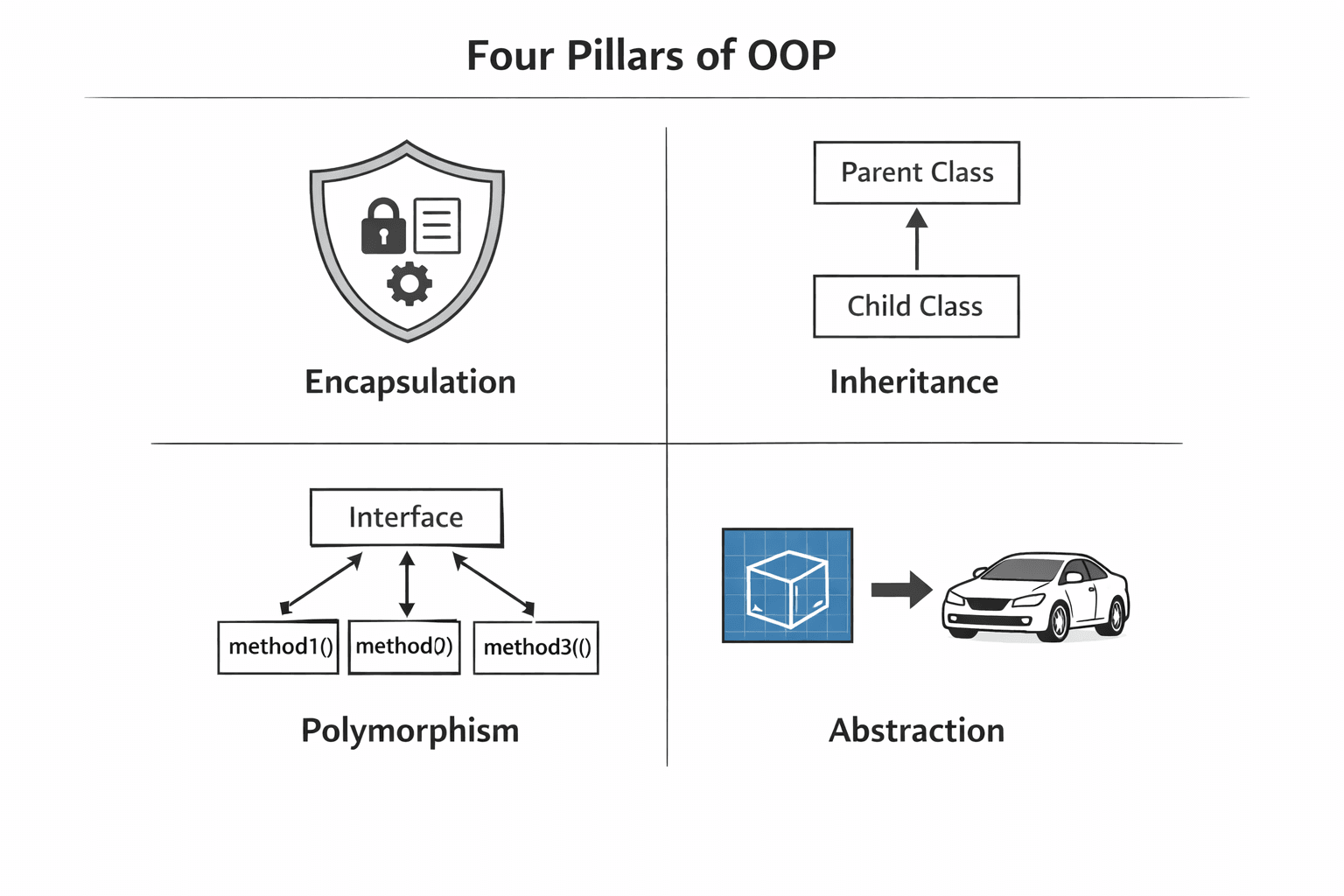
OOP is a programming paradigm based on the concept of "objects," which contain data (fields) and code (methods). Java is fundamentally built around these four pillars.
Class and Object#
- Class: A class is a blueprint or template from which individual objects are created. It defines the state (variables) and behavior (methods) that the objects of the class will have.
- Object: An object is an instance of a class. When you create an object, you allocate memory to hold its state, as defined by its class.
Constructors#
A constructor is a special method that is automatically called when an object is instantiated using the new keyword. It is used to initialize the new object's state. Constructors have the same name as the class and no return type.
this Keyword#
Inside a class, the this keyword is a reference to the current object. It is most commonly used to distinguish between instance variables and parameters with the same name.
Encapsulation#
Encapsulation is the mechanism of wrapping data (variables) and code acting on the data (methods) together as a single unit. It also involves hiding the internal state of an object from the outside world and providing controlled access through public methods (getters and setters). This protects data from unauthorized access and modification.
Inheritance#
Inheritance is a mechanism where one class (child/subclass) acquires the properties and methods of another class (parent/superclass). It represents an "is-a" relationship. In Java, inheritance is achieved using the extends keyword. A class can only extend one parent class.
Polymorphism#
Polymorphism means "many forms." It allows objects of different classes to be treated as objects of a common superclass, and the correct method for that specific object is called at runtime. This is achieved through method overriding.
Method Overriding#
Method overriding occurs when a subclass provides a specific implementation of a method that is already defined in its superclass. This is how runtime polymorphism is achieved. The method in the child class must have the same name, return type, and parameters as the parent method. It's good practice to use the @Override annotation.
Abstraction#
Abstraction is the concept of hiding complex implementation details and showing only the essential features of an object. It helps in managing complexity by focusing on what an object does rather than how it does it. In Java, abstraction is achieved through abstract classes and interfaces.
Abstract Classes#
An abstract class is a class that cannot be instantiated. It may contain abstract methods (methods without a body) and concrete methods (with a body). It serves as a partial blueprint for its subclasses, forcing them to implement the abstract methods.
Interfaces#
An interface is a completely abstract blueprint of a class. It only declares methods (and sometimes constants) but provides no implementation. A class can implement multiple interfaces, providing a way to achieve multiple inheritance in Java. Since Java 8, interfaces can also have default and static methods with implementations.
6. Arrays#
Arrays are fundamental data structures that store a fixed-size sequential collection of elements of the same type.
One-Dimensional Arrays#
An array is declared with its type, followed by square brackets. Memory is allocated using the new keyword, and the size is fixed at creation.
Multi-Dimensional Arrays#
Multi-dimensional arrays are arrays of arrays. The most common is the two-dimensional array, which can be visualized as a table with rows and columns.
Array Traversal#
To access each element of an array, you typically use a loop.
Sorting and Searching#
The java.util.Arrays class provides useful utility methods for working with arrays.
7. Strings#
String Class#
In Java, String is not a primitive type but a class (java.lang.String). It represents a sequence of characters. String objects are created either using literals or the new keyword.
String Immutability#
Once a String object is created, its value cannot be changed. Any operation that appears to modify a string, such as concat() or toUpperCase(), actually creates and returns a new String object. The original string remains unchanged. This immutability is crucial for security, caching (String Pool), and thread-safety.
Important String Methods#
StringBuilder vs StringBuffer#
For scenarios where you need to perform many modifications (append, insert, delete) to a character sequence, using String would be inefficient due to the constant creation of new objects. StringBuilder and StringBuffer are mutable alternatives.
| Feature | StringBuffer | StringBuilder |
|---|---|---|
| Thread-Safety | Synchronized, meaning it is thread-safe for use in multi-threaded environments. | Not synchronized, meaning it is not thread-safe. |
| Performance | Slower due to the overhead of synchronization. | Faster, as it has no synchronization overhead. |
| Use Case | Use when you need to modify strings from multiple threads concurrently. | Use in single-threaded scenarios or where thread-safety is handled externally. This is the most common choice. |
8. Exception Handling#
Exception handling is a mechanism to handle runtime errors, allowing the normal flow of the application to continue. An exception is an event that disrupts the normal execution of a program.
try / catch / finally#
This is the primary block for handling exceptions.
- try: Contains the code that might throw an exception.
- catch: Handles the exception. You can have multiple catch blocks for different exception types.
- finally: (Optional) Contains code that will always execute, regardless of whether an exception occurred or not. It is typically used for cleanup activities like closing files or database connections.
throw and throws#
throw: This keyword is used to explicitly throw a single exception from a method or a block of code. You can throw a newly created exception or one that was just caught.
throws: This keyword is used in a method signature to declare that the method might throw one or more exceptions. It informs the caller that they need to handle these exceptions.
Custom Exceptions#
While Java provides many built-in exceptions, you can create your own for application-specific error conditions. You create a class that extends Exception (to create a checked exception) or RuntimeException (to create an unchecked exception).
9. Collections Framework#
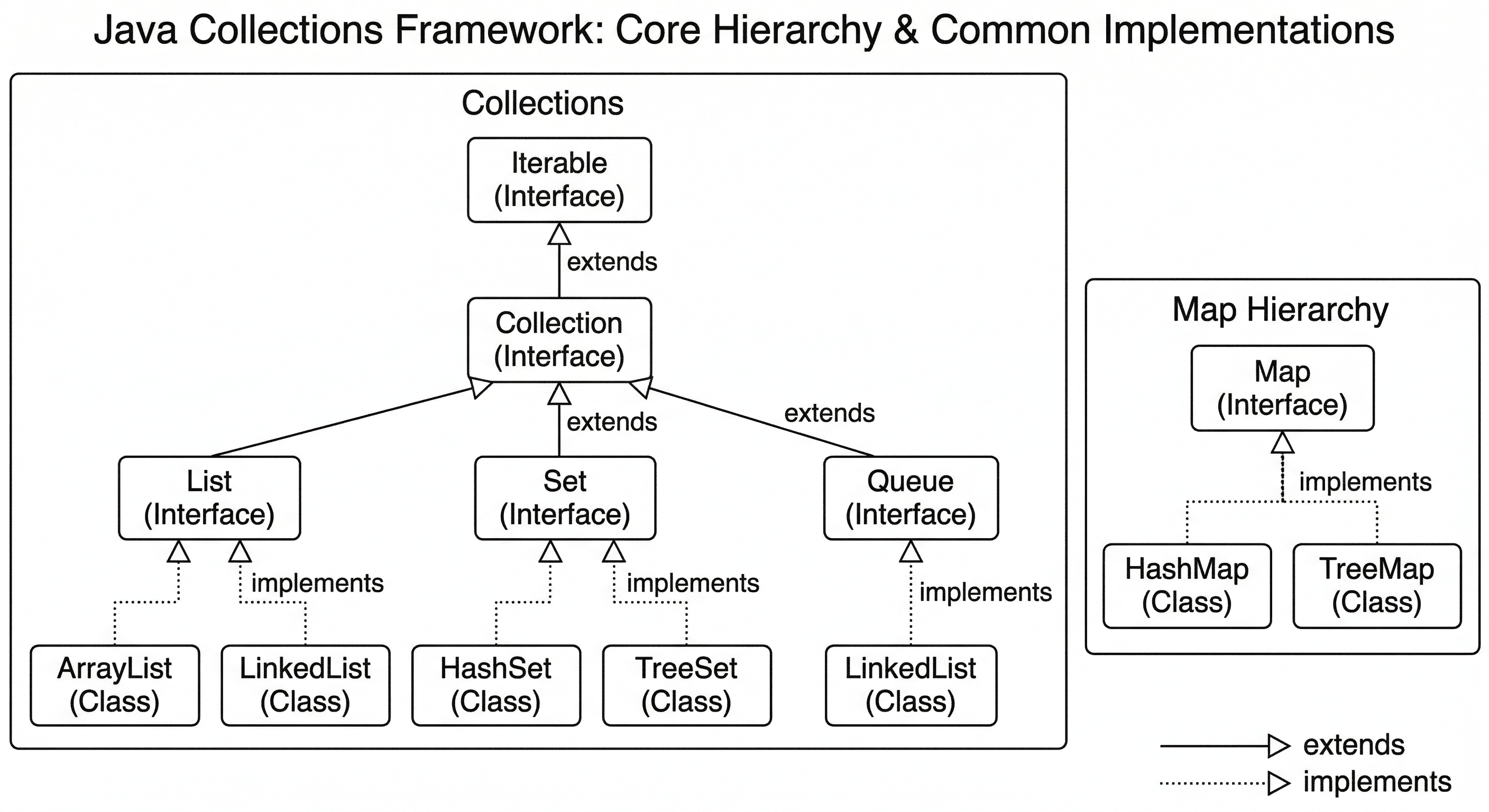
The Collections Framework provides a well-designed set of interfaces and classes for storing and processing groups of data as a single unit. It replaces arrays with more flexible and powerful data structures.
List (Ordered, Allows Duplicates)#
A List is an ordered collection (also known as a sequence). The user has precise control over where in the list each element is inserted and can access them by their integer index. Lists can contain duplicate elements.
- ArrayList: A resizable-array implementation. It offers fast random access (
O(1)) but is slower for inserting or deleting elements in the middle (O(n)) as it may require shifting elements. - LinkedList: A doubly-linked list implementation. It offers better performance for inserting and deleting elements in the middle (
O(1)for some operations) but is slower for random access (O(n)). It can also be used as a queue or deque.
Set (Unordered or Sorted, No Duplicates)#
A Set is a collection that cannot contain duplicate elements. It models the mathematical set abstraction.
- HashSet: Uses a hash table for storage. It offers constant-time performance (
O(1)) for basic operations like add, remove, and contains, but it makes no guarantees about the order of elements. - LinkedHashSet: Extends
HashSetand maintains a doubly-linked list of its entries. This ensures that the iteration order is predictable—the order in which elements were inserted. - TreeSet: Implements the
SortedSetinterface using a tree structure (red-black tree). It stores elements in a sorted (ascending) order. Its operations are slower (O(log n)) thanHashSetbut guarantee sorted order.
Map (Key-Value Pairs)#
A Map is an object that maps keys to values. It cannot contain duplicate keys; each key can map to at most one value.
- HashMap: Implements the
Mapinterface using a hash table. It offers constant-time performance forgetandput. It does not guarantee the order of its entries. - LinkedHashMap: Extends
HashMapand maintains a doubly-linked list of its entries, ensuring predictable iteration order—usually the order in which keys were inserted. - TreeMap: Implements the
SortedMapinterface. It stores its entries in a sorted order based on the keys (natural ordering or a provided comparator). Its operations areO(log n).
Iterator#
An Iterator is an object that enables you to traverse through a collection and to remove elements selectively during the traversal. It provides a uniform way to access elements of any Collection.
Comparable vs Comparator#
Both interfaces are used to define the order of objects, especially for sorting.
| Feature | Comparable | Comparator |
|---|---|---|
| Purpose | Defines the natural ordering of objects. For example, Integer's natural order is numeric ascending. | Defines a custom ordering. For example, sorting Person objects by name length or age. |
| Package | java.lang | java.util |
| Method | int compareTo(T o) | int compare(T o1, T o2) |
| Class Modification | Requires the class whose objects are being compared to implement Comparable. | A separate class or lambda expression implements Comparator. The original class remains unchanged. |
| Sorting Method | Collections.sort(list) | Collections.sort(list, comparator) |
10. File Handling#
File handling in Java is done through classes in the java.io package. It involves reading data from and writing data to files.
File Class#
The File class is an abstract representation of file and directory pathnames. It is used to get information about a file (like existence, size, permissions) but not for reading/writing the file content itself.
FileReader / FileWriter#
These classes are used for reading and writing character files (text files). They handle the conversion between bytes and characters using the platform's default character encoding.
BufferedReader / BufferedWriter#
For better performance, especially when dealing with large files or reading line by line, it is highly recommended to wrap FileReader and FileWriter with BufferedReader and BufferedWriter. These classes use an internal buffer to reduce the number of direct read/write operations to the underlying file system.
Serialization#
Serialization is the process of converting an object into a byte stream, which can then be saved to a file, sent over a network, or stored in a database. Deserialization is the reverse process. For a class to be serializable, it must implement the Serializable marker interface (an interface with no methods).
11. Multithreading#
Multithreading is a Java feature that allows concurrent execution of two or more parts of a program to maximize CPU utilization. Each part is called a thread.
Creating Threads#
There are two primary ways to create a thread in Java.
Extending the Thread Class: Create a subclass of Thread and override its run() method. Then, create an instance of this subclass and call its start() method.
Implementing the Runnable Interface (Preferred): Create a class that implements the Runnable interface and its run() method. Then, pass an instance of this class to a Thread object's constructor and call start(). This is preferred because Java supports single inheritance, so implementing Runnable allows your class to extend another class if needed.
Thread Lifecycle#
A thread can be in one of several states during its lifetime.
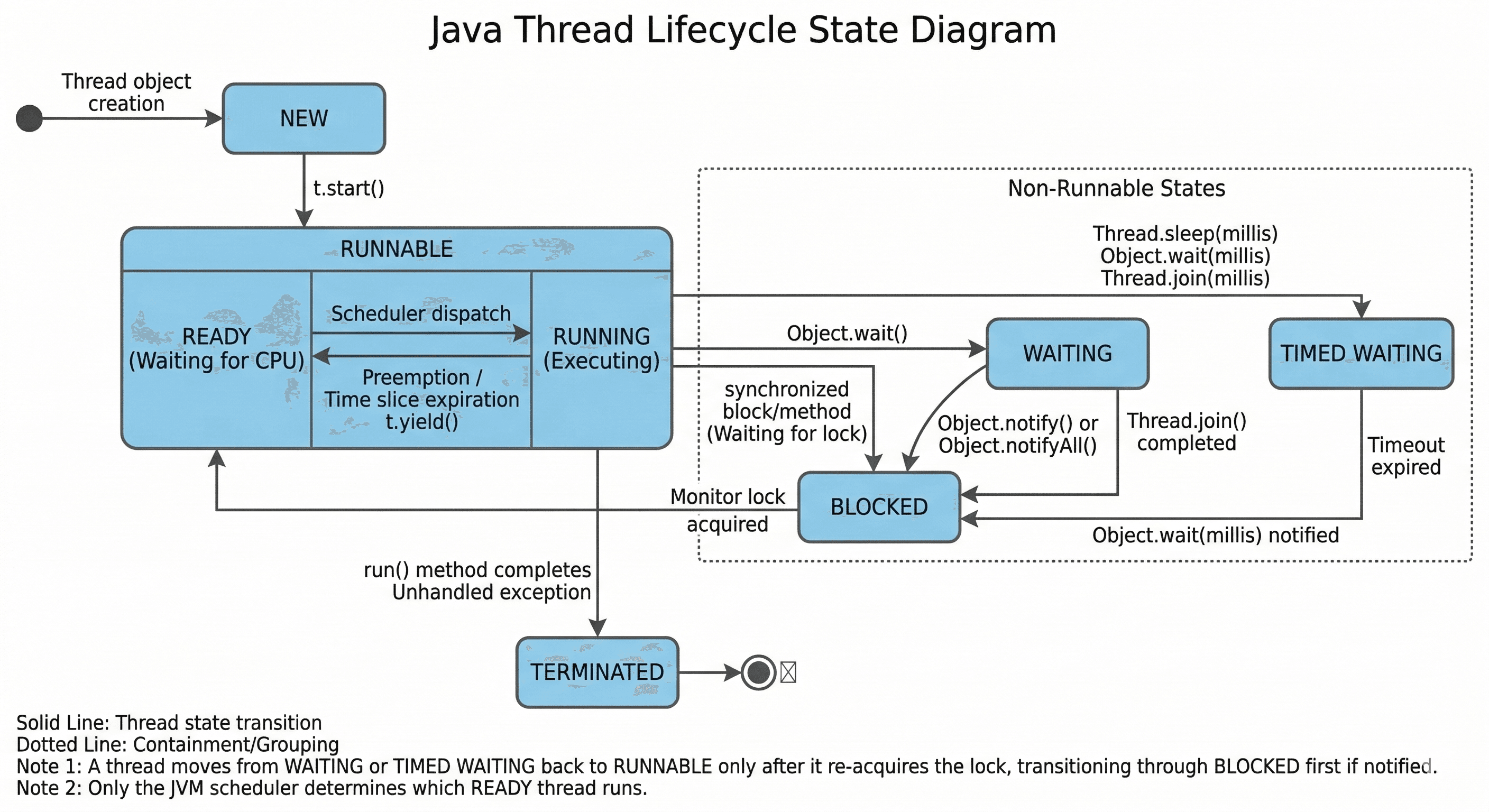
- New: A thread is created but not yet started (
new Thread()). - Runnable: After calling
start(), the thread is ready to run and waiting for CPU time. - Blocked/Waiting: The thread is alive but not eligible to run. It is waiting for a monitor lock (blocked) or for another thread to perform an action (waiting).
- Timed Waiting: A version of waiting with a specified waiting time (e.g.,
Thread.sleep(1000),wait(5000)). - Terminated: The thread's
run()method has completed, and it is no longer alive.
Synchronization#
When multiple threads access shared resources (like an object's variable), it can lead to data inconsistency. Synchronization is the mechanism that ensures that only one thread can access the resource at a time. This is achieved using the synchronized keyword.
Executor Framework#
Introduced in Java 5, the Executor Framework provides a higher-level replacement for working with threads directly. It manages a pool of threads, handles their lifecycle, and allows you to submit tasks for asynchronous execution. This is more efficient and manageable than creating new threads for every task.
12. Java 8 Features#
Java 8 was a landmark release, introducing significant features that brought functional programming concepts to the language.
Lambda Expressions#
A lambda expression is a short block of code that takes in parameters and returns a value. It provides a clear and concise way to represent an instance of a functional interface. It enables you to treat functionality as a method argument.
Functional Interfaces#
A functional interface is an interface that has exactly one abstract method. They can have multiple default or static methods, but only one abstract method. Lambda expressions rely on these interfaces. Common examples include Runnable, Callable, Comparator, and those in the java.util.function package like Predicate, Function, and Consumer. The @FunctionalInterface annotation is used to declare an interface as functional.
Streams API#
The Stream API is used to process collections of objects. A stream is a sequence of objects that supports various methods which can be pipelined to produce the desired result. The key idea is to perform operations on data in a declarative way, similar to SQL queries. Streams do not store data; they operate on the source data structure (like a collection) and may also produce a result.
Method References#
Method references are shorthand for lambda expressions when you are simply calling an existing method. They make the code even more concise. They use the :: operator.
- Static Method:
ClassName::staticMethodName(e.g.,Math::max) - Instance Method of a particular object:
instance::instanceMethodName(e.g.,list::add) - Instance Method of an arbitrary object of a particular type:
ClassName::instanceMethodName(e.g.,String::toUpperCaseused in the Streams example) - Constructor:
ClassName::new
Optional#
Optional is a container object used to represent a value that may or may not be present. It helps in avoiding NullPointerException by forcing the programmer to think about and handle the case of a missing value. Instead of returning null, a method can return an Optional.
Date and Time API (java.time)#
The new Date and Time API (JSR 310) in java.time package is a massive improvement over the old, flawed java.util.Date and java.util.Calendar. The new classes are immutable and thread-safe.
13. JVM Internals#
Understanding the internals of the JVM helps in writing better-performing code and debugging issues like memory leaks and performance bottlenecks.
ClassLoader#
The ClassLoader is a part of the JVM that loads .class files from the file system, network, or other sources into memory. It works on three core principles: delegation, visibility, and uniqueness. The main class loaders are:
- Bootstrap ClassLoader: The root class loader. It loads core Java API classes from the
core Java modulesand other core jars present in theJAVA_HOME/jre/libdirectory. - Extension ClassLoader: It loads classes from the
jre/lib/extdirectory or any other directory specified by thejava.ext.dirssystem property. - System/Application ClassLoader: It loads classes from the application classpath, which includes your project's classes and any JAR files you have included.
Heap vs Stack#
Memory in the JVM is divided into several areas, with the two most important being the Heap and the Stack.
| Feature | Stack | Heap |
|---|---|---|
| What it stores | Primitive local variables, object references (pointers), and method calls (stack frames). | All objects and their instance variables. |
| Memory Type | Memory per thread. Each thread has its own private stack. | Memory shared across all threads of an application. |
| Access Speed | Fast access (LIFO structure). | Slower access compared to the stack. |
| Lifecycle | A stack frame is created when a method is called and destroyed when the method completes. | Objects live until they are no longer referenced and are garbage collected. |
| Size & Error | Size is typically fixed per thread. A deep recursion can cause StackOverflowError. | Size can grow. If the heap is full, you may get OutOfMemoryError. |
Garbage Collection (GC)#
Garbage Collection is the automatic process of identifying and discarding objects that are no longer needed by a program (objects with no live references) to reclaim memory. This frees the developer from manual memory management.
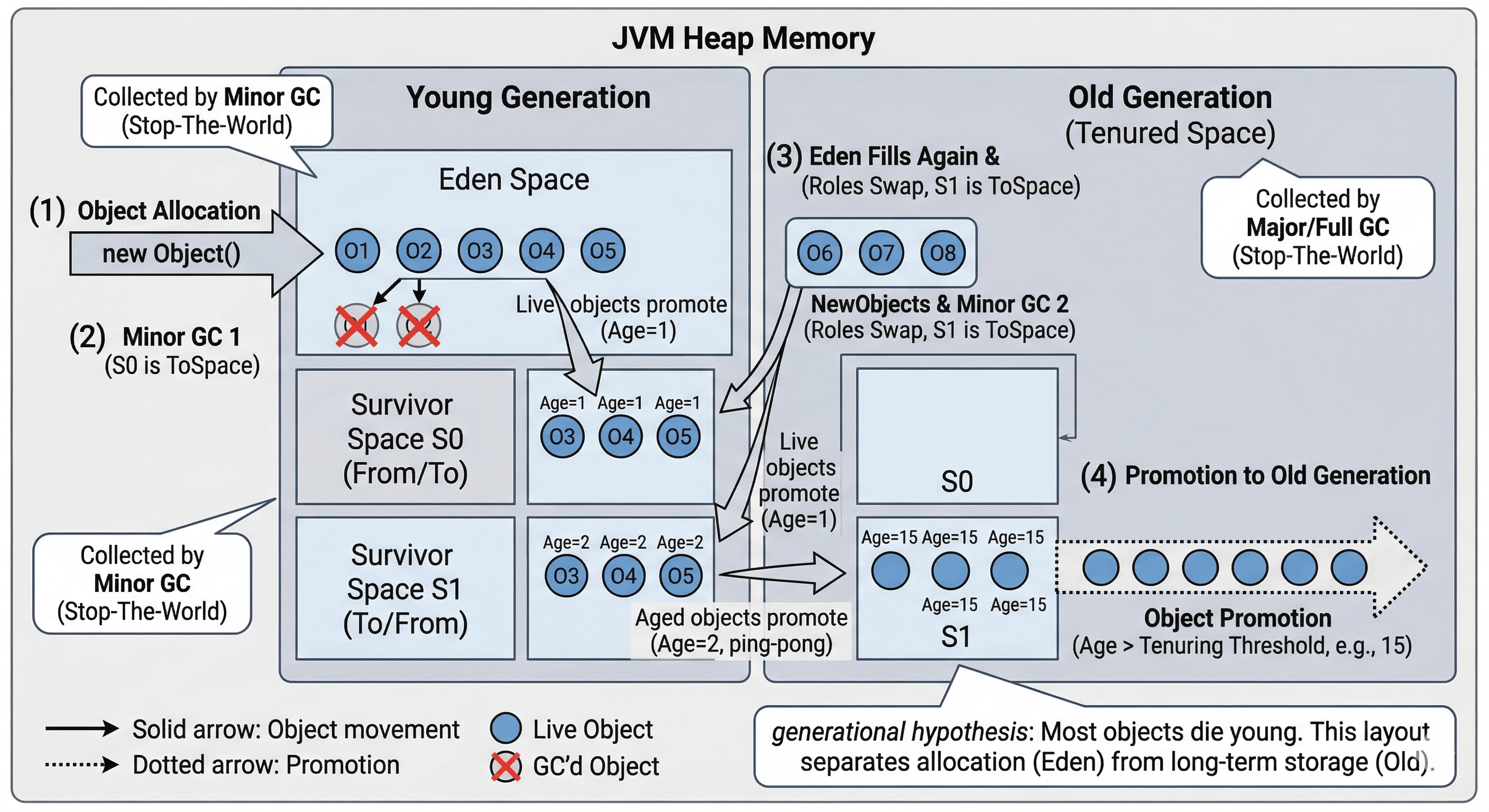
- How it works (basic idea): GC roots (like local variables, static variables) are identified. The garbage collector then traverses all references from these roots. Any objects reachable from a root are marked as "live." The rest are considered garbage.
- Generational GC: Most JVMs use a generational approach because it has been observed that most objects die young. The heap is divided into generations:
- Young Generation: Where new objects are allocated. GC here (Minor GC) is fast and frequent.
- Old Generation: Objects that have survived several GC cycles in the young generation are promoted here. GC here (Major/Full GC) is slower and less frequent.
- Metaspace (replacing PermGen): Stores class metadata.
JIT (Just-In-Time) Compiler#
The JVM initially interprets the bytecode, which can be slow. To improve performance, the JIT compiler comes into play. It monitors the code being executed and identifies "hot spots"—sections of code that are run very frequently. The JIT compiler then compiles these hot spots into native machine code. This native code is cached and executed directly by the processor, bypassing the interpreter, leading to massive performance gains. This is why a Java program can become faster as it runs.
Conclusion#
This Core Java cheat sheet provides a structured overview of the most important concepts every Java developer should understand. From the fundamentals of the language and object-oriented programming to collections, multithreading, and JVM internals, it serves as a quick reference for both beginners and experienced developers. Use it to quickly revise key topics and strengthen your Java foundation. If you found this cheat sheet helpful, consider sharing it with your friends or fellow developers who might benefit from it as well.
Want to Master Spring Boot and Land Your Dream Job?
Struggling with coding interviews? Learn Data Structures & Algorithms (DSA) with our expert-led course. Build strong problem-solving skills, write optimized code, and crack top tech interviews with ease
Learn more