
High Level Design Made Simple – A Complete System Design Cheatsheet
A quick and well-structured guide to High Level Design, covering essential concepts, real-world patterns, and key trade-offs to help you design scalable, reliable systems with confidence.

Shreyash Gurav
March 23, 2026
16 min read
High Level Design Made Simple – A Complete System Design Cheatsheet
Designing scalable systems can feel overwhelming with so many moving parts—caching, load balancing, databases, microservices. This cheatsheet breaks down High Level Design (HLD) into a simple, structured format you can actually understand.
Whether you're preparing for interviews or building real systems, it covers the key concepts in one place—focusing on how things work, the trade-offs involved, and how to make practical design decisions.
1. System Design Fundamentals#
What is High Level Design (HLD)?#
High Level Design is the bird's-eye view of a system. You're not writing code here — you're deciding what components exist, how they talk to each other, and how the system behaves under load or failure.
Think of it as the blueprint before construction. HLD answers: What are we building and how does it fit together?
HLD vs LLD#
| Aspect | High Level Design (HLD) | Low Level Design (LLD) |
|---|---|---|
| Focus | System architecture | Module/class internals |
| Audience | Architects, senior engineers | Developers |
| Output | Diagrams, component map | Class diagrams, DB schemas |
| Detail level | 30,000 feet | Ground level |
| Example | "We use Kafka for async events" | "KafkaConsumer class with retry logic" |
Key System Design Goals#
- Scalability – Can the system handle 10x traffic without a rewrite?
- Reliability – Does it work correctly even when parts fail?
- Availability – Is it up when users need it? (Measured as uptime %)
- Consistency – Do all nodes agree on the same data at the same time?
These four goals often conflict. More on that in the CAP Theorem section.
Functional vs Non-Functional Requirements#
Always split requirements before designing anything.
Functional requirements — what the system does
- User can upload a photo
- System sends an OTP on login
- Search returns results in under 2 seconds
Non-functional requirements — how well it does it
- System must support 1 million concurrent users
- 99.99% uptime SLA
- Data must not be lost during a crash
In interviews, listing NFRs early signals maturity. It tells the interviewer you're thinking about the hard stuff.
Latency vs Throughput#
- Latency — time for one request to complete (e.g., 50ms per API call)
- Throughput — number of requests processed per second (e.g., 10,000 RPS)
You often trade one for the other. Batching improves throughput but increases latency per individual item. Caching reduces latency but adds complexity.
Rule of thumb: optimize latency for user-facing requests, throughput for background pipelines.
2. Core Building Blocks#
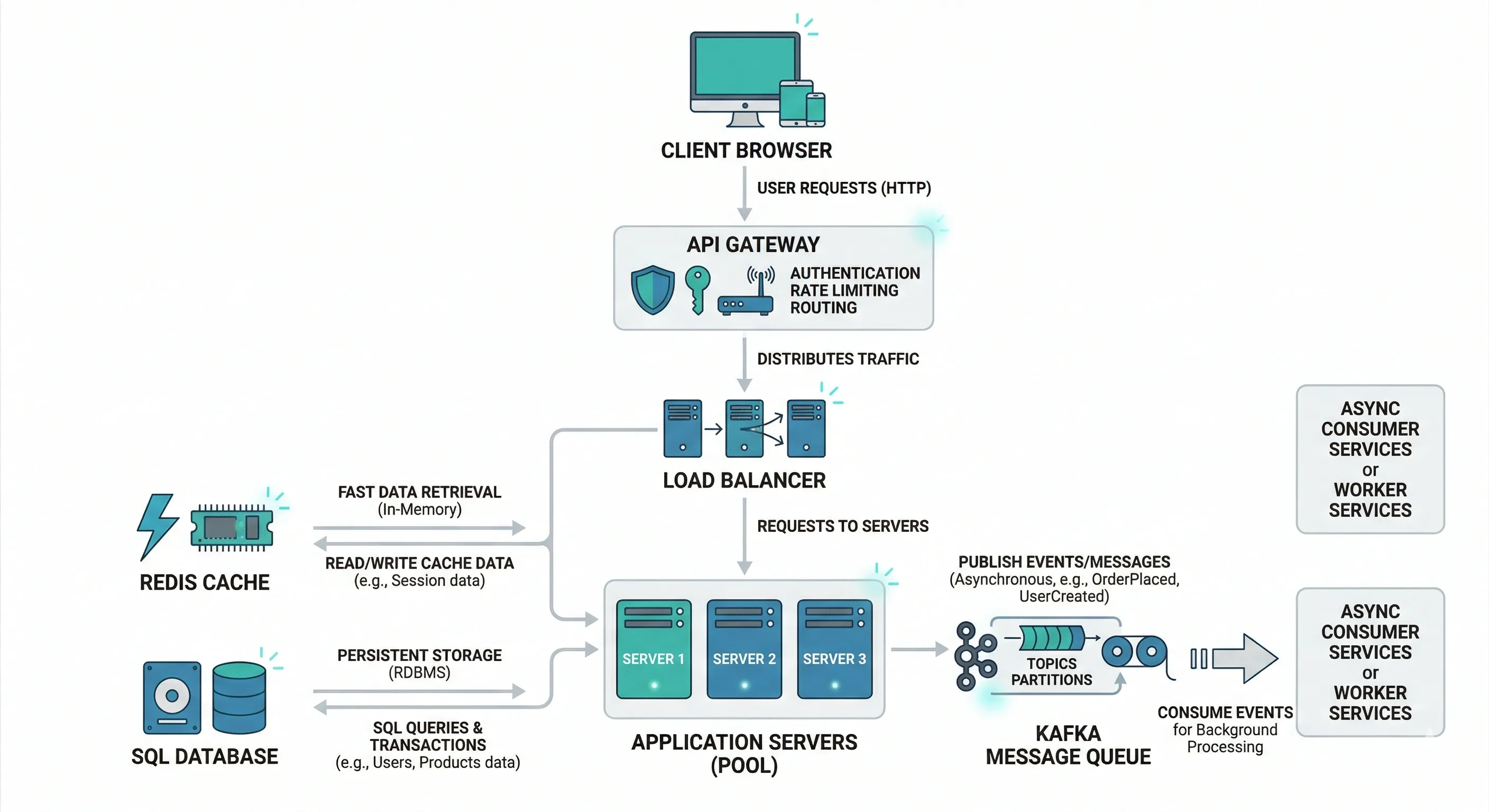
Client, Server, API#
- Client — the consumer of data. Browser, mobile app, another service.
- Server — processes requests, applies business logic, returns responses.
- API — the contract between client and server. Defines what's available and how to call it.
Load Balancer#
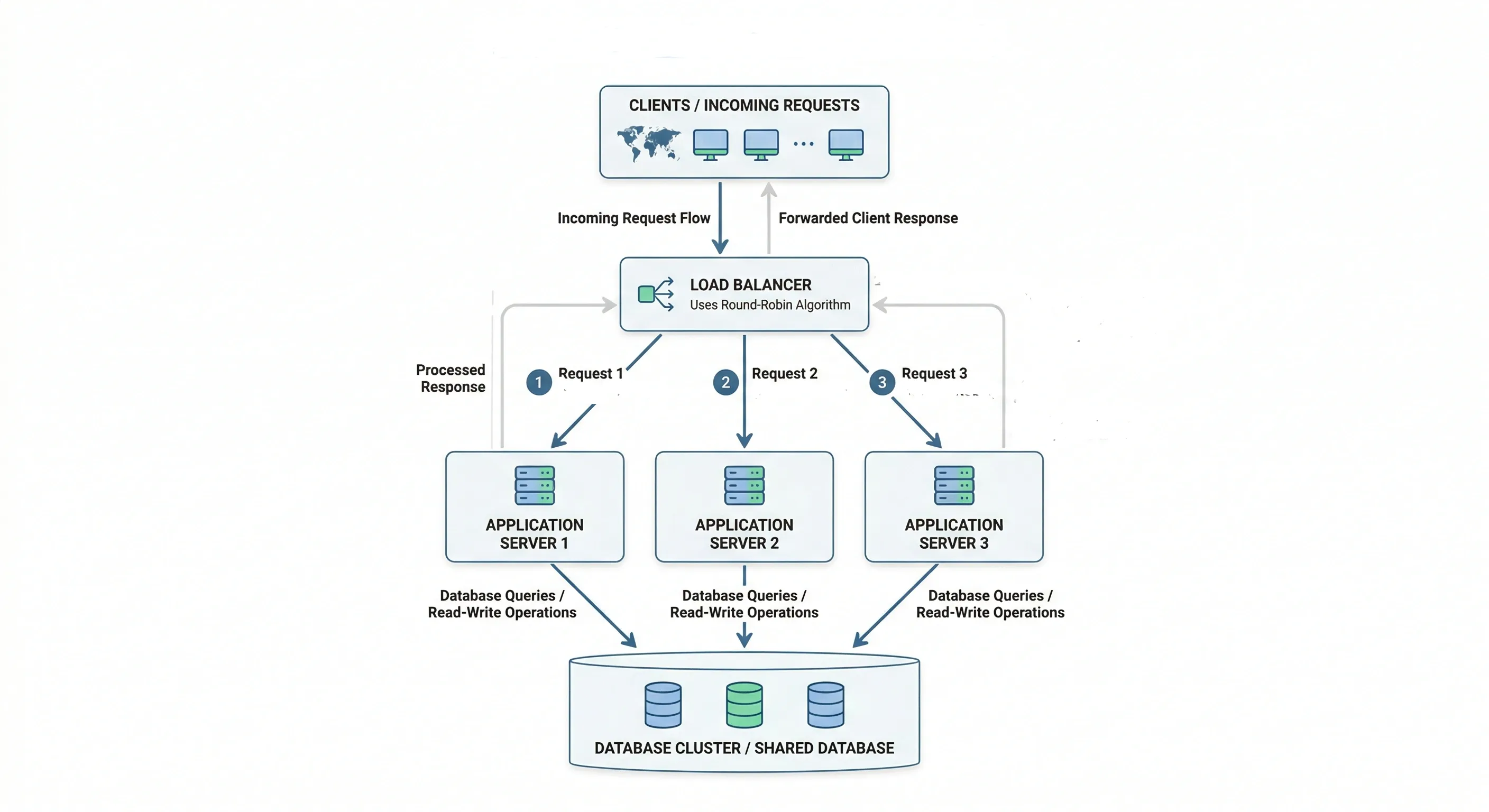
Sits between clients and servers. Distributes incoming traffic so no single server gets overwhelmed.
- Prevents single points of failure
- Enables horizontal scaling
- Handles health checks (removes dead servers from rotation)
Example: Nginx, AWS ALB, HAProxy
Database — SQL vs NoSQL#
| SQL | NoSQL | |
|---|---|---|
| Structure | Fixed schema, tables | Flexible, document/key-value/graph |
| Consistency | Strong (ACID) | Eventual (BASE) |
| Scaling | Vertical (mostly) | Horizontal |
| Best for | Financial data, relations | Feeds, sessions, logs, catalogs |
| Examples | PostgreSQL, MySQL | MongoDB, Cassandra, DynamoDB |
Cache#
A fast, in-memory store that keeps frequently accessed data close to the application layer, reducing database load.
- Redis — in-memory key-value store. Supports strings, hashes, sorted sets, pub/sub. Used for sessions, leaderboards, rate limiting.
- CDN (Content Delivery Network) — caches static assets (images, JS, CSS) on edge servers geographically close to users. Think Cloudflare, Akamai.
Message Queue#
Decouples producers and consumers. Producer puts a message on the queue; consumer picks it up independently.
- Kafka — high-throughput, distributed log. Great for event streaming, audit logs.
- RabbitMQ — traditional message broker. Better for task queues, simpler routing.
Use when: you don't need a synchronous response, you're processing in bulk, or you want to absorb traffic spikes.
3. Scalability Concepts#
Vertical vs Horizontal Scaling#
| Vertical Scaling | Horizontal Scaling | |
|---|---|---|
| What it means | Bigger machine (more CPU/RAM) | More machines |
| Limit | Hardware ceiling | Practically unlimited |
| Downtime | Usually required | Rolling deploys possible |
| Cost | Expensive at scale | Cheaper per unit |
| Best for | Databases (early stage) | Application servers, stateless services |
Stateless vs Stateful Services#
- Stateless — each request carries all needed context. Server doesn't remember previous requests. Easy to scale horizontally. REST APIs are stateless by design.
- Stateful — server remembers user state (e.g., WebSocket connections, game sessions). Harder to scale, requires sticky sessions or shared state store.
Design services to be stateless wherever possible. Move state to a shared store like Redis.
Auto Scaling#
Automatically adds or removes instances based on metrics like CPU, memory, or request queue depth.
- Scale out — add instances when load increases
- Scale in — remove instances when load drops
Cloud providers (AWS Auto Scaling, GCP Managed Instance Groups) handle this natively. Set minimum, maximum, and target thresholds.
CAP Theorem#
A distributed system can guarantee only two of three properties at the same time:
- Consistency — every read gets the most recent write
- Availability — every request gets a (non-error) response
- Partition Tolerance — system keeps working even if nodes can't communicate
In practice, network partitions happen. So you're choosing between CP or AP systems.
| System Type | Choice | Simple Example | Why |
|---|---|---|---|
| Banking System | CP | Bank account balance | You cannot show wrong balance; consistency > availability |
| Payment Gateway | CP | Online payment processing | No duplicate or incorrect transactions allowed |
| Social Media Feed | AP | Instagram/Twitter feed | Slight delay in updates is acceptable |
| Messaging App | AP | WhatsApp messages | Message may arrive late but system should stay available |
| E-commerce Catalog | AP | Product listings | Slightly outdated data is fine |
| Ticket Booking System | CP | Flight/train seat booking | Must avoid double booking |
Consistency Models#
- Strong consistency — after a write, every subsequent read sees that write. Safer but slower.
- Eventual consistency — writes propagate eventually; reads may be stale for a short window. Faster but requires careful design.
Real-world example: your Twitter follower count may be slightly off for a few seconds after someone unfollows. That's eventual consistency in action — and totally acceptable there.
4. Database Design#
SQL vs NoSQL Decision Making#
Ask these questions:
- Do you need complex joins or transactions? → SQL
- Is your schema changing frequently? → NoSQL
- Do you need horizontal scale from day one? → NoSQL
- Is data relational (users, orders, products)? → SQL
- Are you storing logs, events, or documents? → NoSQL
There's no universal winner. Most mature systems use both.
Indexing Basics#
An index is a data structure that speeds up reads at the cost of slower writes and extra storage.
- Without index: full table scan, O(n)
- With index: B-tree or hash lookup, O(log n)
Index columns used in WHERE, JOIN, and ORDER BY clauses. Avoid over-indexing — every index slows down INSERT/UPDATE.
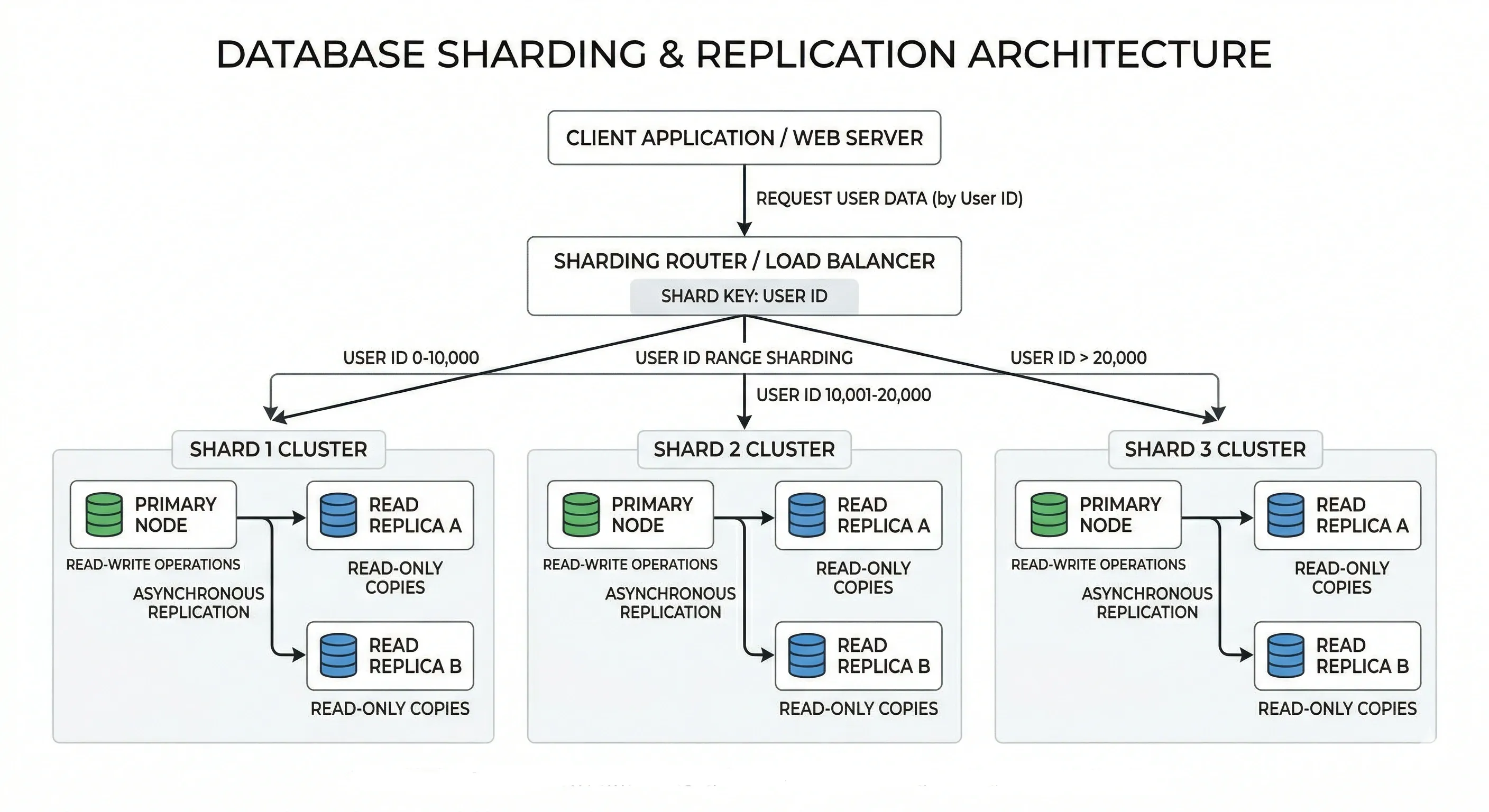
Sharding#
Splitting a large database into smaller pieces (shards) across multiple servers. Each shard holds a subset of data.
- Range-based sharding — shard by ID range (1–1M on shard 1, 1M–2M on shard 2)
- Hash-based sharding — shard by hash of a key (user_id % N)
- Directory-based sharding — a lookup table maps each key to a shard
Challenges: joins across shards are expensive, resharding is painful, hotspots can occur.
Replication#
Copying data from one database node (primary) to one or more others (replicas).
- Synchronous replication — primary waits for replica to confirm before responding. Stronger consistency, higher latency.
- Asynchronous replication — primary doesn't wait. Faster, but replica may lag.
Used for fault tolerance, data redundancy, and geographic distribution.
Read Replicas#
A common pattern: write to the primary, read from replicas.
This offloads read traffic from the primary. Works well when your read:write ratio is high (most web apps are read-heavy).
5. Caching Strategies#
Why Caching?#
Databases are slow compared to memory. A query that takes 50ms from disk takes under 1ms from Redis. Caching reduces latency, saves DB resources, and improves throughput.
Use caching for: frequently read, rarely written data — user profiles, product listings, config values.
Cache-Aside (Lazy Loading)#
The most common pattern. Application checks cache first; if miss, fetches from DB and populates cache.
Good for read-heavy workloads. Cache only stores what's actually requested.
Write-Through#
Every write goes to cache and DB simultaneously.
Keeps cache always fresh. Downside: writes are slightly slower.
Write-Back (Write-Behind)#
App writes to cache only. Cache asynchronously flushes to DB later.
Very fast writes. Risk: if cache crashes before flush, data is lost. Use only when you can tolerate brief inconsistency.
Cache Invalidation#
The hardest part. How do you know when to expire a cached value?
- TTL (Time To Live) — set an expiry time. Simple and effective for most cases.
- Event-driven invalidation — when underlying data changes, explicitly delete or update the cache key.
- Write-through — keeps cache current by design.
"There are only two hard things in computer science: cache invalidation and naming things." — Phil Karlton
6. Load Balancing#
L4 vs L7 Load Balancing#
| Layer 4 (Transport) | Layer 7 (Application) | |
|---|---|---|
| Operates on | TCP/UDP packets | HTTP/HTTPS content |
| Routing basis | IP, port | URL, headers, cookies |
| Speed | Faster (less inspection) | Slightly slower |
| Features | Basic routing | URL routing, SSL termination, auth |
| Example | AWS NLB | AWS ALB, Nginx |
Use L7 when you need smart routing (e.g., /api/* to one server pool, /static/* to another).
Load Balancing Algorithms#
- Round Robin — requests go to servers in rotation. Simple, works when servers are equal.
- Weighted Round Robin — servers with more capacity get proportionally more requests.
- Least Connections — next request goes to the server with fewest active connections. Good for long-lived connections.
- IP Hash / Sticky Sessions — same client always goes to same server. Useful for stateful apps.
- Random — randomly pick a server. Surprisingly effective at scale.
Health Checks#
Load balancers regularly ping servers to check if they're alive.
- Active health checks — LB sends HTTP request to /health every N seconds
- Passive health checks — LB monitors real traffic; marks server unhealthy after N consecutive failures
A dead server gets removed from rotation automatically. When it recovers, it gets added back.
7. API Design Basics#
REST Principles#
REST (Representational State Transfer) is an architectural style, not a protocol. The six principles:
- Stateless — no client session stored on server
- Client-Server — clear separation of concerns
- Uniform Interface — consistent, predictable URLs and methods
- Cacheable — responses can be cached
- Layered System — client doesn't know if it's hitting server directly or via proxy
- Code on Demand (optional) — server can send executable code
Idempotency#
An operation is idempotent if calling it multiple times produces the same result as calling it once.
- GET, PUT, DELETE — idempotent
- POST — not idempotent by default (creates a new resource each time)
Why it matters: networks are unreliable. Clients retry requests. If your order-creation endpoint isn't idempotent, a retry creates a duplicate order. Use an idempotency key (unique request ID in header) to prevent this.
Pagination#
Never return all records in one response. Use one of:
| Method | When to use |
|---|---|
| Offset pagination | Simple, works for most cases. ?page=2&limit=20 |
| Cursor-based | Better for real-time feeds. ?cursor=<last_id> |
| Keyset pagination | Efficient for large datasets. Based on sorted column value |
Offset pagination can be slow at high offsets (LIMIT 20 OFFSET 100000 is expensive). Cursor-based is preferred at scale.
Rate Limiting#
Protects your API from abuse and overload.
- Token bucket — refills tokens at a fixed rate. Requests consume tokens.
- Fixed window — count requests per time window (e.g., 100 per minute)
- Sliding window — smoother than fixed window, avoids edge spikes
Return 429 Too Many Requests with a Retry-After header.
API Versioning#
Plan for breaking changes from day one.
- URL versioning —
/api/v1/users(most common, easy to understand) - Header versioning —
Accept: application/vnd.api.v2+json - Query param —
/api/users?version=2
Never remove a version without a deprecation period. Give consumers time to migrate.
8. Messaging and Asynchronous Systems#
Pub/Sub Model#
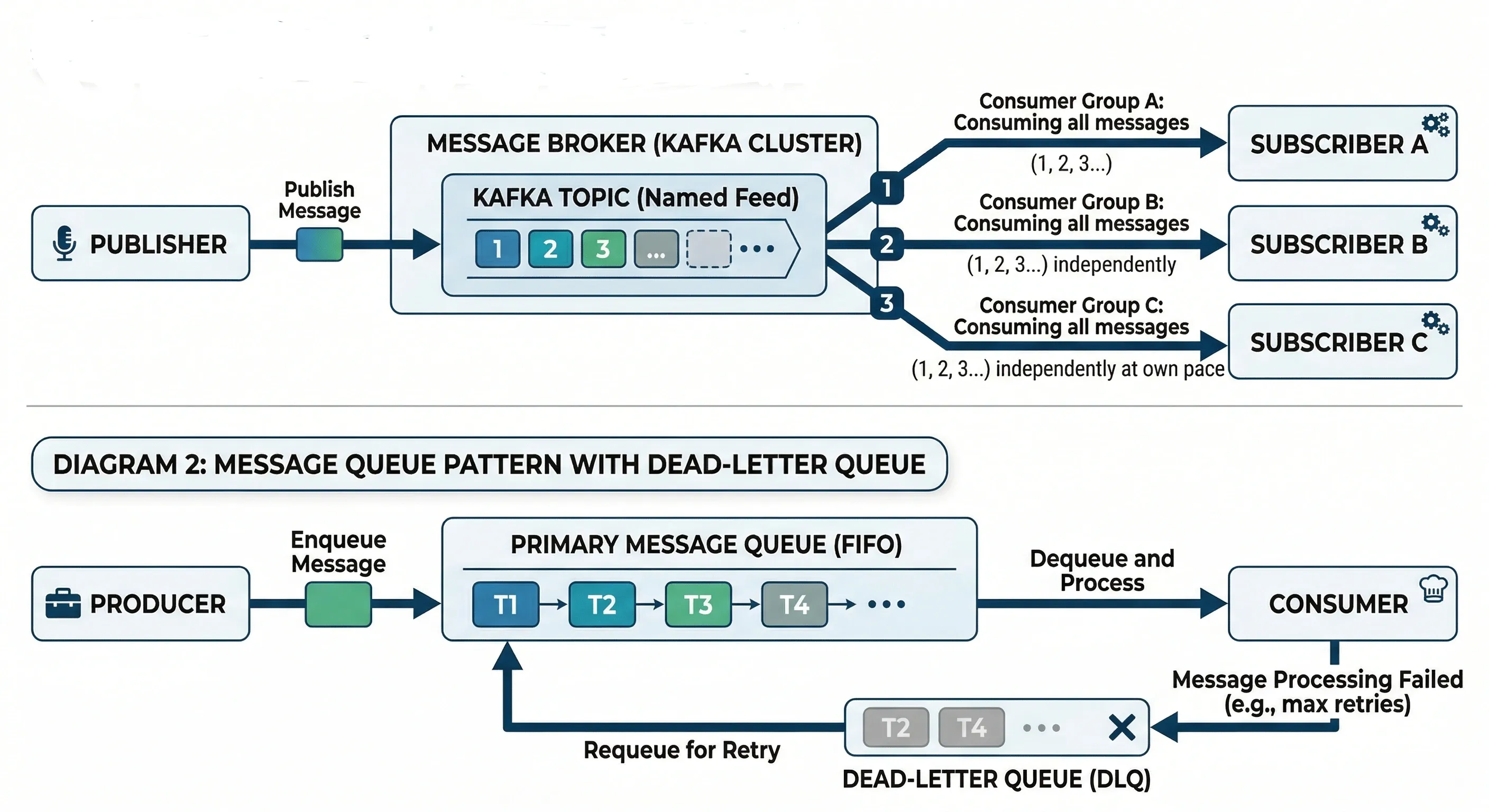
Publishers emit events to a topic. Subscribers listen to topics they care about. Neither knows about the other.
This is loosely coupled. Adding a new subscriber doesn't change the publisher at all.
Message Queues#
Point-to-point. One producer puts a message on the queue; one consumer picks it up.
- Guarantees processing — message stays in queue until acknowledged
- Enables backpressure — if consumers are slow, queue buffers the load
- Good for task processing (image resizing, email sending, PDF generation)
Event-Driven Architecture#
System components communicate entirely through events rather than direct calls.
Benefits:
- Services are decoupled
- Easy to add new functionality (just subscribe to existing events)
- Natural audit log (event stream = history of what happened)
Challenges:
- Harder to debug (no single call stack)
- Eventual consistency by nature
- Need to handle out-of-order events
Retry and Dead-Letter Queues#
When message processing fails, you don't want to lose it.
- Retry — attempt reprocessing N times with exponential backoff
- Dead-Letter Queue (DLQ) — after max retries, move message here for investigation
Always set up a DLQ in production. Silently dropping failed messages is dangerous.
9. Microservices Architecture#
Monolith vs Microservices#
| Monolith | Microservices | |
|---|---|---|
| Deployment | Single deployable unit | Independent services |
| Development | Simpler early on | Complex but scalable |
| Team structure | Works for small teams | Enables team autonomy |
| Failure blast radius | One bug can take everything down | Isolated failures |
| Scaling | Scale everything or nothing | Scale specific services |
| When to use | Early-stage products | Mature, growing systems |
Start with a monolith. Break it apart when you feel the pain — not before.
Service Communication#
Synchronous (Request/Response)
- REST over HTTP, gRPC
- Caller waits for a response
- Simpler to reason about
- Creates tight coupling; if downstream is slow, caller is slow
Asynchronous (Event/Message)
- Kafka, RabbitMQ, SQS
- Caller fires and forgets
- Better resilience and decoupling
- Harder to debug, eventual consistency
Use sync for user-facing flows where you need an immediate answer. Use async for background processing.
API Gateway#
A single entry point for all client requests. Routes to the appropriate downstream service.
Responsibilities:
- Request routing
- Authentication and authorization
- Rate limiting
- SSL termination
- Request/response transformation
- Logging
Examples: AWS API Gateway, Kong, Nginx
Service Discovery#
Services need to know each other's addresses. In dynamic environments (containers, auto-scaling), IPs change constantly.
- Client-side discovery — client queries a service registry (e.g., Consul, Eureka) and picks an instance
- Server-side discovery — load balancer handles it; client just calls the LB
Kubernetes handles this natively via DNS-based service discovery.
10. Reliability and Fault Tolerance#
Redundancy#
Having more than one instance of a component so that if one fails, others take over.
- Active-active: multiple instances all handle traffic
- Active-passive: one primary, one standby that activates on failure
Apply redundancy to: servers, databases, load balancers, entire data centers.
Failover#
The automatic (or manual) process of switching to a redundant component when the primary fails.
- Automatic failover — system detects failure, switches within seconds (e.g., database primary/replica promotion)
- Manual failover — requires human intervention, acceptable for planned maintenance
RTO (Recovery Time Objective) defines how quickly you need to recover. Failover speed must beat your RTO.
Circuit Breaker#
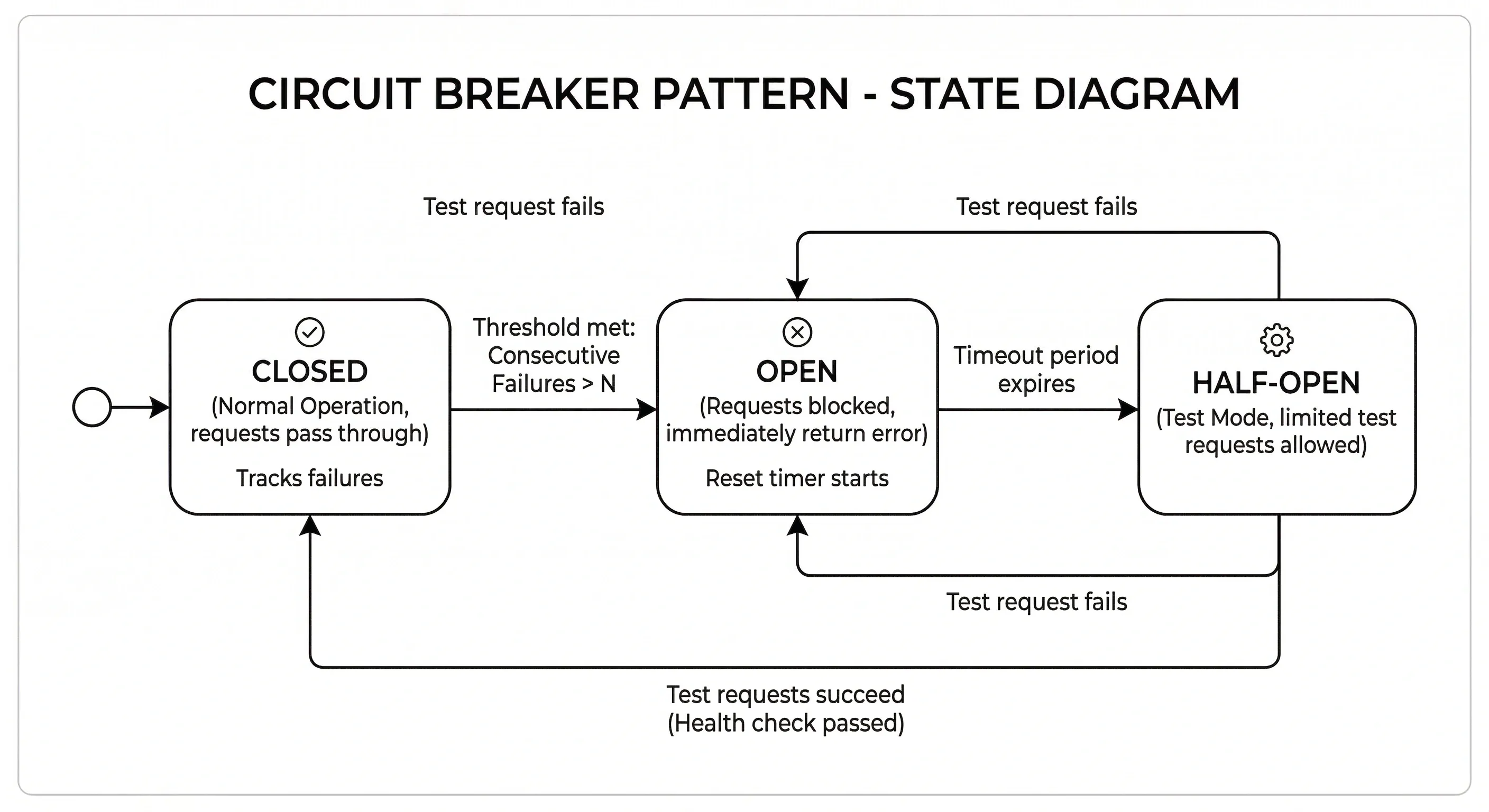
Prevents cascading failures. When a downstream service is failing, stop sending it requests for a period.
Three states:
- Closed — everything normal, requests pass through
- Open — too many failures, requests immediately rejected with an error (fast fail)
- Half-Open — after a timeout, allow a test request through; if it succeeds, close the circuit
Hystrix (Java), Resilience4j, and Polly (.NET) are popular implementations.
Retries and Timeouts#
- Timeout — don't wait forever for a response. Set a reasonable limit (e.g., 500ms for user-facing, 5s for background).
- Retry — on transient failures, try again. Use exponential backoff to avoid hammering a struggling service.
Always combine retries with jitter (randomized delay) to avoid thundering herd.
11. Security Basics#
Authentication vs Authorization#
These are not the same thing.
- Authentication — who are you? (Login, verify identity)
- Authorization — what are you allowed to do? (Permissions, roles)
Auth flow:
Common patterns: JWT tokens, OAuth 2.0, session cookies, API keys.
HTTPS and Encryption#
- HTTPS — HTTP over TLS. Encrypts data in transit. Non-negotiable for production. Get certs from Let's Encrypt (free).
- Encryption at rest — encrypt sensitive database fields (PII, passwords). Never store passwords in plaintext — use bcrypt or Argon2 hashing.
- Encryption in transit — TLS between all internal services, not just public-facing ones.
API Security#
- Validate all inputs — never trust client data. Prevent SQL injection, XSS.
- Use HTTPS everywhere
- Rotate API keys regularly
- Scope tokens minimally — don't give a read-only client write permissions
- Validate JWTs properly — check signature, expiry, and audience
- Use CORS headers correctly — don't set
Access-Control-Allow-Origin: *in production
Rate Limiting and Throttling#
Both protect your system from abuse, but have a subtle difference:
- Rate limiting — hard cap on requests per time window (block after N requests)
- Throttling — slow down responses rather than blocking (return 429 or add delay)
Apply rate limiting per IP, per user, and per API key. Different limits for different tiers (free vs paid users).
12. Monitoring and Observability#
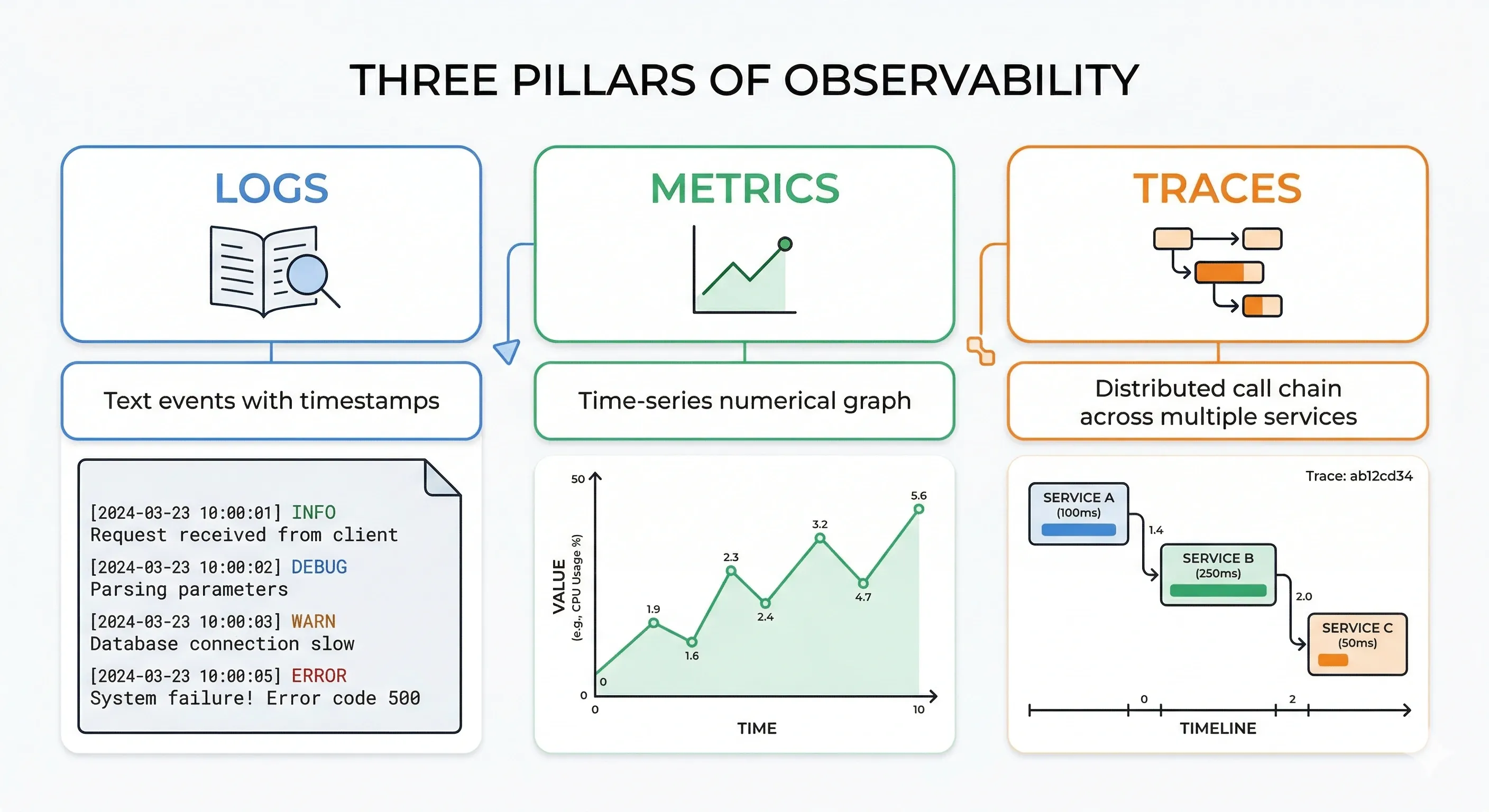
The goal of observability is to understand what your system is doing — especially when things go wrong. The three pillars are logs, metrics, and traces.
Logging#
A log is a timestamped record of an event.
Best practices:
- Use structured logging (JSON format) — easier to parse and query
- Include correlation IDs to trace a request across services
- Log at appropriate levels: DEBUG, INFO, WARN, ERROR
- Don't log sensitive data (passwords, PII, tokens)
- Centralize logs (ELK Stack, Datadog, CloudWatch)
Metrics#
Numerical measurements over time. Used for dashboards and alerting.
Four golden signals (from Google SRE):
- Latency — how long requests take
- Traffic — how many requests per second
- Errors — rate of failed requests
- Saturation — how "full" your system is (CPU, memory, queue depth)
Tools: Prometheus + Grafana, Datadog, AWS CloudWatch.
Distributed Tracing#
A trace follows a single request across multiple services, showing where time is spent.
Tools: Jaeger, Zipkin, AWS X-Ray, Datadog APM. Every service adds a span to the trace with timing and metadata.
Alerts#
Alerts notify on-call engineers when something needs attention.
Good alerting principles:
- Alert on symptoms, not causes (alert on high error rate, not "CPU is high")
- Set thresholds carefully — too sensitive creates alert fatigue
- Every alert should be actionable — if you can't do anything about it, don't alert on it
- Use PagerDuty, OpsGenie, or similar for on-call routing
- Write runbooks: for each alert, document what it means and what to do
Quick Reference: Key Concepts at a Glance#
| Concept | One-Line Summary |
|---|---|
| HLD | Blueprint of components and how they interact |
| CAP Theorem | Pick two: Consistency, Availability, Partition Tolerance |
| Sharding | Split data across multiple DB nodes by a key |
| Cache-Aside | Check cache, miss → fetch DB, populate cache |
| Circuit Breaker | Stop calling a failing service; fail fast |
| Idempotency | Same request, same result, no matter how many times called |
| Rate Limiting | Cap requests per user/IP per time window |
| DLQ | Parking lot for messages that failed after max retries |
| Read Replica | DB copy that handles reads, reducing primary load |
| API Gateway | Single entry point that routes, authenticates, and rate-limits |
Conclusion#
High Level Design is not about memorizing patterns — it’s about understanding trade-offs, scalability, and real-world constraints. Every system you design will require balancing consistency, availability, performance, and cost based on the problem you're solving.
This cheatsheet gives you a solid foundation, but true mastery comes from thinking in systems, practicing real-world problems, and continuously learning from existing architectures.
Keep building, keep breaking things, and keep improving
If you found this helpful, feel free to share it with your friends and help them level up in System Design too
Want to Master Spring Boot and Land Your Dream Job?
Struggling with coding interviews? Learn Data Structures & Algorithms (DSA) with our expert-led course. Build strong problem-solving skills, write optimized code, and crack top tech interviews with ease
Learn more![Complete System Design Interview Preparation For 2-7 Years of Experience [2026]](https://cs-prod-assets-bucket.s3.ap-south-1.amazonaws.com/System_Design_in_One_Shot_97afc77fc6.avif "Complete System Design Interview Preparation For 2-7 Years of Experience [2026]")