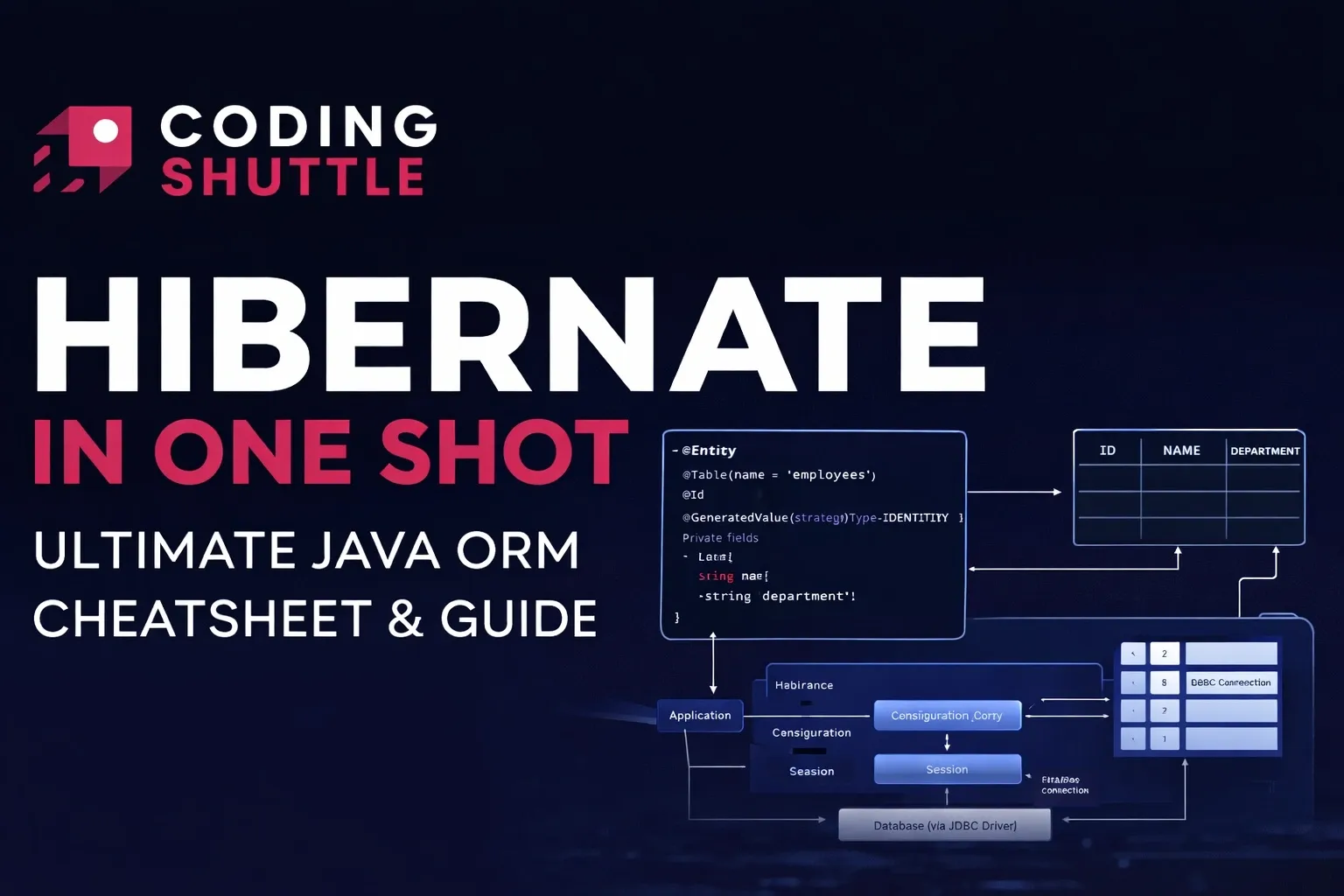
Hibernate in One Shot - Ultimate Java ORM Cheatsheet & Guide
Hibernate in One Shot is a concise cheatsheet that covers everything from ORM basics and entity mapping to CRUD operations, caching, transactions, and performance optimization—perfect for quick learning and revision

Shreyash Gurav
March 20, 2026
14 min read
Hibernate in One Shot: Ultimate Java ORM Cheatsheet & Guide
Hibernate is an open-source Object Relational Mapping (ORM) framework for Java that simplifies database interactions by allowing developers to work with Java objects instead of writing raw SQL queries. It handles mapping between object-oriented code and relational databases, manages connections, caching, and transactions, and is widely used in modern backend applications.
1. Hibernate Fundamentals#
What is Hibernate#
Hibernate is an open-source ORM (Object Relational Mapping) framework for Java. It simplifies database interaction by letting you work with Java objects instead of raw SQL. It implements the JPA specification and sits between your application and the database.
- Developed by Gavin King, now maintained by Red Hat
- Implements JPA (Jakarta Persistence API)
- Handles SQL generation, connection pooling, caching, and transactions
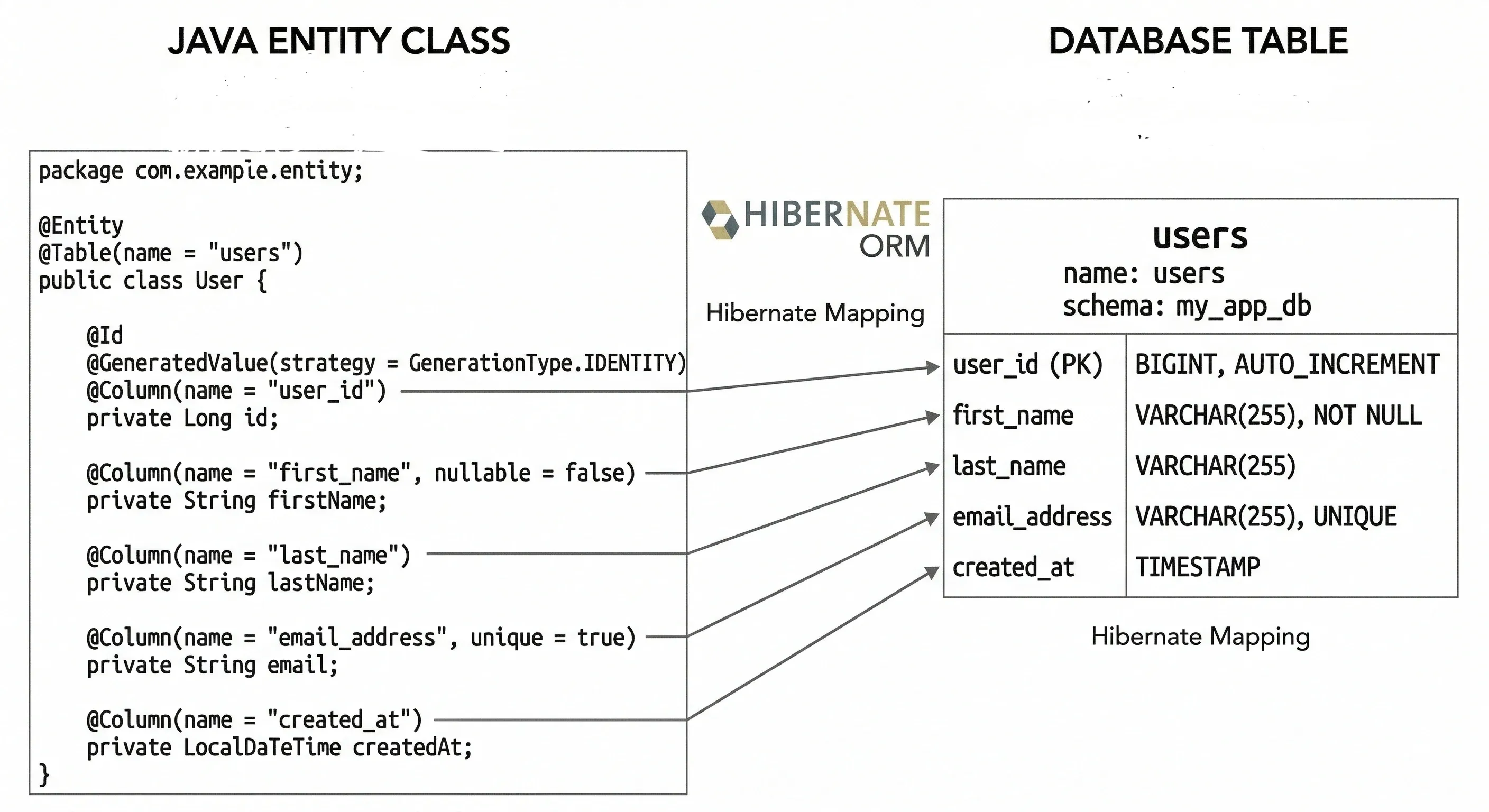
ORM - Object Relational Mapping#
ORM bridges the gap between object-oriented Java code and relational databases. Instead of writing INSERT or SELECT statements, you work with plain Java objects (POJOs).
| Object-Oriented World | Relational World |
|---|---|
| Class | Table |
| Object | Row |
| Field / Property | Column |
| Reference | Foreign Key |
| Collection | Join Table |
Why Hibernate over JDBC#
JDBC works, but it is verbose, error-prone, and forces you to manage everything manually. Hibernate abstracts all of that away.
| Feature | JDBC | Hibernate |
|---|---|---|
| SQL writing | Manual | Auto-generated |
| Object mapping | Manual | Automatic |
| Caching | None built-in | First and second level |
| Transaction management | Manual | Declarative |
| Boilerplate code | High | Minimal |
| Portability | DB-specific SQL | Dialect-based |
Hibernate Architecture Overview#
Key components:
- Configuration - loads Hibernate settings
- SessionFactory - heavyweight, one per database, thread-safe
- Session - lightweight, one per request/transaction, not thread-safe
- Transaction - wraps DB operations
- Query / Criteria - for executing HQL or JPQL queries
2. Core Concepts#
Entity Class and POJO#
A POJO (Plain Old Java Object) becomes a Hibernate entity when you annotate it with @Entity. It must have a no-arg constructor and a primary key field.
Rules for an entity class:
- Must not be
final - Must have a public or protected no-arg constructor
- Must have at least one
@Idfield - Fields should be private with getters/setters
Session and SessionFactory#
SessionFactory is created once when the application starts. It is expensive to build but cheap to use. Think of it as a factory that produces Session objects.
Session is the primary interface to interact with the database. It represents a single unit of work and wraps a JDBC connection.
Persistence Context#
The persistence context is an in-memory cache of entities that Hibernate manages during a session. Every entity loaded or saved goes into this context.
- Tracks changes automatically (dirty checking)
- Ensures identity - same DB row returns the same Java object
- Synchronizes state to DB at flush time
Three entity states:
- Transient - object created but not associated with any session
- Persistent - associated with an active session, tracked by Hibernate
- Detached - was persistent, session is now closed
First-Level Cache#
First-level cache is scoped to the Session. It is enabled by default and cannot be disabled. When you load the same entity twice in the same session, the second call hits cache, not the database.
3. Configuration#
hibernate.cfg.xml#
This is the traditional XML-based configuration file placed in src/main/resources.
Annotation-Based Configuration#
In modern Spring Boot projects, application.properties handles Hibernate config:
Key Properties Explained#
| Property | Values | Description |
|---|---|---|
hibernate.dialect | MySQL8Dialect, PostgreSQLDialect, etc. | Tells Hibernate which SQL dialect to use |
show_sql | true / false | Prints generated SQL to console |
format_sql | true / false | Pretty prints SQL output |
hbm2ddl.auto | create, create-drop, update, validate, none | Controls schema generation |
hbm2ddl.auto values:
create- drops and recreates schema on startupcreate-drop- drops schema on shutdown (good for tests)update- updates schema without dropping datavalidate- validates schema, throws error if mismatchnone- does nothing (recommended for production)
4. Mapping Annotations#
Basic Annotations#
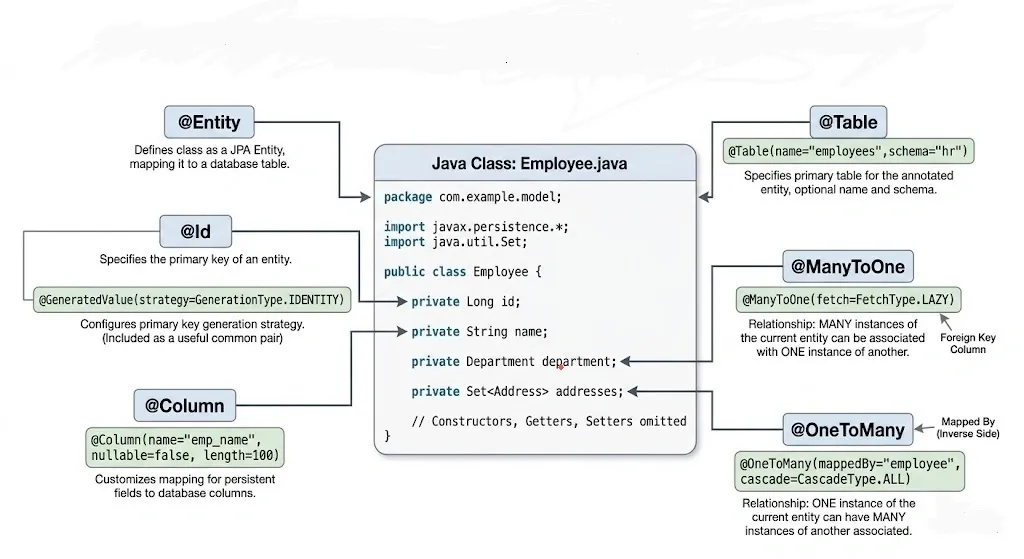
@GeneratedValue strategies:
| Strategy | Description |
|---|---|
IDENTITY | DB auto-increment (MySQL, PostgreSQL) |
SEQUENCE | Uses DB sequence object (PostgreSQL, Oracle) |
TABLE | Uses a separate table to track keys |
AUTO | Hibernate picks the best strategy |
Relationship Annotations#
@OneToOne#
One entity maps to exactly one instance of another.
@OneToMany and @ManyToOne#
One department has many employees. Each employee belongs to one department.
mappedBytells Hibernate that the other side owns the relationship- The owning side (the one with
@JoinColumn) controls the foreign key
@ManyToMany#
Students can enroll in many courses. Each course has many students.
CascadeType Quick Reference#
| CascadeType | Effect |
|---|---|
PERSIST | Saves child when parent is saved |
MERGE | Updates child when parent is merged |
REMOVE | Deletes child when parent is deleted |
REFRESH | Refreshes child when parent is refreshed |
DETACH | Detaches child when parent is detached |
ALL | All of the above |
5. CRUD Operations#
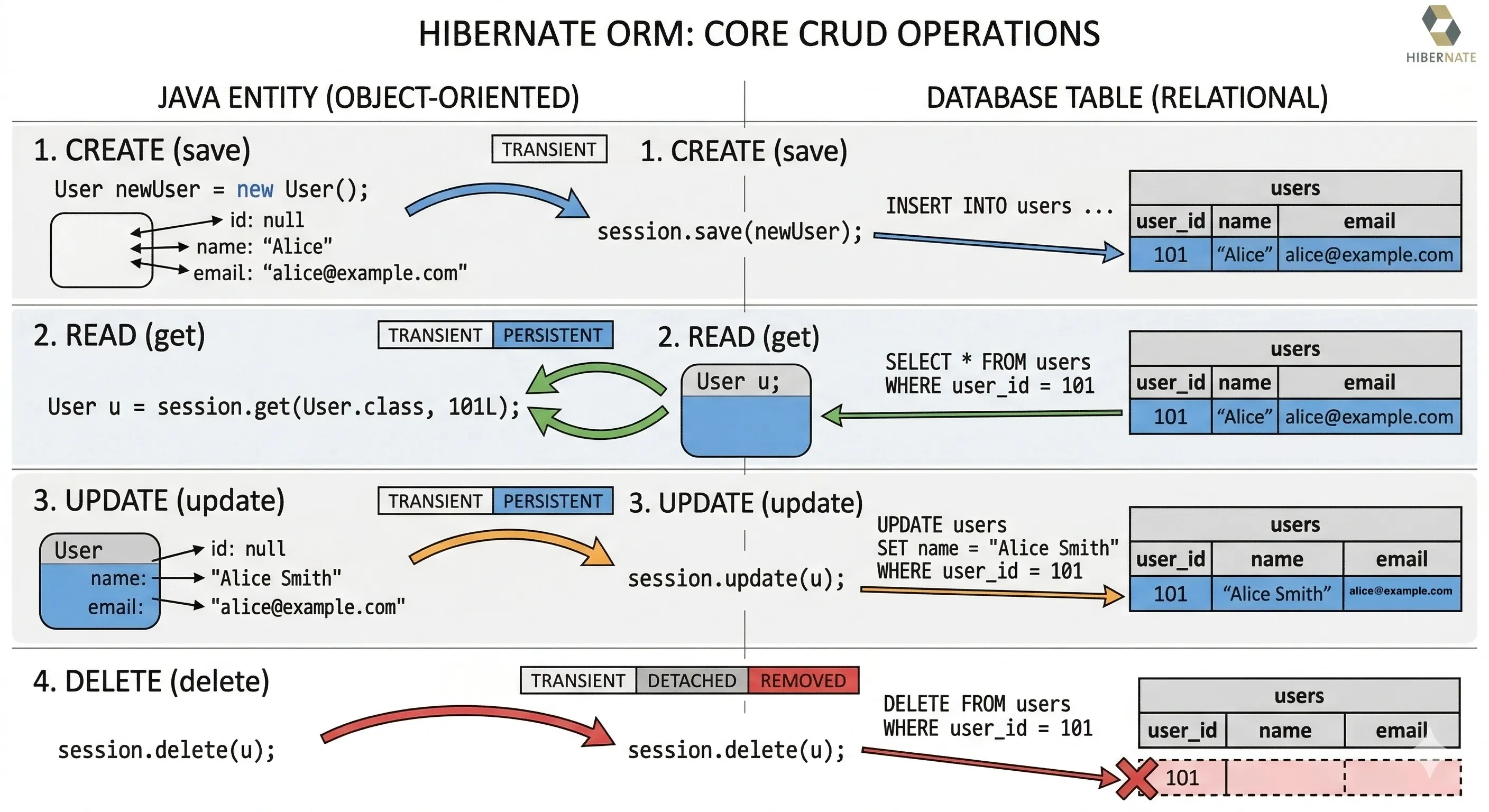
Save and Persist#
save()returns the generated identifier immediatelypersist()is JPA-standard and does not guarantee immediate INSERT
Get and Load#
Use get() when you are unsure whether the record exists. Use load() only when you are certain the record is there.
Update#
Delete#
6. HQL and JPQL#
Basics of HQL#
HQL (Hibernate Query Language) is object-oriented SQL. You write queries against entity class names and field names, not table names and column names. Hibernate translates them to native SQL.
Named Queries#
Named queries are defined once (usually on the entity) and reused by name. They are parsed and validated at startup, which catches errors early.
Pagination#
7. Fetching Strategies#
Lazy vs Eager Loading#
Fetching strategy decides when related entities are loaded from the database.
| Strategy | When data is loaded | Default for |
|---|---|---|
LAZY | Only when you access the field | @OneToMany, @ManyToMany |
EAGER | Immediately with the parent | @ManyToOne, @OneToOne |
General rule: prefer LAZY loading. Use EAGER only when you always need the related data.
N+1 Problem#
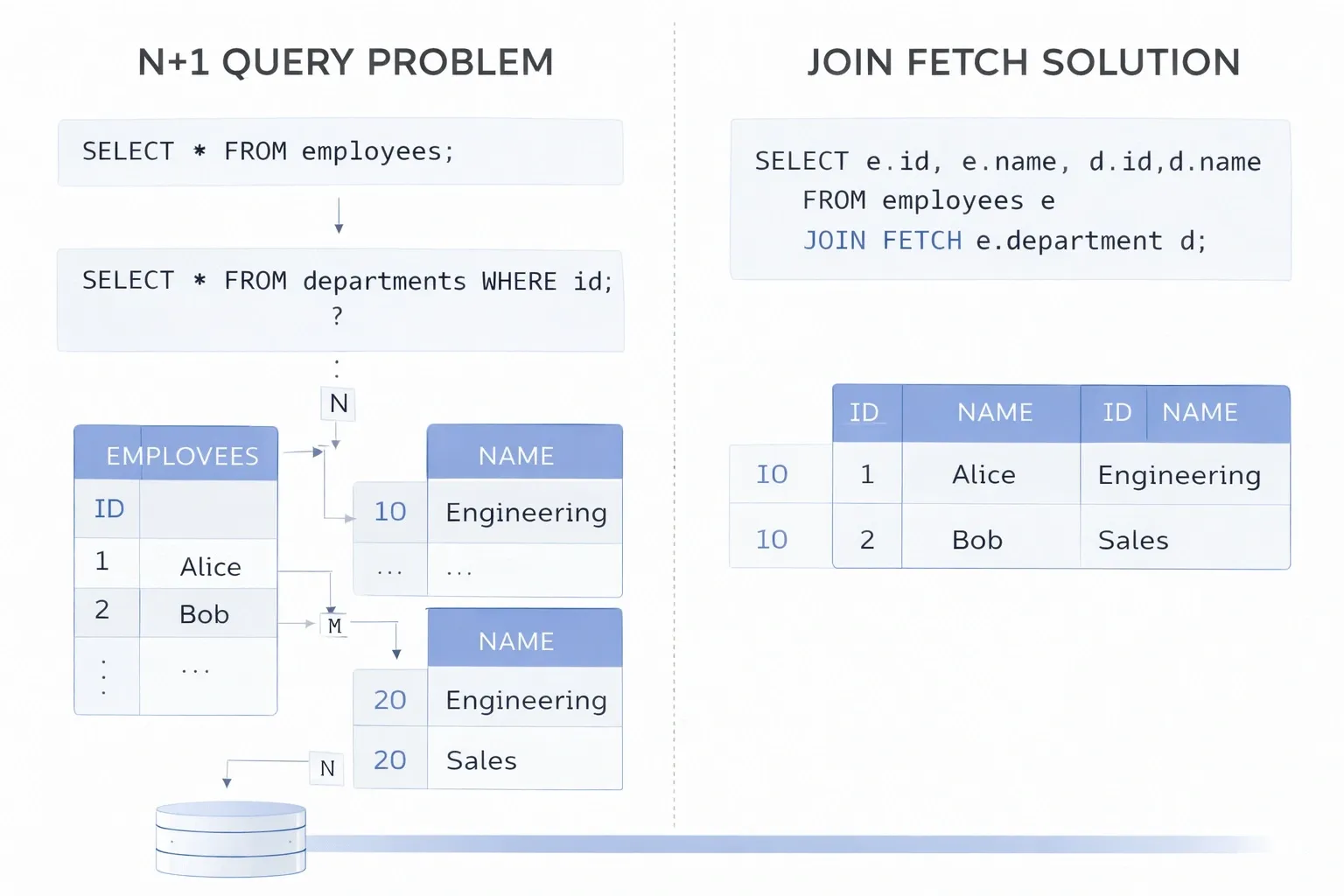
The N+1 problem happens when loading N parent entities triggers N additional queries to load their children, resulting in N+1 total queries to the database.
Fix: use JOIN FETCH
8. Caching#
First-Level Cache#
- Enabled by default, always active
- Scoped to the Session - lives and dies with the session
- Cannot be turned off
- Automatically used when you call
session.get()multiple times for the same entity
Second-Level Cache#
- Shared across sessions within the same SessionFactory
- Disabled by default - you must configure it
- Useful for read-heavy, rarely-changing data (like reference tables)
- Common providers: Ehcache, Infinispan, Hazelcast
Cache Concurrency Strategies:
| Strategy | Use when |
|---|---|
READ_ONLY | Data never changes (best performance) |
READ_WRITE | Data changes occasionally |
NONSTRICT_READ_WRITE | Occasional updates, stale data acceptable |
TRANSACTIONAL | Full transactional integrity needed |
Query Cache - caches query result sets (not just entities). Must be explicitly enabled per query.
9. Transactions#
Transaction Lifecycle#
Every database write operation must happen inside a transaction. Hibernate does not auto-commit by default.
With Spring's @Transactional:
ACID Properties#
| Property | Meaning |
|---|---|
| Atomicity | All operations succeed or none do |
| Consistency | Data is always in a valid state before and after |
| Isolation | Concurrent transactions do not interfere with each other |
| Durability | Committed data survives system failure |
Isolation Levels:
| Level | Dirty Read | Non-Repeatable Read | Phantom Read |
|---|---|---|---|
| READ_UNCOMMITTED | possible | possible | possible |
| READ_COMMITTED | prevented | possible | possible |
| REPEATABLE_READ | prevented | prevented | possible |
| SERIALIZABLE | prevented | prevented | prevented |
10. Schema Design and Best Practices#
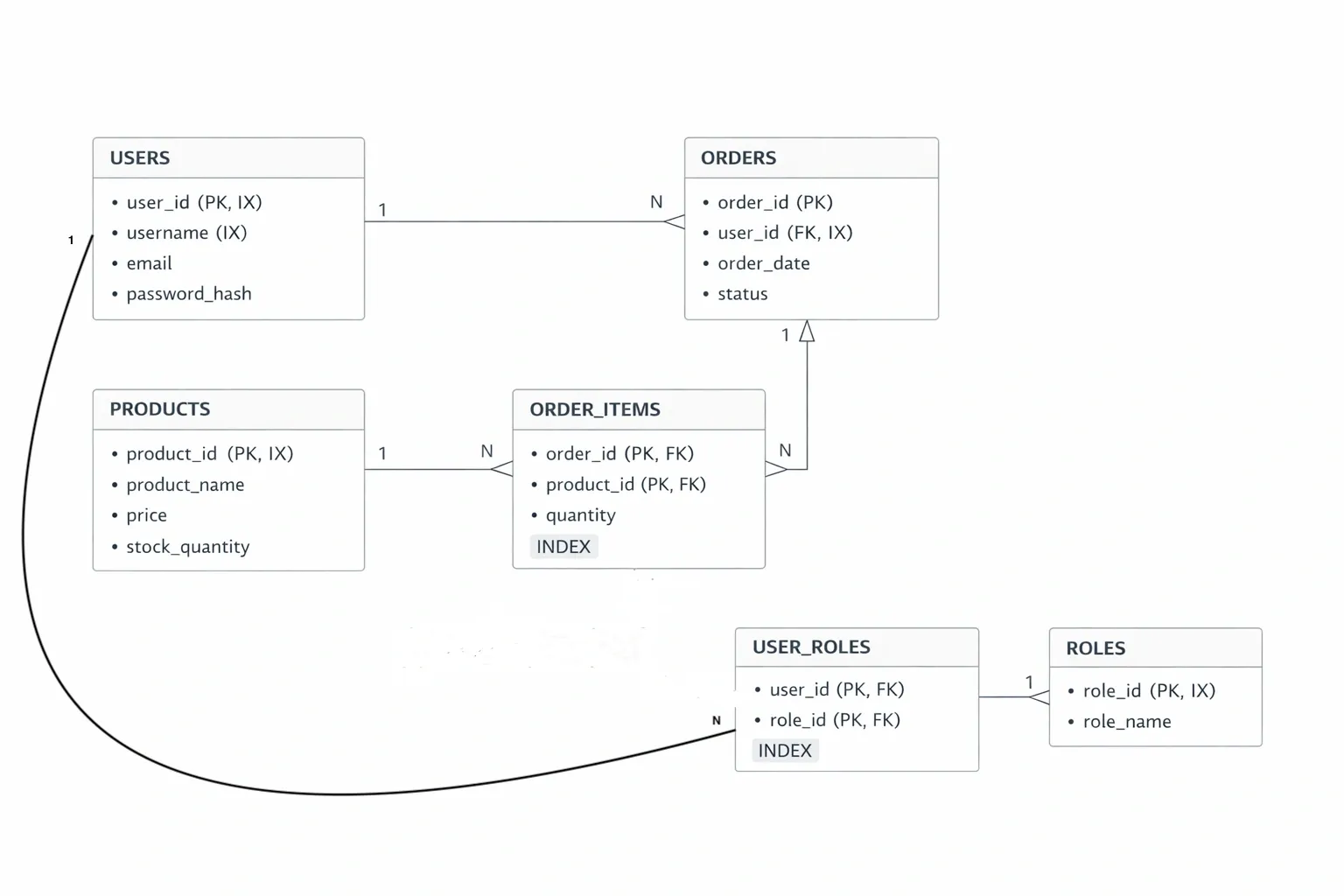
Normalization vs Denormalization#
- Normalization - reduce redundancy, split data into related tables. Better for write-heavy systems. Easier to maintain.
- Denormalization - combine related data into fewer tables. Better for read-heavy systems. Improves query performance at the cost of redundancy.
Hibernate works better with normalized schemas but can handle denormalized designs too.
Efficient Mapping Strategies#
- Use
@ManyToOneinstead of@OneToManyas the owning side where possible - Avoid bidirectional relationships unless you genuinely need to navigate both ways
- Use
mappedBycorrectly - only one side should own the relationship - Prefer
ListoverSetfor ordered collections, butSetfor unordered to avoid duplicates
Performance Considerations#
- Always close sessions - use try-with-resources or finally blocks
- Use pagination for large result sets - never load all rows
- Avoid
FetchType.EAGERon collections - Use
JOIN FETCHonly when you need related data in the same query - Enable second-level cache for reference/static data
- Use batch inserts for bulk operations
11. Common Pitfalls#
LazyInitializationException#
This is one of the most common Hibernate errors. It happens when you try to access a lazily loaded collection or association after the session is already closed.
Fixes:
- Use
JOIN FETCHto load required associations eagerly within the session - Use
@Transactionalto keep session open until the method returns - Use DTOs to avoid returning entities outside the session boundary
- Use
Hibernate.initialize(dept.getEmployees())explicitly before closing session
N+1 Query Issue#
Already covered in Section 7. Quick summary:
- Root cause: lazy loading inside a loop
- Detection: enable
show_sqland count your queries - Fix: use
JOIN FETCHor@EntityGraph
Improper Session Handling#
- Never share a Session across threads - it is not thread-safe
- Never leave sessions open - causes connection pool exhaustion
- Always use transactions for writes - reads may work without them but writes are unreliable without explicit transaction boundaries
12. Hibernate vs JPA#
The Difference#
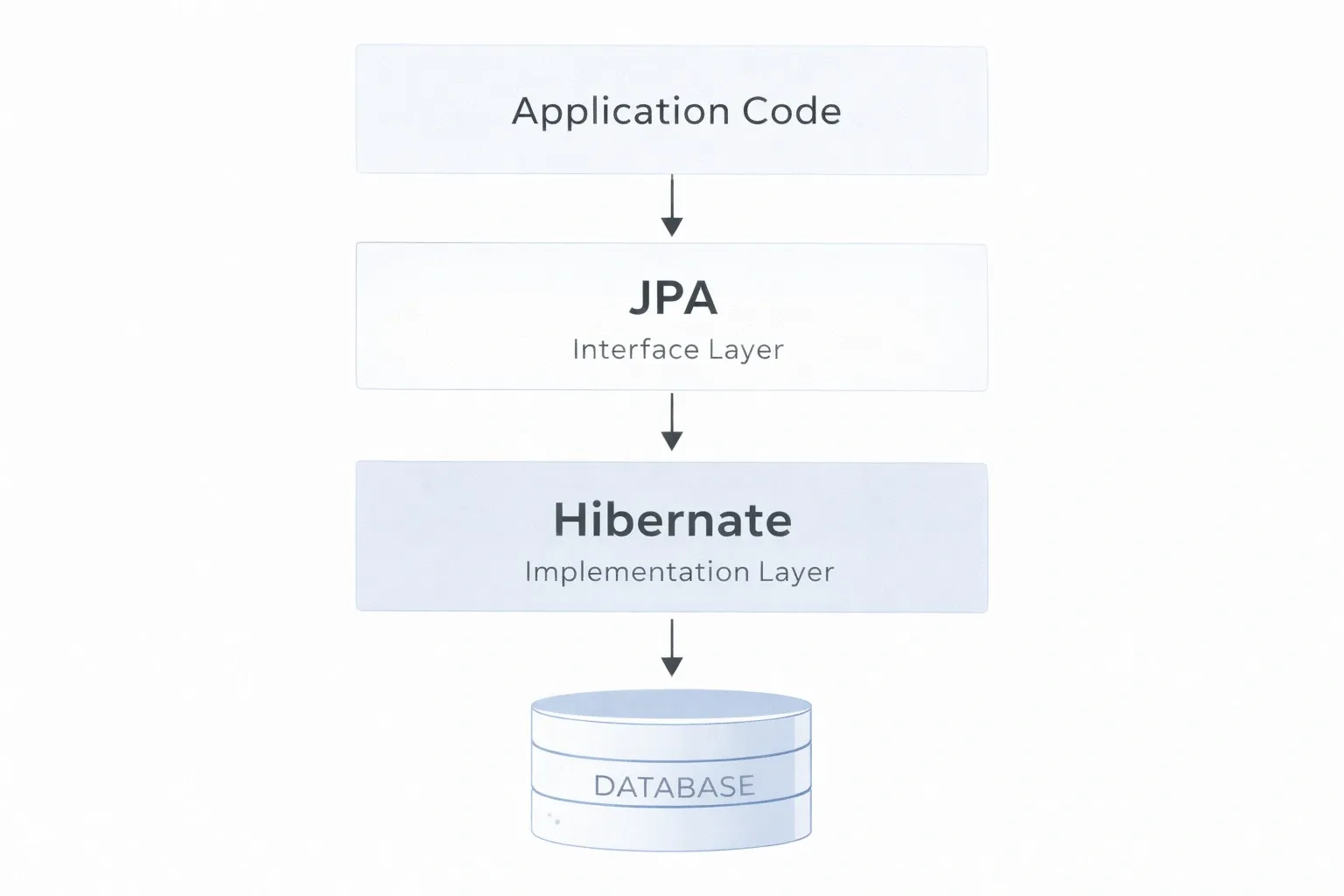
JPA (Jakarta Persistence API) is a specification - it defines a standard set of interfaces and annotations for ORM in Java. Hibernate is the most popular implementation of that specification.
Think of JPA as the interface and Hibernate as the class that implements it.
| Aspect | JPA | Hibernate |
|---|---|---|
| Type | Specification (API) | Implementation |
| Package | jakarta.persistence.* | org.hibernate.* |
| Portability | High - works with any JPA provider | Tied to Hibernate |
| Features | Standard features only | JPA + Hibernate-specific extras |
| Query language | JPQL | HQL (superset of JPQL) |
| EntityManager | EntityManager | Session (also implements EntityManager) |
Code Comparison#
When to Use What#
- Use JPA when you want portability and do not need Hibernate-specific features. Standard choice for enterprise apps.
- Use Hibernate-specific APIs when you need features like Hibernate filters, second-level cache fine-tuning, batch processing helpers, or advanced fetch profiles.
- In practice: use JPA annotations and
EntityManagerfor all standard operations, and reach for Hibernate-specific APIs only when JPA falls short.
Quick Reference Card#
Session Methods#
| Method | Description |
|---|---|
session.save(obj) | Persists new entity, returns ID |
session.persist(obj) | JPA-standard persist |
session.get(Class, id) | Loads by ID, returns null if not found |
session.load(Class, id) | Returns proxy, throws if not found |
session.update(obj) | Updates detached entity |
session.merge(obj) | Merges detached or transient entity |
session.delete(obj) | Deletes entity |
session.flush() | Syncs session state to DB |
session.clear() | Clears first-level cache |
session.evict(obj) | Removes specific entity from cache |
Common Annotations Summary#
| Annotation | Purpose |
|---|---|
@Entity | Marks class as persistent entity |
@Table(name="...") | Maps to specific table |
@Id | Primary key field |
@GeneratedValue | Auto-generate primary key |
@Column | Maps field to column with constraints |
@Transient | Field not persisted |
@OneToOne | One-to-one relationship |
@OneToMany | One-to-many relationship |
@ManyToOne | Many-to-one relationship |
@ManyToMany | Many-to-many relationship |
@JoinColumn | Specifies foreign key column |
@JoinTable | Specifies join table for many-to-many |
@Cache | Enables second-level caching |
@NamedQuery | Defines reusable named HQL query |
hbm2ddl.auto Quick Reference#
| Value | Creates | Drops | Use for |
|---|---|---|---|
create | Yes | On startup | Development only |
create-drop | Yes | On shutdown | Unit testing |
update | Alters if needed | Never | Dev / staging |
validate | Never | Never | Production (safe) |
none | Never | Never | Production (explicit SQL) |
Conclusion#
Hibernate simplifies database interaction by abstracting complex SQL into clean, object-oriented code, allowing developers to focus on business logic instead of low-level data handling. With features like automatic mapping, caching, and transaction management, and its seamless use with frameworks like Spring Boot, Hibernate remains an essential tool for building scalable and maintainable Java backend applications. If you found this helpful, consider sharing it with your friends and peers.
Want to Master Spring Boot and Land Your Dream Job?
Struggling with coding interviews? Learn Data Structures & Algorithms (DSA) with our expert-led course. Build strong problem-solving skills, write optimized code, and crack top tech interviews with ease
Learn more