Computer networks in one shot - The Ultimate Cheat Sheet
This Computer Networks cheat sheet is designed as a quick yet complete revision guide for the most important networking concepts. It walks through the fundamentals like how devices communicate, the OSI and TCP/IP models, IP addressing, DNS, HTTP/HTTPS, routing, switching, and commonly used network protocols. The goal is to explain these ideas in a simple and practical way so you can understand how networks actually work behind the scenes. It’s a helpful one-shot resource for students preparing for interviews, exams, or anyone who wants to refresh their networking basics in one place.

Shreyash Gurav
March 04, 2026
8 min read
Computer Networks in One Shot - The Ultimate Cheatsheet Cheat Sheet
A complete computer networks cheat sheet that simplifies core networking concepts including OSI layers, TCP/IP model, network topologies, IP addressing, subnetting, networking protocols, devices, and security basics. Perfect for quick revision and interview preparation.
Introduction to Computer Networks#
What is a Computer Network#
A computer network is a collection of interconnected devices that can communicate and share resources with each other. These devices, ranging from computers and servers to printers and smartphones, use transmission media and protocols to exchange data.
Why Networks are Needed#
- Resource sharing (printers, storage, applications)
- Cost reduction through hardware and software sharing
- Improved communication and collaboration
- Centralized data management and backup
- Increased reliability through alternative paths
Types of Networks#
| Network Type | Coverage | Typical Use |
|---|---|---|
| PAN (Personal Area Network) | Few meters | Connecting personal devices like phone, laptop, Bluetooth devices |
| LAN (Local Area Network) | Building or campus | Office networks, school computer labs, home networks |
| MAN (Metropolitan Area Network) | City-wide | Cable TV networks, city government connectivity |
| WAN (Wide Area Network) | Country or global | Internet, multinational corporate networks |
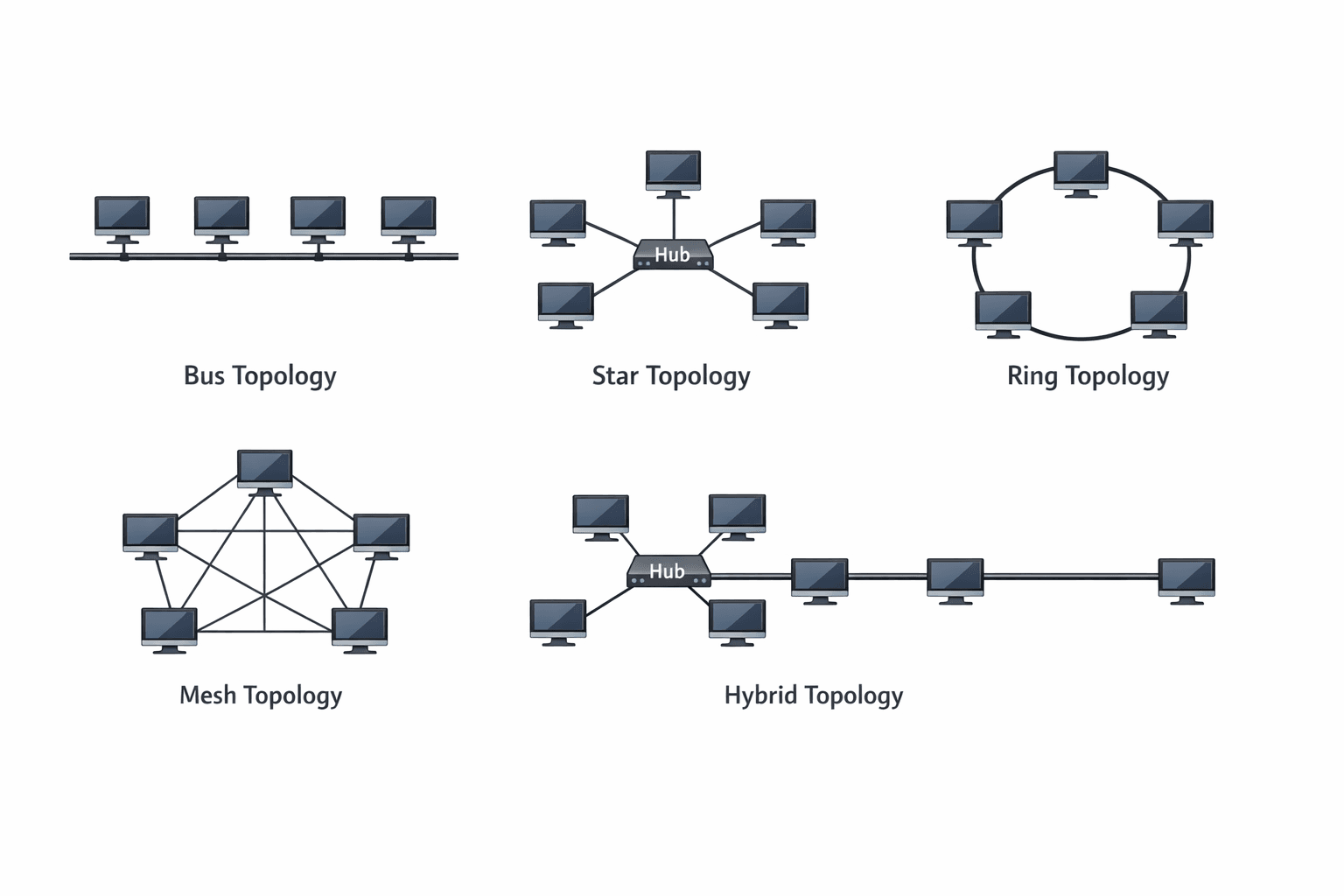
Network Topologies#
Bus Topology: All devices connect to a single central cable. Simple but a break in the main cable brings down the entire network.
Star Topology: All devices connect to a central hub or switch. Easy to install and manage, but central device failure affects all connected devices.
Ring Topology: Each device connects to two other devices, forming a circular path. Data travels in one direction, reducing collision risk.
Mesh Topology: Every device connects to every other device. Provides high redundancy and reliability but expensive to implement.
Hybrid Topology: Combination of two or more different topologies. Used in larger networks to leverage benefits of multiple topologies.
OSI Model#
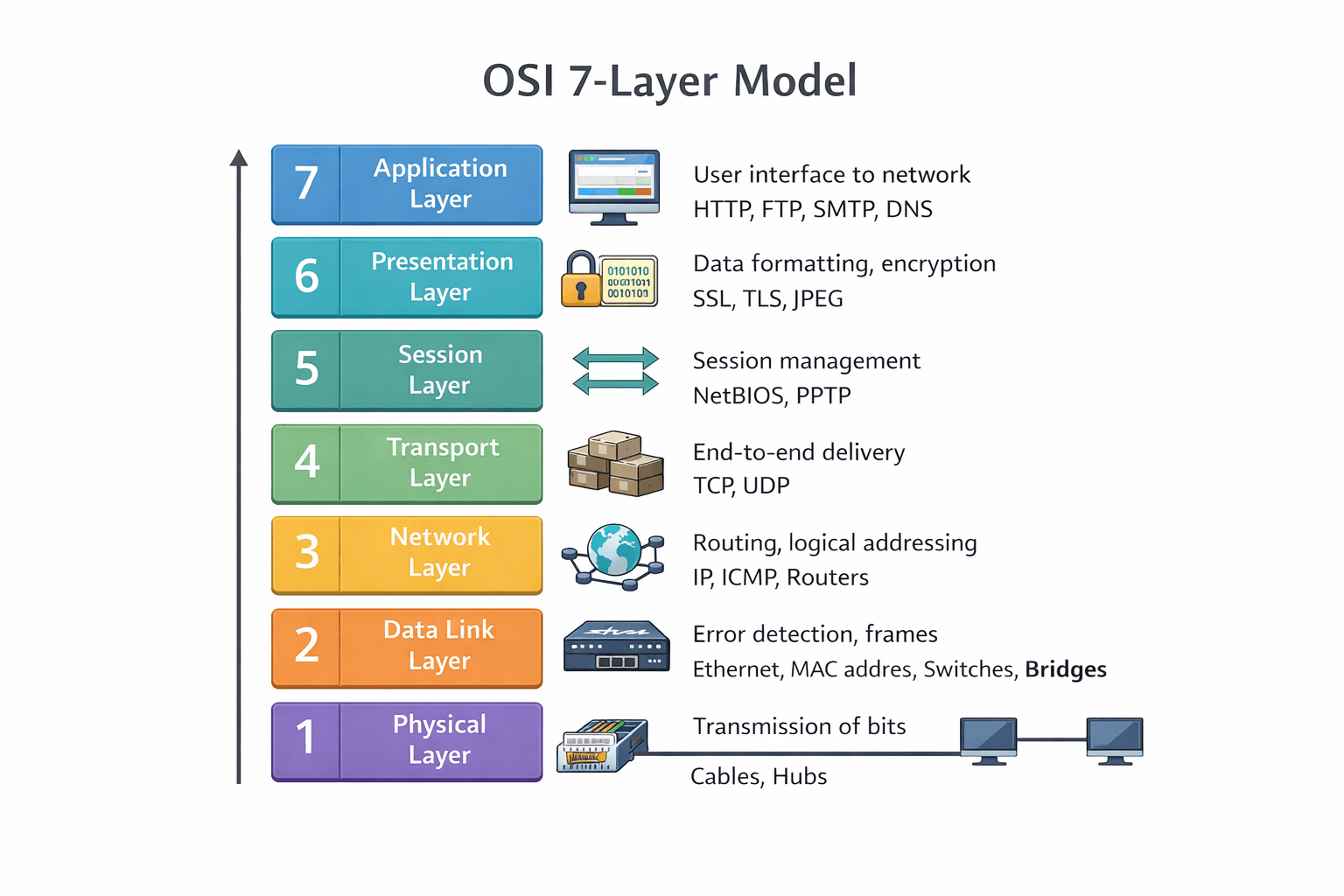
The Open Systems Interconnection (OSI) model is a conceptual framework that standardizes networking functions into seven distinct layers.
The Seven Layers Explained#
Layer 1: Physical Layer Handles the physical connection between devices. Converts data into bits for transmission over physical media like cables or radio waves. Defines voltage levels, cable specifications, and data rates.
Layer 2: Data Link Layer Provides node-to-node data transfer and handles error correction from the physical layer. Organizes bits into frames and manages MAC addresses. Switches and bridges operate at this layer.
Layer 3: Network Layer Responsible for packet forwarding and routing. Determines the best path for data transmission using logical addresses (IP addresses). Routers operate at this layer.
Layer 4: Transport Layer Ensures complete data transfer with error recovery and flow control. Segments and reassembles data. TCP and UDP protocols work here.
Layer 5: Session Layer Manages sessions between applications. Establishes, maintains, and terminates connections. Handles authentication and reconnection after interruptions.
Layer 6: Presentation Layer Translates data between application and network formats. Handles encryption, compression, and data formatting. Ensures data from sender is readable by receiver.
Layer 7: Application Layer Closest to end users. Provides network services directly to applications. HTTP, FTP, SMTP protocols operate at this layer.
OSI Layers and Functions#
| Layer | Name | Function | Example Devices/Protocols |
|---|---|---|---|
| 7 | Application | User interface and application support | HTTP, FTP, SMTP, DNS |
| 6 | Presentation | Data translation, encryption, compression | SSL, TLS, JPEG, ASCII |
| 5 | Session | Session management and synchronization | NetBIOS, RPC, SQL |
| 4 | Transport | End-to-end delivery, error recovery | TCP, UDP, SPX |
| 3 | Network | Logical addressing, routing | IP, ICMP, ARP, Routers |
| 2 | Data Link | Physical addressing, error detection | Ethernet, PPP, Switches |
| 1 | Physical | Bit transmission, hardware specs | Cables, Hubs, Repeaters |
Mnemonic to Remember the Layers#
Please Do Not Throw Sausage Pizza Away (Physical, Data Link, Network, Transport, Session, Presentation, Application)
TCP/IP Model#
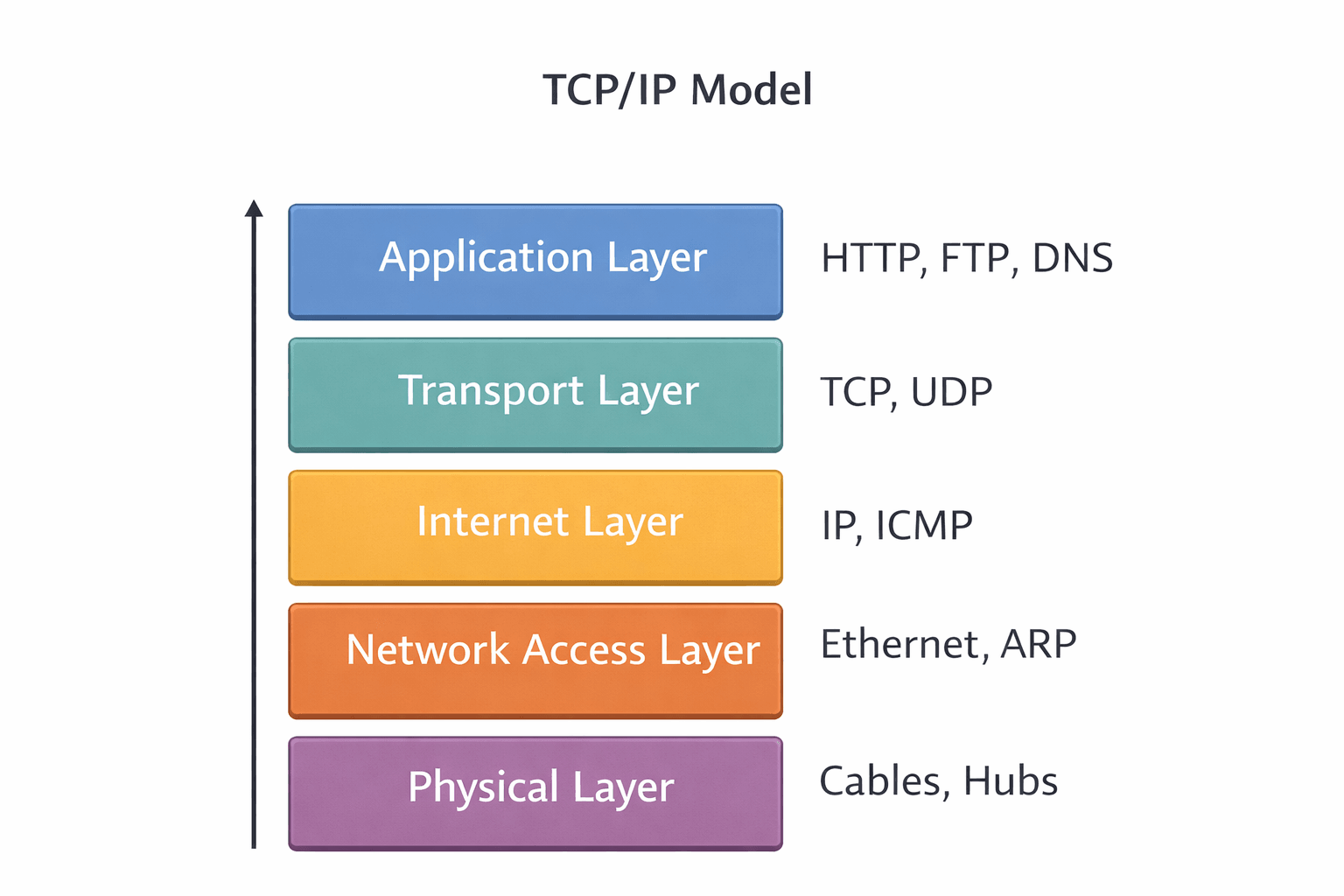
The TCP/IP model is a practical, streamlined framework based on standard protocols used on the internet.
The Four Layers#
Application Layer Combines the functions of OSI's Application, Presentation, and Session layers. Handles high-level protocols, data representation, and session management. Includes HTTP, FTP, SMTP, and DNS.
Transport Layer Corresponds to OSI's Transport layer. Provides reliable or unreliable delivery and error checking. Uses TCP for reliable connections and UDP for faster, connectionless communication.
Internet Layer Equivalent to OSI's Network layer. Handles logical addressing and routing. The core protocol is IP, supported by ICMP and ARP.
Network Access Layer Combines OSI's Data Link and Physical layers. Manages hardware addressing and physical transmission over the network medium.
Protocol Examples by Layer#
| Layer | Protocols |
|---|---|
| Application | HTTP, HTTPS, FTP, SMTP, POP3, DNS, DHCP |
| Transport | TCP, UDP |
| Internet | IPv4, IPv6, ICMP |
| Network Access | Ethernet, Wi-Fi, PPP, ARP |
OSI vs TCP/IP Comparison#
| Aspect | OSI Model | TCP/IP Model |
|---|---|---|
| Layers | 7 layers | 4 layers |
| Development | Theoretical standard | Practical, protocol-based |
| Approach | Layer-by-layer separation | Protocol-specific grouping |
| Usage | Reference model | Actual implementation |
| Transport | Connection-oriented and connectionless | TCP (connection-oriented), UDP (connectionless) |
Networking Devices#
Device Descriptions#
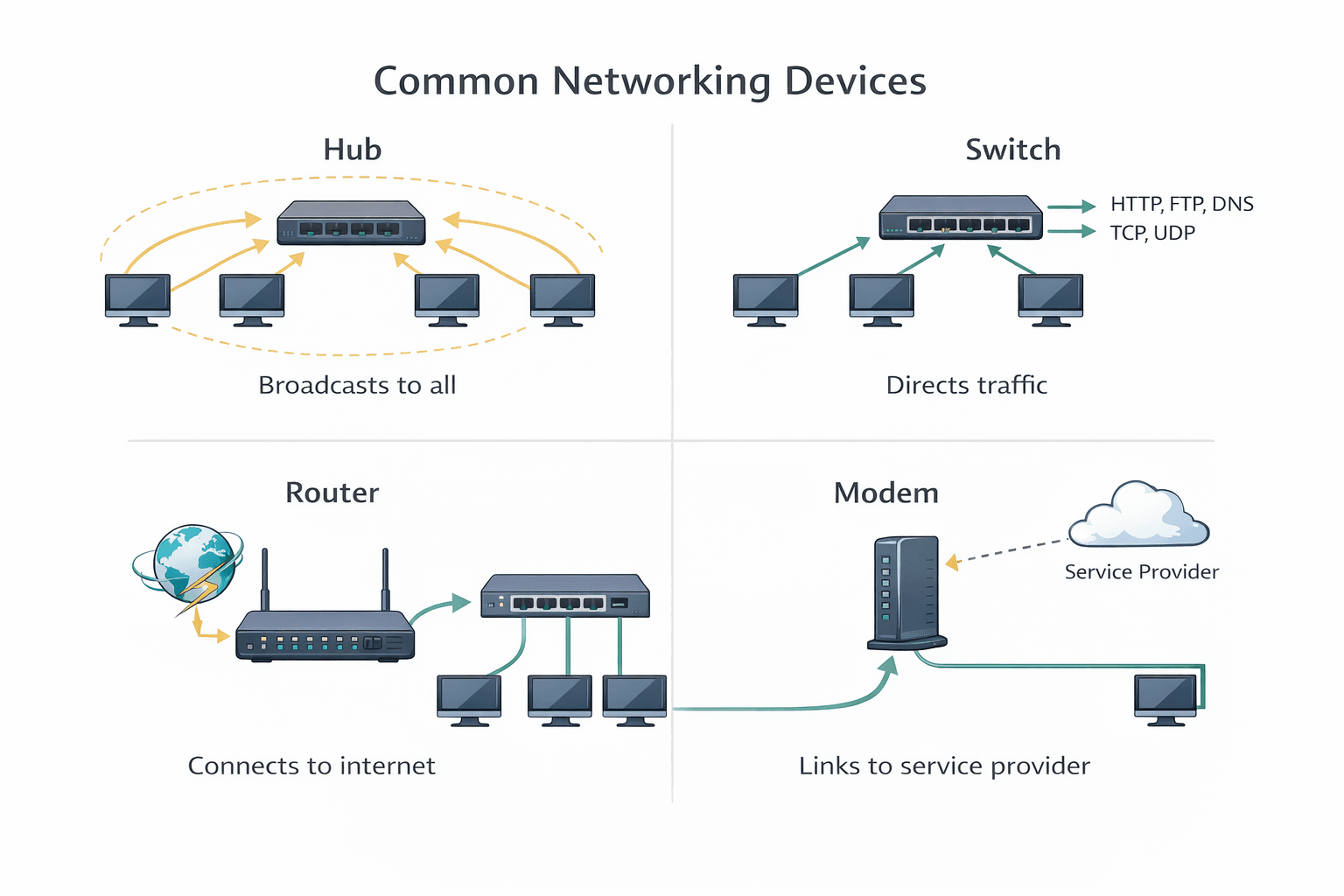
Hub: Basic device that connects multiple Ethernet devices. Broadcasts data to all ports regardless of destination. Operates at Physical layer.
Switch: Intelligent device that forwards data only to specific destination ports using MAC addresses. Operates at Data Link layer.
Router: Connects different networks and directs data packets between them using IP addresses. Operates at Network layer.
Bridge: Connects two network segments and filters traffic based on MAC addresses. Reduces unnecessary traffic.
Repeater: Amplifies and regenerates signals to extend network distance. Operates at Physical layer.
Gateway: Translates data between different network protocols or architectures. Can operate at multiple layers.
Modem: Modulates and demodulates signals for transmission over telephone or cable lines. Converts digital to analog and vice versa.
Access Point: Allows wireless devices to connect to a wired network. Extends wireless coverage.
Device Reference Table#
| Device | OSI Layer | Purpose |
|---|---|---|
| Hub | Physical | Connects devices, broadcasts to all ports |
| Switch | Data Link | Forwards data to specific MAC addresses |
| Router | Network | Routes between networks using IP addresses |
| Bridge | Data Link | Connects and filters between network segments |
| Repeater | Physical | Extends network distance by signal amplification |
| Gateway | Multiple | Translates between different protocols |
| Modem | Physical | Converts digital/analog signals for transmission |
| Access Point | Data Link | Provides wireless connectivity to wired network |
IP Addressing#
IPv4 Format#
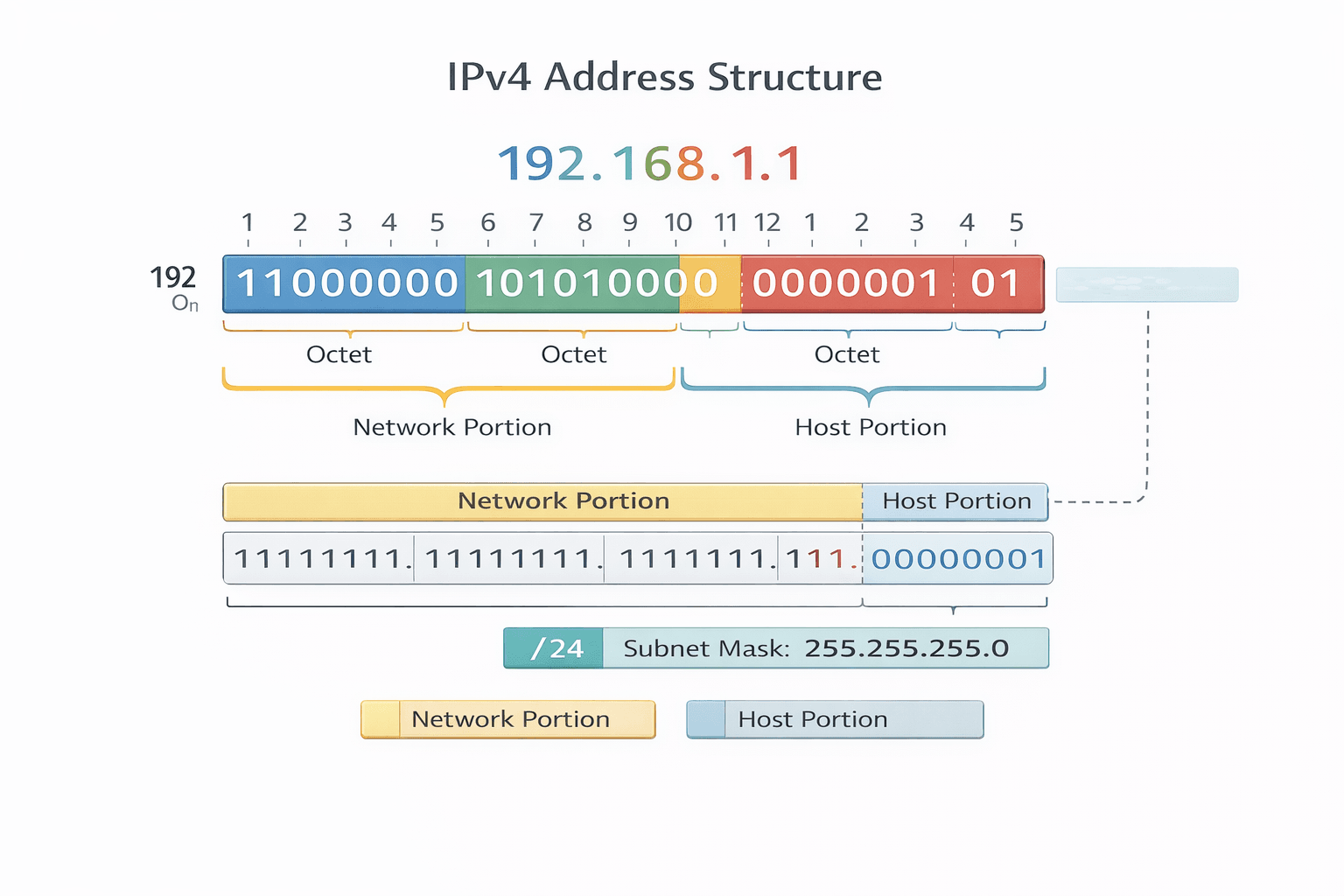
IPv4 addresses are 32-bit numbers written as four decimal octets separated by dots. Each octet ranges from 0 to 255.
Example: 192.168.1.10
IPv6 Basics#
IPv6 addresses are 128-bit hexadecimal numbers written as eight groups of four hexadecimal digits separated by colons. Developed to address IPv4 exhaustion.
Example: 2001:0db8:85a3:0000:0000:8a2e:0370:7334
Public vs Private IP Addresses#
| Type | Description | Example Ranges |
|---|---|---|
| Public | Globally unique, routable on internet | Assigned by ISP |
| Private | Used within local networks, not routable on internet | 10.0.0.0/8, 172.16.0.0/12, 192.168.0.0/16 |
Static vs Dynamic IP#
Static IP: Manually assigned, permanent address. Used for servers and devices needing constant access.
Dynamic IP: Automatically assigned by DHCP server. Changes periodically. Common for client devices.
Loopback Address#
127.0.0.1 (IPv4) or ::1 (IPv6) used to test network software on local machine without sending packets over network.
Subnet Mask#
A 32-bit number that divides an IP address into network and host portions. Uses binary 1s for network bits and 0s for host bits.
Example: 255.255.255.0 indicates first 24 bits are network portion.
CIDR Notation#
Classless Inter-Domain Routing notation specifies IP address and network prefix length.
Example: 192.168.1.0/24 indicates 24 bits for network portion, 8 bits for hosts.
Subnetting#
Why Subnetting is Needed#
- Efficient IP address utilization
- Improved network performance through reduced broadcast traffic
- Enhanced security by isolating network segments
- Simplified network management
Basic Formula#
Number of subnets = 2^n where n is number of bits borrowed from host portion Number of hosts per subnet = 2^h - 2 where h is remaining host bits
Simple Example Calculation#
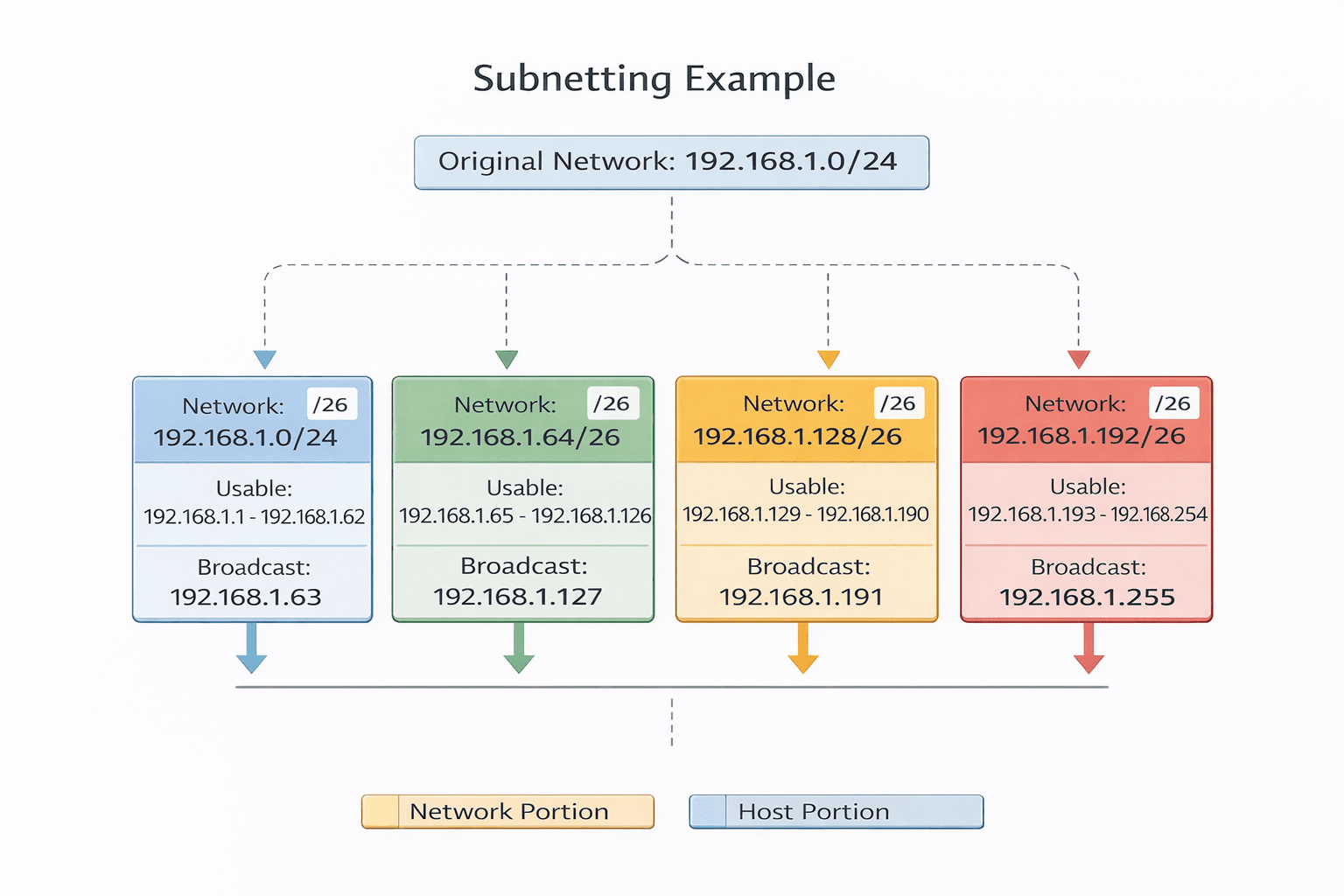
Network: 192.168.1.0/24 Requirement: Create 4 subnets
Borrow 2 bits from host portion (2^2 = 4 subnets) New subnet mask: /26 or 255.255.255.192
Resulting subnets:
- 192.168.1.0/26 (hosts: 192.168.1.1 - 192.168.1.62)
- 192.168.1.64/26 (hosts: 192.168.1.65 - 192.168.1.126)
- 192.168.1.128/26 (hosts: 192.168.1.129 - 192.168.1.190)
- 192.168.1.192/26 (hosts: 192.168.1.193 - 192.168.1.254)
Host Calculation#
For /26 subnet (64 addresses total):
- Network address: first address
- Broadcast address: last address
- Usable hosts: 62 (total - 2)
Common Networking Protocols#
| Protocol | Port | Purpose |
|---|---|---|
| HTTP | 80 | Web page transfer, unencrypted |
| HTTPS | 443 | Secure web page transfer with encryption |
| FTP | 20, 21 | File transfer between client and server |
| SSH | 22 | Secure remote terminal access and command execution |
| SMTP | 25 | Email sending and relaying between mail servers |
| POP3 | 110 | Email retrieval from mail server to client |
| DNS | 53 | Domain name to IP address resolution |
| DHCP | 67, 68 | Automatic IP address assignment to devices |
| Telnet | 23 | Remote terminal access (unencrypted, insecure) |
Network Security Basics#
Firewall#
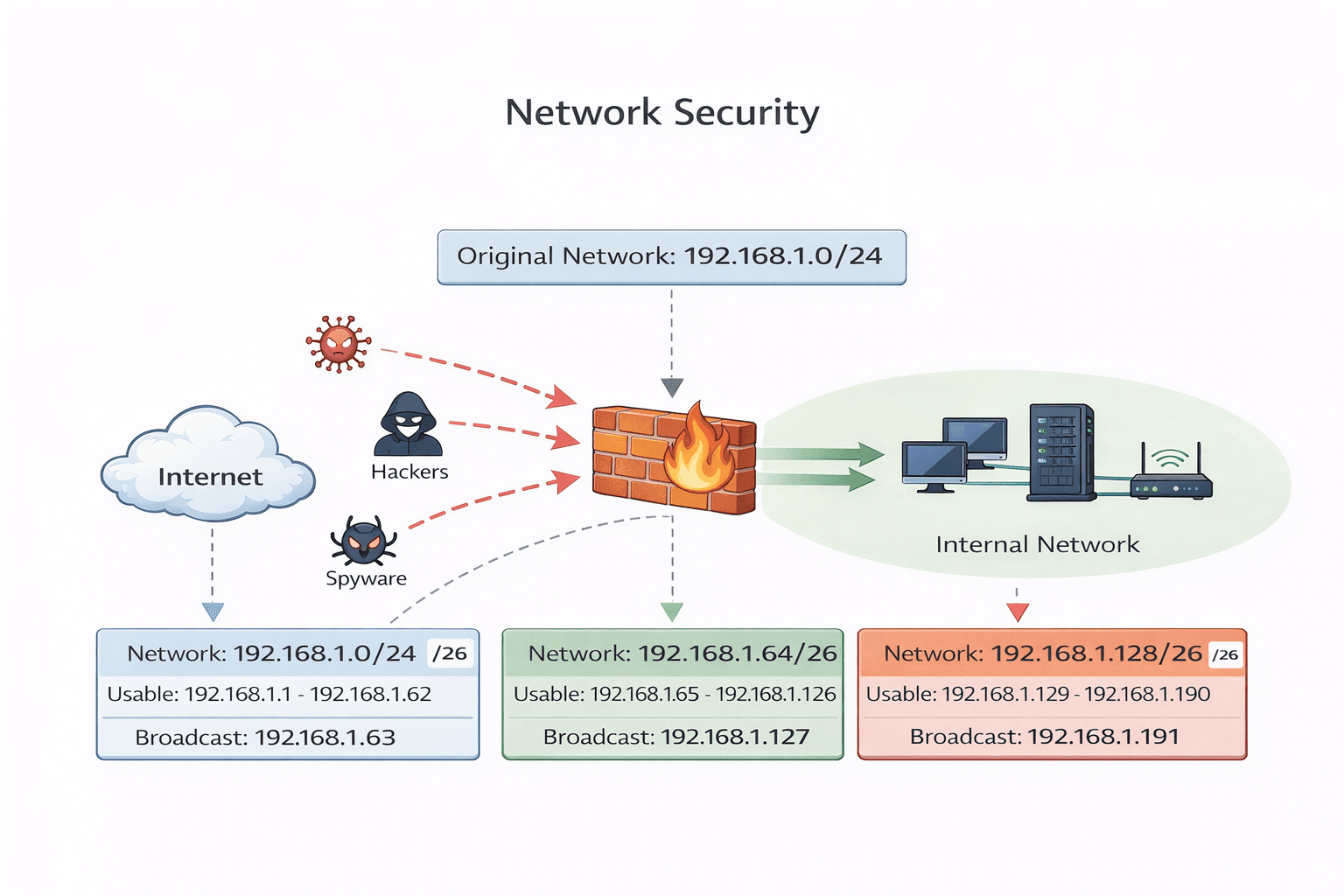
A security system that monitors and controls incoming and outgoing network traffic based on predetermined security rules. Can be hardware-based, software-based, or both. Creates a barrier between trusted internal and untrusted external networks.
VPN#
Virtual Private Network creates encrypted connections over public networks. Provides secure remote access to private networks, masking user location and encrypting all transmitted data.
SSL/TLS#
Secure Socket Layer and Transport Layer Security are cryptographic protocols providing secure communication over networks. Used extensively in web browsing (HTTPS), email, and VoIP. TLS is the modern successor to SSL.
Encryption#
Process of converting data into unreadable format using algorithms and keys. Ensures data confidentiality during transmission and storage. Common types include symmetric (same key for encryption/decryption) and asymmetric (public/private key pairs).
Authentication#
Verification of user or device identity before granting network access. Methods include passwords, biometrics, digital certificates, and multi-factor authentication combining multiple verification methods.
Important Networking Commands#
| Command | Description | Example |
|---|---|---|
| ping | Tests connectivity to a target by sending ICMP echo requests | ping google.com |
| tracert / traceroute | Shows the path packets take to reach destination | tracert 192.168.1.1 |
| ipconfig | Displays IP configuration on Windows systems | ipconfig /all |
| ifconfig | Displays network configuration on Linux/Unix systems | ifconfig eth0 |
| netstat | Shows network connections, routing tables, interface statistics | netstat -an |
| nslookup | Queries DNS to obtain domain name or IP address mapping | nslookup example.com |
Conclusion#
This cheat sheet explains the basic networking concepts like OSI & TCP/IP models, IP addressing, subnetting, common protocols, and basic security. It also includes useful command-line tools for network troubleshooting.
It’s helpful for quick learning, interview preparation, and revision of networking fundamentals.
If you like it, please share it with your friends!
Want to Master Spring Boot and Land Your Dream Job?
Struggling with coding interviews? Learn Data Structures & Algorithms (DSA) with our expert-led course. Build strong problem-solving skills, write optimized code, and crack top tech interviews with ease
Learn more