Building Deep Agents with LangChain and LangGraph: A Hands-On Tutorial
LangGraph turns an agent into an explicit graph where interrupts pause execution for human review or external input. The article shows checkpointer-based state with thread_id and MemorySaver resuming exactly where a run stopped. Deeper than the toy loop, for real production journeys.

Shreyash Gurav
August 29, 2026
13 min read
Building Deep Agents with LangChain and LangGraph: A Hands-On Tutorial
Build an agent and you will reach the same point quickly: the model answers, requests a tool, you run it, and you loop back. A raw tool-call loop is a small state machine you write by hand, and it handles a single linear exchange well. The trouble starts the moment you need a human pause before a destructive write, a fallback model on a rate limit, or a sub-agent that spawns its own work, because the decisions now branch and the loop has to be flattened into nested conditionals no one can read. This article builds the step up from that loop: an agent expressed as a graph of nodes, with state that persists and interventions that a loop cannot express, in LangGraph.
LangGraph is the tool for expressing that graph, and the reason it matters is simple. A while loop is a line. An agent with retries, a human-approval gate before a destructive write, a fallback model on rate-limit, and a sub-agent that spawns its own work is not a line, it is a directed acyclic graph with cycles. LangGraph lets you draw that graph in code where a plain loop forces you to flatten it into nested conditionals that no one can read.
The mental model: your code is a graph, not a loop#
LangGraph's core idea is that every agent is a StateGraph. You define nodes, which are plain Python functions, and edges, which say which node runs next. A node can be a model call, a tool, a validation step, whatever you want. What makes it an agent rather than a pipeline is that the graph can cycle, a node can point back to an earlier node, and that cycle is what lets the model iterate on a task.
The state is the connective tissue. Every node receives the current state and returns a partial update that gets merged back. This is the biggest mental shift from the raw loop: instead of one long messages list that you keep appending to, you have a well-typed state object, and each node declares what part of it they mutate.
The Annotated[list, add_messages] annotation is the trick that makes state merging sane. By default, when a node returns new state, LangGraph overwrites the key. But for messages, you never want to overwrite, you want to append. The add_messages reducer handles that for you, which means any node can add to the conversation without you manually writing "hmm, did the previous node already set this?" logic. It is a small thing that removes an entire class of bugs.
From functions to a graph#
The heart of a tool-calling agent in LangGraph is two nodes and an edge that goes around a cycle: the model node decides, and the tool node executes. The trick is the conditional edge, which reads the state after the model call and decides whether to call tools again or finish.
The tools_condition callable is the prebuilt version of the decision you wrote by hand in a raw loop: does the last assistant message contain tool_calls? If yes, route to the "tools" node. If no, route to "end". The result is a cycle, and if you print the graph it is genuinely two nodes looping, which is exactly how you should picture your own hand-built loop translated to graph form.
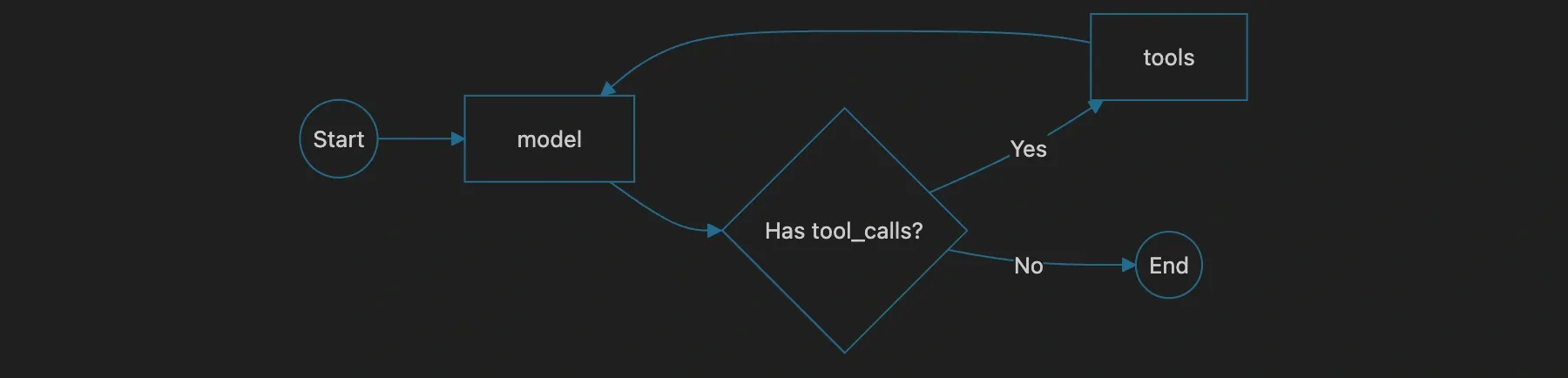
The value starts to show the moment this two-node cycle is not enough. Add a human-in-the-loop gate and you need a third node plus an edge that stops the graph and waits. Add a fallback model and you need a branch inside call_model. Add input validation and you need a node before model that rejects malformed state. Each of these is a trivial addition to a graph and an awkward patch to a loop. This is the whole argument for the tool.
Intermediate steps: memory for your agent#
A deep agent is not "call a tool once and answer." It is "gather evidence over many turns, and when you answer, cite the steps that got you there." The naive approach to that is to stuff every tool result into messages and let the model scroll through raw JSON. That works until the JSON is large, and then it drowns the context and your model starts hallucinating rather than reading.
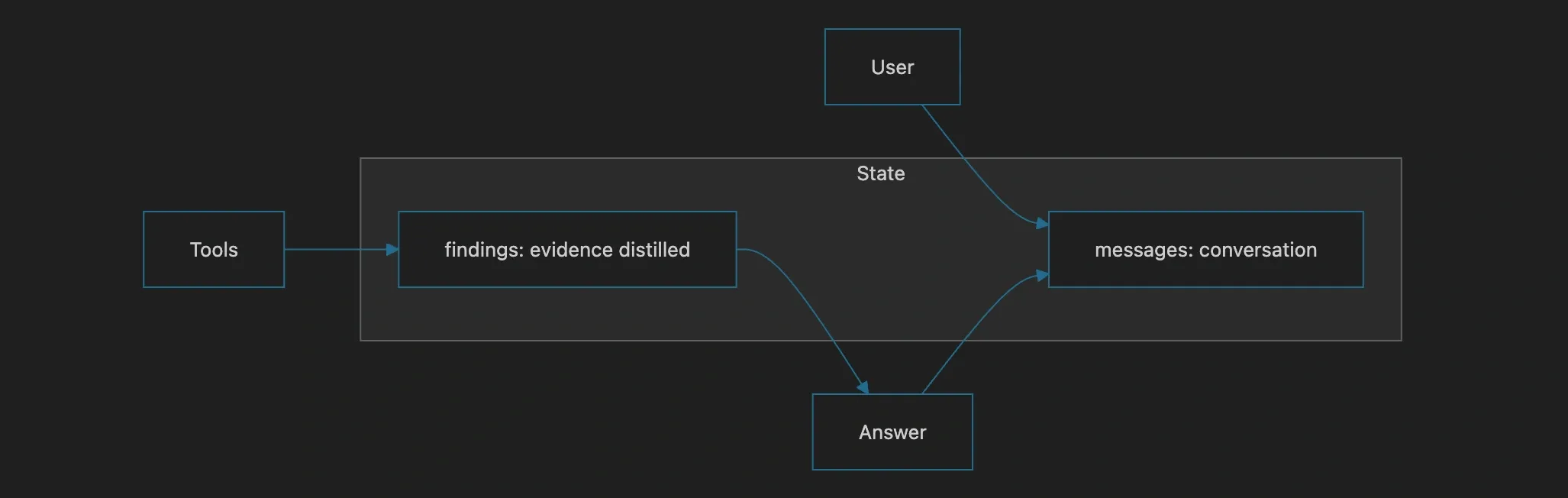
The fix is to keep intermediate steps in state separately from the chat messages, so the model can reference a curated summary instead of raw tool output. LangGraph makes this natural because state is a plain dict with as many keys as you want.
The point is architectural: your agent has two memories, the conversation and the findings, and they should not be conflated. The conversation is what the model says. The findings are what the agent learned from the world. Keeping them separate means the answer node can generate a response from findings while the user-facing messages stay clean, and it means you can truncate or summarize the raw tool scroll without losing the conclusions. Most "context window too small" crises in agent systems trace back to a failure to make this distinction early.
Human-in-the-loop is where graphs stop being a toy#
Here is the pattern that justifies LangGraph over a hand loop more than any other, and it is the one most tutorials skip because it requires a real graph. Some tool calls should not execute without human approval. Deleting a row, transferring money, sending an email to a customer, these need a gate.
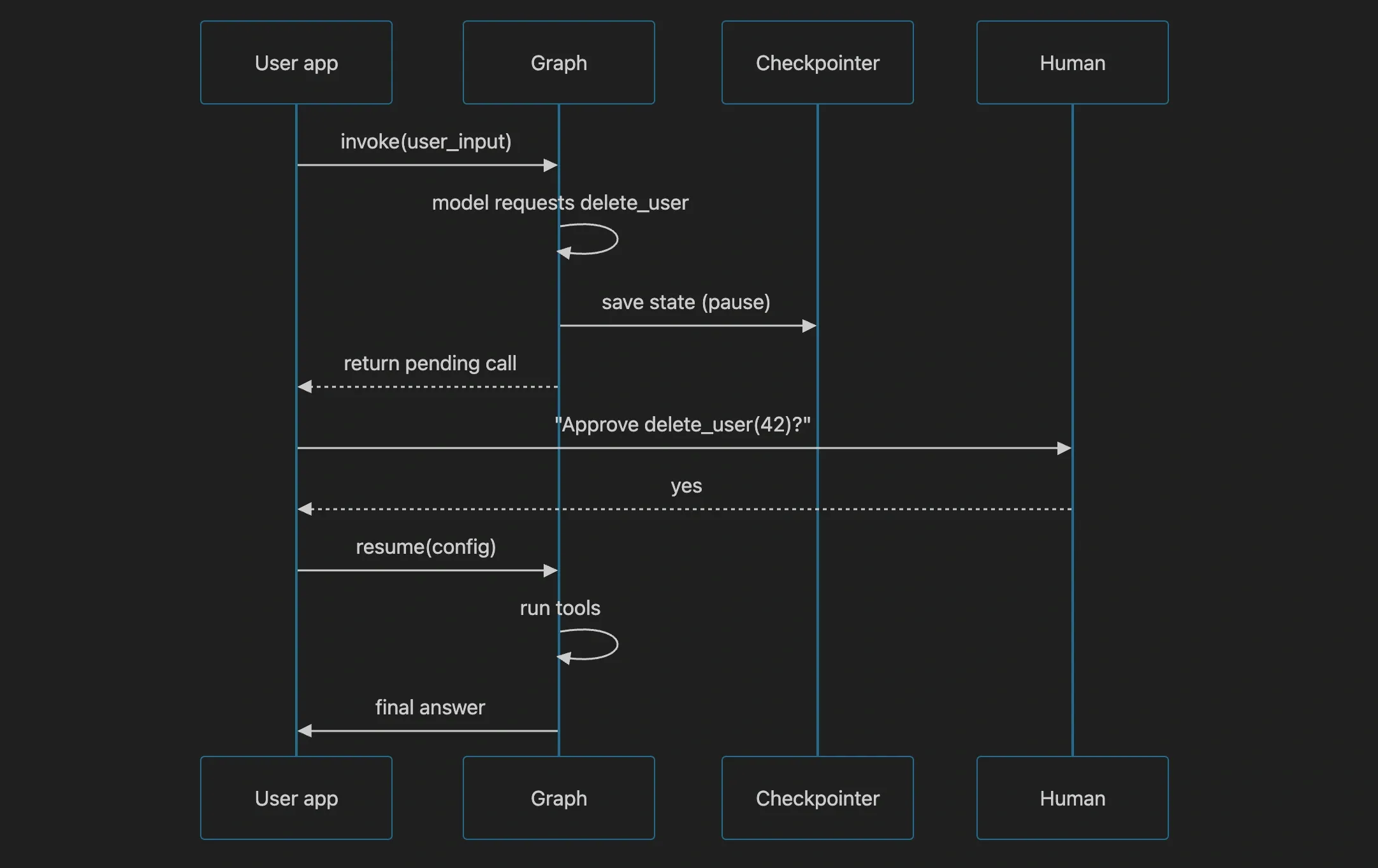
In a loop you would write if tool.name == "delete": ask_user(), which blocks the whole thread. In LangGraph you use interrupts. The graph pauses at a node, serializes its state, returns control to your application, and can be resumed later with the human's decision injected. That is a dramatically better model for a web server, where you cannot afford to block a request thread waiting on a person.
The prebuilt pattern is interrupt_before. You compile the graph with an interrupt before the tools node, run it, and when it pauses, LangGraph hands you the state and a unique config id. You persist that config, show the user what the model wants to do, and later call app.invoke(None, config=config) to resume with an approval embedded in state.
The CLI version shows the mechanism but not how a web server should actually use it. In production you never block a request thread on a person. Instead the handler runs the graph up to the pause, receives the interrupt, and hands the pending tool call off to the user out of band. The durable config id, that thread_id, is the key: you persist it with the pending action, and when the user answers later, possibly through a different request, you resume with that same config:
The interrupt pauses the graph, not the process. The graph's state lives in a checkpointer (in memory, or SQLite, Postgres, or Redis in production thanks to langgraph-checkpoint), so a pause is durable. If your server crashes mid-pause, the resume point survives. That durability is the difference between a demo that looks interactive and a system that actually survives a human walking away for an hour and coming back.
Retries and fallbacks without spaghetti#
Real model calls fail. You get a rate-limit error, a timeout, a context overflow, a malformed tool call. A production agent must handle all of these, and doing it in a raw loop means wrapping every client.chat.completions.create in the same try/except boilerplate. In a graph, fallback and retry are compositions, not nesting.
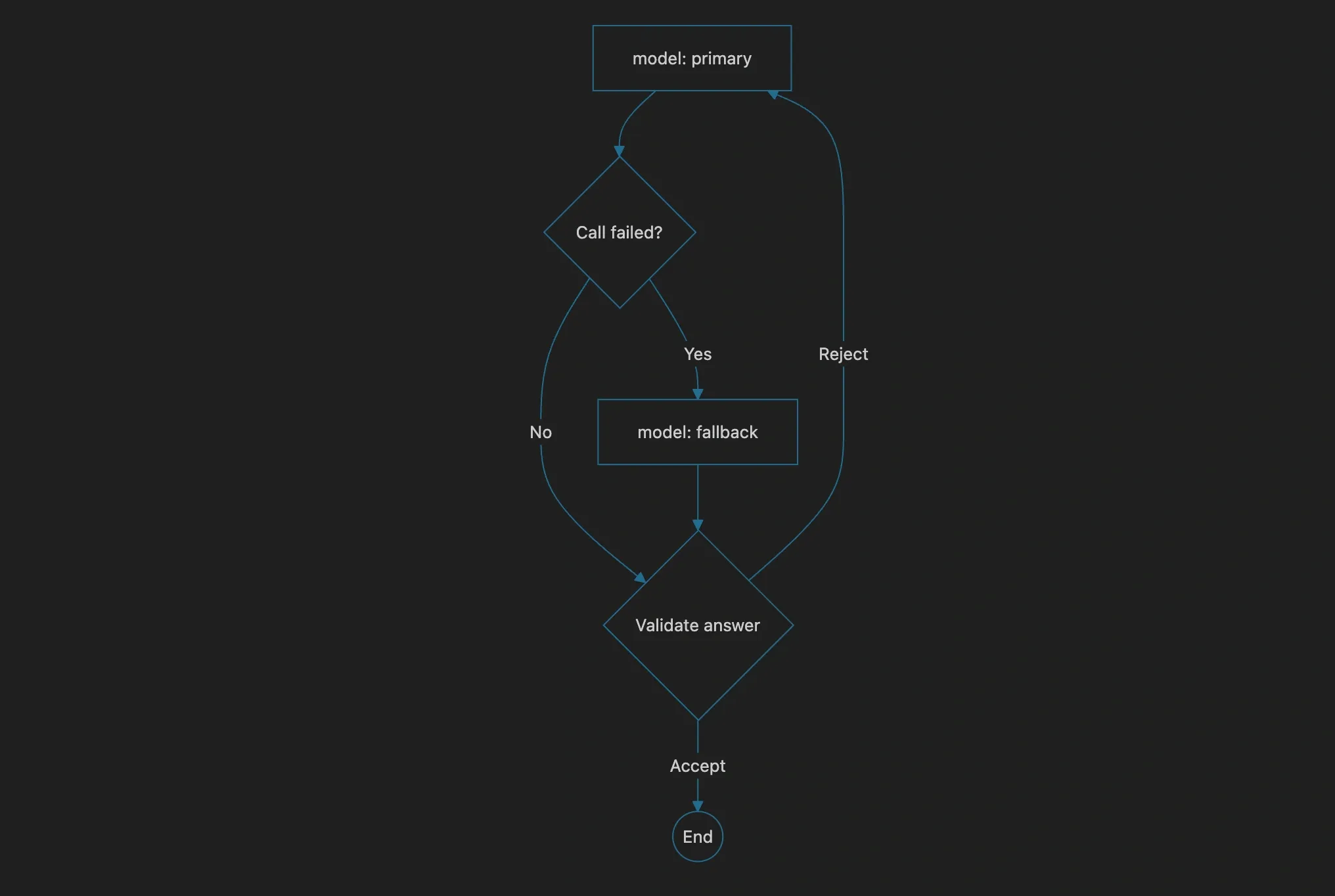
The cleanest approach is to make a node that tries a primary model and falls back to a cheaper or more permissive one. LangChain's with_fallbacks wrapper does this at the model level, and it composes with graph nodes because a node is just a function that returns state.
The same idea applies at the graph level. If a validation node decides the model's answer is unacceptable, it can return state that routes back to the model node to try again, with an explicit instruction in a message telling the model what went wrong. That is a retry that has semantics, because the retried call sees the criticism as context. A blind for loop retry has no such context and will reproduce the same mistake.
Sub-agents and the problem of scope#
The last pattern that takes a graph from "nice" to "deep" is the sub-agent: a node that itself contains a compiled graph, running an inner agent to handle a focused sub-task and returning only its result. This is how you keep one graph from becoming an unmaintainable 20-node monolith. The outer graph decides the strategy, and each strategy step delegates to a specialized inner agent.
A word of caution, because this is where most teams go wrong. Sub-agents multiply cost and latency through the roof, and they look sophisticated while often being unnecessary. The rule of thumb I hold teams to: only reach for a sub-agent when a single model in a single context window cannot hold the scope of the task, or when a sub-task needs a fundamentally different model or toolset. If a sub-agent would just call the same tools the parent could call itself, you have added a hop for no reason. The graph buys you the capability, not the obligation.

The friction points worth naming#
LangGraph is not free. Before you commit a team to it, know what you are paying.
The first cost is the learning curve of its abstractions: reducers, checkpoints, interrupts, threads. These are real concepts and they are worth learning, but they will slow down the first few days of any engineer new to the framework. The second cost is debugging. A graph's execution trace is not a stack you step through, it is a state machine you inspect, and when something goes wrong you will spend time reading state snapshots instead of a traceback. The get_state and update_state introspection methods are essential here, and any serious project should log state transitions from day one.
The third cost is vendor coupling. LangGraph is part of the LangChain ecosystem, and while the graph API is useful on its own, you should be honest that adopting it ties your orchestration layer to a specific framework's lifecycle and roadmap. If you are building a genuinely large system, that trade is usually acceptable, the alternative, hand-rolling a durable state machine with checkpoints and interrupts, is thousands of lines of subtle code, worth far more than the framework costs.
Where it lands#
The reason LangGraph exists is that agent control flow is real software and deserves to be built like it. A loop can express one thing, repetition, and every deviation from pure repetition, a human pause, a validation branch, a fallback, a delegated sub-task, becomes a hack bolted onto the loop. A graph expresses all of those as first-class structure, and by doing so it makes the agent's actual decision-making readable, testable, and durable.
The most surprising thing, once you build a few, is how boring the well-designed ones are. The deep agent is not the one with the most nodes or the fanciest sub-agent tree. It is the one whose control flow is boring enough to reason about, whose state is explicit enough to inspect, and whose pauses for human judgment and retries are so clearly drawn that no one has to reverse-engineer what happens when something fails. That boring graph is the whole point.
Want to Master Spring Boot and Land Your Dream Job?
Struggling with coding interviews? Learn Data Structures & Algorithms (DSA) with our expert-led course. Build strong problem-solving skills, write optimized code, and crack top tech interviews with ease
Learn more